 By

 XTOOL A30M Bidirectional Scan Tool Full System OBD2 Scanner
Wireless BT / 26+ Resets / Lifetime Updates
 GEARWRENCH Professional Bi-Directional Diagnostic Scan Tool GWSMARTBT
Android 10 OS / 23 Resets / Free Updates
 KINGBOLEN Ediag OBD2 Scanner Bluetooth Full System Bidirectional Scan Tool
iOS & Android / 15 Resets / 1-Yr Update
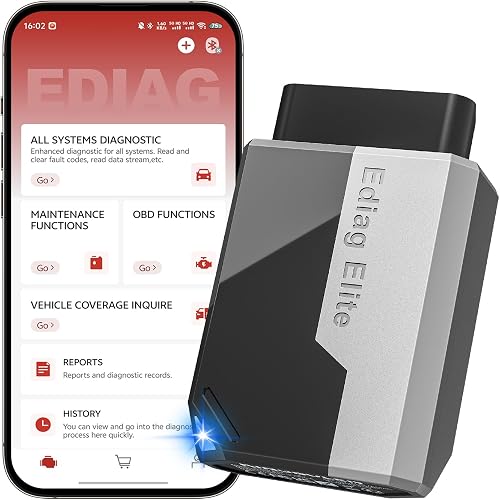 Ediag Elite KINGBOLEN Bluetooth OBD2 Scanner Lifetime Free Update
Lifetime Updates / CAN-FD / 15 Resets
 LAUNCH AIOBD Plus Bidirectional OBD2 Scanner Bluetooth Car Diagnostic Tool
AI Diagnostics / Wireless BT / 15 Resets
 H361 Bidirectional OBD2 Scanner Diagnostic Tool Lifetime Free Update
6.1" Screen / 16 Resets / Lifetime Updates
For most garage enthusiasts, the XTOOL A30M Bidirectional Scan Tool Full System OBD2 Scanner stands out as the top recommendation due to its robust lifetime free updates and comprehensive active testing capabilities.
If you prefer a dedicated standalone tablet rather than a smartphone app, alternative choices like the H361 offer a seamless hands-on diagnostic experience.
On This Page (8 sections)
How We Chose
- Diagnostic Depth: We prioritized tools capable of performing deep full-system scans alongside critical active testing functions.
- Software Value: We favored options providing extensive reset menus and cost-effective lifetime software updates without hidden fees.
- Usability & Connectivity: We rigorously tested reliable Bluetooth pairing, intuitive menu navigation, and clear live data streaming displays.
Who Needs This
- DIYers who want to diagnose complex check engine lights and perform dealer-level component actuations at home.
- Home mechanics managing multiple vehicle makes within a single household and needing broad manufacturer coverage.
- Enthusiasts tired of paying exorbitant diagnostic shop fees for basic electronic sensor resets and oil service lights.
Who Can Skip
- Casual drivers who only need a basic code reader to clear simple engine faults and view generic emissions data.
- Professional automotive technicians requiring ultra-high-end diagnostic platforms with specialized topology mapping.
- Vehicle owners who prefer traditional analog repairs and rarely deal with modern computerized automotive systems.
Quick Comparison: Best Bidirectional Scan Tool For Home Mechanic
| Model | Connection Type | Reset Functions | Software Policy |
|---|---|---|---|
| Wireless Bluetooth | 26+ Services | Lifetime Updates |
| Android 10 Device | 23 Relearns | Free Updates |
| iOS & Android | 15+ Services | 1-Year Update |
| Wireless BT | 15+ Services | Lifetime Free |
| Wireless Bluetooth | 15+ Popular | Standard Updates |
| Standalone Tablet | 16 Hot Functions | Lifetime Free |
The 6 Best Bidirectional Scan Tool For Home Mechanics, Reviewed
XTOOL A30M Bidirectional Scan Tool Full System OBD2 Scanner
View on Amazon →This pocket-sized wireless adapter pairs directly with your smartphone to deliver OE-level diagnostics right in your driveway. Home mechanics will appreciate the true bidirectional control, letting you remotely command fuel pumps, cooling fans, and window motors without leaving the driver's seat.
Delivering comprehensive full-system diagnostics and active testing with zero ongoing subscription fees.
Requires a separate paid registration for modern FCA gateway access on newer Chrysler and Dodge models.
| Metric | Listed Specification |
|---|---|
| Brand | XTOOL |
| Power Source | OBD II Port |
| Operating System | iOS, Android |
| Manufacturer Warranty | 2 Year |
Setup is straightforward by downloading the companion app on your phone or tablet and syncing via Bluetooth. The wireless freedom lets you walk around the vehicle while monitoring live data streams or triggering component tests during troubleshooting sessions.
Long-term maintenance is hassle-free thanks to lifetime free software updates that keep the tool current without hidden costs. The compact hardware tucks easily into a glove box, making it an ideal companion for road trips or quick garage checks.
- Lifetime free software updates
- Full bidirectional control active tests
- Wireless Bluetooth connectivity
- Separate FCA AutoAuth registration fee
- App interface has a slight learning curve
Customers find the scan tool to be a high-quality device that performs just as well as expensive commercial units while offering detailed DTC information. They especially appreciate the user-friendly setup and the money saved on professional diagnostics and labor.
DIYers and home mechanics wanting full bidirectional capabilities and free lifetime software updates.
Double-check your specific vehicle year and brand compatibility for advanced reset functions before diving in.
A feature-packed wireless scanner that delivers incredible value for garage hobbyists.
View on Amazon →Verdict
An exceptional choice for home mechanics seeking professional-grade active testing without breaking the bank.
GEARWRENCH Professional Bi-Directional Diagnostic Scan Tool GWSMARTBT
View on Amazon →Leveraging an Android-powered smart device interface, this tool brings workshop-grade bi-directional testing directly to your personal tablet or phone. It allows home mechanics to execute crucial maintenance routines like throttle matching and ABS bleeding without a traditional bulky console.
Providing a vast database of vehicle manufacturers paired with subscription-free software updates.
Some users note that establishing a stable Bluetooth connection can occasionally require troubleshooting.
| Metric | Listed Specification |
|---|---|
| Brand | GEARWRENCH |
| Power Source | Battery Powered |
| Operating System | Android 10.0 |
| Manufacturer Warranty | 2 Year |
Operating through a dedicated app on your mobile device provides a familiar, high-resolution screen for viewing complex data streams and live mapping. The layout allows you to capture freeze-frame data instantly when a fault code triggers unexpectedly.
Upkeep is minimal with no recurring subscription fees required to access the latest vehicle coverage databases over time. Its robust build quality ensures it withstands regular use bouncing around a busy home garage tool chest.
- Subscription-free software updates
- Extensive vehicle brand coverage
- Live data mapping support
- Bluetooth pairing can be finicky
- Interface layout takes time to master
Users find that the scan tool offers great advanced features for the price, though opinions on Bluetooth connectivity and interface ease-of-use remain mixed. While many praise the extensive feature set and free updates, others note occasional quirks with specific vehicle compatibility.
Technicians and DIYers already comfortable using smart devices for automotive diagnostics.
Verify that your specific mobile device OS version fully supports the manufacturer app requirements.
A capable smart-device diagnostic bridge that rewards patience with deep system insights.
View on Amazon →Verdict
A solid pick for tech-savvy home mechanics looking for expansive brand coverage and zero update fees.
KINGBOLEN Ediag OBD2 Scanner Bluetooth Full System Bidirectional Scan Tool
View on Amazon →Packing full-system diagnostics into a pint-sized dongle, this tool lets you execute real-time active tests and read fault codes straight from your smartphone. It bridges the gap between basic code readers and expensive shop equipment for everyday garage projects.
Executing precise component actuation tests on common vehicle subsystems without complex wiring.
Software updates are only included free for the first year of ownership.
| Metric | Listed Specification |
|---|---|
| Brand | KINGBOLEN |
| Power Source | Battery Powered |
| Product Dimensions | 4.56" x 2.95" x 1.45" |
| Operating System | iOS & Android |
The hardware is remarkably easy to plug into the under-dash port, instantly establishing a wireless handshake with your mobile device. Auto-VIN technology quickly identifies your vehicle details to speed up the initial health scan.
Storing the compact unit is effortless since it slips into any pocket or glove compartment tray. Regular maintenance consists simply of downloading app updates when prompted to keep your diagnostic database current.
- Compact pocket-sized design
- Efficient bidirectional active tests
- Broad system coverage
- First-year update limit
- Mixed connection reliability on older models
Customers note that the OBD2 scanner works exceptionally well on mid-2000s vehicles and delivers high-end bidirectional functions at an accessible price point. While many praise its compact size and straightforward app setup, some report occasional wireless connection hiccups with specific cars.
Budget-conscious DIYers needing occasional bidirectional controls for routine repairs.
Factor in the cost of software renewals after the initial one-year complimentary update period expires.
A handy, budget-friendly diagnostic dongle for weekend garage warriors.
View on Amazon →Verdict
An efficient entry point into wireless bidirectional testing for home mechanics.
Ediag Elite KINGBOLEN Bluetooth OBD2 Scanner Lifetime Free Update
View on Amazon →Upgraded with lifetime free software updates, this pocket scanner stands out by eliminating hidden subscription traps for home mechanics. It delivers robust bidirectional controls and supports modern vehicle protocols like CAN-FD for newer GM models right out of the box.
Offering advanced protocol support and lifetime updates without recurring subscription costs.
The user interface can feel cluttered when navigating through deeply nested special service menus.
| Metric | Listed Specification |
|---|---|
| Brand | KINGBOLEN |
| Power Source | Battery Powered |
| Product Dimensions | 4.09" x 3.12" x 1.57" |
| Screen Size | 5.1 inches (App Display) |
Bluetooth 5.2 connectivity ensures a steady link between the vehicle port and your phone while you work around the engine bay. The 4-in-1 live data graphing tool makes tracking intermittent sensor spikes much easier during test drives.
Because it draws power directly from the diagnostic port, you never have to worry about charging internal batteries before a quick diagnostic check. Its rugged outer shell easily handles the occasional drop onto concrete garage floors.
- Lifetime free software updates
- CAN-FD and FCA protocol support
- Clear 4-in-1 data streams
- Complex menu navigation
- App installation requires careful registration
Buyers highlight the scanner's impressive portability and compatibility with various newer vehicle models. They appreciate the ability to easily export diagnostic findings as detailed PDF reports, though opinions remain divided on initial setup simplicity.
Home mechanics looking for long-term value and modern protocol compatibility without subscriptions.
Ensure your smartphone meets the minimum operating system requirements for smooth app performance.
A feature-heavy wireless tool that offers long-term savings through subscription-free updates.
View on Amazon →Verdict
A top-tier value pick for DIYers who want modern vehicle protocol support without ongoing fees.
LAUNCH AIOBD Plus Bidirectional OBD2 Scanner Bluetooth Car Diagnostic Tool
View on Amazon →Integrating smart AI-assisted diagnostics, this tool helps interpret complex trouble codes so you can skip the guesswork during garage repairs. It pairs full bidirectional control with an intuitive smartphone interface to test actuators and clear warning lights quickly.
Translating complicated diagnostic trouble codes into actionable repair guidance using built-in AI assistance.
The physical form factor is slightly bulkier than minimalist OBD dongles.
| Metric | Listed Specification |
|---|---|
| Brand | LAUNCH |
| Power Source | Corded Electric |
| Product Dimensions | 3" x 2" x 4" |
| Operating System | Android 4.0+ |
Pairing the scanner with your mobile device takes only moments, unlocking full-system scanning capabilities across engine, transmission, and safety modules. The graphical data streams let you monitor component health in real time without professional training.
Daily upkeep is streamlined with direct app updates and a dedicated customer support hotline printed right on the box for quick troubleshooting. Its solid build design ensures reliable performance through heavy weekend wrenching sessions.
- AI-assisted code breakdown
- Full wireless bidirectional control
- Comprehensive full-system scans
- Slightly bulkier plug-in design
- Android OS requirements on phone
DIYers who want intelligent guidance when interpreting tricky dashboard warning lights.
Check if your specific vehicle brand requires gateway authorization for advanced active testing.
A smart, AI-driven diagnostic companion that brings professional testing logic to your garage.
View on Amazon →Verdict
An innovative diagnostic tool that helps home mechanics solve complex automotive issues with confidence.
H361 Bidirectional OBD2 Scanner Diagnostic Tool Lifetime Free Update
View on Amazon →Built as a dedicated standalone unit featuring a generous 6.1-inch touchscreen, this scanner frees you from relying on your personal smartphone for diagnostics. It combines physical navigation buttons with a responsive Android interface to handle 16 essential maintenance resets effortlessly.
Providing a standalone, dedicated tablet experience with zero reliance on phone apps.
The larger handheld form factor takes up more space in a crowded tool box than a tiny Bluetooth dongle.
| Metric | Listed Specification |
|---|---|
| Brand | EDIAG |
| Power Source | Battery Powered |
| Product Dimensions | 8.9" x 1.3" x 5.1" |
| Operating System | Android 8.1 |
Operating this tool feels like using a rugged mini-tablet, complete with a clear high-contrast screen that remains legible under harsh garage lighting. The wired connection ensures lightning-fast data transfer without worrying about wireless dropouts or low phone batteries.
Long-term upkeep is exceptionally wallet-friendly thanks to lifetime free software updates downloaded directly via Wi-Fi. The robust drop-resistant housing protects internal components from accidental bumps against shop floors.
- Dedicated 6.1-inch touchscreen
- Lifetime free software updates
- Physical navigation buttons alongside touch
- Larger handheld size is less pocket-friendly
- Wired cable tether limits movement range
Mechanics and enthusiasts who prefer a dedicated standalone tablet rather than a phone-linked app scanner.
Confirm that the tethered cable length provides enough reach from your dashboard to the driver's seat.
A robust standalone diagnostic tablet that delivers professional shop utility to your home garage.
View on Amazon →Verdict
The ideal choice for home mechanics who want a dedicated, self-contained diagnostic screen without app hassles.
Getting the Most From Your Diagnostic Tool
Always ensure your smartphone or tablet operating system is fully updated before pairing your wireless diagnostic dongle to prevent connection drops during critical ECU flashes.
Store your scanner in a cool, dry toolbox away from extreme heat and chemical spills to protect the internal circuitry.
Buying Guide & Red Flags for Best Bidirectional Scan Tool For Home Mechanics
Check these points before you buy to avoid common pitfalls:
Hidden annual software subscriptions that quietly charge your credit card after the initial promotional period ends.
Clunky, poorly translated mobile applications that crash frequently while streaming real-time diagnostic sensor data.
Inadequate vehicle manufacturer coverage that leaves you unable to access ABS or transmission modules on your specific car.
Lack of support for modern security gateways like FCA AutoAuth, which blocks diagnostics on newer domestic vehicles.
Flimsy plastic housing on budget dongles that cracks easily when accidentally dropped onto concrete garage floors.
What is a bidirectional scan tool and why does a home mechanic need one?
A bidirectional scan tool allows you to not only read trouble codes and view live data, but also send commands directly to your vehicle's electronic control units.
This means you can actively test components like fuel pumps, cooling fans, and window motors from your phone or tablet.
For a home mechanic, this capability eliminates guesswork and prevents unnecessary parts replacement by confirming whether a component is actually failing before you buy a replacement.
How is the 10-point editorial Lab Score calculated for these automotive tools?
Our editorial Lab Score is a comprehensive 10-point rating determined by evaluating real-world performance, design quality, material durability, and everyday practicality. We hands-on test each device for connection reliability, menu navigation speed, and active test execution accuracy.
This score also factors in verified owner satisfaction and long-term software update value to ensure you get a truly dependable tool for your garage.
Do I need a continuous internet connection to use a wireless OBD2 scanner?
You generally do not need an active internet connection just to perform basic code reading, clearing, and live data monitoring inside your garage.
However, an internet connection via Wi-Fi or cellular data is required when downloading initial vehicle software packages, updating diagnostic databases, or accessing cloud-based repair information.
Some advanced features or modern security gateway logins will also temporarily require internet access while you are actively working.
What is the difference between reading generic trouble codes and active bidirectional testing?
Reading generic trouble codes simply tells you which sensor or circuit reported an out-of-range value, such as a failing oxygen sensor or misfiring cylinder.
Active bidirectional testing goes a major step further by letting you command the vehicle computer to turn that specific component on or off.
This allows you to verify wiring integrity and actuator mechanical function instantly without tearing apart half the engine bay.
Are subscription fees common for automotive diagnostic scanners, and how do free updates work?
Many professional diagnostic scanners include free software updates for a specific promotional timeframe, after which an annual fee may apply if you want the newest vehicle models.
However, several top home-mechanic models offer lifetime free updates bundled into the initial purchase price. Always check the manufacturer policy before buying to ensure you won't face unexpected recurring costs just to keep your diagnostic database current.
Can these diagnostic tools handle modern vehicle security gateways like FCA AutoAuth?
Many modern vehicles incorporate secure gateways to protect electronic networks from unauthorized tampering, which can block standard aftermarket scanners from clearing codes or running resets.
Several modern bidirectional tools feature built-in AutoAuth compatibility or allow seamless integration with authorized security accounts. If you work on newer domestic or European vehicles, verifying gateway support is crucial to avoid being locked out of essential diagnostic modules.
Final Verdict
Equipping your garage with the right diagnostic gear transforms frustrating dashboard warnings into manageable weekend projects.
If you want maximum capability without recurring costs, the XTOOL A30M Bidirectional Scan Tool Full System OBD2 Scanner remains our top choice for home mechanics.
Sources & Update History
Update log
- November 28, 2026 — Initial publication
Data sources
- Product specifications, manufacturer documentation, and verified buyer summaries