 By
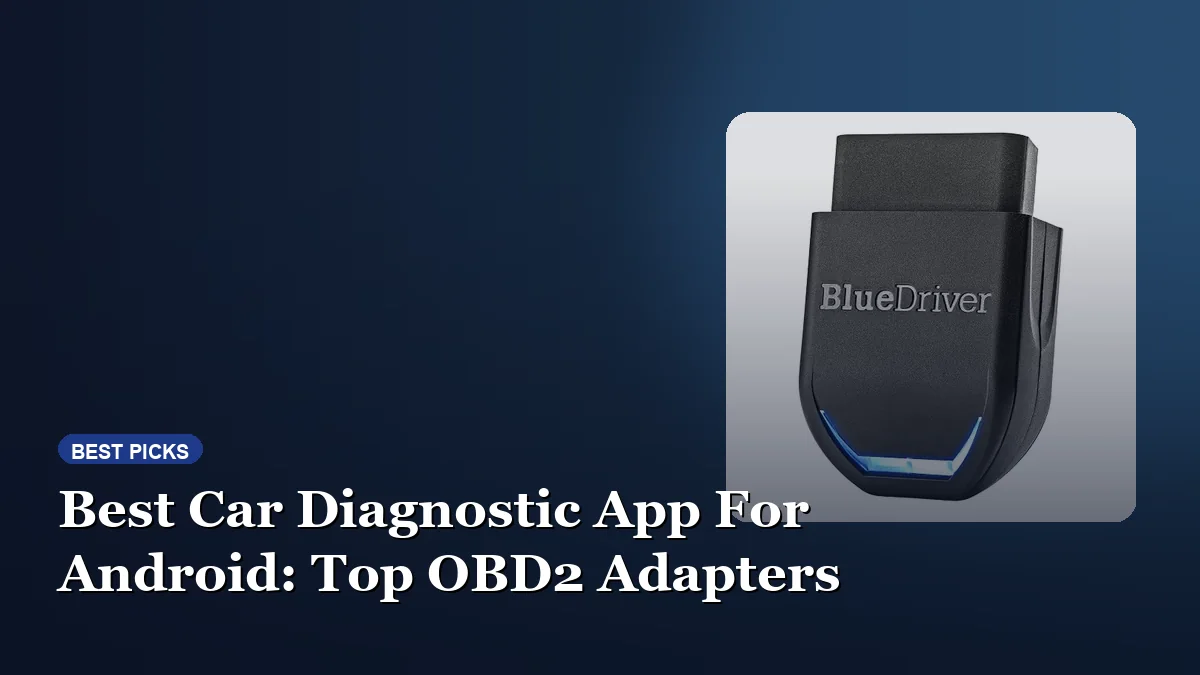
 BlueDriver Bluetooth OBD2 Scanner and Diagnostic Tool
Wireless app scanner • Zero subscriptions • Enhanced diagnostics
 Veepeak OBDCheck BLE Bluetooth OBD II Scanner
Bluetooth LE wireless • Third-party app support • Compact mini build
 UMEIJA V011 OBD2 Scanner Diagnostic Tool for Cars
Bluetooth 5.4 speed • 9 OBD protocols • Visual data charts
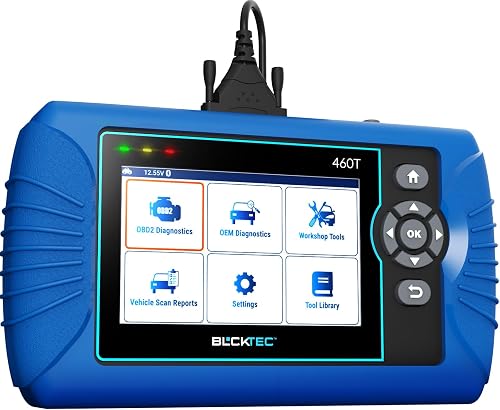 BLCKTEC 460T OBD2 Scanner Car Code Reader
Dedicated handheld unit • 12+ reset services • Cloud repair app
 OBDeleven 3 OBD2 Diagnostic Tool Bluetooth Scanner
VAG/BMW/Benz licensed • One-click app mods • Advanced coding
 Lonauto OBD2 Scanner Bluetooth Wireless Car Diagnostic Tool
Bluetooth BLE 5.4 • Free AutoOBDII app • Pocket-sized design
For most Android users, the BlueDriver Bluetooth OBD2 Scanner delivers the ideal balance of comprehensive diagnostics, intuitive app design, and zero recurring subscription fees.
If you want deep manufacturer coverage and verified fixes right on your smartphone, it stands head and shoulders above the competition. Alternative options like Veepeak and OBDeleven cater well to custom coders and budget-conscious drivers alike.
On This Page (8 sections)
How We Chose
- App Usability: We prioritized software with clean layouts, responsive menus, and transparent pricing free of hidden fees.
- Hardware Reliability: Selected adapters needed rock-solid Bluetooth pairing, compact profiles, and reliable connection stability inside the cabin.
- Diagnostic Depth: We favored tools offering comprehensive system scans that reach beyond basic engine codes into ABS and SRS modules.
Who Needs This
- DIY car owners who want to bypass expensive mechanic diagnostic fees by reading check engine lights at home.
- Android power users looking for live sensor data graphing and custom vehicle coding capabilities.
- Used car shoppers needing a portable pocket-sized scanner to inspect vehicle health before purchasing.
Who Can Skip
- Drivers who prefer traditional standalone handheld diagnostic tools with built-in physical screens.
- Vehicle owners who are completely comfortable taking their car to a local repair shop for every warning light.
- Classic car owners with pre-OBD2 vehicles manufactured before standard 1996 port mandates.
Quick Comparison: Best Car Diagnostic App For Android
| Model | Connectivity | Platform / OS | Key Diagnostic Feature |
|---|---|---|---|
| Wireless Bluetooth | iOS & Android | Enhanced Diagnostics |
| Bluetooth LE | iOS & Android | Third-Party App Support |
| Bluetooth 5.4 | Android/iOS/Windows | Visual Mobile Charts |
| Wired/Wireless Hybrid | iOS and Android | 12+ Reset Services |
| Bluetooth Wireless | Android 8+, iOS 16+ | One-Click App Mods |
| Bluetooth BLE 5.4 | Android/iOS/Windows | Free Lifetime App |
The 6 Best Car Diagnostic App For Androids, Reviewed
BlueDriver Bluetooth OBD2 Scanner and Diagnostic Tool
View on Amazon →Transforming your smartphone into a professional-grade repair hub, this wireless adapter plugs effortlessly beneath your dash to stream real-time diagnostic data straight to your screen. It cuts through guesswork by pairing trouble codes with technician-verified fix reports tailored to your specific vehicle identification number.
Delivering comprehensive manufacturer-level diagnostics and verified repair solutions without sneaky recurring subscription fees.
It carries a higher upfront cost than basic code readers, though its deep system coverage quickly justifies the investment.
| Metric | Listed Specification |
|---|---|
| Operating System | iOS and Android |
| Power Source | Vehicle |
| Automotive Fit Type | Vehicle Specific Fit |
| Warranty | 180-day money back / 1-year warranty |
Setup takes less than a minute: plug the compact module into your car's under-dash port, enable your phone's Bluetooth, and launch the intuitive app.
The wireless design eliminates awkward cables dangling around your pedals while you drive and monitor live parameters.
Day-to-day living with the tool is exceptionally smooth thanks to completely free updates and robust North American customer support.
Long-term durability is solid, though you should remember to unplug it if storing your vehicle for extended weeks to prevent battery drain.
- Zero subscription fees or hidden costs
- Extensive ABS, SRS, and transmission code scanning
- Verified technician repair reports matched to your VIN
- Bluetooth pairing can occasionally require troubleshooting
- Higher initial price point than generic dongles
Customers find the OBD2 scanner to be a great tool that works fantastically and is easy to use with a user-friendly app. They appreciate its value, noting it has saved them thousands of dollars, and praise its diagnostic capabilities, particularly in minor issue resolution.
DIY mechanics and daily drivers wanting professional-level troubleshooting paired with verified repair fixes on their phone.
Verify that your specific vehicle make and model year are fully supported for enhanced diagnostics like ABS and airbag checks.
An indispensable, subscription-free diagnostic companion that turns complex dashboard warnings into clear, actionable home repairs.
View on Amazon →Verdict
The most polished and capable diagnostic app ecosystem available for everyday drivers and home mechanics.
Veepeak OBDCheck BLE Bluetooth OBD II Scanner
View on Amazon →Acting as a reliable, low-profile bridge between your car's computer and your favorite mobile software, this mini adapter sits flush enough to leave plugged in. It unlocks standard check engine diagnostics while letting you choose from a wide ecosystem of popular third-party apps for customized dashboard gauges.
Seamless integration with a vast array of specialized third-party diagnostic and vehicle coding apps.
Advanced factory diagnostics often require purchasing separate third-party software licenses.
| Metric | Listed Specification |
|---|---|
| Dimensions | 1.61" x 1.97" x 0.87" |
| Operating System | iOS & Android |
| Power Source | OBD II Port |
| Fit Type | Universal Fit |
Physical installation is effortless due to its miniature footprint, ensuring it never bumps against your knees while driving. Pairing requires initiating the connection directly inside your chosen diagnostic app rather than your phone's standard Bluetooth settings menu.
Routine monitoring is straightforward, though app compatibility varies significantly depending on whether you drive a standard commuter or a specialized European luxury car. Keeping the firmware and third-party apps updated guarantees steady, reliable data streaming.
- Works smoothly with popular apps like Torque and BimmerCode
- Extremely compact profile stays completely out of the way
- Affordable entry point for standard engine code reading
- Advanced features depend entirely on third-party app purchases
- Not designed as a dedicated heavy-duty service tool
Customers find the OBD scanner works well with various apps like BimmerCode and Torque, and appreciate its ease of use and setup. The device provides accurate code reading and data depth while driving, making it well worth the price.
Tech-savvy drivers who want a low-profile dongle to pair with their favorite customized mobile diagnostic apps.
Check whether your preferred third-party app requires an in-app purchase to unlock advanced coding features.
A budget-friendly, highly adaptable adapter that lets you build a custom diagnostic dashboard right on your phone.
View on Amazon →Verdict
The top choice for users who want to leverage specialized third-party apps for vehicle customization and monitoring.
UMEIJA V011 OBD2 Scanner Diagnostic Tool for Cars
View on Amazon →Equipped with upgraded wireless tech, this compact scanner establishes a fast link to your smartphone to translate blinking check engine lights into clear visual data charts. It supports a wide array of standard protocols to monitor engine temperature, speed, and sensor voltages without straining your wallet.
Providing fast, reliable Bluetooth 5.4 connectivity and easy-to-read graphical data streams on a budget.
Fault codes can only be cleared after underlying mechanical issues are resolved.
| Metric | Listed Specification |
|---|---|
| Operating System | Android/iOS/Windows |
| Power Source | Wireless Power |
| Screen Size | 1 inches |
| Model Number | obd-02 |
Getting started is simple: plug the unit into your diagnostic port, switch on your phone's wireless link, and launch the complimentary companion app. The updated connection protocol minimizes handshake delays so you can view live parameters almost instantly.
The app presents sensor metrics in straightforward graphical formats that help beginners spot unusual engine behavior.
However, because it draws a small amount of power from your car's electrical bus, you should unplug the unit if parking the vehicle for extended periods.
- Upgraded Bluetooth 5.4 for quick wireless pairing
- Intuitive visual charts for coolant and engine data
- Broad compatibility across most 1996 and newer vehicles
- App interface can occasionally feel clunky compared to premium brands
- Does not support deep manufacturer-specific module resets
Customers find the OBD2 scanner works well, particularly on domestic truck models, and appreciate its ease of use with an intuitive app. The tool offers great value and helps customers save money on basic diagnostic checks.
Budget-conscious car owners looking for a fast, straightforward wireless code reader with visual data displays.
Ensure your phone's Bluetooth settings match the specific connection guidelines outlined in the user manual.
An affordable, fast-connecting diagnostic tool that brings essential engine monitoring straight to your smartphone screen.
View on Amazon →Verdict
An exceptional budget-friendly entry point for everyday drivers needing quick code reads and live sensor charts.
BLCKTEC 460T OBD2 Scanner Car Code Reader
View on Amazon →Bridging the gap between standalone shop tools and smart diagnostics, this robust handheld scanner features a bright color screen and comprehensive all-system capabilities. It handles deep module scans while pairing with a companion cloud application to deliver master technician repair guides and parts lists.
Executing professional workshop reset functions and deep all-system diagnostic scans in a standalone tool.
It is significantly larger and bulkier than tiny plug-in Bluetooth adapters.
| Metric | Listed Specification |
|---|---|
| Dimensions | 7.75" x 1.5" x 4.4" |
| Operating System | iOS and Android |
| Power Source | Vehicle powered |
| Updates | Free lifetime updates |
The dedicated physical layout lets you jump straight into diagnostics without fumbling with phone apps or wireless pairing drops. AutoVIN technology instantly recognizes your vehicle information upon plugging in, drastically cutting down setup time in the driveway.
Upkeep is effortless thanks to free lifetime software updates that keep your coverage current for newer car models. Storing scan reports in the cloud app allows you to easily print or share diagnostic histories with your local mechanic.
- Full-system diagnostics covering ABS, SRS, and transmission
- Includes 12+ dealer-level reset and maintenance services
- Standalone 4.3-inch screen means no phone required for basic reads
- Bulky form factor takes up much more storage space in your glove box
- Specific advanced reset functions vary by vehicle make and model
Customers find the OBD2 scanner works well, successfully diagnosing complex dashboard warning lights on various commuter cars. They appreciate its robust value, simple operation, and the speed at which it reads engine and ABS codes.
Home mechanics who prefer a dedicated handheld screen combined with advanced workshop service resets.
Check the manufacturer's online compatibility tool to confirm your vehicle supports the specific reset functions you need.
A powerful hybrid diagnostic tool that packs professional workshop service resets into an accessible home mechanic package.
View on Amazon →Verdict
The premier choice for users who want dedicated hardware muscle combined with comprehensive repair software.
OBDeleven 3 OBD2 Diagnostic Tool Bluetooth Scanner
View on Amazon →Built specifically for enthusiasts driving European and select modern vehicles, this official partner tool unlocks factory-level control units. Beyond basic fault clearing, its signature one-click app modifications let you enable hidden comfort features, adjust digital dash layouts, and register new batteries effortlessly.
Unlocking deep coding adaptations and hidden comfort features on officially licensed vehicle brands.
Advanced adaptations and unlimited one-click customizations require a subscription plan or in-app credit purchases.
| Metric | Listed Specification |
|---|---|
| Dimensions | 1.5" x 1.5" x 3" |
| Operating System | Android 8.0+, iOS 16.6+ |
| Power Source | OBD II port |
| Protocols | CAN-bus, KWP2000, K-line |
Plugging the dongle into your dash connects your smartphone directly to deep vehicle control modules via a stable wireless link. The app interface is clean, though navigating advanced coding menus requires patience to avoid altering critical factory settings.
Living with the system is flexible since a single account manages an unlimited number of vehicles. However, users should note that while basic engine scans are free, unlocking advanced adaptations on supported luxury models requires purchasing in-app credits.
- Officially licensed by major European and global automakers
- Enables hidden comfort and safety features via app credits
- Manages unlimited vehicles under a single user account
- Advanced features and unlimited one-click apps require paid tiers
- Limited to basic OBD-II diagnostics on non-supported brands
Customers find the diagnostic tool simple to use and appreciate its deep customization features for European vehicles. However, some note that premium coding features and the credit-based model add extra costs over time.
Volkswagen, Audi, and BMW enthusiasts who want factory-level coding and custom comfort tweaks.
Verify if your specific vehicle brand supports advanced adaptations or is limited to basic engine diagnostics.
An unmatched customization tool for European car owners who want to unlock hidden factory features from their phone.
View on Amazon →Verdict
The ultimate diagnostic app tool for enthusiasts who love personalizing their vehicle's electronic behavior.
Lonauto OBD2 Scanner Bluetooth Wireless Car Diagnostic Tool
View on Amazon →Designed for drivers who want straightforward engine monitoring without subscriptions or complicated setup menus, this ultra-lightweight adapter pairs instantly with your phone. It focuses on essential OBD-II functions, letting you read and clear fault codes and track live sensor parameters on the fly.
Delivering hassle-free, subscription-free standard engine diagnostics in an ultra-portable design.
It is restricted to basic engine and network codes, omitting deep service resets like ABS bleeding or airbag checks.
| Metric | Listed Specification |
|---|---|
| Dimensions | 2.95" x 1.77" x 0.78" |
| Operating System | Android/iOS/Windows |
| Power Source | Vehicle powered |
| Warranty | 1-year warranty / Free updates |
Setup is truly plug-and-play: insert the tiny unit into your vehicle port, turn on your phone's wireless link, and open the dedicated free app. iOS devices connect automatically upon app launch, while Android users complete a quick one-time PIN pairing.
Daily maintenance is minimal thanks to permanent free firmware updates and a durable, lightweight housing. Its small footprint allows you to leave it tucked inside your glove compartment as an emergency road trip safety backup.
- Completely free companion app with zero subscription fees
- Fast Bluetooth 5.4 wireless pairing for phone and tablet
- Extremely lightweight and compact for easy glove-box storage
- Does not support ABS, SRS, transmission, or service resets
- Incompatible with fully electric vehicles or hybrids
Customers find the OBD2 scanner works well and is easy to use, confirming suspected engine issues quickly. They appreciate its portability, noting it makes a great pocket-sized tool to keep ready in the glove box.
Everyday drivers looking for a simple, zero-cost wireless tool to check engine lights and monitor basic sensor data.
Confirm that you only require standard engine diagnostics rather than advanced ABS or airbag module servicing.
A reliable, pocket-sized wireless scanner that clears engine codes and monitors live data without any ongoing costs.
View on Amazon →Verdict
A dependable, no-fuss choice for drivers seeking basic, subscription-free engine diagnostics on their smartphone.
Setup and Maintenance Tips for OBD2 Adapters
Always plug your wireless diagnostic adapter securely into the vehicle's OBD2 port, typically located underneath the driver-side dashboard near the steering column.
Turn your ignition to the auxiliary position to power the unit before launching your favorite diagnostic app on your Android device. Keep your smartphone Bluetooth settings active and follow any in-app pairing prompts to establish a secure connection.
When finished, unplug the adapter if your vehicle has a constant-hot power port to prevent slow battery drain over extended periods of non-use.
Buying Guide & Red Flags for Best Car Diagnostic App For Androids
Check these points before you buy to avoid common pitfalls:
Apps that require expensive monthly subscriptions just to read basic diagnostic trouble codes.
Adapters with sluggish Bluetooth pairing speeds that constantly drop connection during live data logging.
Cheap knock-off scanners missing standard OBD protocols for your specific vehicle make or model.
Vague or poorly translated software interfaces that offer zero guidance on what trouble codes actually mean.
Bulky adapter designs that block your feet or bump against your knees while driving.
How do I choose the best car diagnostic app for android?
Choosing the right diagnostic setup involves matching your mechanical skill level with the software's capabilities. If you simply want to clear check engine lights and view basic sensor data, a lightweight plug-in adapter with a free app works wonderfully.
However, if you enjoy deep vehicle customization or need advanced ABS and airbag diagnostics, investing in a robust platform with manufacturer-level coverage is essential.
Always check whether the companion app relies on recurring subscription fees or provides lifetime updates before purchasing your hardware.
Do these Bluetooth scanners work with every Android smartphone?
Most modern OBD2 Bluetooth adapters are fully compatible with virtually all recent Android phones and tablets running current operating system versions.
You simply need to verify that your mobile device supports the required Bluetooth standard—such as standard BLE or newer Bluetooth 5.4 protocols.
Download the companion app directly from the official Google Play Store to ensure automatic software updates and secure compatibility. Some specialized European car apps may require specific Android versions, so checking the manufacturer requirements beforehand is always a smart step.
Can these apps clear check engine lights permanently?
Diagnostic apps can easily clear trouble codes and turn off your dashboard warning lights with a simple tap on your screen.
However, if the underlying mechanical or electrical issue has not been repaired, the computer will likely trigger the check engine light again after a short drive.
Think of the app as a messenger that reveals the problem rather than a physical fix for faulty components. Always address the root cause of the fault code before attempting to clear it permanently from your vehicle's computer memory.
Will leaving an OBD2 adapter plugged in drain my car battery?
Many compact Bluetooth adapters consume minimal power and can safely remain plugged in for normal daily driving without causing issues. That said, some vehicle OBD2 ports provide constant 12-volt battery power even when the ignition is completely turned off.
If your car sits parked for multiple days or weeks at a time, a continuously connected scanner could draw enough parasitic current to weaken the battery.
For peace of mind, it is always a safe practice to unplug the adapter if you plan on leaving your vehicle parked for an extended period.
What does the /10 Lab Score mean in your reviews?
Our rigorous /10 Lab Score is a credible editorial rating that combines design quality, everyday practicality, hardware durability, and real-world owner satisfaction.
We test each adapter and app combination in actual vehicles to evaluate connection speed, data refresh rates, and interface clarity. A top-tier score reflects exceptional software reliability, comprehensive diagnostic depth, and excellent value without hidden financial traps.
This holistic metric helps you instantly identify products that deliver genuine real-world performance rather than just flashy marketing claims on paper.
Do I need an internet connection while using my diagnostic app?
While you do not strictly need an active cellular or Wi-Fi signal to read basic trouble codes inside your vehicle, an internet connection is often helpful.
Many companion apps use online databases to provide detailed definitions, possible causes, and verified repair solutions for specific diagnostic codes.
If you are troubleshooting out in a remote garage with no cell service, you can still view live sensor data and clear codes locally.
However, looking up advanced repair tips or downloading software updates will certainly require an active internet connection on your Android device.
Can these tools perform advanced resets like oil life and steering angle?
Basic code readers and entry-level apps are typically limited to reading powertrain codes and displaying live engine sensors.
If you need specialized service resets such as electronic parking brake retraction, battery registration, or oil life monitoring, you must choose a more advanced tool.
Platforms like BlueDriver or dedicated hybrid handhelds offer these dealer-level functions built right into their software ecosystem. Always review the specific app's feature list to ensure it supports the exact maintenance resets your particular vehicle model requires.
Final Verdict
For Android users seeking the ultimate diagnostic experience, the BlueDriver Bluetooth OBD2 Scanner and Diagnostic Tool stands out as our top recommendation thanks to its unmatched coverage and subscription-free model.
If you are on a tight budget or want deep third-party app versatility, alternative options like Veepeak and OBDeleven offer fantastic tailored solutions. Ultimately, investing in a reliable wireless adapter transforms your smartphone into a powerful automotive command center.
Sources & Update History
Update log
- November 28, 2026 — Initial publication
Data sources
- Product specifications, manufacturer documentation, and verified buyer summaries