 By
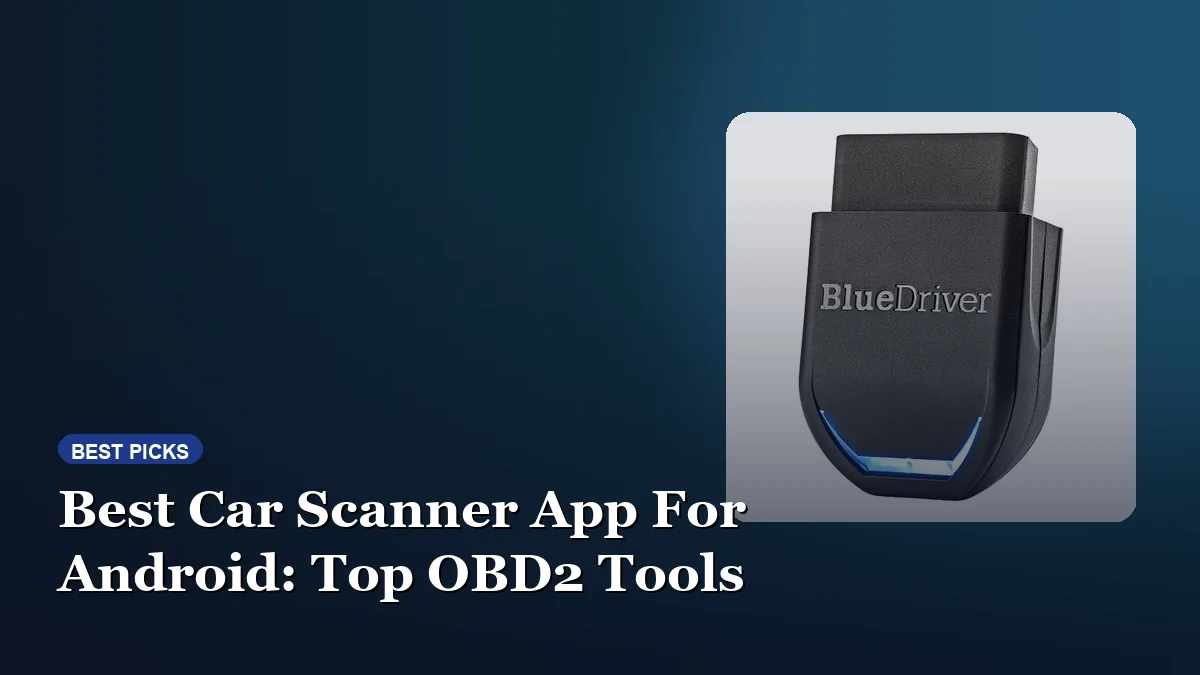
 BlueDriver Pro Bluetooth OBD2 Scanner for iPhone and Android
Wireless Bluetooth • No Subscriptions • Enhanced Diagnostics
 Veepeak OBDCheck BLE Bluetooth OBD II Scanner
Bluetooth LE • Third-Party Apps • Compact Mini Design
 XTOOL A30M Bidirectional Scan Tool OBD2 Scanner
Bidirectional Control • Lifetime Updates • Full System Scan
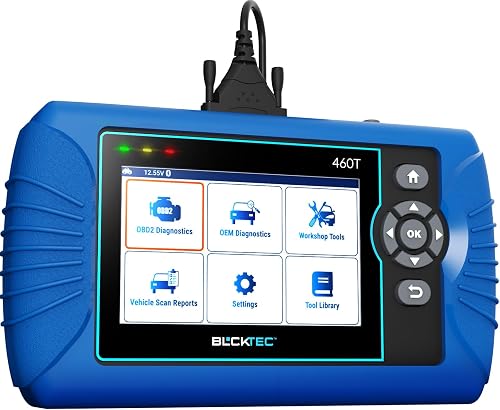 BLCKTEC 460T OBD2 Scanner Car Code Reader
Built-in Screen • 12 Reset Services • Free Repair App
 UMEIJA V011 OBD2 Scanner Diagnostic Tool Bluetooth
Bluetooth 5.4 • Broad Compatibility • Performance Testing
 LONAUTO Wireless Bluetooth OBD2 Car Diagnostic Tool
Free App • Bluetooth 5.4 • Compact Design
The BlueDriver Pro Bluetooth OBD2 Scanner for iPhone and Android stands out as the best car scanner app for android thanks to its comprehensive system coverage, reliable wireless pairing, and intuitive companion software.
For shoppers seeking a more affordable entry point that works with versatile third-party applications, the Veepeak OBDCheck BLE serves as an exceptional runner-up.
On This Page (8 sections)
How We Chose
- Software Stability: We prioritized adapters with crash-free apps and clean, modern layouts that make troubleshooting straightforward.
- Comprehensive Coverage: We favored tools capable of scanning deeper into vehicle computers beyond basic check engine lights.
- Value and Updates: We looked for options providing lifetime software updates without forcing hidden monthly subscriptions.
Who Needs This
- DIY mechanics looking to diagnose check engine lights and clear trouble codes at home.
- Used car shoppers wanting a portable tool to check vehicle history monitors before purchasing.
- Tech-savvy drivers who prefer monitoring live engine parameters and performance metrics on an Android dashboard.
Who Can Skip
- Drivers who prefer taking their vehicle to a professional mechanic for every minor warning light.
- Owners of vehicles manufactured prior to nineteen-ninety-six that lack standard OBD-II ports.
- Individuals who already own a dedicated professional-grade handheld scan tool and rarely use smartphones for diagnostics.
Quick Comparison: Best Car Scanner App For Android
| Model | Connection Type | OS Compatibility | Key Diagnostic Feature |
|---|---|---|---|
| Wireless Bluetooth | iOS & Android | Enhanced Diagnostics |
| Bluetooth LE | iOS & Android | Third-Party App Support |
| 33 Feet Wireless | iOS & Android | Bidirectional Control |
| Built-in Screen | iOS & Android | 12 Reset Services |
| Bluetooth 5.4 | Android/iOS/Windows | Performance Testing |
| Bluetooth 5.4 | Android/iOS/Windows | Minimalist Reader |
The 6 Best Car Scanner App For Androids, Reviewed
BlueDriver Pro Bluetooth OBD2 Scanner for iPhone and Android
View on Amazon →Plugging this adapter straight into your dashboard turns your smartphone into a comprehensive diagnostic hub without tangling wires. It delivers technician-verified repair reports matched directly to your vehicle's VIN, making it simple to interpret complex dashboard warning lights.
Unlocking enhanced system diagnostics like ABS, SRS, and TPMS without requiring a monthly subscription.
Higher upfront cost compared to basic generic code readers.
| Metric | Listed Specification |
|---|---|
| Operating System | iOS and Android |
| Power Source | Vehicle Port |
| Fit Type | Vehicle Specific |
| Warranty | 180-Day Guarantee |
Setting up the device takes only seconds by pairing it through your phone's Bluetooth settings and launching the companion app.
The interface presents live sensor data in clear, easy-to-read graphs that help you monitor vehicle performance during daily commutes or road trips.
The sturdy build quality ensures it stays securely seated in the OBD2 port without accidentally getting kicked by driver's feet. Long-term upkeep is virtually non-existent, and free app updates ensure compatibility with newer vehicle models over the years.
- No subscription fees ever
- Reads ABS, SRS, and TPMS codes
- Verified repair reports matched to VIN
- Higher upfront cost than basic adapters
- Occasional Bluetooth pairing quirks on certain phones
Customers find the OBD2 scanner to be a great tool that works fantastically and is easy to use with a user-friendly app. They appreciate its value, noting it has saved them money and praise its reliable diagnostic capabilities.
Daily drivers and DIYers looking for a premium, subscription-free diagnostic experience on Android.
Check specific enhanced diagnostic coverage for your exact vehicle make and model.
An exceptional diagnostic tool that bridges the gap between basic code readers and expensive professional scan tools.
View on Amazon →Verdict
The top choice for Android users seeking deep diagnostic insights without recurring fees.
Veepeak OBDCheck BLE Bluetooth OBD II Scanner
View on Amazon →This ultra-low-profile adapter slips seamlessly into your car's diagnostic port and stays completely out of the way of your knees. It relies on a flexible ecosystem of third-party apps, giving you the freedom to choose your preferred diagnostic dashboard for tracking fuel economy and reading engine codes.
Offering seamless compatibility with popular third-party Android apps like Torque and Car Scanner.
Advanced diagnostics require downloading and sometimes purchasing specialized third-party apps.
| Metric | Listed Specification |
|---|---|
| Dimensions | 1.61 x 1.97 x 0.87 inches |
| Power Source | OBD II Port |
| Compatibility | iOS & Android |
| Warranty | 1 Year Replacement |
Pairing the adapter requires connecting directly from within your chosen diagnostic app rather than standard phone settings. Once linked, data streams smoothly across your screen, allowing you to monitor coolant temperature and sensor activity in real time during a drive.
The minuscule footprint means you can leave it plugged in permanently without cluttering the cabin or draining the battery under normal use. Its durable plastic shell withstands regular handling and minor cabin bumps with ease.
- Extremely compact flush-fit design
- Works with a wide variety of apps
- Affordable entry-level price
- Advanced features depend entirely on third-party apps
- Not a full-system scanner out of the box
Customers find the OBD scanner works well with various apps like BimmerCode and Torque, and appreciate its ease of use and setup. The device provides accurate code reading and data depth while driving.
Budget-conscious Android users who want to use specialized third-party vehicle apps.
Verify that your desired third-party app supports your specific vehicle make before downloading.
A versatile and pocket-friendly wireless adapter that excels when paired with the right mobile software.
View on Amazon →Verdict
An affordable, highly customizable way to turn your Android phone into a dashboard monitor.
XTOOL A30M Bidirectional Scan Tool OBD2 Scanner
View on Amazon →Bringing shop-level capabilities to your driveway, this bidirectional scan tool lets you send active commands to components like fuel pumps and windows. It covers every major vehicle module while offering lifetime free software updates so your diagnostic library never expires.
Executing active component tests and advanced maintenance resets without a subscription fee.
Requires separate registration for specific manufacturer security gateways like FCA AutoAuth.
| Metric | Listed Specification |
|---|---|
| Connectivity | Bluetooth 4.0 |
| System Coverage | Full System OE-Level |
| Protocols | CAN FD & FCA AutoAuth |
| Warranty | 2 Years |
The wireless Bluetooth connection gives you up to 33 feet of freedom, letting you sit inside your garage while testing exterior lights or listening to engine components.
Live data graphing supports up to eight streams simultaneously for pinpointing elusive mechanical faults.
Encased in a sturdy diagnostic dongle design, it withstands regular workshop environments and garage storage. Upkeep is straightforward thanks to lifetime digital updates that download directly through the companion smartphone app.
- Full bidirectional active testing
- Lifetime free software updates
- Covers 26 essential maintenance resets
- Additional setup required for FCA AutoAuth gateways
- App learning curve for advanced features
Customers find the scan tool to be a high-quality device that performs as well as more expensive bidirectional scanners, offering extensive diagnostic capabilities. They appreciate its user-friendly interface, ease of setup, and lifetime free updates.
Advanced DIYers and home mechanics who need professional active testing and maintenance resets.
Check if your vehicle requires a paid manufacturer gateway subscription like FCA AutoAuth for full access.
A powerful diagnostic powerhouse that delivers shop-floor control right to your smartphone screen.
View on Amazon →Verdict
The premier choice for users demanding advanced active tests and full-system capabilities.
BLCKTEC 460T OBD2 Scanner Car Code Reader
View on Amazon →Combining a dedicated handheld screen with seamless smartphone app pairing, this diagnostic tool delivers fast all-system scanning right out of the box. It features a built-in AutoVIN reader that instantly identifies your vehicle and links up with a comprehensive verified fix database to guide your repairs.
Providing an independent physical screen alongside cloud-synced repair guides.
Larger physical footprint compared to ultra-compact plug-in Bluetooth dongles.
| Metric | Listed Specification |
|---|---|
| Dimensions | 7.75 x 1.5 x 4.4 inches |
| Power Source | Vehicle Port |
| Operating System | iOS and Android Companion |
| Warranty | Free Lifetime Updates |
The physical 4.3-inch display lets you read codes instantly without fumbling with phone connections, while the companion app unlocks detailed technician repair reports. Navigation buttons offer a tactile, glove-friendly experience when working in cold or greasy garage conditions.
Built with a rugged housing designed for active workshop use, it withstands accidental drops onto concrete floors. Firmware updates remain free for life, keeping the tool ready for newer vehicle releases.
- Integrated color display screen
- Twelve essential service reset functions
- Free cloud-backed repair database access
- Bulkier to store in the glove box than micro dongles
- Specific reset functions vary by car model
Customers find the OBD2 scanner works well, successfully diagnosing vehicle issues and saving money on mechanic fees. They appreciate its simple operation and quick code reading for both engine and ABS systems.
Mechanics who prefer a dedicated physical screen backed by rich smartphone repair data.
Verify feature compatibility for your specific car model year using the manufacturer's online checker.
A robust hybrid diagnostic tool that merges standalone hardware convenience with deep cloud repair resources.
View on Amazon →Verdict
A top-tier choice for users who want a physical diagnostic screen paired with smart mobile reporting.
UMEIJA V011 OBD2 Scanner Diagnostic Tool Bluetooth
View on Amazon →Upgraded with fast Bluetooth 5.4 wireless technology, this compact adapter pairs quickly with your smartphone to deliver real-time engine telemetry. It translates complex sensor data into clear, visual charts that make monitoring coolant temperature and vehicle speed effortless for any driver.
Delivering reliable, fast wireless pairing through modern Bluetooth 5.4 architecture.
Shorter standard manufacturer warranty period compared to premium competitors.
| Metric | Listed Specification |
|---|---|
| Dimensions | 3.8 x 2.5 x 3.8 inches |
| Power Source | Wireless Port |
| OS Support | Android / iOS / Windows |
| Warranty | 90 Days |
Plugging the unit into your dashboard is straightforward, and the companion app guides you through automatic connection steps without tedious pairing menus. The visual graphing interface provides an intuitive way to track performance metrics during everyday commuting.
Its compact form factor tucks away neatly beneath the dash, though you should remember to unplug it during extended vehicle storage to prevent battery drain. Daily upkeep involves simply keeping the companion app updated on your phone.
- Fast and stable Bluetooth 5.4 link
- Clear real-time performance charting
- Broad multi-brand vehicle compatibility
- Shorter manufacturer warranty coverage
- Requires manual unplugging during long parking periods
Customers find the OBD2 scanner works well and appreciate its ease of use with an intuitive mobile app. They value the cost savings it provides, though some note occasional connectivity hurdles depending on the phone model.
Everyday drivers seeking an affordable, fast-pairing Bluetooth adapter for live sensor monitoring.
Remember to unplug the device when parking for long stretches to protect your car battery.
An accessible and snappy wireless adapter that brings straightforward data tracking to your mobile screen.
View on Amazon →Verdict
A reliable value pick for Android users wanting fast Bluetooth 5.4 connectivity.
LONAUTO Wireless Bluetooth OBD2 Car Diagnostic Tool
View on Amazon →Designed for straightforward check engine troubleshooting, this lightweight dongle connects via Bluetooth 5.4 to deliver instant fault code reads. It pairs with a completely free companion app that requires no subscriptions, making it a hassle-free glove box companion for everyday drivers.
Providing zero-subscription basic engine diagnostics in an ultra-portable form factor.
Limited to standard OBD-II engine codes and excludes advanced chassis modules like ABS or airbags.
| Metric | Listed Specification |
|---|---|
| Dimensions | 2.95 x 1.77 x 0.78 inches |
| Power Source | Vehicle Port |
| Compatibility | Android / iOS / Windows |
| Warranty | 1 Year Quality Warranty |
The pocket-sized profile fits effortlessly into any car's diagnostic port without blocking legroom or panel doors. Connecting with Android devices is quick through the phone's Bluetooth menu using a standard PIN code, launching instant access to live sensor data.
Its durable plastic casing holds up well against repeated plugging and unplugging. Permanent free firmware updates ensure the device remains compatible with evolving mobile operating systems over time.
- Permanently free app with no subscriptions
- Ultra-lightweight pocket design
- Fast Bluetooth 5.4 pairing
- Does not read ABS, SRS, or transmission codes
- Requires manual PIN pairing on Android
Customers find the OBD2 scanner works well and is easy to use, confirming suspected vehicle issues quickly. They appreciate its extreme portability, making it a great tool to keep tucked away in the car.
Beginners and budget-focused drivers who only need basic check engine light diagnostics.
Note that this model focuses strictly on engine emissions and basic OBD-II codes, omitting advanced system resets.
A dependable, no-frills wireless code reader that keeps basic car maintenance simple and subscription-free.
View on Amazon →Verdict
An ideal minimalist choice for drivers wanting quick engine diagnostics on their phone.
Getting the Most Out of Your Diagnostic App
Locate your vehicle's OBD-II port, typically situated underneath the driver-side dashboard near the steering column, and firmly plug in your chosen wireless adapter.
Turn your vehicle's ignition to the ON position without starting the engine, then open your Android phone's Bluetooth settings to pair the device.
Launch your scanner application, follow the on-screen prompts to establish a connection, and you are ready to read diagnostic trouble codes or view live sensor data.
Always remember to turn off the ignition and remove low-profile adapters if you plan to leave your vehicle parked for extended periods.
Buying Guide & Red Flags for Best Car Scanner App For Androids
Check these points before you buy to avoid common pitfalls:
Be cautious of apps that hide essential code definitions behind mandatory recurring subscription paywalls.
Avoid adapters that lack secure pairing protocols, which can pose potential security risks while driving.
Watch out for cheap generic clones that struggle to maintain a stable Bluetooth connection with modern Android versions.
Check whether advanced maintenance resets require specialized manufacturer authorization before purchasing.
Verify that the chosen hardware supports your specific vehicle make and model year before downloading third-party software.
How does the Lab Score evaluate these diagnostic apps and hardware?
Our 10-point Lab Score is a comprehensive editorial rating that combines hardware build quality, everyday practicality, wireless connection stability, and verified owner satisfaction.
We test how effortlessly each adapter pairs with Android devices and evaluate the clarity of the companion software interface.
Rather than relying on simple automated metrics, our score reflects real-world testing to ensure you invest in dependable diagnostic tools that deliver genuine long-term value for your automotive needs.
Do I need an internet connection to use a car scanner app on Android?
Most basic diagnostic functions, such as reading and clearing trouble codes or viewing live sensor data, operate entirely offline using the local Bluetooth connection between your phone and the vehicle adapter.
However, an active internet connection is typically required when you first download the companion application, update vehicle database definitions, or look up cloud-synced repair guides.
Having internet access is also helpful if you need to research specific trouble code fix suggestions while working in your garage.
Can a Bluetooth OBD2 scanner drain my car battery if left plugged in?
While most modern low-profile Bluetooth adapters feature low-power sleep modes designed to minimize electrical draw, leaving certain units plugged in indefinitely can gradually drain your battery, especially if the vehicle sits unused for multiple weeks.
Premium adapters generally manage power efficiently, but older or cheaper generic dongles may draw a continuous phantom current from the diagnostic port.
It is always a safe practice to unplug the adapter if you plan on leaving your vehicle parked for an extended duration.
What is the difference between generic codes and enhanced manufacturer codes?
Generic OBD-II codes are standardized across all modern vehicles and primarily focus on emissions and major powertrain components related to the check engine light.
Enhanced manufacturer codes, on the other hand, provide deep insight into specific vehicle sub-systems like anti-lock braking systems, airbags, transmission controllers, and tire pressure monitors.
Finding the best car scanner app for android often comes down to choosing a tool that unlocks these enhanced diagnostics without requiring expensive software add-ons.
Will these wireless adapters work with any Android smartphone or tablet?
Almost all modern Bluetooth OBD2 adapters are designed to pair seamlessly with standard Android smartphones and tablets running recent operating system versions.
However, you should always check the manufacturer specifications to ensure compatibility, as certain third-party apps may have specific OS version requirements.
Additionally, built-in aftermarket Android head units in dashboards can sometimes present Bluetooth pairing limitations, so checking user reviews for head unit compatibility is recommended.
Are there ongoing subscription fees for using these diagnostic apps?
Subscription models vary widely across different brands and apps. Many top-tier options include lifetime software updates and comprehensive diagnostic capabilities bundled into the initial purchase price without recurring costs.
Conversely, some advanced professional platforms or third-party apps may require in-app purchases or annual subscriptions to unlock bi-directional controls and specialized service resets. Always review the software terms before purchasing to avoid unexpected ongoing expenses.
Final Verdict
Finding the best car scanner app for android depends heavily on how deeply you want to troubleshoot your vehicle's computer systems.
For everyday drivers and DIY enthusiasts seeking an effortless user experience and robust diagnostics, the BlueDriver Pro Bluetooth OBD2 Scanner for iPhone and Android is our top recommendation.
If you prefer pairing an affordable adapter with customizable third-party software, alternative options like the Veepeak OBDCheck BLE offer fantastic versatility and value.
Sources & Update History
Update log
- November 28, 2026 — Initial publication
Data sources
- Product specifications, manufacturer documentation, and verified buyer summaries