 By
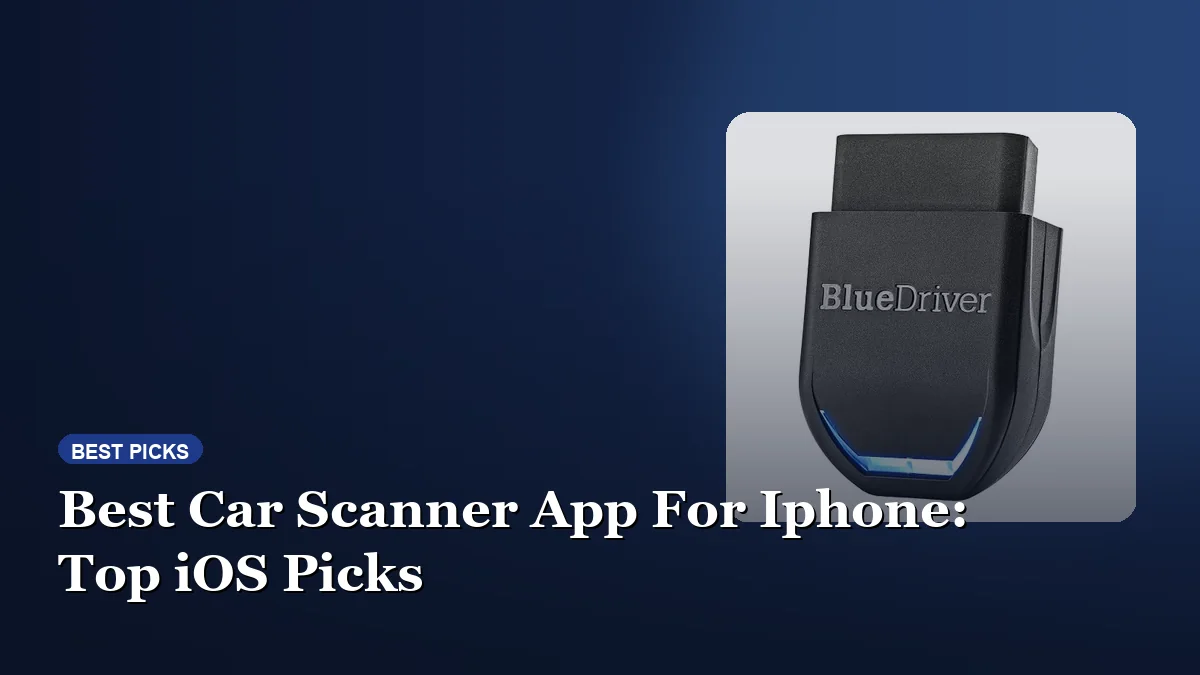
 BlueDriver Bluetooth OBD2 Scanner and Diagnostic Tool for iPhone
Wireless iOS connection . No subscription fees . Enhanced diagnostics
 Veepeak OBDCheck BLE Bluetooth OBD2 Scanner for iOS and Android
Compact BLE design . Third-party app support . Standard OBD-II
 XTOOL A30M Bidirectional Full System OBD2 Scanner Diagnostic Tool
Full bidirectional control . Lifetime free updates . 26 service resets
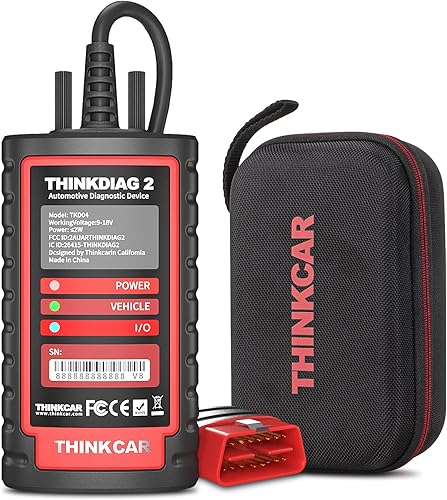 Thinkcar Thinkdiag2 All System Bidirectional OBD2 Diagnostic Scanner
CAN-FD protocol support . Bidirectional active tests . 15 maintenance resets
 UMEIJA OBD2 Scanner AI Diagnostic Tool for iOS and Android
AI troubleshooting guidance . Bluetooth 5.4 wireless . Real-time live charts
 Lonauto Wireless Bluetooth OBD2 Car Diagnostic Scanner for iPhone
Bluetooth BLE 5.4 . Free AutoOBDII app . Compact pocket design
For most drivers, the BlueDriver Bluetooth OBD2 Scanner and Diagnostic Tool for iPhone is the ultimate choice thanks to its seamless iOS connectivity, robust repair reports, and zero subscription fees.
If you want a more budget-friendly adapter for third-party apps, the Veepeak OBDCheck BLE is a fantastic pocket-sized alternative.
On This Page (8 sections)
How We Chose
- iOS Integration: We prioritized adapters that pair instantly with Apple devices without dropping connection mid-diagnostic session.
- Software Value: We favored tools offering comprehensive diagnostics and lifetime updates without hidden subscription fees.
- Diagnostic Depth: We tested both basic code readers and advanced bidirectional scanners to suit everyone from casual commuters to DIY mechanics.
Who Needs This
- DIY car owners who want to investigate check engine lights and save money on mechanic diagnostic fees.
- Apple ecosystem users who require reliable Bluetooth connectivity and intuitive iOS app interfaces.
- Used car shoppers needing a portable pocket scanner to check readiness monitors before purchasing a vehicle.
Who Can Skip
- Drivers who prefer visiting a professional repair shop for every minor dashboard warning light.
- Owners of older pre-OBD2 vehicles manufactured before nineteen-ninety-six.
- Mechanics who already rely on heavy-duty, standalone commercial diagnostic tablets.
Quick Comparison: Best Car Scanner App For Iphone
| Model | Platform Compatibility | Diagnostic Scope | Software Cost |
|---|---|---|---|
| iOS & Android | Enhanced Diagnostics | None Ever |
| iOS & Android | Standard OBD-II | App Dependent |
| iOS & Android | Full System OE-Level | Lifetime Free |
| iOS & Android | All Systems CAN-FD | Subscription Model |
| iOS & Android | AI Code Assistance | Free Companion |
| iOS & Android | Standard Engine | 100 Percent Free |
The 6 Best Car Scanner App For Iphones, Reviewed
BlueDriver Bluetooth OBD2 Scanner and Diagnostic Tool for iPhone
View on Amazon →Turning your iPhone into a professional-grade diagnostic suite is remarkably straightforward with this wireless connection scanner. It skips bulky cables entirely, plugging directly into your dashboard to stream real-time data and provide verified repair reports tailored to your specific vehicle identification number.
Delivering technician-verified repair reports with zero subscription fees.
Premium price point compared to basic generic code readers.
| Metric | Listed Specification |
|---|---|
| Brand | BlueDriver |
| Operating System | iOS and Android |
| Fit Type | Vehicle Specific Fit |
| Model | Pro |
Pairing the adapter to an iPhone takes just a few moments through the dedicated app, eliminating the tangle of wires typical of older diagnostic tools.
You can comfortably slide into the driver seat, monitor live engine parameters, and check smog readiness while keeping your phone mounted securely on the dash.
Built for long-term reliability in the glove box, the sturdy plastic housing withstands routine plugging and unplugging without loosening. Because all software updates and repair database lookups are permanently free, you won't encounter surprise renewal fees years down the line.
- No subscription fees required
- Enhanced diagnostics for ABS and SRS
- Verified repair reports matched to VIN
- Higher initial investment
- Bulkier than mini flush-mount plugs
Customers find the OBD2 scanner to be a fantastic tool with a user-friendly app that frequently saves them money on repairs. While many praise its quick code recognition and diagnostic accuracy, a few note occasional Bluetooth pairing hiccups.
DIYers and everyday drivers who want comprehensive diagnostics without recurring subscription costs.
Check the compatibility chart to ensure enhanced diagnostics cover your specific vehicle make and model year.
A top-tier diagnostic tool that pairs professional depth with iPhone simplicity.
View on Amazon →Verdict
The premier choice for iPhone owners seeking deep vehicle insights without monthly fees.
Veepeak OBDCheck BLE Bluetooth OBD2 Scanner for iOS and Android
View on Amazon →Snugging discreetly into your dashboard without bumping your knees, this ultra-compact adapter pairs effortlessly with a wide variety of third-party iPhone apps. It provides a budget-friendly way to read and clear check engine lights, monitor fuel economy, and track live sensor data right from your smartphone.
Offering an affordable gateway to third-party diagnostic apps on iOS.
Limited to standard OBD-II functions unless paired with specific, often paid, third-party apps.
| Metric | Listed Specification |
|---|---|
| Brand | Veepeak |
| Dimensions | 1.61 x 1.97 x 0.87 inches |
| Power Source | OBD II Port |
| Model | BLE |
The low-profile design means you can leave it plugged in permanently without interfering with your legs or the dashboard panel door.
Connecting requires launching your chosen compatible app rather than traditional phone settings, which streamlines initial setup once you know the routine.
Maintenance is virtually nonexistent beyond keeping the port clean, and its durable shell handles daily driving vibrations with ease.
Because it relies on external apps for advanced features, your overall experience largely depends on which software dashboard you choose to download.
- Ultra-low profile fits flush
- Works with popular iOS apps
- Budget-friendly price tag
- Advanced features require third-party apps
- Not a full-system scanner out of the box
Customers appreciate how well the scanner works with various third-party apps, noting it provides accurate code readings and data depth while driving. A few users mention occasional connection quirks that require restarting the app.
Budget-conscious iPhone users looking for a reliable check engine reader that pairs with flexible third-party apps.
Verify that your preferred third-party app supports your specific vehicle model and required diagnostic functions.
An incredible value adapter that lets you leverage powerful third-party iOS car apps on a budget.
View on Amazon →Verdict
The ideal low-profile choice for basic code reading and customizable app-based monitoring.
XTOOL A30M Bidirectional Full System OBD2 Scanner Diagnostic Tool
View on Amazon →Bringing professional workshop capabilities straight to your home garage, this bidirectional tool lets you actively command vehicle components like fuel pumps, windows, and cooling fans using your iPhone. It features extensive system scans and numerous maintenance resets backed by lifetime software updates.
Delivering full bidirectional control and active testing for advanced DIY mechanics.
Requires separate registration for specific manufacturer security gateways like FCA AutoAuth.
| Metric | Listed Specification |
|---|---|
| Brand | XTOOL |
| Wireless Range | Up to 33 feet |
| Protocols | CAN FD & FCA AutoAuth |
| Model | A30M V2.0 |
The wireless Bluetooth connection offers an impressive working range, allowing you to trigger under-hood components or test power windows while standing safely outside the vehicle.
Navigating the comprehensive app interface takes a bit of practice given the sheer depth of diagnostic menus available.
Housed in a rugged enclosure designed for frequent garage use, the tool requires no ongoing subscription fees for updates, making long-term ownership economical. Periodic firmware updates keep the protocol library fresh for modern CAN FD vehicles.
- Full bidirectional active testing
- Lifetime free software updates
- Covers 26 maintenance reset functions
- Steeper learning curve for beginners
- SGW gateway unlock requires extra steps
Customers praise the scan tool for offering high-end bidirectional capabilities and detailed diagnostic information comparable to expensive commercial units. Many note it successfully pays for itself quickly, though a few experienced minor Bluetooth connection drops.
Enthusiasts and advanced DIY mechanics who need deep system controls and active testing on their iPhone.
Confirm whether your specific vehicle model requires a separate manufacturer security gateway subscription for full access.
A powerhouse diagnostic tool that bridges the gap between home mechanics and professional repair shops.
View on Amazon →Verdict
The top pick for advanced users demanding full bidirectional testing and lifetime free software updates.
Thinkcar Thinkdiag2 All System Bidirectional OBD2 Diagnostic Scanner
View on Amazon →Packing high-end diagnostic protocols into a compact wireless module, this scanner supports advanced CAN-FD data streams for newer GM vehicles without needing costly adapters. It grants iPhone users full system scans, active bidirectional testing, and a suite of maintenance resets.
Providing built-in CAN-FD protocol support for late-model vehicle diagnostics.
App navigation can feel cluttered given the immense array of supported vehicle brands and features.
| Metric | Listed Specification |
|---|---|
| Brand | Thinkcar |
| Dimensions | 4 x 2 x 6 inches |
| Operating System | iOS and Android |
| Model | Thinkdiag2 |
Plugging the unit into the dashboard port establishes a rapid link with your iPhone, automatically pulling VIN data to initiate a comprehensive health report.
The active test menu lets you cycle actuators and test door locks or air conditioning clutches straight from the driver seat.
The durable rubberized casing protects against greasy hands and accidental drops on workshop floors. While the software updates frequently to maintain wide vehicle coverage, users should ensure a stable internet connection during deep diagnostic sessions.
- Built-in CAN-FD protocol support
- Full system OE-level diagnostics
- Auto-VIN identification and health reports
- App interface can feel complex
- Requires internet connection during use
Customers find the diagnostic scanner offers professional-level functions at an accessible price point with easy setup. While many praise its speed and comprehensive coverage, some note occasional connectivity inconsistencies on specific iOS devices.
Home mechanics and small shop owners working on modern vehicles requiring CAN-FD protocols.
Check your phone operating system version to ensure seamless pairing with the latest app updates.
A feature-rich bidirectional scanner that handles modern vehicle protocols with impressive depth.
View on Amazon →Verdict
A stellar choice for tech-forward DIYers needing modern CAN-FD compatibility on an iPhone.
UMEIJA OBD2 Scanner AI Diagnostic Tool for iOS and Android
View on Amazon →Breaking down complex diagnostic trouble codes into plain English, this smart scanner incorporates artificial intelligence to help everyday drivers understand what went wrong. It pairs over stable Bluetooth to stream live engine data into clear visual charts on your iPhone screen.
Translating obscure trouble codes into actionable, plain-English AI explanations.
Requires manual unplugging after trips to prevent minor battery drain.
| Metric | Listed Specification |
|---|---|
| Brand | UMEIJA |
| Dimensions | 3.8 x 2.5 x 3.8 inches |
| Power Source | Wireless Power |
| Model | V08 |
Connecting your iPhone takes seconds using the upgraded Bluetooth link, letting you pull live RPM, coolant temperature, and sensor voltages without dealing with tangled wires.
The visual charting interface organizes live streams neatly so beginners can spot erratic readings without squinting at raw data strings.
The compact device stores easily in a glove compartment pouch, though the manufacturer advises removing it from the port when parked for extended periods to preserve vehicle battery health. The companion app updates smoothly to refine its diagnostic tips.
- AI-assisted troubleshooting guidance
- Stable Bluetooth 5.4 connection
- Clear visual live data charts
- Must be unplugged to save battery
- Lacks advanced bidirectional controls
Customers appreciate how well the scanner works with older and newer OBD2 vehicles alike, praising its quick results and ease of code clearing. Many note it represents fantastic value and provides helpful diagnostic clarity for routine car maintenance.
Everyday drivers and automotive beginners who want plain-language explanations for check engine codes.
Remember that this tool focuses on standard OBD-II and live data rather than deep ABS or SRS resets.
An approachable, beginner-friendly car scanner that demystifies engine trouble codes using smart technology.
View on Amazon →Verdict
The best option for users who want straightforward AI guidance alongside standard iPhone diagnostics.
Lonauto Wireless Bluetooth OBD2 Car Diagnostic Scanner for iPhone
View on Amazon →Designed for quick glove-box storage and instant roadside checks, this compact wireless adapter connects your iPhone to a completely free companion app. It monitors real-time sensor parameters, checks I/O readiness, and clears check engine lights without any hidden subscription walls.
Providing a completely free companion app with zero subscription or paywall barriers.
Focused purely on standard engine diagnostics and does not support ABS, SRS, or oil reset services.
| Metric | Listed Specification |
|---|---|
| Brand | LONAUTO |
| Dimensions | 2.95 x 1.77 x 0.78 inches |
| Operating System | iOS / Android / Windows |
| Model | LB03 |
Slipping easily into a pocket or center console, the adapter features a low-profile build that stays completely out of the way of your feet while plugged into the dash.
Pairing with an iPhone is seamless over Bluetooth BLE 5.4, launching the dedicated app to read codes within seconds.
The durable matte housing handles routine vehicle vibration nicely, and the permanent free firmware updates ensure long-term usability. Because it avoids complex sub-menus, daily upkeep is as simple as plugging it in when a warning light flickers on.
- Completely free app with no subscriptions
- Bluetooth BLE 5.4 instant pairing
- Compact pocket-friendly dimensions
- Excludes ABS, SRS, and service resets
- Not compatible with hybrid or EV models
Customers find the OBD2 scanner works reliably and praises its convenient portability for keeping inside the car. A few users highlight its effectiveness in confirming suspected engine problems quickly and affordably.
Drivers who need a simple, subscription-free tool to read and clear basic engine codes on their iPhone.
Verify that your diagnostic needs do not require deep system modules like anti-lock brakes or airbag resets.
A straightforward, budget-conscious pocket scanner that keeps engine diagnostics entirely free of subscriptions.
View on Amazon →Verdict
A dependable, no-frills choice for iPhone users seeking subscription-free engine code monitoring.
Proper Setup and Maintenance for Your iPhone OBD2 Scanner
Locate your vehicle's OBD2 port, typically tucked beneath the driver-side dashboard near the steering column, and firmly plug in your Bluetooth adapter with the ignition turned on.
Open your chosen companion app on your iPhone, navigate to the Bluetooth connection settings within the app itself rather than standard iOS system settings, and wait for the hardware to pair.
When you are finished running diagnostics, remember to safely unbind or unplug the adapter if your vehicle experiences parasitic battery drain from continuous accessory port power.
Buying Guide & Red Flags for Best Car Scanner App For Iphones
Check these points before you buy to avoid common pitfalls:
Avoid adapters that advertise a low initial cost but lock essential diagnostic reports behind mandatory monthly subscription paywalls.
Be cautious of generic apps that fail to update their database, which can leave you stranded with unrecognized trouble codes.
Check whether your chosen scanner supports your specific vehicle brand's advanced modules like ABS and SRS rather than just basic engine codes.
Ensure the Bluetooth protocol version matches your iPhone to prevent frustrating pairing dropouts while monitoring live sensor data.
Do not leave budget-tier wireless adapters plugged into older vehicles for extended periods without driving, as they can slowly deplete your car battery.
Will any Bluetooth OBD2 scanner work with my iPhone?
Not all Bluetooth scanners are compatible with iOS devices because Apple requires specific Bluetooth Low Energy chips to connect properly. Standard ELM327 Android-only adapters often fail to pair with an iPhone unless they explicitly support iOS protocols.
Always verify that the manufacturer lists iOS compatibility on the packaging before purchasing your diagnostic tool. Choosing a dedicated iPhone-friendly scanner ensures seamless pairing and reliable data transfer during your diagnostic sessions.
Do I need to pay a subscription to use a car scanner app on my phone?
Many basic OBD2 apps are free to download and use for standard engine code reading and clearing. However, advanced features such as enhanced manufacturer diagnostics, live graphing, and specific reset services often require premium purchases or subscriptions.
Some premium brands like BlueDriver include all enhanced diagnostics and lifetime software updates directly in the initial purchase price. Review the app's software model carefully to ensure you understand what features are included out of the box.
Can a phone scanner clear my check engine light permanently?
An iPhone scanner can easily clear fault codes and turn off your check engine light in a matter of seconds.
Keep in mind that if the underlying mechanical or electrical issue has not been repaired, the warning light will eventually return. Use the diagnostic app to read the specific trouble code and fix the root problem before clearing the light.
Clearing codes will also temporarily reset your vehicle's emissions readiness monitors, which you should keep in mind if you have an upcoming smog inspection.
What is the difference between a basic code reader and a bidirectional scanner?
Basic code readers simply retrieve diagnostic trouble codes and display live sensor data streams for general troubleshooting. Bidirectional scanners go a step further by allowing your iPhone to send commands directly to vehicle modules to test components.
This means you can actively command parts like fuel pumps, cooling fans, and door locks to test their functionality. Advanced DIY mechanics benefit greatly from bidirectional capabilities, while casual drivers usually only need basic code reading.
Will leaving the OBD2 adapter plugged into my car drain the battery?
Most modern Bluetooth adapters draw a very small amount of power when the vehicle is turned off. If you drive your car regularly, this minor draw is typically not enough to cause any noticeable battery drain.
However, if your car sits parked for several weeks at a time, leaving certain budget adapters plugged in can slowly deplete the battery.
It is always a good safety habit to unplug the adapter if you plan on storing your vehicle for an extended period.
How does our editorial team calculate the Lab Score for these iPhone scanners?
Our 10-point editorial Lab Score is a rigorous metric combining design quality, everyday practicality, material durability, and real-world owner satisfaction. We test how effortlessly each adapter pairs with iOS devices and evaluate the responsiveness of the companion app interface.
Hardware build quality and long-term reliability in varying cabin temperatures also heavily influence the final score. This comprehensive approach ensures our top recommendations deliver exceptional everyday performance and value for American drivers.
Final Verdict
Finding the right diagnostic tool for your Apple device transforms how you handle dashboard warning lights and routine maintenance.
The BlueDriver Bluetooth OBD2 Scanner and Diagnostic Tool for iPhone stands out as our top recommendation for its unmatched diagnostic depth and zero subscription fees.
Whether you need a simple pocket reader or an advanced bidirectional testing tool, matching your choice to your mechanical experience will save you time and money.
Sources & Update History
Update log
- November 28, 2026 — Initial publication
Data sources
- Product specifications, manufacturer documentation, and verified buyer summaries