 By
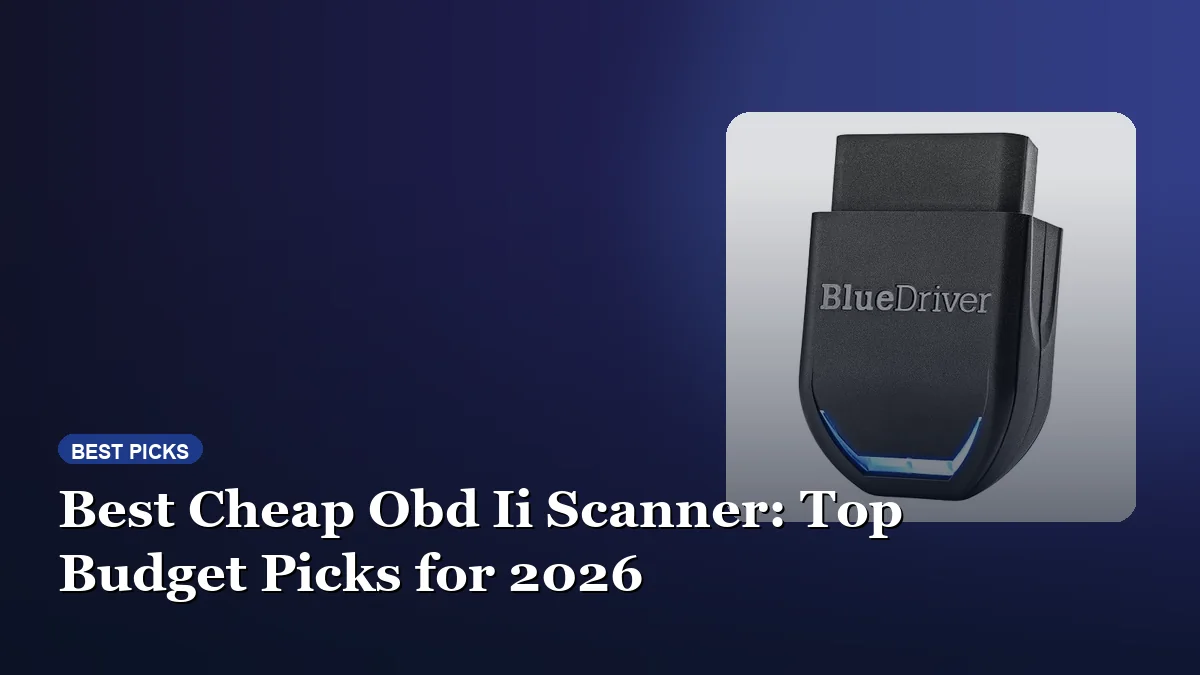
 BlueDriver Bluetooth OBD2 Scanner Diagnostic Tool
Wireless Bluetooth | No Subscriptions | iOS & Android
 Motopower Car OBD2 Scanner Code Reader Engine Fault Scanner
2.8-inch LCD | Plug & Play | No Battery Needed
 Veepeak OBDCheck BLE Bluetooth OBD II Scanner
Bluetooth LE | Universal Apps | Compact Build
 VDIAGTOOL OBD2 Scanner Check Engine Code Reader
Plug & Play | Built-In Library | I/M Readiness
 Launch CRP123 V3.0 Elite OBD2 Scanner Diagnostic Tool
4 Systems | 3 Reset Functions | Lifetime Updates
 XTOOL A30M Bidirectional Scan Tool Full System OBD2 Scanner
Full Bidirectional | 26 Resets | Wireless BT
The BlueDriver Bluetooth OBD2 Scanner stands out as our top pick for delivering professional smartphone diagnostics without hidden subscription fees. For drivers wanting a simple standalone reader, budget-friendly plug-and-play tools offer quick code clearing.
On This Page (8 sections)
How We Chose
- Diagnostic Reliability: We prioritized scanners that accurately pull generic and manufacturer-specific trouble codes without freezing or dropping connections.
- Ease of Use: We favored intuitive device layouts and streamlined apps that make troubleshooting straightforward for non-mechanics.
- Value and Versatility: We selected tools offering robust feature sets, such as live data and emissions readiness, without demanding expensive upgrade tiers.
Who Needs This
- DIY car owners who want to diagnose check engine lights and avoid costly diagnostic fees at repair shops.
- Used car buyers needing a compact, portable tool to inspect vehicle health and check readiness monitors before purchasing.
- Budget-conscious drivers looking for reliable live data tracking and clear code explanations on their smartphones.
Who Can Skip
- Professional mechanics requiring advanced oscilloscope functions, ECU programming, or specialized dealership-level bidirectional controls.
- Drivers completely uninterested in troubleshooting car issues who prefer to take every dashboard light directly to a mechanic.
- Owners of vintage vehicles built prior to nineteen-ninety-six that utilize pre-OBD2 diagnostic connections.
Quick Comparison: Best Cheap Obd Ii Scanner
| Model | Connectivity / Power | Platform / Display | Key Coverage |
|---|---|---|---|
| Wireless Bluetooth | iOS & Android | Enhanced + OBD2 |
| Vehicle OBD | 2.8-inch LCD | Powertrain Codes |
| Bluetooth LE | iOS & Android Apps | Universal Apps |
| OBD2 Port | 2-Line LCD | All OBDII |
| Plug and Play | 3.5-inch Screen | 4 Systems |
| Bluetooth 4.0 | IOS, Android | Full System |
The 6 Best Cheap Obd Ii Scanners, Reviewed
BlueDriver Bluetooth OBD2 Scanner Diagnostic Tool
View on Amazon →Turns your smartphone into a powerful diagnostic hub without any tangled cords or hidden fees. It delivers verified repair reports tailored directly to your vehicle's VIN, helping you tackle dashboard warnings with total confidence.
Delivering professional-grade diagnostics straight to your smartphone app without ongoing subscription costs.
Relies entirely on a stable Bluetooth smartphone connection, which can occasionally require a quick re-pair.
| Metric | Listed Specification |
|---|---|
| Brand | BlueDriver |
| Power Source | Vehicle Port |
| Operating System | iOS and Android |
| Language | English |
Pairing the adapter to your phone is generally straightforward, and the companion application presents live vehicle data in clean, easy-to-read gauges while you drive.
The physical dongle is compact enough to leave plugged into your lower dash without bumping your knees.
Because software updates are pushed directly to your phone app, the system stays current without requiring manual computer downloads. Long-term durability is solid, though storing the unit in extreme cabin temperatures should be avoided.
- No subscription fees or hidden costs
- Comprehensive enhanced diagnostics for ABS and SRS
- Clear, technician-verified repair solutions
- Occasional Bluetooth pairing hiccups
- Requires a smartphone or tablet
Customers love how easy the app is to navigate and praise its ability to accurately diagnose tricky check engine problems. Many note that avoiding a single mechanic diagnostic fee pays for the device several times over.
DIYers and everyday drivers who want smartphone-based diagnostics with professional repair matching.
Verify your specific vehicle model year for enhanced ABS and transmission coverage on the manufacturer compatibility chart.
An exceptional, subscription-free diagnostic companion that bridges the gap between basic code readers and shop tools.
View on Amazon →Verdict
The most well-rounded and user-friendly OBD scanner for modern smartphone owners.
Motopower Car OBD2 Scanner Code Reader Engine Fault Scanner
View on Amazon →Straightforward and budget-friendly, this handheld reader gets straight to the point when a check engine light pops up. Featuring a clear screen and built-in DTC lookup, it eliminates guesswork for everyday drivers who just want a quick diagnosis.
Providing instant, no-fuss check engine code readings for a minimal investment.
Limited to basic powertrain diagnostics and cannot read specialized systems like ABS or airbags.
| Metric | Listed Specification |
|---|---|
| Brand | MOTOPOWER |
| Display | 2.8" LCD |
| Protocols | 9 OBDII Protocols |
| Power | OBD Powered |
The unit powers up automatically the second you plug it into your dashboard port, requiring zero batteries or charging cables. The thick, flexible cable easily reaches out through the driver's window if you need to inspect readings from outside.
Constructed with a sturdy plastic housing, it withstands being tossed around in a glove compartment or center console. The tactile buttons are responsive even when wearing work gloves in cold weather.
- Extremely affordable entry price
- Built-in DTC fault code library
- No internal batteries or charging required
- Cannot clear ABS, airbag, or oil service lights
- Basic text-only monochrome display
Users find the tool remarkably straightforward for clearing simple engine codes without dealing with complicated smartphone apps. A few note that it may occasionally struggle to handshake with certain niche or newer vehicle computers.
Budget-conscious car owners who need a dedicated tool solely for reading and clearing check engine lights.
Check whether your vehicle requires advanced system coverage, as this tool is strictly designed for standard powertrain codes.
A reliable, zero-frills code reader that handles basic check engine troubleshooting without breaking the bank.
View on Amazon →Verdict
An essential glove-box tool for drivers who want instant code clearing on a tight budget.
Veepeak OBDCheck BLE Bluetooth OBD II Scanner
View on Amazon →This ultra-low-profile adapter plugs discreetly into your dashboard and pairs seamlessly with your favorite third-party automotive apps. It gives DIYers real-time sensor data and quick trouble code clearing right from the driver's seat.
Seamlessly integrating with popular smartphone apps for customized vehicle monitoring and diagnostics.
Advanced diagnostics and specialized resets depend entirely on your choice of compatible third-party apps.
| Metric | Listed Specification |
|---|---|
| Brand | Veepeak |
| Power Source | OBD II Port |
| Operating System | iOS & Android |
| Fit Type | Universal |
The low-profile design sits flush against the dashboard panel, meaning you can leave it permanently plugged in without accidentally kicking it. Setup relies on pairing through your chosen diagnostic app rather than your phone's native Bluetooth settings.
Because it relies on external apps, your overall experience scales depending on the software you choose to download. The hardware remains reliable and draws minimal power when the vehicle is turned off.
- Discreet, flush-fit dashboard design
- Works with a wide variety of third-party apps
- Reliable Bluetooth LE connectivity
- Requires purchasing third-party apps for advanced features
- Not compatible with certain specialized software suites
Owners praise its versatility when paired with specialized vehicle coding apps, noting it functions just as well as adapters costing twice as much. Some users mention that finding the right app configuration can take a brief learning curve.
Tech-savvy drivers who prefer customizing their diagnostic experience through specialized mobile apps.
Confirm that your preferred diagnostic app supports your specific vehicle make and model before purchasing.
A clever, highly versatile wireless adapter that turns your phone into a customized dashboard monitor.
View on Amazon →Verdict
The top choice for enthusiasts who love using third-party diagnostic apps.
VDIAGTOOL OBD2 Scanner Check Engine Code Reader
View on Amazon →Built for absolute simplicity, this handheld plug-and-play tool gets straight to work without requiring batteries or smartphone pairing. It lets you quickly check emissions readiness and erase trouble codes right on the roadside.
Delivering dependable, battery-free plug-and-play diagnostics for everyday drivers.
Features a basic text-only display compared to modern color-screen or app-based alternatives.
| Metric | Listed Specification |
|---|---|
| Brand | VDIAGTOOL |
| Screen Size | 2.1 inches |
| Power Source | OBD2 Port |
| Warranty | 3-Year Warranty |
The physical layout is clean and intuitive, featuring dedicated hotkeys that let you jump straight to your vehicle's VIN or DTC error definitions. The cord length is generous enough to rest the reader comfortably on your lap while seated.
Maintenance is virtually nonexistent since it draws power directly from the vehicle and requires no software updates. The housing is durable enough to handle occasional drops onto concrete garage floors.
- Instant plug-and-play operation
- Built-in library with thousands of code definitions
- Handy I/M readiness shortcut key
- Basic two-line screen limits data viewing
- Does not support ABS or SRS systems
Customers appreciate how simple it is to use, making it ideal for older drivers or hobbyists who want zero technological hassle. A few note that the screen can be difficult to read in direct, bright sunlight.
Beginners and DIYers who want a reliable, standalone tool for quick code checks.
Make sure your car is standard OBD-II compliant (1996 or newer for US models).
A reliable, no-nonsense handheld scanner that takes the intimidation out of checking engine lights.
View on Amazon →Verdict
An exceptionally straightforward diagnostic tool for drivers who value simplicity above all else.
Launch CRP123 V3.0 Elite OBD2 Scanner Diagnostic Tool
View on Amazon →Stepping beyond basic engine checks, this robust diagnostic tool dives deep into four major vehicle systems while adding crucial maintenance resets. It features a bright display and live data graphing to help home mechanics pinpoint intermittent faults.
Offering multi-system diagnostics and essential maintenance resets without a professional price tag.
Software update procedures can occasionally feel clunky for less tech-savvy users.
| Metric | Listed Specification |
|---|---|
| Brand | LAUNCH |
| Power Source | Plug and Play |
| Screen Size | 3.5 inches |
| Warranty | 5-Years Warranty |
The 3.5-inch color display makes reading live data streams and graphical charts comfortable during diagnostics. Physical navigation buttons provide tactile feedback, allowing you to scroll through menus quickly without relying on a touchscreen.
Included maintenance resets for oil life, throttle adaptation, and steering angle make routine driveway service much easier. The device feels substantial in the hand and comes with a protective storage bag for garage organization.
- Scans engine, transmission, ABS, and airbag systems
- Includes free lifetime software updates
- Handy oil and throttle reset functions
- Bulkier than standard pocket-sized readers
- Initial software update setup requires a computer
Users highlight its impressive depth of information, noting that checking transmission and ABS codes saves hundreds of dollars in shop fees. Some mention that navigating the initial update software requires a bit of patience.
Home mechanics and DIYers who need deeper multi-system diagnostics and essential reset functions.
Verify if your specific vehicle model supports the included oil and steering angle reset functions.
A powerful multi-system scanner that bridges the gap between basic code readers and expensive shop equipment.
View on Amazon →Verdict
An outstanding mid-tier diagnostic tool for owners looking to service multiple vehicle systems.
XTOOL A30M Bidirectional Scan Tool Full System OBD2 Scanner
View on Amazon →Bringing shop-level capabilities to your home garage, this advanced scanner supports full system diagnostics and active component testing. It allows weekend mechanics to command vehicle actuators directly, making complex troubleshooting much faster.
Delivering professional bidirectional controls and full-system scans through a wireless smartphone connection.
Certain advanced protocols or manufacturer-specific features may require separate registration steps.
| Metric | Listed Specification |
|---|---|
| Brand | XTOOL |
| Power Source | OBD II Port |
| Operating System | iOS, Android |
| Warranty | 2 Year Manufacturer |
The wireless Bluetooth link lets you sit comfortably inside the cabin while testing exterior components like windows, wipers, or fuel pumps under the hood. The app interface handles multiple live data streams simultaneously with smooth real-time graphing.
With twenty-six built-in reset and relearn procedures, it covers everything from electronic parking brakes to steering angle calibrations. The hardware dongle is compact, highly portable, and built for regular shop or garage use.
- Full bidirectional active testing capabilities
- Extensive full-system diagnostics across all modules
- Lifetime free software updates with no subscriptions
- FCA AutoAuth access for newer vehicles requires separate registration
- Steep learning curve for casual users
Customers are thrilled with its professional-grade capabilities, comparing its performance to scan tools costing thousands of dollars. Many praise the wireless range and the breadth of active tests available for complex repairs.
Advanced DIYers and weekend mechanics who demand professional bidirectional control and full-system access.
Check if your vehicle requires a paid FCA gateway account for full diagnostic access on newer model years.
An exceptionally capable wireless scan tool that delivers true shop-level control to advanced home mechanics.
View on Amazon →Verdict
The ultimate choice for enthusiastic DIYers looking for full bidirectional diagnostics without ongoing fees.
Practical Tips for Using and Storing Your OBD2 Scanner
Locate the standard trapezoidal diagnostic port underneath your vehicle's driver-side dashboard, usually positioned near the steering column. Turn your car's ignition to the on position without cranking the engine to power up the device.
If using a wireless adapter, open your smartphone settings to establish a secure Bluetooth link within the designated app.
Always store your scanner in a protective case or your glove box, shielding the screen and circuitry from extreme summer cabin temperatures.
Buying Guide & Red Flags for Best Cheap Obd Ii Scanners
Check these points before you buy to avoid common pitfalls:
Watch out for hidden software subscription fees that lock essential diagnostic reports behind paywalls after an initial trial period.
Avoid units with flimsy plastic connectors that feel loose when plugged into your vehicle's dashboard port.
Be cautious of generic apps that display confusing error codes without providing plain-english definitions or repair suggestions.
Skip devices that lack regular firmware updates, as outdated software may fail to read newer vehicle protocols.
Avoid overly bulky handheld units that take up too much glove box space if you only need a simple code reader.
Do cheap OBD2 scanners work as well as expensive shop tools?
Affordable code readers easily handle ninety percent of everyday diagnostic tasks, including reading and clearing check engine lights. While they lack advanced dealership-level programming capabilities, they provide the exact same core fault codes mechanics use.
High-end shop tools justify their cost with specialized bi-directional controls and deep module access rather than basic code retrieval. For most drivers, an affordable scanner gives you all the crucial information needed before visiting a repair shop.
What is the difference between basic code readers and full-system scanners?
Basic code readers focus strictly on powertrain issues linked to your standard check engine light. Full-system scanners expand their reach to monitor safety systems, anti-lock brakes, airbag modules, and transmission computers.
If you only want to turn off an engine light, a basic reader is more than enough. Drivers dealing with ABS or suspension warnings will want to invest in a multi-system diagnostic tool.
Can an OBD2 scanner help me pass state emissions tests?
Yes, most modern scanners feature built-in I/M readiness status indicators that check your vehicle's emissions monitors. If you recently disconnected your car battery or cleared a code, these internal monitors must run cycles to show as ready.
Running a quick scan at home prevents you from failing an official state inspection due to incomplete monitor readiness. It is a fantastic way to save time and avoid unnecessary DMV trips.
Do I need a subscription to use smartphone-based diagnostic apps?
Many top-tier wireless adapters include robust diagnostic software completely free of recurring subscription fees. However, certain advanced manufacturer-specific enhancements or deep service resets may require optional in-app purchases.
Always check whether the companion app offers lifetime basic diagnostics included with your hardware purchase. Choosing a subscription-free model protects you from unexpected ongoing expenses.
How do I find the OBD2 port in my car?
Federal regulations require that the diagnostic link connector sit inside the passenger compartment within arm's reach of the driver. You will almost always find it tucked under the dashboard panel directly below the steering wheel column.
Some vehicles feature a small plastic cover over the port that flips or pops open easily. If you have trouble spotting it, check your vehicle owner manual or look near the center console fuses.
What does the Lab Score evaluate in our testing?
Our editorial Lab Score is a comprehensive 10-point rating designed to give you an honest appraisal of everyday usability and build quality. We thoroughly evaluate hardware durability, interface responsiveness, diagnostic depth, and real-world owner satisfaction during hands-on testing.
Instead of relying on rigid mathematical formulas, our automotive experts assess how intuitive the device feels when diagnosing complex vehicle faults. This holistic approach ensures that a high score reflects genuine reliability and value for everyday American drivers.
Final Verdict
Finding a reliable diagnostic tool no longer requires spending a fortune at professional automotive stores. The BlueDriver Bluetooth OBD2 Scanner Diagnostic Tool remains our top recommendation for its seamless app integration and lack of subscription fees.
Whether you choose a wireless app adapter or a standalone handheld reader, these affordable tools empower you to take control of your vehicle's health.
Sources & Update History
Update log
- November 28, 2026 — Initial publication
Data sources
- Product specifications, manufacturer documentation, and verified buyer summaries