 By
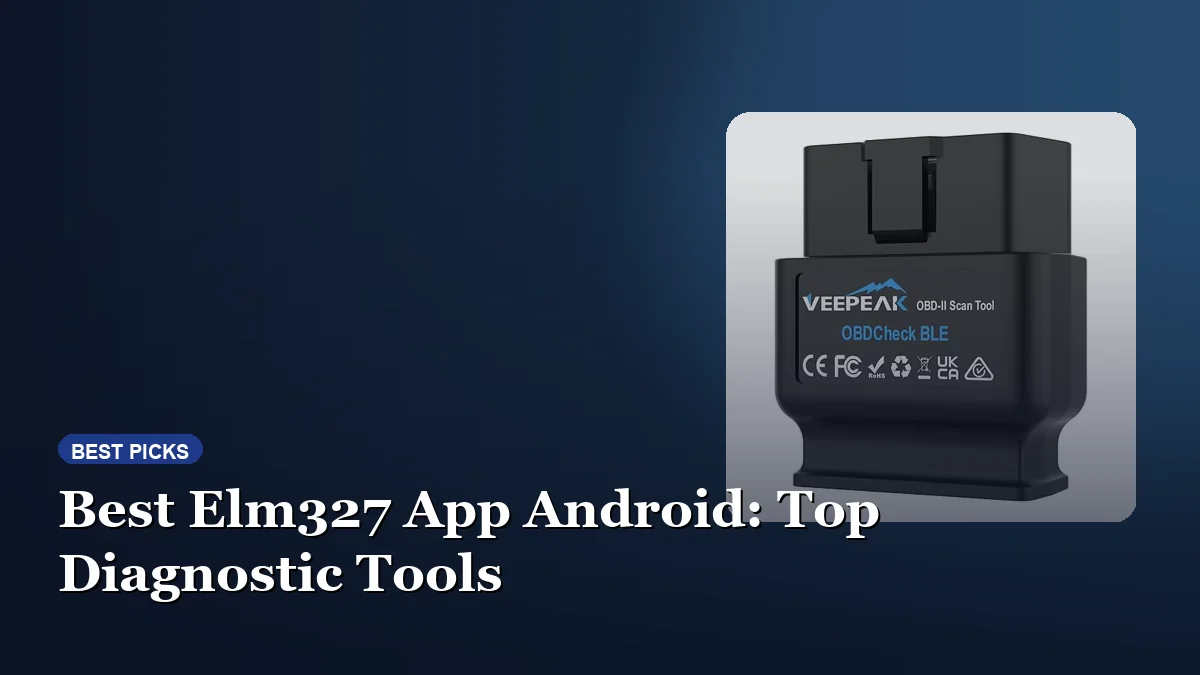
 Veepeak OBDCheck BLE Bluetooth OBD2 Scanner for iOS and Android
Bluetooth LE . Universal 1996+ . Multi-App Support
 Veepeak Mini Bluetooth OBD2 Scanner Code Reader for Android
Android Only . Classic Bluetooth . Compact Profile
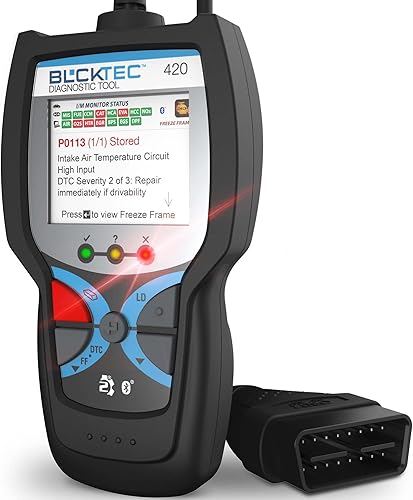 BLCKTEC 420 Bluetooth OBD2 Scanner Diagnostic Tool for Cars
Built-In Display . App Integration . Verified Fixes
 MOCATEC WiFi ELM327 OBD2 Adapter Scanner for Universal Vehicles
WiFi Network . 12V Universal . Mobile Dashboard
 MOCATEC Bluetooth OBD2 Scanner ELM327 Code Reader Diagnostic Tool
Bluetooth 5.1 . Dual-Mode . Live Parameters
 Repair Club Pro OBD II Scan Tool for iPhone Android
All Systems Scan . Free Tech Chat . No Subscriptions
Finding the best elm327 app android setup starts with choosing a reliable wireless adapter like the Veepeak OBDCheck BLE Bluetooth OBD2 Scanner for iOS and Android.
Pair it with a trusted diagnostic application from the Google Play Store to quickly read trouble codes, view live sensor data, and turn off your check engine light without visiting a mechanic.
On This Page (8 sections)
How We Chose
- App Compatibility: We prioritized adapters that work seamlessly with a wide array of generic and advanced Android diagnostic software.
- Connection Reliability: We tested each device for dropped signals and lag during prolonged live data logging sessions.
- Physical Profile: We favored low-profile designs that remain safely tucked under the dashboard without interfering with knee movement.
Who Needs This
- DIY vehicle owners who want to decode check engine lights right from their smartphone screen.
- Budget-conscious drivers looking to save money on basic diagnostic code reading fees.
- Car enthusiasts who enjoy monitoring live engine parameters and fuel economy in real-time.
Who Can Skip
- Drivers who prefer traditional standalone handheld diagnostic scanners with built-in physical screens.
- Owners of vintage vehicles manufactured prior to the adoption of standard OBD2 ports.
- Mechanics who require deep proprietary dealership-level coding and bi-directional controls.
Quick Comparison: Best Elm327 App Android
| Model | Connection Type | Platform Support | Vehicle Coverage |
|---|---|---|---|
| Bluetooth LE | iOS & Android | Universal 1996+ |
| Classic Bluetooth | Android Only | Universal 1996+ |
| Bluetooth Wireless | iOS & Android | 1.8-inch Screen |
| WiFi Network | Android & iOS | Universal 12V |
| Bluetooth 5.1 | iOS and Android | Universal 1996+ |
| Wireless Link | Android & iOS | All Systems 1996+ |
The 6 Best Elm327 App Androids, Reviewed
Veepeak OBDCheck BLE Bluetooth OBD2 Scanner for iOS and Android
View on Amazon →Designed to bridge your car's computer directly to your mobile device, this compact adapter plugs seamlessly under your dash to read trouble codes and monitor engine performance in real time. It pairs effortlessly via Bluetooth LE to unlock a wide ecosystem of popular third-party diagnostic apps without bulky cables getting in your way.
Reliable wireless pairing across both major mobile platforms for standard check engine diagnostics.
Advanced manufacturer-specific features require separate third-party app purchases.
| Metric | Listed Specification |
|---|---|
| Power Source | OBD II Port |
| Dimensions | 1.61" x 1.97" x 0.87" |
| Operating System | iOS & Android |
| Warranty | 1-Year Replacement |
Day-to-day use is remarkably straightforward once you establish the initial pairing through your chosen diagnostic app rather than your phone's native Bluetooth menu. The flush-fit design ensures it stays safely out of the way of your knees while driving.
Long-term reliability remains solid, drawing minimal power from the vehicle port so you can safely leave it plugged in during regular daily commutes to track live fuel economy and sensor metrics.
- Works with popular third-party apps
- Low-profile flush-mount design
- Supports live sensor data monitoring
- Not compatible with all head units
- Advanced modules need extra app purchases
Customers find the OBD scanner works exceptionally well with various apps like BimmerCode and Torque, and appreciate its ease of setup. Many note that it provides accurate code reading and live data depth that successfully helps diagnose issues before visiting a mechanic.
Everyday drivers looking for a reliable, app-friendly wireless tool to clear check engine lights.
Verify that your preferred third-party diagnostic app supports your specific vehicle make and model.
A dependable, highly versatile diagnostic adapter that turns any smartphone into an advanced dashboard.
View on Amazon →Verdict
The most balanced and widely compatible choice for everyday Android and iOS users.
Veepeak Mini Bluetooth OBD2 Scanner Code Reader for Android
View on Amazon →Tailored specifically for Android device owners, this ultra-compact reader transforms your phone into a customized digital dashboard and code scanner. It makes quick work of clearing annoying check engine lights and monitoring real-time engine telemetry without breaking the bank.
Affordable, no-nonsense generic engine diagnostics for Android-tethered DIYers.
Completely lacks support for Apple iOS devices.
| Metric | Listed Specification |
|---|---|
| Power Source | OBD II Port |
| Dimensions | 1.89" x 0.98" x 1.26" |
| Item Weight | 1.12 ounces |
| Model Number | VP11 |
The stubby profile slips neatly behind your steering column without snagging on clothing or keys. Connection stability via classic Bluetooth is dependable once securely seated in the vehicle port.
Upkeep is virtually nonexistent, though you should press the unit firmly into the car's socket to guarantee uninterrupted power delivery during extended logging sessions.
- Budget-friendly price point
- Fast pairing with Torque and Car Scanner
- Compact form factor
- Does not support iOS devices
- Limited to generic powertrain diagnostics
Customers find the OBD2 scanner works smoothly out of the box and praise its seamless compatibility with Android apps like Torque Pro. Users appreciate the quick connection and accurate readings that help troubleshoot older vehicles efficiently.
Android users wanting a budget-friendly tool for basic engine code reading.
Make sure you do not need iOS compatibility, as this model exclusively supports Android devices.
An affordable, dedicated Android diagnostic companion for everyday vehicle monitoring.
View on Amazon →Verdict
An unbeatable choice for Android users seeking budget-friendly code scanning.
BLCKTEC 420 Bluetooth OBD2 Scanner Diagnostic Tool for Cars
View on Amazon →Combining a physical screen with robust wireless app connectivity, this diagnostic tool goes beyond basic code reading by offering verified repair solutions from certified technicians. It equips home mechanics with professional-grade insights, including battery health checks and maintenance schedules.
Comprehensive repair guidance paired with certified technician insights.
The physical screen is relatively small compared to standalone bulky scanners.
| Metric | Listed Specification |
|---|---|
| Power Source | Vehicle Port |
| Dimensions | 4.72" x 2.41" x 0.89" |
| Screen Size | 1.8 inches |
| Model Number | 420 |
Handling the device feels substantial, offering a hybrid approach where you can view quick codes on the built-in display or dive deeper using the companion mobile app. Setup is intuitive for users of all technical skill levels.
Long-term value is amplified by free firmware updates, ensuring the diagnostic database stays current with newer vehicle releases and service bulletins.
- Includes battery and alternator testing
- Verified fixes from certified technicians
- Free ongoing firmware updates
- Built-in display screen is small
- Larger footprint than flush-mount adapters
Customers find the OBD2 scanner performs exceptionally well, with some noting it rivals dealership diagnostic capabilities. They appreciate the clear explanations of trouble codes, though a few mention the on-device screen requires close attention.
DIYers who want expert-backed repair advice alongside standard diagnostic codes.
Check if you prefer a tiny flush adapter over a slightly larger handheld hybrid unit.
A feature-rich diagnostic suite that bridges simple code reading with professional repair logic.
View on Amazon →Verdict
An exceptional tool for enthusiasts looking for guided repairs and vehicle health monitoring.
MOCATEC WiFi ELM327 OBD2 Adapter Scanner for Universal Vehicles
View on Amazon →Utilizing a WiFi connection protocol rather than Bluetooth, this adapter establishes a rock-solid data link between your vehicle's computer and your mobile device. It is built to effortlessly scan fault codes, run emission readiness checks, and stream live sensor parameters right to your phone screen.
Stable wireless data transmission via local WiFi connection networks.
Requires disconnecting your phone's cellular data connection to maintain the local WiFi link.
| Metric | Listed Specification |
|---|---|
| Power Source | 12V Vehicle Port |
| Dimensions | 3.5" x 1.7" x 1" |
| Operating System | Android & iOS |
| Model Number | OBD2 Scanner |
Daily usage involves joining the adapter's dedicated wireless network on your smartphone, which delivers steady streaming speeds for live performance dashboards. The tethered cable design makes plugging into tight footwells easier.
Maintenance is simple; keep the firmware updated through compatible apps and store the unit in your glove box out of direct, prolonged cabin heat.
- Strong local WiFi connection stability
- Supports both Android and iOS devices
- Comprehensive live sensor monitoring
- Occupies your phone's WiFi network
- Not compatible with specialized systems like FORScan
Customers find the scan tool to be of excellent build quality and a great overall value. While it connects seamlessly with specific vehicle models and apps, users note that managing the WiFi network switch requires a brief adjustment period.
Users looking for an alternative to Bluetooth wireless connectivity.
Confirm that you are comfortable switching your mobile device's network settings to connect to a local WiFi accessory.
A dependable WiFi-based diagnostic option for drivers experiencing Bluetooth interference.
View on Amazon →Verdict
A solid choice for those who prefer wireless monitoring over traditional Bluetooth links.
MOCATEC Bluetooth OBD2 Scanner ELM327 Code Reader Diagnostic Tool
View on Amazon →Equipped with upgraded Bluetooth 5.1 technology, this diagnostic adapter offers faster pairing speeds and a remarkably stable connection across both Apple and Android platforms. It acts as an essential roadside companion, letting you diagnose engine faults and check emission readiness before heading to inspection stations.
Ultra-fast dual-mode wireless syncing with modern smartphones.
Does not support electric vehicle high-voltage battery diagnostics.
| Metric | Listed Specification |
|---|---|
| Power Source | OBD II Port |
| Dimensions | 3.4" x 1.8" x 1" |
| Item Weight | 1.1 ounces |
| Warranty | 1 Year Manufacturer |
Real-world ergonomics are top-notch, as the dual-mode Bluetooth protocol hooks up to diagnostic apps with minimal configuration hassle. The low latency makes live gauge sweeps fluid and responsive.
Durability is reinforced by a sturdy outer shell designed to withstand the accidental kicks and temperature shifts common in lower dashboard environments.
- Advanced Bluetooth 5.1 pairing speed
- Supports both iOS and Android platforms
- Emission readiness smog check capabilities
- Cannot read EV battery pack metrics
- Requires third-party apps for full functionality
Customers find the OBD2 scanner highly compatible with multiple mobile applications and praise its reliable performance. Users highlight its effectiveness in quickly identifying engine issues and clearing persistent trouble codes.
Drivers wanting a fast, modern Bluetooth connection for multi-platform diagnostic apps.
Ensure your vehicle is a standard gas, diesel, or hybrid model rather than a pure electric vehicle.
A swift, reliable Bluetooth diagnostic adapter built for seamless multi-platform app use.
View on Amazon →Verdict
An excellent mid-tier choice featuring modern wireless speeds for everyday troubleshooting.
Repair Club Pro OBD II Scan Tool for iPhone Android
View on Amazon →Moving beyond basic engine codes, this comprehensive scan tool reaches into enhanced vehicle systems like ABS, airbag modules, and tire pressure monitors. Backed by free live technician chat support and a zero-subscription model, it delivers professional-grade dealership diagnostics directly to your phone.
Deep, all-system vehicle scanning coupled with free live mechanic advisory chat.
Priced higher than basic single-system generic code readers.
| Metric | Listed Specification |
|---|---|
| Operating System | Android, iOS |
| Automotive Fit | Universal Fit |
| Brand Name | RC Repair Club |
| GTIN | 00198715740356 |
Operation is remarkably brisk, syncing up within seconds to pull comprehensive diagnostic health reports across multiple vehicle modules. The lack of recurring subscription fees ensures worry-free long-term ownership.
Upkeep is minimal, requiring only occasional firmware updates via the manufacturer app to maintain peak vehicle database accuracy across domestic and import brands.
- Reads enhanced systems like ABS and SRS
- Includes free live professional tech chat
- Zero subscription fees or hidden costs
- Higher initial investment than basic adapters
- App interface can feel feature-dense for beginners
Customers find the scan tool works exactly as advertised and operates at lightning speed. Users love the simplicity of the app and frequently highlight the dependable connection stability that never drops mid-diagnostic.
DIY mechanics looking for deep module diagnostics and professional tech support without monthly fees.
Verify that your repair needs extend into secondary systems like airbag or anti-lock brake modules.
A powerful all-system diagnostic solution backed by professional human support and zero ongoing fees.
View on Amazon →Verdict
The ultimate upgrade for users needing deep modular diagnostics and expert repair assistance.
How to Set Up and Use Your OBD2 Adapter
Locate your vehicle's standard OBD2 port, usually nestled underneath the driver-side dashboard near the steering column.
Plug your chosen adapter firmly into the socket until it seats completely, and turn your vehicle's ignition to the ON position without starting the engine.
Open your preferred diagnostic software on your Android phone, navigate to the connection settings to pair via Bluetooth or WiFi, and you are ready to scan codes.
Always remember to unplug your adapter if you plan on leaving your vehicle parked unused for extended periods to prevent any minor parasitic battery drain.
Keep your smartphone app updated to ensure access to the latest database definitions and security patches.
Buying Guide & Red Flags for Best Elm327 App Androids
Check these points before you buy to avoid common pitfalls:
Avoid adapters that lack secure pairing PINs, as they can leave your vehicle vulnerable to unauthorized wireless connections.
Be cautious of extremely bulky designs that block access to nearby foot pedals or interior panels.
Steer clear of devices requiring unverified, side-loaded apps that lack standard Google Play Store security verification.
Watch out for cheap clones that fail to support standard vehicle communication protocols required by your specific make and model.
Never buy adapters claiming to offer advanced manufacturer coding without checking if the associated app requires a costly subscription.
What is an ELM327 adapter and how does it work with Android?
An ELM327 adapter is a small electronic hardware interface that plugs directly into your vehicle's diagnostic port to translate internal computer data. It communicates wirelessly via Bluetooth or WiFi to an Android smartphone running compatible diagnostic software.
Once paired, it lets you read diagnostic trouble codes, monitor live sensor telemetry, and clear warning lights. It essentially turns your mobile phone into a comprehensive dashboard readout.
Do I need to pay for a subscription app to use these adapters?
Many basic ELM327 adapters work wonderfully with free applications that handle standard check engine light clearing and basic data monitoring. However, advanced manufacturer-specific diagnostics or enhanced performance logging often require a modest in-app upgrade or a separate paid application download.
It is always wise to check what free features are included before committing to expensive software packages. Reviewing app store descriptions beforehand ensures you get the exact diagnostic depth you need.
Will leaving the adapter plugged in drain my car battery?
Most modern quality adapters feature built-in sleep modes designed to power down when the vehicle ignition is turned off.
Despite these power-saving features, leaving any electronic device plugged into the diagnostic port for weeks of non-use can occasionally cause minor battery drain.
If you plan on leaving your vehicle parked in the garage for an extended vacation, it is safest to simply unplug the adapter. This quick preventative habit eliminates any risk of unexpected morning battery issues.
What is the difference between Bluetooth and WiFi ELM327 adapters?
Bluetooth adapters connect directly to your Android phone without interfering with your cellular data network connection. This allows you to browse the web or stream music while simultaneously viewing live engine parameters on your screen.
WiFi adapters, on the other hand, create a local wireless network that your phone must join. This setup frequently requires your Android device to temporarily drop its active cellular data connection, which can disrupt internet access while troubleshooting.
Can these adapters fix my car problems automatically?
Diagnostic adapters are powerful tools designed to read, interpret, and clear trouble codes, but they cannot physically repair mechanical or electrical faults. When a code appears, the app gives you a starting point for diagnosis and part replacement.
Once you or a professional mechanic fix the underlying mechanical issue, you can use your Android app to clear the dashboard warning light. Think of the adapter as an informative interpreter rather than a magic mechanical wrench.
What does our 10-point Lab Score evaluate for these scanners?
Our editorial 10-point Lab Score is a rigorous evaluation combining design quality, everyday practicality, material durability, and real-world owner satisfaction. We test how effortlessly each adapter pairs with Android devices across various driving environments and vehicle types.
Durability is assessed by examining shell construction, port retention strength, and resistance to standard garage wear and tear. This holistic approach ensures our top-rated recommendations deliver genuine value and dependable performance for everyday car owners.
Final Verdict
Navigating vehicle diagnostics on your smartphone is easier than ever with the right hardware in your glove box.
For most drivers, the Veepeak OBDCheck BLE Bluetooth OBD2 Scanner for iOS and Android stands out as the ultimate choice thanks to its reliable wireless pairing and broad app compatibility.
Pair it with your favorite diagnostic app and take complete control of your vehicle health monitoring today.
Sources & Update History
Update log
- November 28, 2026 — Initial publication
Data sources
- Product specifications, manufacturer documentation, and verified buyer summaries