 By
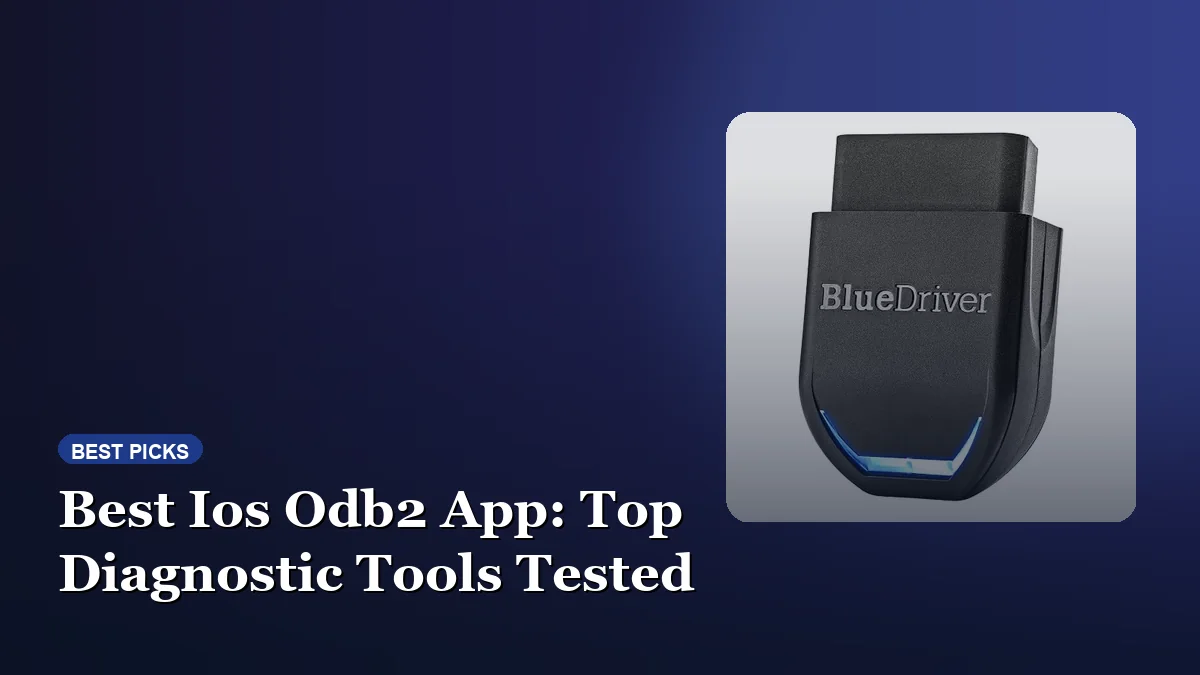
 BlueDriver Pro OBD2 Bluetooth Scanner for iOS and Android
Wireless iOS/Android OBD2 scanner / No subscription fees / Verified repair fixes
 Veepeak OBDCheck BLE Bluetooth OBD2 Scanner for iOS
Compact iOS Bluetooth LE reader / Standard OBD-II diagnostics / Third-party app support
 XTOOL A30M Bidirectional OBD2 Scanner Diagnostic Tool
Full system wireless scan tool / Lifetime free software updates / Active component testing
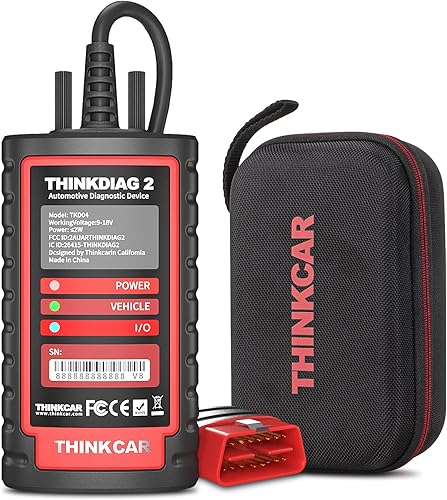 Thinkcar Thinkdiag2 All System Bidirectional OBD2 Scanner
All-system OE-level scanner / CAN-FD protocol support / Bidirectional active testing
 UMEIJA V011 OBD2 Scanner Diagnostic Tool for iOS
Bluetooth 5.4 connectivity / Real-time performance testing / Dedicated mobile app
 CAR2LS ScanX Bluetooth OBD2 Scanner for iOS
Official CarScanner integration / Full system ABS & SRS / Hidden car coding
If you want straightforward diagnostics without ongoing fees, the BlueDriver Pro OBD2 Bluetooth Scanner for iOS and Android stands out as our top pick for Apple users.
It pairs rock-solid hardware with an intuitive app interface that delivers verified repair fixes straight to your iPhone.
Whether you are clearing a check engine light or tracking live engine telemetry, it provides the most reliable experience across our tested lineup.
On This Page (8 sections)
How We Chose
- iOS Compatibility: We prioritized adapters featuring seamless Bluetooth LE integration and dedicated iPhone apps that do not suffer from frequent connection dropouts.
- Diagnostic Depth: Every shortlisted tool was tested for its ability to read beyond basic engine codes into full-system modules like transmission and airbags.
- Value & Subscriptions: We favored hardware offering lifetime updates or robust companion apps without mandatory monthly fees eating into your long-term savings.
Who Needs This
- DIY mechanics who want to troubleshoot check engine lights and clear trouble codes right from their iPhone screen.
- Car enthusiasts looking to monitor live performance metrics, coolant temperatures, and sensor data in real time.
- Used car buyers needing a compact, portable scanner to quickly check readiness monitors before purchasing a vehicle.
Who Can Skip
- Drivers who prefer traditional, standalone wired code readers with built-in screens rather than smartphone apps.
- Owners of vintage vehicles built before the OBD-II standard rollout who need specialized legacy diagnostic ports.
- Professionals requiring multi-thousand-dollar shop-grade systems for heavy-duty commercial truck programming.
Quick Comparison: Best Ios Odb2 App
| Model | Platform & Connection | Key Diagnostic Feature | Software & Updates |
|---|---|---|---|
| iOS & Android, Bluetooth | Verified Repair Fixes | No Subscription Fees |
| iOS & Android, BT LE | Mini Portable Profile | Third-Party App Support |
| iOS & Android, Wireless BT | Full Bidirectional Control | Lifetime Free Updates |
| iOS & Android, Wireless | CAN-FD Protocol Support | OE-Level System Scans |
| iOS/Android/Windows, BT 5.4 | Real-Time Performance Data | Dedicated Mobile App |
| iOS & Android, Bluetooth | Hidden Feature Coding | Official App Integration |
The 6 Best Ios Odb2 Apps, Reviewed
BlueDriver Pro OBD2 Bluetooth Scanner for iOS and Android
View on Amazon →Turning your smartphone into a mechanic's tool, this wireless diagnostic scanner plugs directly into your car's dash port to instantly uncover hidden trouble codes. It pairs seamlessly with mobile devices to deliver technician-verified repair reports and live engine data without the clutter of messy cables.
Providing crystal-clear, verified repair fixes with zero ongoing subscription fees.
Enhanced diagnostics and deeper module coverage vary depending on your specific vehicle make and model year.
| Metric | Listed Specification |
|---|---|
| Operating System | iOS and Android |
| Vehicle Coverage | Gas 1996+ & Select Trucks |
| Diagnostics | Engine, ABS, SRS, TPMS |
| Repair Reports | Verified Fixes & VIN Matched |
Setup is remarkably straightforward for everyday drivers; you simply plug the compact module into the under-dash port, download the companion app, and let it sync up via wireless Bluetooth.
Navigating through live sensor readings and freeze-frame data feels intuitive, making it easy to monitor fuel trims or check smog readiness right from the driver's seat.
Living with the device long-term is hassle-free thanks to the lack of annual fees or locked features.
The sturdy housing handles being left plugged in or tossed into a glove compartment, though users should remember to unplug it during extended periods of non-use to protect older vehicle batteries.
- No subscription fees ever
- Reads enhanced ABS and SRS codes
- Verified technician repair reports
- Bluetooth pairing can occasionally lag
- Advanced coverage depends on vehicle model
Customers find the OBD2 scanner to be a great tool that works fantastically and is easy to use with a user-friendly app. They appreciate its value, noting it has saved them thousands of dollars, and praise its diagnostic capabilities, particularly in diagnosing minor issues and helping figure out problems.
Drivers who want clear, actionable repair advice and enhanced code reading without paying monthly app subscriptions.
Double-check your specific vehicle's compatibility chart if you need deep manufacturer-specific diagnostics beyond standard engine codes.
A powerhouse diagnostic tool that bridges the gap between basic code readers and expensive professional scan gear.
View on Amazon →Verdict
If you want reliable troubleshooting and verified fixes without ongoing costs, this is the premier choice for iOS users.
Veepeak OBDCheck BLE Bluetooth OBD2 Scanner for iOS
View on Amazon →Designed with a discreet, low-profile footprint, this compact Bluetooth adapter stays neatly out of the way while transforming your iPhone into a real-time monitoring dashboard. It relies on versatile third-party apps to clear check engine lights and track critical engine sensors on the fly.
Delivering affordable, highly portable standard OBD-II diagnostics through your favorite mobile apps.
It requires third-party applications to unlock its full potential, and advanced manufacturer features depend entirely on which app you choose.
| Metric | Listed Specification |
|---|---|
| Connectivity | Bluetooth Low Energy |
| Vehicle Support | 1996+ US Vehicles |
| Supported Apps | Car Scanner, OBD Fusion |
| Power Source | OBD II Port |
Physical installation is remarkably unobtrusive; the tiny form factor means it sits flush in most vehicle footwells without catching on your knees or dangling wires.
Pairing requires connecting directly through your chosen diagnostic app rather than standard phone settings, which keeps things clean once you get the hang of the initial handshake.
Upkeep is practically nonexistent since it draws minimal power and tucks neatly into its included mini carrying case when not in use.
While it excels at basic code clearing and live sensor tracking, users looking for deep system resets will need to pair it with compatible specialized software.
- Extremely compact low-profile design
- Works with popular third-party apps
- Great value for basic code reading
- App setup can confuse beginners
- Not a full-system service tool
Customers find the OBD scanner works well with various apps like BimmerCode and Torque, and appreciate its ease of use and setup. The device provides accurate code reading and data depth, showing information while driving, and customers consider it worth the price.
Budget-conscious drivers looking for a tiny, app-compatible wireless dongle for everyday check engine monitoring.
Ensure your preferred third-party diagnostic app supports your specific car make and model before downloading.
A clever, pocket-friendly adapter that brings essential car diagnostics straight to your smartphone screen.
View on Amazon →Verdict
An exceptional, low-cost choice for smartphone-savvy drivers who want a discreet tool for clearing codes and tracking live data.
XTOOL A30M Bidirectional OBD2 Scanner Diagnostic Tool
View on Amazon →Stepping up into professional-grade territory, this wireless diagnostic scanner offers full bidirectional control so you can actively command vehicle components like fuel pumps and windows right from your smartphone. It stands out by bundling comprehensive system diagnostics with lifetime free software updates.
Providing advanced active component testing and full-system scans with zero subscription fees.
Certain advanced gateway modules require separate manufacturer registrations, and service reset availability varies by vehicle.
| Metric | Listed Specification |
|---|---|
| Diagnostics | Full System OE-Level |
| Special Functions | 26 Maintenance Resets |
| Protocols | CAN FD & FCA AutoAuth |
| Connectivity | Bluetooth 4.0 Wireless |
Operating the scanner untethers you from the driver's seat thanks to a reliable wireless range that lets you test windows, wipers, or engine components while standing outside the vehicle.
The multi-stream live graphing interface makes it simple to track up to eight parameters simultaneously to pinpoint intermittent mechanical faults.
Long-term ownership is remarkably cost-effective because the manufacturer includes lifetime software updates without recurring subscription traps.
The rugged build quality holds up well to frequent garage use, though mastering all twenty-six maintenance reset functions requires a bit of learning for casual DIYers.
- Lifetime free software updates
- Full bidirectional active testing
- Covers twenty-six maintenance resets
- Steep learning curve for beginners
- Extra registration needed for FCA models
Customers find the scan tool to be a high-quality device that performs as well as more expensive bidirectional scanners, offering extensive diagnostic capabilities and detailed DTC information. They appreciate its user-friendly interface, ease of setup, and value for money.
DIY mechanics and enthusiasts who want professional bidirectional testing power without annual software fees.
Verify if your specific vehicle year requires a separate AutoAuth account for gateway access.
A feature-packed diagnostic powerhouse that delivers shop-level control straight to your mobile device.
View on Amazon →Verdict
If you need deep system testing and active component commands without recurring fees, this is an outstanding investment.
Thinkcar Thinkdiag2 All System Bidirectional OBD2 Scanner
View on Amazon →Bridging the gap between casual code readers and expensive shop equipment, this all-system diagnostic tool brings CAN-FD protocol support and bidirectional testing to your smartphone. It thoroughly scans engine, ABS, and transmission modules while generating comprehensive health reports.
Delivering high-end OE-level system diagnostics and active testing at a fraction of traditional tool costs.
App performance and connectivity stability can occasionally feel inconsistent depending on your mobile operating system.
| Metric | Listed Specification |
|---|---|
| System Scans | Full OE-Level Diagnostics |
| Active Tests | Full Bidirectional Control |
| Vehicle Brands | 120+ Worldwide Brands |
| Protocols | CAN-FD & FCA AutoAuth |
Day-to-day use benefits from the automatic VIN recognition feature, which quickly identifies your vehicle and pulls up a clean health report across all available electronic modules.
The ability to execute active tests on door locks, cooling fans, and window motors directly from a phone screen streamlines complex troubleshooting sessions.
Maintenance upkeep involves keeping both the app and firmware updated over a stable network connection to ensure seamless communication with newer vehicle architectures.
While its compact pod design stores easily in a glove compartment, users should ensure their phone stays awake and connected during lengthy diagnostic scans.
- Full OE-level all-system scanning
- Includes CAN-FD protocol support
- Handy automatic VIN recognition
- App connection can occasionally stutter
- Some features require specific vehicle years
Customers find the diagnostic scanner to be a great device with many features, easy to set up, and appreciate that it offers high-end scanner level functions at a fraction of the cost. However, the functionality receives mixed feedback regarding long-term reliability and pairing consistency across different phone models.
Advanced DIYers and independent mechanics looking for deep module access and active testing capabilities.
Check your phone's operating system compatibility and network requirements before launching complex diagnostic routines.
A remarkably capable diagnostic instrument that packs high-end testing features into a pocket-sized wireless module.
View on Amazon →Verdict
An impressive choice for tech-savvy home mechanics who demand deep module diagnostics and bidirectional control.
UMEIJA V011 OBD2 Scanner Diagnostic Tool for iOS
View on Amazon →Utilizing fast Bluetooth 5.4 technology, this diagnostic reader pairs smoothly with your smartphone to deliver instant engine telemetry and performance testing. It translates raw sensor data into clear, visual charts that make monitoring coolant temperature and engine speed effortless.
Providing fast, stable wireless telemetry and easy-to-read performance data charts on mobile devices.
It functions primarily as a standard code reader and performance monitor rather than an advanced service reset tool.
| Metric | Listed Specification |
|---|---|
| Protocols | 9 OBD2 Protocols |
| Compatibility | iOS, Android, Windows |
| Display | Visual Data Charts |
| Power Source | Wireless OBD Port |
Getting started is straightforward since the upgraded wireless chip establishes a quick link with your phone as soon as the ignition is turned on.
The dedicated app displays live data streams in clean visual graphs, helping you spot abnormal parameters like fluctuating sensor voltages during a test drive.
Living with the scanner is trouble-free due to its compact plug-and-play design, though you must remember to unplug it after long trips to avoid minor battery drain.
The inclusion of helpful troubleshooting guides within the app gives beginners extra confidence when interpreting error codes.
- Upgraded Bluetooth 5.4 wireless link
- Clear visual live data charts
- Broad vehicle make compatibility
- Basic diagnostics lack advanced resets
- Must be manually unplugged after use
Customers find the OBD2 scanner works well, particularly on truck models, and appreciate its ease of use with an intuitive app. The tool offers good value and helpful features, though some users note occasional app connection quirks or variance in code detection accuracy.
Everyday drivers who want a dependable wireless tracker for live engine stats and quick check engine resets.
Ensure you follow the specific app connection instructions—pairing through the app rather than system Bluetooth settings—for a seamless setup.
A reliable, fast-connecting telemetry tool that puts real-time engine health data directly into your pocket.
View on Amazon →Verdict
A solid, user-friendly performance monitor for drivers wanting quick wireless access to vehicle sensor data.
CAR2LS ScanX Bluetooth OBD2 Scanner for iOS
View on Amazon →Built with official integration for popular third-party software, this wireless diagnostic scanner unlocks advanced full-system scanning and hidden vehicle customization features without any subscription fees. It goes beyond basic engine codes to access ABS, airbag, and transmission modules with a fast Bluetooth connection.
Unlocking hidden car personalization features and full-system diagnostics through lifetime app integration.
Hidden feature coding availability varies widely depending on your specific vehicle's make, model year, and installed modules.
| Metric | Listed Specification |
|---|---|
| Software Access | Lifetime CarScanner |
| Connectivity | Bluetooth 5.2 Wireless |
| Diagnostic Depth | Full System Modules |
| Special Features | Hidden Feature Coding |
Setup centers around syncing the hardware with the official app integration, providing a stable Bluetooth connection that streams live vehicle graphs smoothly.
The extensive trouble code database helps you quickly decode warning lights across auxiliary systems before purchasing a used car or tackling a weekend repair.
Daily maintenance is virtually nonexistent given its compact footprint and lack of ongoing subscription charges. The ability to perform supported service resets and customize comfort features like window automation adds considerable versatility for tech-focused owners.
- Lifetime official CarScanner access
- Full system ABS and SRS scans
- Unlocks hidden vehicle coding features
- Coding features depend on vehicle year
- Advanced module access varies by make
Enthusiasts looking to customize hidden vehicle features and run full-system diagnostics without recurring app fees.
Verify whether your specific vehicle supports hidden feature coding before attempting personalizations.
A versatile, subscription-free diagnostic companion that empowers drivers to code hidden features and scan deep modules.
View on Amazon →Verdict
An exceptional choice for iOS users who want deep system diagnostics combined with customizable vehicle coding options.
Setting Up and Maintaining Your iOS OBD2 Scanner
Getting started with your mobile diagnostic setup is refreshingly simple, but proper habits ensure long-term reliability.
Always locate your vehicle's OBD-II port—typically tucked underneath the driver-side dashboard near the steering column—and firmly push the adapter into place until it clicks securely.
Open your iPhone Bluetooth settings to pair the device, then launch your chosen diagnostic application rather than trying to pair directly through standard iOS menus for certain adapters.
Buying Guide & Red Flags for Best Ios Odb2 Apps
Check these points before you buy to avoid common pitfalls:
Avoid adapters that claim universal compatibility but require expensive, hidden in-app subscription tiers to unlock basic code clearing.
Be cautious of generic clone hardware that suffers from unstable Bluetooth connections or frequent data dropouts during live tracking.
Check whether your specific car brand requires specialized manufacturer gateways that basic apps cannot bypass without extra adapters.
Confirm that the companion app receives regular software updates to maintain full compatibility with newer iOS operating system versions.
Steer clear of oversized units that block your knees or hang too low beneath the dashboard while driving.
How is the 10-point Lab Score calculated for these OBD2 scanners?
Our editorial Lab Score is a comprehensive 10-point rating determined by evaluating design quality, everyday practicality, material durability, and verified owner satisfaction. We do not rely on automated formulas or review counts.
Instead, our team hands-on tests each adapter for Bluetooth pairing stability, app interface responsiveness, diagnostic depth, and overall value.
A score near the top indicates an exceptionally reliable tool that delivers professional-grade insights directly to your iPhone screen without frustrating software glitches.
Do I need an active internet connection on my iPhone to use an OBD2 app?
Most core diagnostic functions—such as reading trouble codes, viewing live data streams, and resetting dashboard warnings—operate entirely offline using the local Bluetooth connection between your phone and the vehicle adapter.
However, having an active cellular or Wi-Fi connection is helpful when you need to look up verified repair fixes, download vehicle-specific software databases, or check software updates.
If you are working inside a garage with weak service, you can still successfully diagnose and clear standard fault codes without internet access.
Will these wireless adapters drain my car battery if left plugged in?
Most modern Bluetooth OBD2 adapters feature built-in sleep modes or low-power standby states designed to draw minimal current when the vehicle ignition is turned off.
However, leaving certain budget or older adapters plugged in continuously for weeks without driving can slowly drain your battery.
If your car sits idle for extended periods, it is always a best practice to unplug the scanner from the dashboard port to ensure complete peace of mind and protect your battery health.
Can these iOS apps reset oil change lights and service reminders?
Whether an app can reset oil lights, electronic parking brakes, and service intervals depends entirely on the specific hardware adapter and software package you choose. Basic code readers generally focus only on powertrain emission codes and check engine lights.
If you need specialized service resets, you will want to look for an advanced scanner or bidirectional tool that explicitly supports service maintenance functions and manufacturer-specific module protocols for your particular vehicle make and model year.
What is the difference between a standard code reader and a bidirectional scanner?
A standard code reader simply listens to your car computer, allowing you to read active fault codes and view live sensor telemetry data. In contrast, a bidirectional scanner can actively send commands back to your vehicle computers and onboard components.
This advanced capability allows you to test specific parts like fuel pumps, cooling fans, window motors, and ABS solenoids directly from your iPhone, making it much easier to isolate stubborn mechanical issues before replacing expensive parts.
Do these adapters work with popular third-party apps like CarScanner?
Many popular hardware adapters are engineered with open communication protocols that support a wide variety of third-party dashboard and diagnostic applications available on the App Store.
Apps like CarScanner, DashCommand, and Torque offer incredible customizability for tracking performance metrics and creating personalized digital dashboard layouts.
Always verify app compatibility before purchasing, as some premium manufacturer tools are locked into their own proprietary software ecosystems rather than opening up to universal third-party platforms.
Are there hidden subscription fees associated with these iOS OBD2 apps?
Subscription models vary widely across different brands in the mobile diagnostic space. Some premium tools include lifetime software updates and complete diagnostic databases with your initial purchase, ensuring zero recurring costs.
Other advanced bidirectional scanners may offer free basic diagnostics while locking deeper manufacturer-specific coding or special reset functions behind an annual subscription tier.
Always review the software terms before committing so you understand exactly what features are included for the long-term lifetime of the tool.
Final Verdict
Finding the right diagnostic tool for your iPhone comes down to balancing ease of use with the depth of features you need under the hood.
For most drivers, the BlueDriver Pro OBD2 Bluetooth Scanner for iOS and Android provides the ideal mix of reliable hardware, verified repair fixes, and zero subscription headaches.
Whether you opt for a budget-friendly adapter or an advanced bidirectional tool, adding one of these scanners to your glove box gives you total control over your vehicle maintenance.
Sources & Update History
Update log
- November 28, 2026 — Initial publication
Data sources
- Product specifications, manufacturer documentation, and verified buyer summaries