 By
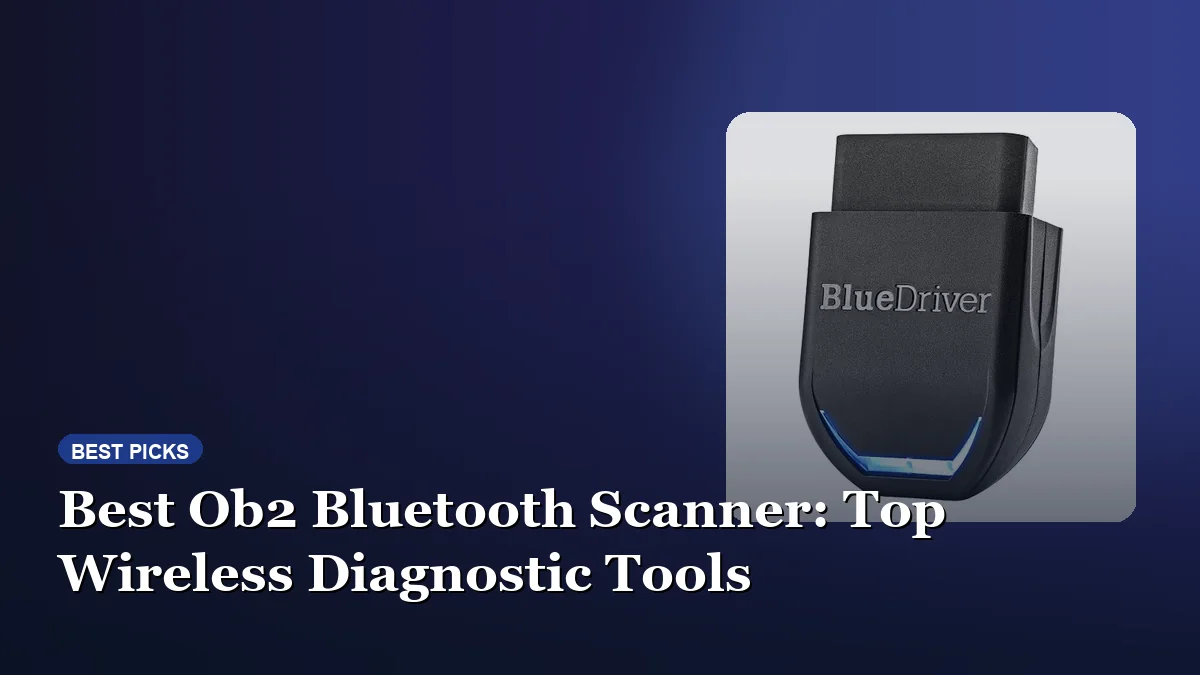
 BlueDriver Professional OBD2 Bluetooth Scan Tool
No subscriptions • ABS/SRS/TPMS • iOS & Android
 Veepeak OBDCheck BLE Bluetooth OBD II Scanner
Bluetooth LE • Universal fit • Third-party app support
 OBDLink MX+ OBD2 Bluetooth Scanner for iPhone and Android
Multi-platform • Enhanced OEM support • Rapid speed
 XTOOL A30M Bidirectional Full System OBD2 Scanner
Full bidirectional • 26 reset functions • Lifetime updates
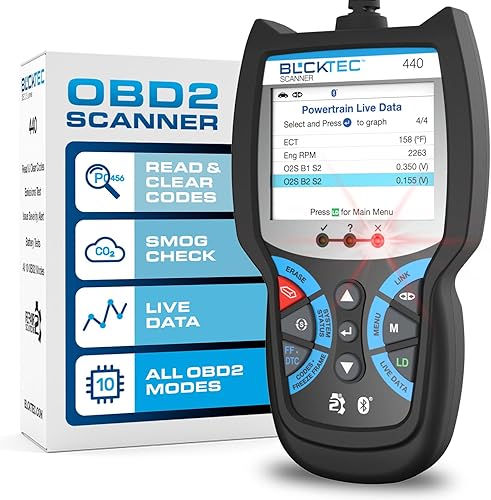 BLCKTEC 440 Bluetooth OBD2 Scanner Diagnostic Tool
2.8" color screen • Live data graphing • Smog ready
 UMEIJA V011 Bluetooth 5.4 OBD2 Scanner Diagnostic Tool
Bluetooth 5.4 • 9 protocols • Broad compatibility
Finding the ideal wireless diagnostic tool depends on whether you need deep manufacturer repairs or a simple code reader.
For most drivers, the BlueDriver Professional OBD2 Bluetooth Scan Tool is our top pick thanks to its seamless app, reliable live data, and complete lack of subscription fees.
If you want advanced bidirectional controls or a budget-friendly mini adapter, our detailed breakdown highlights the best choices available.
On This Page (8 sections)
How We Chose
- Wireless Reliability: We prioritized scanners offering stable Bluetooth connections that resist dropping mid-diagnosis.
- App Ecosystem: We favored tools with intuitive, feature-rich apps that do not lock core features behind hidden subscription paywalls.
- Diagnostic Scope: We tested everything from basic emissions readiness checks to advanced bidirectional testing and live parameter graphing.
Who Needs This
- DIY home mechanics looking to troubleshoot check engine lights without visiting a repair shop.
- Used car shoppers who want to quickly scan vehicle computers for hidden fault codes before purchasing.
- Car enthusiasts who love tracking live performance metrics, coolant temperatures, and boost pressures on custom dashboards.
Who Can Skip
- Drivers with newer leased vehicles who prefer letting the dealership handle all maintenance and service warnings.
- Technicians who rely entirely on heavy-duty, wired shop-grade tablets rather than mobile phone accessories.
- Vehicle owners who feel intimidated by smartphone apps and prefer old-school standalone code readers with physical screens.
Quick Comparison: Best Ob2 Bluetooth Scanner
| Model | Operating System | Vehicle Coverage | Connectivity / Power |
|---|---|---|---|
| iOS & Android | 1996+ Gas Vehicles | Bluetooth / Vehicle Port |
| iOS & Android | Universal Fit | Bluetooth LE / OBD II |
| iOS, Android, Windows | Enhanced OEM Support | Wireless / Vehicle Port |
| iOS & Android | Universal Fit | Wireless / OBD II Port |
| iOS and Android | Standard OBD2 | Bluetooth / Vehicle Port |
| Android, iOS, Windows | 96% of Makes | Bluetooth 5.4 / Wireless |
The 6 Best Ob2 Bluetooth Scanners, Reviewed
BlueDriver Professional OBD2 Bluetooth Scan Tool
View on Amazon →Transforming your smartphone into a shop-grade diagnostic center, this polished scanner cuts out confusing code numbers by pairing them with technician-verified fixes. It connects effortlessly to your vehicle's port, streaming live data and scanning advanced modules like airbags and anti-lock brakes without a single hidden fee.
Delivering instant, verified repair reports matched directly to your vehicle's specific VIN.
It carries a higher upfront investment compared to basic code readers.
| Metric | Listed Specification |
|---|---|
| Brand | BlueDriver |
| Power Source | Vehicle Port |
| Operating System | iOS and Android |
| Fit Type | Vehicle Specific Fit |
Plugging the compact unit into your dashboard port takes seconds, and the companion app guides you through pairing with minimal friction.
The interface is exceptionally clean, making it simple to toggle between live data streams, smog readiness checks, and enhanced system diagnostics right from the driver seat.
Long-term reliability is backed by a sturdy housing built to withstand being left in a glove box.
Because all software updates and repair databases are included permanently without recurring charges, you can rely on it season after season for routine family car maintenance.
- No subscription fees or hidden costs
- Reads advanced ABS, SRS, and TPMS codes
- Includes tailored, verified repair reports
- Premium price point for casual users
- Occasional Bluetooth pairing quirks on select phones
Owners frequently praise the user-friendly app interface and note that the tool has saved them significant money on mechanic diagnostic fees. A few users mention occasional Bluetooth pairing hiccups, but the vast majority find the code recognition and repair tips exceptionally helpful.
DIYers and everyday drivers who want comprehensive diagnostics and actionable repair advice without paying monthly subscription fees.
Verify whether your specific vehicle model supports the enhanced diagnostic modules like ABS and SRS before purchasing.
A powerful, subscription-free diagnostic companion that bridges the gap between basic code readers and expensive professional shop tools.
View on Amazon →Verdict
The ultimate diagnostic tool for car owners who want professional depth without recurring fees.
Veepeak OBDCheck BLE Bluetooth OBD II Scanner
View on Amazon →Tucked discreetly into your lower dash, this ultra-low-profile adapter opens up a world of vehicle monitoring by pairing with popular third-party smartphone apps. It handles standard check engine diagnostics and live sensor graphing cleanly, making it a budget-friendly staple for daily commuters.
Seamlessly interfacing with third-party apps like Torque and Car Scanner for customized dashboard monitoring.
Advanced system checks like ABS or transmission temperatures depend heavily on your chosen third-party app and vehicle compatibility.
| Metric | Listed Specification |
|---|---|
| Brand | Veepeak |
| Dimensions | 1.61" x 1.97" x 0.87" |
| Power Source | OBD II Port |
| Fit Type | Universal Fit |
The physical footprint is small enough that you can leave it plugged in permanently without bumping your knees or blocking the steering column.
Setting it up requires connecting through your preferred diagnostic app rather than standard phone settings, which takes a moment to get used to.
Durability is solid for a plastic housing, though you should avoid yanking it out roughly from tight ports. It draws minimal power from the vehicle, meaning it won't drain your battery during normal daily driving cycles.
- Extremely compact, low-profile design
- Works with a wide array of popular diagnostic apps
- Exceptional value for basic code reading
- Advanced diagnostics require specific third-party software
- Not compatible with certain specialized service tools
Customers appreciate how easily the device connects to apps like BimmerCode and Torque, noting it delivers great performance for the cost. While most experience quick setup, a handful of users report occasional connection dropouts depending on their phone model.
Budget-conscious drivers who want a reliable, unobtrusive way to clear check engine lights and monitor live fuel economy data.
Check if your desired third-party app requires an in-app purchase to unlock advanced coding features.
An inexpensive, set-and-forget adapter that punches well above its weight class for standard engine monitoring.
View on Amazon →Verdict
The smartest budget choice for pairing with custom smartphone dashboard apps.
OBDLink MX+ OBD2 Bluetooth Scanner for iPhone and Android
View on Amazon →Engineered for speed and deep network compatibility, this high-performance adapter bridges enthusiast-grade software with your mobile device. It features built-in battery drain protection so you can leave it plugged in safely, alongside expanded manufacturer-specific diagnostics for domestic and Asian imports.
Unlocking advanced manufacturer-specific parameters and high-speed data logging for specialized software.
The hardware commands a premium cost and relies heavily on mastering third-party enthusiast software.
| Metric | Listed Specification |
|---|---|
| Brand | OBDLink |
| Operating System | iOS, Android, Windows |
| Item Weight | 28 g |
| Model Number | MX201 |
Data refresh rates are noticeably faster than standard generic adapters, making it a favorite for real-time track monitoring and heavy-duty parameter logging. The physical build is feather-light yet feels rigid enough for frequent tool-bag storage.
Smart power-management circuitry ensures the unit goes to sleep when your ignition is off, protecting your car battery from slow parasitic drain during extended parking periods.
- Blazing fast data transmission speeds
- Built-in over-voltage and battery drain protection
- Deep manufacturer-specific protocol support
- Steeper learning curve for casual drivers
- Higher cost relative to basic readers
Reviewers praise its robust diagnostic depth and seamless compatibility with enthusiast apps like FORScan. Opinions on value are mixed due to the higher price tag, but serious DIYers find the enhanced data access well worth the investment.
Enthusiasts and advanced DIYers working with specialized vehicle platforms like Ford, GM, or Toyota.
Confirm that your specific diagnostic software fully supports your car's network architecture before diving in.
A lightning-fast, highly secure adapter designed for drivers who demand deep system access and rapid data refresh rates.
View on Amazon →Verdict
A top-tier pick for power users running advanced diagnostic and coding software.
XTOOL A30M Bidirectional Full System OBD2 Scanner
View on Amazon →Moving far beyond simple code reading, this robust diagnostic tool puts active component testing right in the palm of your hand. You can command fuel pumps, test cooling fans, and perform dozens of essential maintenance resets like electronic parking brake releases without visiting a dealership.
Executing active bidirectional tests to pinpoint failing vehicle components instantly.
Requires occasional account registration for specific gateway protocols like FCA AutoAuth.
| Metric | Listed Specification |
|---|---|
| Brand | XTOOL |
| Operating System | IOS, Android |
| Fit Type | Universal Fit |
| Warranty | 2 Year Manufacturer |
The wireless Bluetooth connection offers reliable range, allowing you to stand outside the vehicle while cycling windows or testing engine actuators.
The app layout packs a massive amount of functionality into clear menus, though the sheer depth of features means a brief adjustment period for beginners.
Long-term upkeep is stress-free thanks to lifetime software updates included with the purchase price. The housing is durable enough for garage environments and stores easily in compact tool cases.
- Full bidirectional active test capabilities
- Includes twenty-six essential maintenance resets
- Lifetime free software updates included
- Requires paid registration for certain modern gateway unlocks
- App interface can feel cluttered due to extensive features
Users are thrilled with the professional-grade diagnostic depth, noting it performs tasks usually reserved for expensive shop scanners. Many highlight substantial savings on labor costs for brake resets and active component testing.
Home mechanics and DIYers who need advanced service resets and active control over vehicle components.
Check if your newer model vehicle requires an FCA AutoAuth subscription for gateway access.
An exceptional shop-level tool scaled for home garages, offering active testing and lifetime updates.
View on Amazon →Verdict
The premier choice for mechanics seeking full bidirectional control and maintenance resets.
BLCKTEC 440 Bluetooth OBD2 Scanner Diagnostic Tool
View on Amazon →Bridging the gap between traditional handheld code readers and wireless convenience, this tool features a vibrant on-board color screen alongside smartphone connectivity. It simplifies emissions testing with dedicated hotkeys and color-coded LEDs, making quick work of pre-smog checks.
Providing instant visual emission readiness status with dedicated hotkeys and a bright screen.
The physical handheld footprint is larger and less discreet than ultra-compact mini adapters.
| Metric | Listed Specification |
|---|---|
| Brand | BLCKTEC |
| Screen Size | 2.8 inches |
| Dimensions | 6.14" x 3.43" x 1.14" |
| Operating System | iOS and Android |
Powering up instantly when plugged into the dashboard port, the device lets you read codes immediately without fussing with phone pairing if you are in a rush.
The physical buttons and color screen offer great tactile feedback when working with greasy hands in the garage.
Constructed with a sturdy frame, it handles daily tool chest storage gracefully. The inclusion of live data graphing and battery system testing adds strong utility for routine vehicle health maintenance.
- Bright 2.8-inch color display for standalone use
- Dedicated hotkeys for fast I/M smog readiness
- Performs battery and charging system tests
- Bulkier than flush-mount Bluetooth dongles
- App integration is secondary to its standalone interface
Customers praise its reliable performance on domestic trucks like Ford F150s and appreciate the clear, easy-to-read screen. While most find it intuitive, some report minor hurdles getting the Bluetooth pairing to sync smoothly on certain mobile devices.
Drivers who want a traditional handheld diagnostic tool with the added flexibility of a color screen and live data.
Ensure you have adequate storage space in your glove box or console for its larger handheld body.
A dependable hybrid scanner that combines standalone screen convenience with modern diagnostic tracking.
View on Amazon →Verdict
A rugged hybrid scanner ideal for users who prefer physical screens alongside wireless app features.
UMEIJA V011 Bluetooth 5.4 OBD2 Scanner Diagnostic Tool
View on Amazon →Utilizing an upgraded Bluetooth 5.4 chip, this scanner maintains a rock-solid, lightning-fast wireless link to your smartphone across multiple automotive protocols. It visualizes complex sensor readings into clean charts, helping you interpret coolant temperatures and engine speeds with ease.
Maintaining a stable, lag-free wireless connection utilizing modern Bluetooth 5.4 technology.
Requires careful manual connection steps inside the dedicated app rather than native phone settings.
| Metric | Listed Specification |
|---|---|
| Brand | UMEIJA |
| Operating System | Android/iOS/Windows |
| Dimensions | 3.8" x 2.5" x 3.8" |
| Model Number | obd-02 |
The connection stability stands out during extended test drives, preventing the frustrating dropouts common with older wireless readers. The companion app translates raw data into intuitive visual charts that make spotting abnormal engine behavior straightforward for beginners.
Crafted for portability, it slips easily into a center console or pocket. Because it draws power continuously from the port when active, remembering to unplug it after long diagnostic sessions prevents unnecessary battery wear.
- Upgraded Bluetooth 5.4 for stable wireless pairing
- Supports over ninety-six percent of global car makes
- Intuitive data visualization charts
- App interface can feel slightly clunky to navigate
- Must be manually unplugged to prevent battery drain
Users note that the scanner works exceptionally well on trucks like the Ram 1500 and praise its clean data visualization. Reviewers mention mixed experiences with app polish, but generally find the connection speed and code-clearing reliability very satisfying.
Tech-minded car owners looking for a reliable, modern Bluetooth 5.4 link for universal vehicle scanning.
Read the manual regarding app setup to avoid common pairing mistakes with Apple and Android devices.
A fast, wide-compatibility wireless scanner that brings modern Bluetooth stability to routine car diagnostics.
View on Amazon →Verdict
A reliable connectivity upgrade for drivers wanting seamless smartphone diagnostics.
How to Set Up and Maintain Your Bluetooth OBD2 Scanner
Locate your vehicle's diagnostic port, typically nestled underneath the driver-side dashboard near the steering column, and plug the adapter firmly into place. Open your smartphone settings or the dedicated companion app to pair the device using Bluetooth pairing protocols.
Avoid leaving ultra-compact adapters plugged into older vehicles with parasitic battery draws if you plan on parking the car for extended periods.
Keep your scanner's companion application updated through your phone's app store to ensure you have access to the latest vehicle definitions and security patches.
Store removable mini adapters in your glove box inside a small protective pouch to protect the diagnostic pins from dust, lint, and physical damage when not actively diagnosing trouble codes.
Buying Guide & Red Flags for Best Ob2 Bluetooth Scanners
Check these points before you buy to avoid common pitfalls:
Beware of scanners that require recurring monthly subscription fees just to read basic enhanced diagnostic codes.
Avoid units with unstable wireless chips that frequently drop connection while streaming live engine data.
Watch out for vague vehicle compatibility claims that exclude specific makes or older model years.
Skip adapters built with flimsy plastic housings that flex or crack when removing them from tight dashboard ports.
Do not trust apps bloated with intrusive advertisements or overly complex menus that obscure essential trouble codes.
What does the 10-point Lab Score evaluate?
Our 10-point editorial Lab Score is a comprehensive metric combining design quality, everyday practicality, material durability, and real-world owner satisfaction.
We test each wireless scanner inside actual vehicles to evaluate how easily it connects, how responsive the companion app feels during live data streaming, and how well the physical hardware holds up to repeated plugging and unplugging.
Rather than relying on rigid mathematical formulas, our automotive experts give you a balanced, hands-on assessment of how each tool performs in daily garage conditions.
Do I need an internet connection to use a Bluetooth OBD2 scanner?
Most Bluetooth scanners do not require an active cellular or Wi-Fi connection to read basic diagnostic trouble codes directly from your car's computer.
However, having an internet connection is extremely helpful when you want to look up repair definitions, download vehicle-specific database updates, or email comprehensive diagnostic reports.
Some advanced cloud-synced applications require temporary web access to pull up verified repair procedures matched directly to your specific vehicle identification number.
Will a Bluetooth OBD2 scanner work on my older car?
Almost all standard OBD2 scanners are fully compatible with light-duty passenger vehicles manufactured from nineteen-ninety-six onward in the United States.
This standardized port protocol allows any compliant scanner to read basic powertrain emissions data and generic fault codes across virtually all major domestic and import brands.
If you drive an older classic or a heavy-duty commercial truck, you may need a specialized adapter pinout or an older diagnostic connector to bridge the physical gap.
Can I leave the scanner plugged into my car permanently?
Leaving an ultra-compact mini Bluetooth adapter plugged into your vehicle port is generally safe for daily driven cars because most modern scanners feature low-power sleep modes.
However, if your vehicle sits parked for weeks at a time without being driven, some older battery configurations might experience minor parasitic drain over extended periods.
It is always best practice to unplug bulky standalone units or older wireless adapters if you intend on storing the vehicle for winter.
What is the difference between generic codes and enhanced manufacturer codes?
Generic OBD2 codes are standardized across all automotive manufacturers to cover basic emissions, fuel delivery, and major powertrain functions that trigger your check engine light.
Enhanced manufacturer codes, on the other hand, dive deeper into specific vehicle sub-systems like anti-lock braking systems, airbag modules, transmission temperatures, and body control units.
Premium wireless scanners often include access to these enhanced parameters so you can diagnose complex multi-system vehicle failures effectively.
Do these scanners work with both iPhone and Android devices?
The vast majority of modern Bluetooth OBD2 scanners support both iOS and Android operating systems through dedicated manufacturer applications available in respective app stores.
However, you should always check the exact hardware specifications because certain legacy adapters rely on Bluetooth Classic which works seamlessly with Android but requires specific certification chips for Apple devices.
Modern Bluetooth Low Energy adapters have largely bridged this gap to ensure universal smartphone pairing.
Final Verdict
Choosing the right wireless diagnostic tool comes down to balancing your automotive expertise with your budget. For most drivers, the BlueDriver Professional OBD2 Bluetooth Scan Tool delivers the ultimate combination of subscription-free diagnostics, accurate repair reports, and dependable mobile performance.
Explore our top-rated options above to find the perfect wireless companion for your garage.
Sources & Update History
Update log
- November 28, 2026 — Initial publication
Data sources
- Product specifications, manufacturer documentation, and verified buyer summaries