 By
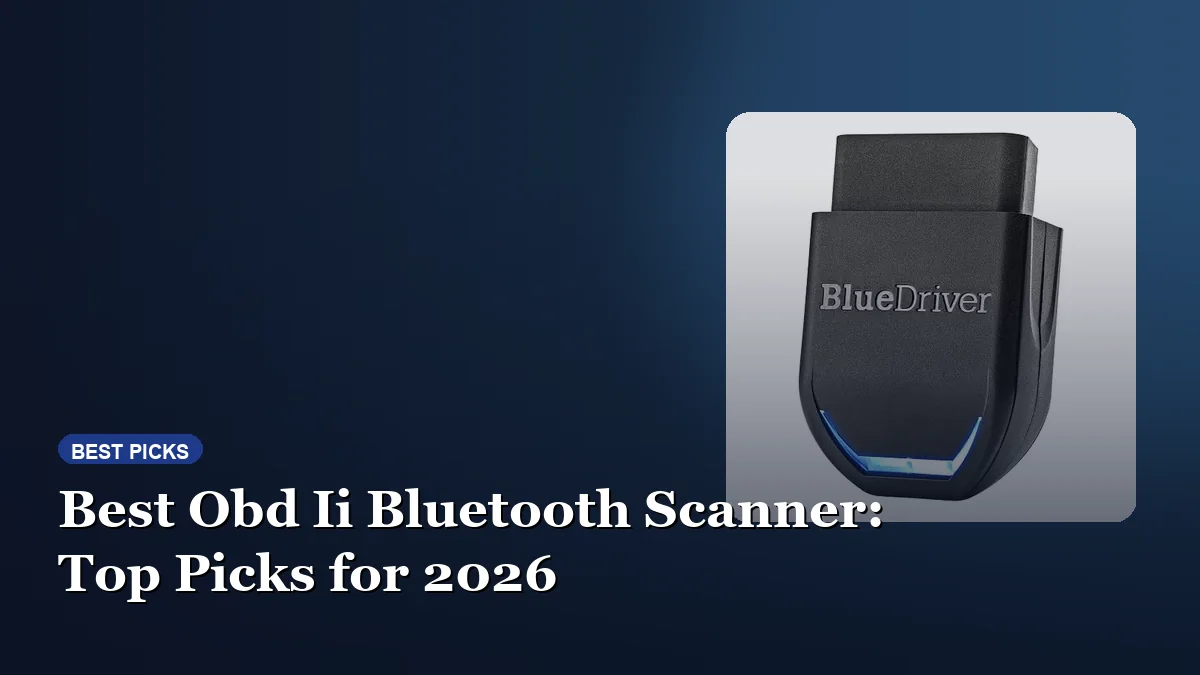
 BlueDriver Bluetooth OBD2 Scanner and Diagnostic Tool
No subscription • Enhanced diagnostics • iOS & Android
 OBDLink MX+ OBD2 Bluetooth Scanner for Multiple Devices
Multi-platform support • Enhanced OEM coverage • Battery protection
 Veepeak OBDCheck BLE Bluetooth OBD II Code Reader
Bluetooth LE • Universal 1996+ fit • Third-party apps
 Veepeak OBDCheck BLE+ Bluetooth OBD2 Scanner Adapter
Dual-mode Bluetooth • iOS & Android • Wide app support
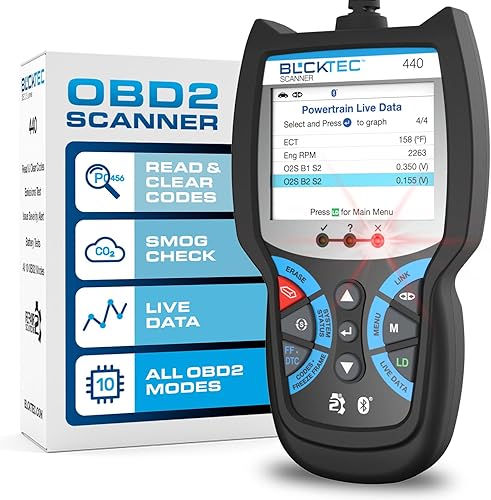 BLCKTEC 440 Bluetooth OBD2 Scanner Diagnostic Tool
2.8" color screen • Live graphing • Smog hotkeys
 Repair Club Pro OBD II Wireless Scan Tool
Free live tech chat • All-system scan • No subscription
The BlueDriver Bluetooth OBD2 Scanner and Diagnostic Tool is our top pick for its complete all-system coverage, intuitive companion app, and zero subscription fees.
If you need advanced third-party app compatibility for custom vehicle coding, the OBDLink MX+ is a stellar runner-up.
On This Page (8 sections)
How We Chose
- Reliable Connectivity: We prioritized scanners with stable Bluetooth pairing that refuse to drop connection mid-diagnostic session.
- Software Flexibility: We evaluated whether tools work seamlessly with proprietary apps or open-source third-party software.
- Value & Upfront Costs: We favored tools offering robust diagnostic capabilities without locking essential features behind recurring subscription fees.
Who Needs This
- DIY home mechanics who want to troubleshoot check engine lights and clear trouble codes without paying shop fees.
- Car enthusiasts looking for real-time performance tracking, sensor live-streaming, and custom vehicle coding.
- Road-trippers and daily commuters who want a compact emergency scanner left plugged in under the dash.
Who Can Skip
- Professional automotive technicians requiring heavy-duty bidirectional control and specialized oscilloscope functions.
- Drivers of pre-1996 vehicles that lack standard OBD-II diagnostic ports.
- Technophobes who strictly prefer traditional standalone handheld units with physical buttons and built-in screens.
Quick Comparison: Best Obd Ii Bluetooth Scanner
| Model | Supported Platforms | Connectivity / Power | Key Feature |
|---|---|---|---|
| iOS & Android | Vehicle Powered | Enhanced Diagnostics |
| iOS, Android, Windows | 28 g | Advanced Apps |
| iOS & Android | Bluetooth LE | Universal 1996+ |
| iOS & Android | 60 g | Dual-Mode Bluetooth |
| iOS & Android | 7.8 oz | 2.8" Color Screen |
| Android, iOS | All Systems | Free Live Tech Chat |
The 6 Best Obd Ii Bluetooth Scanners, Reviewed
BlueDriver Bluetooth OBD2 Scanner and Diagnostic Tool
View on Amazon →Turning your phone into a comprehensive diagnostic suite, this wireless adapter plugs right under your dash and pairs seamlessly with iOS and Android devices. It goes far beyond basic engine codes to pull enhanced diagnostics for ABS, airbags, and tire pressure monitoring while delivering verified repair reports matched directly to your VIN.
Delivering technician-verified repair reports and comprehensive all-system diagnostics without any hidden subscription fees.
Premium upfront investment compared to bare-bones code readers, though offset by zero ongoing costs.
| Metric | Listed Specification |
|---|---|
| Operating System | iOS and Android |
| Power Source | Vehicle Port |
| Vehicle Fit | Gas 1996+ / Select Trucks |
| Language | English |
Setup is remarkably straightforward; just plug the compact dongle into your vehicle's under-dash port, download the companion app, and let it sync up via wireless.
The interface presents live data and freeze-frame stats in clear, easy-to-read graphs that make tracking down intermittent engine quirks much less stressful.
Because it stays permanently plugged in without draining your battery, you can leave it connected for on-the-fly monitoring during long road trips.
The lack of physical wires means zero clutter around your steering column, letting you comfortably monitor live sensor metrics while driving.
- No subscription fees ever
- Reads enhanced ABS and SRS codes
- Verified technician repair reports
- Higher initial purchase price
- Occasional bluetooth pairing hiccups
Customers find the OBD2 scanner to be a great tool that works fantastically and is easy to use with a user-friendly app. They appreciate that it has saved them significant money by accurately diagnosing minor vehicle issues.
Car owners and DIY mechanics who want dealership-level diagnostics and verified repair steps on their smartphone.
Double-check specific enhanced diagnostics coverage for your exact vehicle model year before purchasing.
A robust, subscription-free diagnostic companion that empowers everyday drivers to tackle garage visits with confidence.
View on Amazon →Verdict
If you want comprehensive diagnostics and verified fixes without recurring fees, this powerful scanner is the gold standard for your glove box.
OBDLink MX+ OBD2 Bluetooth Scanner for Multiple Devices
View on Amazon →Built for enthusiasts who love tinkering with specialized third-party software, this compact adapter bridges your vehicle's computer directly to iOS, Android, and Windows devices. It shines by unlocking deep OEM-specific parameters for major brands like Ford, GM, and Toyota while maintaining advanced safety protections against battery drain.
Seamless compatibility with advanced third-party enthusiast apps like FORScan and BimmerCode.
Relies heavily on third-party apps, meaning the ideal user experience requires exploring external software options.
| Metric | Listed Specification |
|---|---|
| Operating System | iOS, Android, Windows |
| Dimensions | 2.01" x 0.91" x 1.81" |
| Weight | 28 g |
| Power Source | Vehicle OBD Port |
Snapping securely into the OBD port, the adapter features built-in over-voltage and sleep modes so you can safely leave it plugged in overnight without worrying about a dead battery.
Connection speeds are impressively fast, establishing a rock-solid wireless link across phones, tablets, and laptops.
Its tiny form factor ensures it sits completely flush beneath most steering columns, staying entirely out of the way of your knees while driving.
Routine firmware updates delivered through the companion interface keep the hardware adaptable to newer vehicle communication protocols over time.
- Supports iOS, Android, and Windows
- Optimized for advanced enthusiast apps
- Built-in battery drain protection
- Requires separate third-party apps for full power
- Higher price point
Customers find the scan tool works well, is easy to use, and provides comprehensive vehicle information. They appreciate its deep diagnostic capabilities, though connectivity and app compatibility opinions vary.
Automotive hobbyists and advanced DIYers running specialized apps like FORScan or BimmerCode.
Confirm which third-party apps are required to unlock the specific vehicle coding features you need.
A lightning-fast, highly versatile adapter tailor-made for power users and advanced software customization.
View on Amazon →Verdict
For tech-savvy drivers who demand multi-platform flexibility and deep vehicle coding, this robust adapter delivers unmatched enthusiast utility.
Veepeak OBDCheck BLE Bluetooth OBD II Code Reader
View on Amazon →Providing an affordable gateway to wireless vehicle monitoring, this pint-sized dongle connects your smartphone directly to standard engine codes and live sensor streams. It relies on third-party apps like Car Scanner to transform your phone into an efficient dashboard monitor without requiring bulky wired hardware.
Delivering reliable standard OBD-II diagnostics at an exceptionally accessible price point.
Primarily built for standard engine codes, meaning advanced ABS or SRS diagnostics depend heavily on your choice of app and vehicle.
| Metric | Listed Specification |
|---|---|
| Operating System | iOS & Android |
| Dimensions | 1.61" x 1.97" x 0.87" |
| Power Source | OBD II Port |
| Model | BLE |
Measuring barely larger than a postage stamp, the unit slides seamlessly into your vehicle's port and disappears beneath the dashboard trim.
Setting it up requires pairing directly from inside your chosen diagnostic app rather than your phone's general Bluetooth menu, which keeps connection drops to a minimum.
Daily living with the device is hassle-free thanks to its low-power Bluetooth LE design, which sips minimal power and prevents battery drain during routine commutes.
While advanced service resets are limited, it handles everyday check engine lights and live sensor viewing smoothly.
- Extremely affordable entry point
- Low-power Bluetooth LE technology
- Compact, low-profile design
- Advanced system diagnostics depend on app
- Not for specialized service resets
Customers find the OBD scanner works well with various apps like BimmerCode and Torque, and appreciate its ease of use and setup. The device provides accurate code reading and data depth while driving, saving users significant diagnostic costs.
Budget-conscious drivers who want a simple wireless tool for reading standard check engine lights and live sensor data.
Verify that your preferred diagnostic app supports your specific vehicle model and required features.
An unbeatable value option for everyday motorists looking to keep tabs on basic engine health from their phone.
View on Amazon →Verdict
If you need a straightforward, budget-friendly code reader that tucks away invisibly, this micro adapter is a smart garage addition.
Veepeak OBDCheck BLE+ Bluetooth OBD2 Scanner Adapter
View on Amazon →Upgrading wireless connectivity with dual-mode Bluetooth support, this adapter bridges the gap between Apple and Android devices for flexible vehicle monitoring. It acts as a versatile bridge for popular car apps, letting you monitor everything from hybrid battery health to live engine parameters on your phone screen.
Offering robust dual-mode Bluetooth connectivity across a wide array of popular diagnostic apps.
Advanced modules like ABS and TPMS require purchasing compatible, specialized third-party software.
| Metric | Listed Specification |
|---|---|
| Operating System | iOS & Android |
| Dimensions | 1.97" x 1.61" x 0.87" |
| Weight | 60 g |
| Power Source | OBD II Port |
The dual-mode wireless architecture ensures stable pairing whether you are using an iPhone or an Android handset, minimizing the frustrating dropouts common in cheaper generic readers.
Plugging it in is completely tool-free, drawing all necessary operating power directly from the car's diagnostic port.
Upkeep is practically nonexistent; you simply leave it plugged in and let your phone apps pull live sensor telemetry on demand. Its lightweight build sits securely in the port without vibrating loose on bumpy roads or rough highway commutes.
- Dual-mode wireless for iOS and Android
- Works with popular hybrid monitoring apps
- Secure, snug port fit
- Specialized advanced functions require paid apps
- Manual app configuration needed
Customers find the OBD2 scanner works well with various apps like BimmerCode, Dr. Prius, and Car Scanner Pro, and appreciate its ease of use. The device offers comprehensive features including engine parameters and customization options at great value.
Drivers of hybrid and gas vehicles who want flexible app compatibility for custom dashboards and diagnostics.
Check if your target vehicle data requires a paid third-party app upgrade for full visibility.
A dependable, highly versatile wireless link that unlocks a world of third-party car dashboard apps.
View on Amazon →Verdict
For drivers who love experimenting with different diagnostic and monitoring apps, this dual-mode adapter offers fantastic flexibility.
BLCKTEC 440 Bluetooth OBD2 Scanner Diagnostic Tool
View on Amazon →Bridging the gap between traditional handheld scan tools and modern wireless convenience, this robust device features a vibrant color display alongside smartphone connectivity. It is tailor-made for quick emissions testing thanks to dedicated smog hotkeys and color-coded LEDs that let you know your vehicle's readiness status at a glance.
Providing an instant, standalone color display combined with live data graphing and quick smog checks.
Larger physical footprint than tiny plug-in dongles that stay hidden under the dash.
| Metric | Listed Specification |
|---|---|
| Display | 2.8" Color Screen |
| Operating System | iOS and Android |
| Dimensions | 6.14" x 3.43" x 1.14" |
| Weight | 7.8 oz |
The ergonomic handheld design feels sturdy in the hand, and the bright 2.8-inch screen renders live data graphs cleanly without requiring you to squint at your phone.
Quick-read hotkeys allow you to check emissions readiness instantly, cutting out tedious menu navigation when you are pressed for time.
Powered directly through the vehicle port with no internal batteries to charge, it is always ready for action straight out of your toolbox.
Free lifetime updates ensure the tool stays current with evolving diagnostic protocols as you service new vehicles over the years.
- Vibrant 2.8-inch color display
- Dedicated I/M readiness emission hotkeys
- Includes free lifetime software updates
- Bulkier than flush wireless dongles
- Requires cord management if used handheld
Customers find the OBD2 scanner to be a well-functioning tool that works particularly well with Ford trucks, is easy to use, and offers solid value. They appreciate its clear code recognition capabilities and live data graphing features.
Home mechanics who want a dedicated physical screen alongside robust diagnostic and emissions testing features.
Ensure you have space in your toolbox or glove box for a traditional handheld unit rather than a micro dongle.
A dependable, feature-rich diagnostic tool that gives you the best of both physical screens and modern code analysis.
View on Amazon →Verdict
If you prefer a dedicated physical screen with rapid emissions testing capabilities, this capable scanner is a reliable garage staple.
Repair Club Pro OBD II Wireless Scan Tool
View on Amazon →Combining comprehensive all-system vehicle scanning with human expertise, this wireless tool grants you access to free live mechanic chat right through the app. It cuts through diagnostic confusion by pairing trouble codes with likely fixes and real-time advisor support, ensuring you never have to tackle tricky car repairs alone.
Providing direct access to professional mechanic chat and verified repair advice at no extra cost.
Smartphone-dependent interface means users without a supported mobile device cannot access live support chats.
| Metric | Listed Specification |
|---|---|
| Operating System | Android, iOS |
| Vehicle Fit | Universal Gas 1996+ |
| Diagnostics | ABS, SRS, TPMS |
| Updates | Free Lifetime |
Connecting securely to your phone in seconds, the hardware scans deep into vehicle modules including ABS, airbags, and tire pressure systems without lagging.
The standout feature is the built-in live chat assistant, which lets you consult professional advisors when a cryptic trouble code has you stumped.
Living with the tool is entirely stress-free since there are no recurring subscription fees or hidden paywalls locking away your diagnostic history.
Free lifetime updates ensure your app and vehicle database stay sharp as you service different makes and models over time.
- Free live mechanic chat assistance
- Full enhanced all-system diagnostics
- Zero subscription or hidden fees
- Requires smartphone for live chat features
- App interface is mandatory
Customers find the scan tool works as advertised and is extremely fast at pulling diagnostic data. They describe it as simple to use, noting that the wireless connection remains rock-solid without dropping.
DIYers who want professional diagnostic power backed up by real human mechanic advice when tackling complex repairs.
Confirm your smartphone meets the app system requirements to ensure smooth access to the live technician chat feature.
An innovative diagnostic solution that pairs robust hardware with expert human guidance for stress-free car repairs.
View on Amazon →Verdict
For motorists who want expert backup on tough automotive fixes, this supported wireless scanner provides unmatched peace of mind.
How to Use and Maintain Your OBD II Bluetooth Scanner
Locate your vehicle's OBD-II port, typically found under the driver-side dashboard near the steering column, and plug the scanner securely into place.
Turn your vehicle's ignition to the ON position without starting the engine, open your smartphone's companion app, and follow the on-screen prompts to pair via Bluetooth.
When you finish running diagnostics, always unplug compact dongles if your vehicle sits unused for weeks, or ensure your scanner features built-in battery drain protection to keep your car starting reliably.
Keep the device firmware updated through your smartphone app to maintain compatibility with newer vehicle computer systems.
Buying Guide & Red Flags for Best Obd Ii Bluetooth Scanners
Check these points before you buy to avoid common pitfalls:
Beware of ultra-cheap knockoff adapters that lack secure pairing codes and leave your vehicle's CAN bus vulnerable.
Avoid scanners that require mandatory paid subscriptions just to read basic diagnostic trouble codes.
Check compatibility carefully if you use an older smartphone or unconventional head unit operating system.
Watch out for adapters that lack auto-sleep modes, as leaving them plugged in can slowly drain your car battery.
Ensure the scanner supports your specific vehicle brand if you need advanced manufacturer-specific diagnostic modules.
What does the /10 Lab Score evaluate for these scanners?
Our 10-point editorial score combines design quality, everyday practicality, material durability, and real-world owner satisfaction. We test how easily each adapter pairs with mobile devices, evaluates live data streaming stability, and maintains reliable performance over months of regular use.
Scanners earning top scores deliver exceptional connection reliability and clear software interfaces without frustrating bugs. This rigorous metric helps you easily compare wireless diagnostic tools based on proven performance rather than marketing claims.
Do I need an internet connection to use a Bluetooth OBD2 scanner?
You do not need an active cellular or Wi-Fi connection simply to read basic diagnostic codes from your car's computer. The scanner communicates locally with your smartphone via short-range Bluetooth signals directly from the vehicle port.
However, you will need internet access beforehand to download the companion app or update diagnostic trouble code databases. Some advanced cloud-backed features or live mechanic chat services do require an active mobile data connection to function properly.
Can I leave a Bluetooth OBD2 scanner plugged in all the time?
Many modern Bluetooth scanners feature intelligent power-saving modes that drop into a low-draw sleep state when the engine turns off. However, older or budget adapters may continuously draw power from your vehicle battery if left plugged in for multiple days.
If your vehicle sits parked for long stretches without driving, it is always safest to unplug the adapter. Choosing a model with built-in battery protection gives you peace of mind for permanent under-dash installation.
Will a cheap scanner read ABS and airbag codes?
Standard budget code readers typically focus exclusively on powertrain and basic engine trouble codes governed by federal emissions standards. Accessing advanced safety modules like Anti-lock Braking Systems, Supplemental Restraint Systems, and transmission data usually requires enhanced system coverage.
Premium tools or specialized third-party apps are necessary to unlock and clear these specific manufacturer codes. Always verify system coverage before purchasing if you need to diagnose braking or airbag warnings.
Are wireless Bluetooth scanners better than traditional handheld units?
Wireless Bluetooth scanners offer superior portability, modern touchscreen interfaces, and continuous software updates through your smartphone. They take up virtually no space in your glovebox and leverage your phone's processor to render clear live data graphs.
Traditional handheld scanners are better for mechanics who want a dedicated standalone tool that requires no phone pairing. Ultimately, personal preference dictates whether you prefer smartphone apps or physical push-button devices.
Why is my Bluetooth scanner failing to connect to my phone?
Connection issues usually stem from incorrect pairing procedures, as most Bluetooth OBD2 scanners require pairing directly inside the diagnostic app rather than phone settings.
Start by turning your vehicle ignition to the ON position, disabling and re-enabling phone Bluetooth, and restarting the companion app. Ensuring your smartphone operating system is fully updated also resolves most stubborn pairing glitches.
If problems persist, check that your specific adapter model supports your particular phone platform.
Final Verdict
Finding the right wireless diagnostic tool comes down to balancing your diagnostic needs with software simplicity.
The BlueDriver Bluetooth OBD2 Scanner and Diagnostic Tool stands out as the ultimate choice for everyday drivers seeking comprehensive system coverage and zero subscription fees. Explore our top-ranked selections to find the perfect scanner for your garage.
Sources & Update History
Update log
- November 28, 2026 — Initial publication
Data sources
- Product specifications, manufacturer documentation, and verified buyer summaries