 By
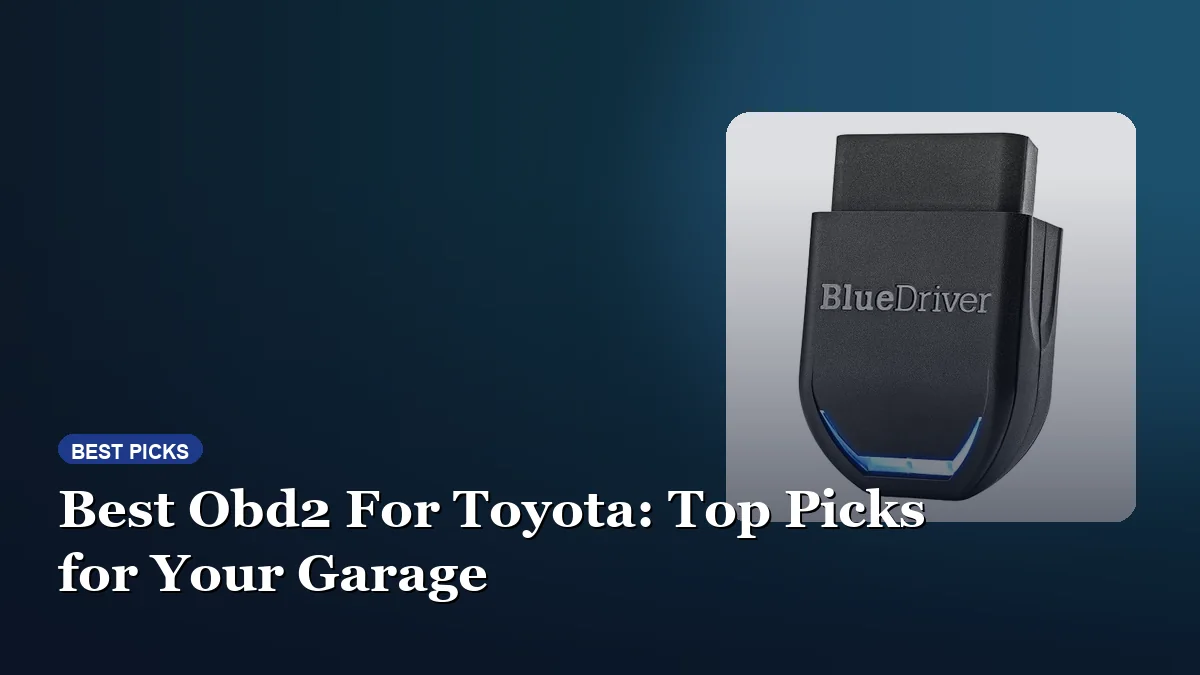
 BlueDriver Bluetooth OBD2 Scanner and Code Reader Pro
Wireless app-based | No subscriptions | Enhanced Toyota diagnostics
 MOTOPOWER MP69033 Car OBD2 Scanner Code Reader
Standalone handheld | Built-in DTC library | No batteries needed
 XTOOL A30M Bidirectional Scan Tool OBD2 Scanner
Full system control | 26 reset functions | Lifetime free updates
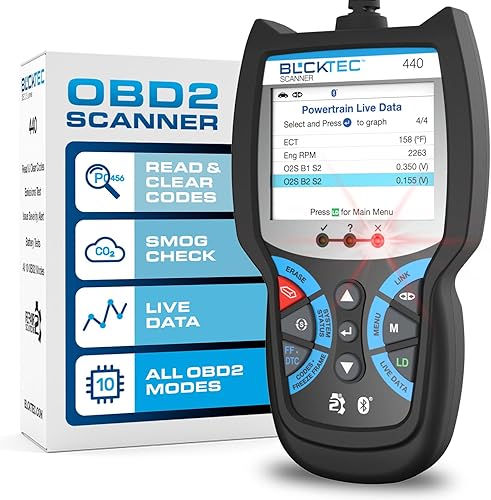 BLCKTEC 440 Bluetooth OBD2 Scanner Diagnostic Tool
Color screen display | Smog readiness keys | Live data graphing
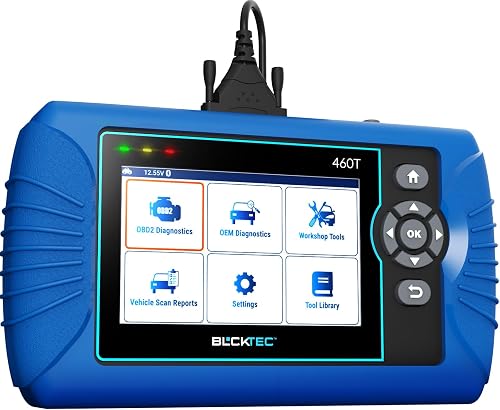 BLCKTEC 460T OBD2 Scanner Diagnostic Tool
All system scans | 12 reset services | 4.3 inch screen
 OBDMATE OM701 OBD2 Scan Tool for Toyota Lexus Scion
Tailored for Toyota | Full system access | Battery cranking test
Finding the right diagnostic companion starts with the BlueDriver Bluetooth OBD2 Scanner and Code Reader Pro, our top pick for its wireless app integration and deep manufacturer coverage.
Whether you are clearing a stubborn check engine light or checking live sensor data, pairing your vehicle with the right scanner saves time and expensive dealership fees.
We evaluated options ranging from budget handheld code readers to advanced bidirectional tools to match every garage skill level.
On This Page (8 sections)
How We Chose
- Diagnostic Depth: We prioritized scanners capable of reading proprietary Toyota, Lexus, and Scion modules beyond basic engine codes.
- Interface Usability: Every recommended tool was judged on screen clarity, app design, and how easily users can interpret live data.
- Value and Updates: We favored options offering transparent pricing with zero hidden subscriptions or lifetime software updates.
Who Needs This
- DIY mechanics looking to diagnose check engine lights and monitor live sensor data on their Toyotas.
- Owners of older or high-mileage Toyota models who want to proactively track transmission and ABS health.
- Drivers wanting to skip costly dealership diagnostic fees by reading and clearing trouble codes at home.
Who Can Skip
- Car owners who prefer taking their vehicle to a professional mechanic for every minor warning light.
- Drivers who only need basic generic OBD2 code reading and have no interest in live graphing or advanced resets.
- Those uncomfortable using smartphone apps or touchscreen interfaces for automotive maintenance.
Quick Comparison: Best Obd2 For Toyota
| Model | Connectivity / Platform | Screen Size / Display | Core Feature |
|---|---|---|---|
| Wireless Bluetooth | Smartphone App | Enhanced Toyota Diagnostics |
| Wired Cable Port | 2.8 Inches | Instant Code Clearing |
| Bluetooth 4.0 | Tablet / App | 26 Reset Functions |
| Wired Cable Port | 2.8 Inches | Smog Readiness Keys |
| Wired Cable Port | 4.3 Inches | All System Scans |
| Corded Electric | 2.8 Inches | Battery Cranking Test |
The 6 Best Obd2 For Toyotas, Reviewed
BlueDriver Bluetooth OBD2 Scanner and Code Reader Pro
View on Amazon →Turns your smartphone into a professional-grade diagnostic hub without cluttering your cabin with wires. It effortlessly uncovers deep-seated trouble codes for Toyota and other major makes while supplying technician-verified repair fixes matched straight to your vehicle identification number.
Delivering comprehensive manufacturer-specific diagnostics directly to a smartphone app with zero ongoing subscription costs.
Relies entirely on a stable smartphone Bluetooth connection, which can occasionally require re-pairing during multi-car diagnostic sessions.
| Metric | Listed Specification |
|---|---|
| Operating System | iOS / Android |
| Vehicle Fit | 1996+ Gas & Diesel |
| Power Source | Vehicle OBD2 Port |
| Coverage | All Major Makes |
Living with this pocket-sized dongle is remarkably convenient since it stays permanently plugged into your vehicle's dash without getting bumped by your knees.
Setting up the companion application takes only moments, instantly transforming your phone into an intuitive dashboard tracking live sensor data.
Maintenance involves zero upkeep beyond updating the app on your phone, and the lack of fragile handheld cords makes it exceptionally durable rattling around in a glove compartment.
It handles heavy weekend diagnostic sessions smoothly, though you will want to keep your phone charged when monitoring live sensor graphs over extended drives.
- Zero subscription fees forever
- Wireless smartphone integration
- VIN-matched verified repair fixes
- Occasional Bluetooth pairing hiccups
- Requires active smartphone battery
Customers find the OBD2 scanner to be a great tool that works fantastically and is easy to use with a user-friendly app. They appreciate its value, noting it has saved them thousands of dollars while accurately diagnosing minor issues.
Daily drivers and DIYers wanting a wireless, subscription-free diagnostic app right on their phone.
Double-check that your specific smartphone operating system meets the latest app compatibility requirements.
An exceptional wireless scanning solution that packs dealership-level intelligence right into your pocket.
View on Amazon →Verdict
The absolute top choice for Toyota owners seeking effortless smartphone diagnostics and permanent freedom from recurring app subscription fees.
MOTOPOWER MP69033 Car OBD2 Scanner Code Reader
View on Amazon →Built for quick, straightforward engine troubleshooting, this handheld tool gets straight to the point without requiring smartphones or apps. It features a bright, backlit LCD screen and an integrated lookup library that instantly decodes check engine warnings right out of the box.
Delivering instant, no-fuss check engine code clearing using a dedicated physical button interface.
Lacks advanced capabilities for non-engine systems, meaning it cannot read ABS, airbag, or transmission trouble codes.
| Metric | Listed Specification |
|---|---|
| Display Type | Backlit LCD |
| Protocols | 9 OBD2 Protocols |
| Languages | 6 Supported |
| Weight | 10.2 Ounces |
Out of the storage pouch, this dedicated handheld reader feels reassuringly simple to operate with tactile buttons that respond well even when wearing garage gloves.
The attached cable gives you plenty of slack to sit comfortably in the driver's seat while scanning parameters.
Because it draws power directly from the car, you never have to worry about dead internal batteries or charging cables.
Upkeep is virtually nonexistent, though the plastic housing prefers a dry glove box rather than rolling around unprotected in a truck bed.
- No internal batteries or setup required
- Clear backlit LCD screen
- Straightforward physical button controls
- No ABS or airbag system support
- Basic code-reading scope
Customers find the OBD2 scanner easy to use, particularly for non-mechanics, and appreciate its accuracy in diagnosing check engine lights. They consider it well worth the price, noting it saved them both time and money.
Budget-conscious car owners needing a simple, reliable tool to clear basic engine fault lights.
Confirm you only need standard engine diagnostics, as this tool skips advanced body and safety systems.
A dependable, no-nonsense handheld reader that makes clearing basic engine codes foolproof.
View on Amazon →Verdict
The ideal budget companion for quick engine light checks without the complexity of smartphone pairing.
XTOOL A30M Bidirectional Scan Tool OBD2 Scanner
View on Amazon →Moving far beyond basic code reading, this robust wireless tool grants full bidirectional control so you can command vehicle components like fuel pumps and windows right from your device. Paired with lifetime free software updates, it delivers professional workshop capabilities straight to your home garage.
Executing active component tests and specialized reset procedures typically locked behind expensive dealership equipment.
Advanced features and multiple reset menus require a brief learning curve for novice home mechanics.
| Metric | Listed Specification |
|---|---|
| System Coverage | All Systems OE-Level |
| Wireless Range | Up to 33 Feet |
| Live Graphing | Up to 8 Streams |
| Language Support | 22 Languages |
Using the wireless dongle with a tablet creates a clean diagnostic workstation where you can monitor live data graphs from outside the vehicle while testing components. The connection remains remarkably stable within a standard garage workspace.
Long-term ownership benefits immensely from the lack of subscription fees for updates, ensuring your tool stays compatible as newer vehicle systems emerge. Storing the compact unit safely keeps the internal Bluetooth pairing hardware protected between maintenance projects.
- Full bidirectional active tests
- Lifetime free software updates
- Simultaneous 8-stream data graphing
- Steeper learning curve for beginners
- App interface can feel dense
Customers find the scan tool to be a high-quality device that performs as well as more expensive bidirectional scanners, offering extensive diagnostic capabilities and detailed DTC information. They appreciate its user-friendly interface and value for money.
Enthusiasts and home mechanics wanting professional workshop capabilities without yearly fees.
Verify specific reset function availability for your exact vehicle year and model beforehand.
A powerhouse diagnostic tool that punches well above its weight class for serious DIY mechanics.
View on Amazon →Verdict
The ultimate pick for advanced users seeking full bidirectional testing and permanent software support.
BLCKTEC 440 Bluetooth OBD2 Scanner Diagnostic Tool
View on Amazon →Designed for fast emissions testing and straightforward engine oversight, this dedicated handheld unit features a vibrant color screen and dedicated shortcut keys. It simplifies state smog preparation by combining color-coded status LEDs with instant I/M readiness hotkeys for hassle-free checks.
Streamlining emissions pre-checks and providing color-coded visual feedback for immediate system status.
Restricted to standard engine diagnostics and general emissions data rather than deep manufacturer-specific body systems.
| Metric | Listed Specification |
|---|---|
| Display | Vibrant Color LCD |
| Emissions Check | I/M Readiness Hotkeys |
| Compatibility | 1996+ OBD2 Vehicles |
| Updates | Free Lifetime |
The physical layout places critical shortcut buttons right where your thumb rests, making menu navigation feel fast and intuitive during quick garage checks. The color screen maintains crisp visibility even under harsh overhead garage lighting.
Maintenance is completely hassle-free since it powers directly from the vehicle port and requires no internal battery upkeep. Its durable polymer casing handles being tossed into a door pocket or trunk organizer without missing a beat.
- Vibrant color display screen
- Dedicated smog readiness hotkeys
- No internal batteries needed
- Limited to basic OBD2 systems
- Bulkier than wireless dongles
Customers find the OBD2 scanner to be a well-functioning tool that works particularly well with Ford vehicles, is easy to use, and offers good value for money. They appreciate its code recognition capabilities and its live data features.
Drivers needing quick emissions test preparation and reliable check engine light clearing.
Check if your vehicle requires deep ABS or transmission scanning, as this model focuses primarily on emissions and engine codes.
A reliable, highly visual diagnostic tool that takes the stress out of annual emissions testing.
View on Amazon →Verdict
The top choice for emissions readiness and colorful, easy-to-read engine diagnostics.
BLCKTEC 460T OBD2 Scanner Diagnostic Tool
View on Amazon →Built for comprehensive workshop-level investigations, this powerful handheld console scans all available vehicle modules while integrating with the RepairSolutions2 app for verified repair guides. It speeds through tasks using AutoVIN technology and delivers deep diagnostic insights across engine, ABS, SRS, and transmission systems.
Combining all-system diagnostics with cloud-backed repair reports and robust workshop reset services.
Larger physical footprint takes up more space in your toolkit compared to compact wireless dongles.
| Metric | Listed Specification |
|---|---|
| Diagnostics | All Available ECUs |
| App Integration | RepairSolutions2 |
| Data Graphing | 4-Stream Overlay |
| VIN Retrieval | AutoVIN Technology |
The generous screen estate allows you to view multi-parameter live data graphs simultaneously without squinting, making complex troubleshooting much smoother. Plug-and-play responsiveness is exceptionally quick, auto-detecting vehicle particulars moments after connection.
Living with the console is pleasant thanks to the included hard storage case that keeps the heavy-duty OBD cable neatly coiled. Regular lifetime updates ensure the internal software database keeps pace with modern vehicle computers.
- All-system diagnostic capability
- 12+ workshop reset services
- Companion app with verified fixes
- Larger handheld tool footprint
- Requires checking specific vehicle compatibility
Customers find the OBD2 scanner works well, noting it successfully diagnoses vehicle issues quickly. They appreciate its value, noting it saves money, and find it simple to use while reading all engine and ABS codes without trouble.
Serious DIYers wanting a standalone, all-system diagnostic console with professional repair guidance.
Use the manufacturer's online compatibility checker to verify reset feature support for your specific model year.
A robust, professional-grade diagnostic console that bridges the gap between home tinkering and workshop repair.
View on Amazon →Verdict
The finest standalone diagnostic station for comprehensive all-system scans and guided repair solutions.
OBDMATE OM701 OBD2 Scan Tool for Toyota Lexus Scion
View on Amazon →Engineered specifically to cater to Toyota, Lexus, and Scion vehicles, this dedicated scan tool provides deep manufacturer-specific access across every electrical control module. It goes beyond standard codes by including a battery cranking test and essential maintenance reset functions tailored directly to Japanese vehicle architectures.
Unlocking comprehensive factory-level diagnostics across Toyota, Lexus, and Scion vehicle lineups.
Manufacturer-specific depth is heavily concentrated on Toyota-family vehicles, offering only generic OBD2 support for other makes.
| Metric | Listed Specification |
|---|---|
| Diagnostics | Full OE-Level Toyota |
| Special Tests | Battery & DLC Pin |
| Software | Lifetime Free Updates |
| Accessories | Hard Carrying Case |
Operating the tool feels straightforward with dedicated shortcut keys and a bright screen that makes reading live transmission or fluid temperatures effortless. The included hard carrying case keeps the device and USB cables organized in your trunk.
Long-term reliability benefits from lifetime free software updates via Windows or Mac, ensuring the tool remains relevant as your garage fleet evolves. The solid build quality stands up well to regular garage use without feeling fragile.
- Dedicated Toyota and Lexus coverage
- Built-in battery cranking test
- Includes hard carrying case
- Limited advanced features for non-Toyota brands
- Corded connection limits mobility
Toyota, Lexus, and Scion owners looking for factory-level diagnostic depth without a monthly subscription.
Keep in mind that tire pressure monitoring system resets are not supported for Toyota models on this specific unit.
An exceptional brand-specific diagnostic tool that gives Toyota owners deep insight into their vehicle's electronic systems.
View on Amazon →Verdict
The unsurpassed choice for Toyota and Lexus enthusiasts seeking deep factory-level system coverage and battery analysis.
How to Properly Use and Store Your OBD2 Scanner
Always ensure your Toyota's ignition is turned off before plugging any diagnostic tool into the under-dash port, usually located beneath the driver's side steering column.
Once securely connected, follow the on-screen prompts or launch your paired mobile app to establish a stable communication link with the vehicle's computer.
When you finish scanning or clearing codes, safely power down the application before unplugging the device to protect data integrity.
Store your scanner in a cool, dry protective case away from extreme summer heat or winter freezing temperatures to preserve internal circuitry and display screens.
Buying Guide & Red Flags for Best Obd2 For Toyotas
Check these points before you buy to avoid common pitfalls:
Avoid scanners that require ongoing monthly or annual subscription fees just to read standard diagnostic trouble codes.
Be wary of generic tools that claim full-system coverage but can only access basic engine powertrain modules.
Check for compatibility limitations, as certain advanced reset features may not work across every model year.
Never leave a hardwired or wireless OBD2 scanner plugged in permanently if your vehicle sits unused for extended periods.
Ensure your smartphone's operating system meets the minimum version requirements before purchasing a Bluetooth app-based scanner.
What does the /10 Lab Score evaluate for these diagnostic tools?
Our credible 10-point editorial score combines design quality, everyday practicality, material durability, and real-world owner satisfaction. We thoroughly assess how well each scanner balances physical build sturdiness with intuitive software navigation.
Reviewers test wireless connection stability, menu responsiveness, and overall value to ensure you get a reliable diagnostic companion. This holistic rating helps you easily identify top performers that excel in actual garage conditions.
Can a standard OBD2 scanner read Toyota-specific ABS and airbag codes?
Most basic, inexpensive code readers are strictly limited to powertrain and generic engine emissions codes.
If you need to diagnose anti-lock brake systems, supplemental restraint airbags, or transmission issues on your Toyota, you must choose an advanced all-system or brand-specific scanner.
Investing in a tool with enhanced diagnostic capabilities ensures you can troubleshoot complex warning lights without visiting a dealership. Always verify system compatibility before purchasing if you need deeper module access.
Do I need a continuous internet connection to use a wireless Toyota OBD2 scanner?
Wireless Bluetooth OBD2 scanners rely on a direct local connection between the adapter plugged into your car and your smartphone or tablet.
You do not need an active cellular or Wi-Fi network to read or clear basic diagnostic trouble codes while sitting in your vehicle.
However, an internet connection is typically required initially to download companion apps, update vehicle databases, or pull repair report suggestions from the cloud. Once downloaded, most core diagnostic functions operate entirely offline.
Will leaving an OBD2 scanner plugged into my Toyota drain the battery?
Leaving certain diagnostic tools plugged into your vehicle's OBD2 port continuously can slowly draw power from the battery, especially if the device features a permanent LED display or active Bluetooth radio.
While modern vehicles often cut power to the port after the ignition is turned off, some auxiliary circuits remain live.
It is always a best practice to unplug your scanner when you finish your diagnostic session to prevent unexpected battery drain. This simple habit protects your electrical system and extends the lifespan of the tool.
How do I know if my Toyota is compatible with modern diagnostic scanners?
Virtually all light-duty vehicles sold in the United States from nineteen-ninety-six onward are fully compliant with standard OBD2 protocols. This means any mainstream code reader or wireless scanner can connect to your vehicle's data link connector under the dashboard.
However, older or international import models from the mid-nineteen-nineties might require specific proprietary adapters or older diagnostic software. Always cross-reference your vehicle's exact model year and production market with the manufacturer specifications before buying a specialized tool.
Are lifetime software updates actually free on these diagnostic tools?
Many reputable diagnostic tool manufacturers now include lifetime software updates at no additional cost, ensuring your device remains compatible with newer vehicle releases.
When evaluating options, always check the manufacturer's update policy to confirm whether updates require a Windows computer, a Wi-Fi connection, or a paid annual subscription.
Free updates are crucial because car manufacturers frequently introduce new module parameters and system codes in newer vehicle generations. Keeping your scanner updated guarantees long-term utility in your home garage.
Final Verdict
When you need a reliable diagnostic partner for your garage, the BlueDriver Bluetooth OBD2 Scanner and Code Reader Pro stands out as our ultimate recommendation for its seamless app integration and robust coverage.
Whether you prefer a dedicated handheld screen or a wireless smartphone setup, choosing the right tool makes troubleshooting warning lights straightforward and stress-free.
By matching your technical comfort level with the appropriate diagnostic depth, you can keep your vehicle running smoothly while avoiding unnecessary repair shop expenses.
Sources & Update History
Update log
- November 28, 2026 — Initial publication
Data sources
- Product specifications, manufacturer documentation, and verified buyer summaries