 By
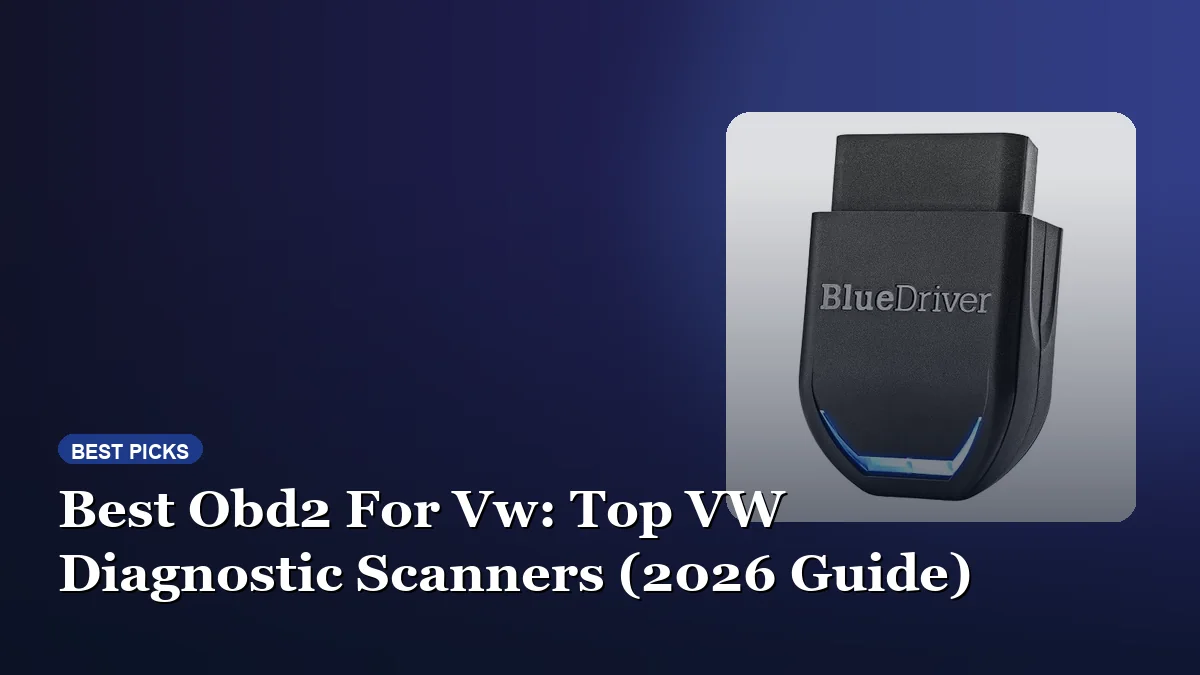
 BlueDriver Pro Bluetooth OBD2 Scanner for iPhone and Android
Wireless smartphone scanner / No subscription / Enhanced diagnostics
 XTOOL A30M Bidirectional Full System OBD2 Scanner
Full system bi-directional / Lifetime free updates / 26+ resets
 AUTOPHIX 5600 Full System OBD2 Scanner for VW Audi
Dedicated VW/Audi scanner / Standalone handheld / Full system access
 OBDeleven 3 Bluetooth OBD2 Diagnostic Tool for VAG
Official VAG license / One-click app mods / Bluetooth mobile tool
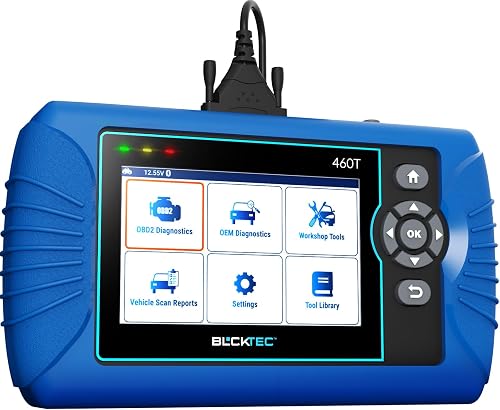 BLCKTEC 460T OBD2 Scanner Car Code Reader
12+ workshop resets / Multi-stream graphing / AutoVIN tech
 CAR2LS ScanX Bluetooth OBD2 Scanner for iPhone Android
Full system diagnostics / CarScanner integration / Bluetooth 5.2
The BlueDriver Pro Bluetooth OBD2 Scanner for iPhone and Android stands out as the top pick for Volkswagen owners seeking comprehensive, subscription-free diagnostics.
Whether you need to clear stubborn check engine lights or run deep system scans, choosing the right scanner saves both time and dealership fees.
On This Page (8 sections)
How We Chose
- VAG Compatibility: Every shortlisted tool must reliably interface with Volkswagen specific networks like CAN and UDS protocols.
- Feature Depth: We prioritize scanners offering comprehensive all-system diagnostics rather than basic generic code reading.
- Value & Reliability: Scanners must deliver exceptional performance relative to their cost, backed by our 10-point editorial scoring system.
Who Needs This
- DIY Volkswagen and Audi owners wanting to skip expensive dealership diagnostic fees.
- Drivers who need to quickly read, interpret, and clear persistent check engine or ABS lights.
- Enthusiasts looking to customize hidden vehicle features using coding apps.
Who Can Skip
- Owners of older pre-OBD2 Volkswagen vehicles built before nineteen-ninety-six.
- Drivers who prefer paying a professional mechanic for every minor dashboard warning light.
- Those who never plan to touch a wrench or troubleshoot basic electronic faults.
Quick Comparison: Best Obd2 For Vw
| Model | Platform / Interface | Connection Type | Key Feature |
|---|---|---|---|
| iOS & Android | Wireless Bluetooth | Enhanced diagnostics |
| iOS & Android | Bidirectional Active | 26+ Resets |
| Standalone Handheld | Vehicle Battery | Full VAG access |
| iOS & Android 8.0+ | Bluetooth Mobile | One-Click Apps |
| iOS and Android | Corded / Wired | 4.3 Inch Screen |
| Android, iOS | Bluetooth 5.2 | CarScanner integration |
The 6 Best Obd2 For Vws, Reviewed
BlueDriver Pro Bluetooth OBD2 Scanner for iPhone and Android
View on Amazon →Turns your phone into a powerful diagnostic hub without a nest of bulky cables getting in your way. It bridges the gap between basic code readers and expensive professional gear by serving up technician-verified repair reports matched right to your VIN.
Delivering crystal-clear, verified repair reports with zero subscription fees.
Bluetooth pairing can occasionally require a couple of retries depending on your phone model.
| Metric | Listed Specification |
|---|---|
| Operating System | iOS and Android |
| Fit Type | Vehicle Specific Fit |
| Power Source | Vehicle Port |
| Warranty | 180-Day Guarantee |
Plugging this compact dongle into the dashboard port is effortless, immediately pairing with your smartphone to pull live telemetry as you cruise down the highway.
The interface translates cryptic trouble codes into plain English so you can actually understand what is happening under the hood.
Because there are no wires or standalone screens to manage, it easily lives inside your glove box for instant access during unexpected dashboard warnings. Long-term updates keep the database current without badgering you for monthly membership dues.
- No subscription fees
- Verified technician fixes
- Wireless smartphone app
- Occasional Bluetooth pairing hiccups
- App dependence
Customers find the OBD2 scanner to be a great tool that works fantastically and is easy to use with a user-friendly app. They appreciate its cost-saving diagnostic capabilities, though a few note occasional Bluetooth pairing quirks.
Everyday drivers who want professional-grade troubleshooting guidance right on their phone.
Double-check specific make and model compatibility for advanced ABS and airbag functions.
A remarkably user-friendly tool that pays for itself the very first time you bypass a mechanic's diagnostic fee.
View on Amazon →Verdict
An exceptional overall choice that blends wireless convenience with deep diagnostic clarity.
XTOOL A30M Bidirectional Full System OBD2 Scanner
View on Amazon →Brings workshop-level active testing capabilities straight to your home garage by letting you remotely command components like fuel pumps and cooling fans. It bypasses recurring software fees by bundling lifetime updates directly into a single wireless mobile package.
Executing advanced bidirectional commands and active component tests from your phone.
Certain advanced security protocols like FCA AutoAuth require separate third-party registration.
| Metric | Listed Specification |
|---|---|
| Power Source | OBD II Port |
| Connectivity | Bluetooth 4.0 |
| Operating System | iOS, Android |
| Protocols | CAN FD & FCA |
The wireless connection lets you sit comfortably inside the cabin while testing wipers, windows, or fuel injectors outside under the hood. Live data streams can be viewed simultaneously in multi-channel graphs to spot erratic sensor behavior instantly.
Routine maintenance like electronic parking brake releases and oil service resets are cleanly laid out in the companion app. The hardware feels sturdy enough for regular weekend garage projects without taking up much space.
- Full bidirectional controls
- Lifetime free software updates
- Simultaneous live data graphing
- FCA security gateway requires extra setup
- App interface has a learning curve
Customers find the scan tool to be a high-quality device that performs as well as more expensive bidirectional scanners, offering extensive diagnostic capabilities. They appreciate the user-friendly interface and lifetime free updates, though some note occasional connection hiccups.
DIY mechanics who want active component testing and deep reset capabilities.
Verify whether your specific vehicle model requires an external security gateway unlock for full diagnostics.
A powerhouse diagnostic tool that punches well above its weight class for garage enthusiasts.
View on Amazon →Verdict
The ultimate choice for home mechanics needing advanced active testing without subscription traps.
AUTOPHIX 5600 Full System OBD2 Scanner for VW Audi
View on Amazon →Eliminates smartphone pairing hassles by delivering a dedicated standalone handheld design built explicitly for Volkswagen and Audi vehicles. It dives deep into manufacturer-specific control modules to clear stubborn warning lights without requiring any monthly apps or internet subscriptions.
Providing deep, dedicated diagnostics for VW and Audi cars without relying on a smartphone.
Limited strictly to VAG group vehicles and select model years for advanced functions.
| Metric | Listed Specification |
|---|---|
| Power Source | Vehicle Battery |
| Operating System | Windows (Updates) |
| Display | Color Screen |
| Compatibility | 1996-2019 VAG |
The physical button layout and clear color screen make it exceptionally easy to navigate greasy garage conditions without worrying about smartphone notifications or unstable Bluetooth signals. Simply plug it into the lower dash port and it powers right up.
Handling routine VAG upkeep like brake pad resets or battery registration becomes remarkably straightforward for home garages. The rugged plastic housing withstands being tossed into a toolbox alongside wrenches and sockets.
- Dedicated VW and Audi focus
- No smartphone app needed
- Physical buttons for greasy hands
- Not useful for non-VAG brands
- Older display resolution
Customers find the OBD2 scanner reliable, noting it scans and clears codes effectively while providing accurate real-time sensor readings. They appreciate its cost-effectiveness, with users reporting significant savings on home repairs like brake service.
Volkswagen and Audi owners who prefer a dedicated handheld tool over phone apps.
Confirm your specific model year falls within the supported range for advanced service resets.
A must-have diagnostic companion for anyone maintaining an aging European hatchback or sedan at home.
View on Amazon →Verdict
A dependable, dedicated tool tailored precisely to the quirks of Volkswagen and Audi electronics.
OBDeleven 3 Bluetooth OBD2 Diagnostic Tool for VAG
View on Amazon →Unlocks hidden vehicle features and deep comfort tweaks through an innovative one-click mobile app officially licensed by major European automakers. It replaces tedious manual coding lines with simple digital switches that let you customize everything from lighting behavior to digital gauges.
Unlocking hidden vehicle customizations and digital tweaks via official manufacturer licensing.
Advanced adaptations and certain automated features require credits or higher-tier subscription plans.
| Metric | Listed Specification |
|---|---|
| Dimensions | 1.5" x 1.5" x 3" |
| Protocols | CAN, KWP2000, K-line |
| Power Source | OBD II Port |
| Min OS | Android 8 / iOS 16.6 |
The pocket-sized dongle plugs flush into your diagnostic port, establishing a quick wireless link with your phone's app interface. Navigating control units feels intuitive, though utilizing specialized tweaks requires purchasing or earning in-app credits.
Because there are no wires or dedicated screens, you can leave it plugged in while monitoring live sensor telemetry on a mount. Long-term use requires a stable internet connection, which is worth keeping in mind for remote garage locations.
- Official manufacturer licensing
- Convenient one-click customizations
- Compact flush-mount design
- In-app credit system for advanced features
- Requires active internet connection
Customers find the diagnostic tool simple to use and appreciate its deep feature set for European vehicles. However, opinions on value are mixed due to the credit-based pricing model for premium features and app connectivity requirements.
European car enthusiasts who want to customize hidden comfort and lighting settings.
Check which advanced features require paid credits versus the free baseline diagnostics.
An unmatched digital customization tool for European car owners who love personalization.
View on Amazon →Verdict
The premier choice for tweaking and coding European vehicles right from your smartphone.
BLCKTEC 460T OBD2 Scanner Car Code Reader
View on Amazon →Combines a generous color display with advanced AutoVIN identification to scan every computer module in your vehicle within seconds. It pairs physical garage utility with cloud-backed repair guidance to help you track down stubborn dashboard warnings without guesswork.
Delivering rapid all-system scans backed by comprehensive repair app integration.
Physical unit is bulkier than pocket-sized dongles and requires wired dashboard connection.
| Metric | Listed Specification |
|---|---|
| Dimensions | 7.75" x 1.5" x 4.4" |
| Power Source | Vehicle Port |
| Updates | Lifetime Free |
| Compatibility | 1996+ US/Canada |
The larger screen real estate makes it easy to view up to four live data streams stacked in clear, synchronized graphs. Plugging it in triggers an instant automatic VIN read, skipping manual vehicle entry steps entirely.
Resetting oil maintenance lights, electronic parking brakes, and steering angle sensors feels like having a professional bench tool at home. The robust housing easily survives daily workshop handling and accidental drops.
- Large easy-to-read screen
- Fast AutoVIN identification
- Comprehensive repair app database
- Bulkier handheld footprint
- Geographic restriction to North America
Customers find the OBD2 scanner works well, quickly diagnosing engine and ABS codes while saving money on shop visits. They appreciate its simplicity and reset functions, though some note that specific advanced features vary by vehicle model.
Home mechanics who prefer a standalone tool with a large screen and deep diagnostic depth.
Verify that your specific vehicle model supports all desired reset functions prior to purchase.
A comprehensive, reliable garage scanner that simplifies complex multi-system troubleshooting.
View on Amazon →Verdict
A top-tier diagnostic tool for DIYers wanting a large screen and professional reset capabilities.
CAR2LS ScanX Bluetooth OBD2 Scanner for iPhone Android
View on Amazon →Pairs ultra-compact hardware with trusted CarScanner app integration to deliver full-system diagnostics without recurring subscription fees. It pulls from a massive trouble code library to uncover hidden faults during pre-purchase inspections and routine checks alike.
Offering budget-friendly wireless full-system diagnostics with bundled app access.
Advanced vehicle coding features are generally limited to models manufactured after certain years.
| Metric | Listed Specification |
|---|---|
| Dimensions | 1.97" x 0.87" x 1.38" |
| Operating System | Android, iOS |
| Power Source | Port Powered |
| Coding Support | 2012+ Vehicles |
The low-profile design plugs seamlessly into the lower dash without bumping against your knees while driving. Bluetooth 5.2 establishes a remarkably quick wireless handshake with your phone as soon as the ignition turns on.
Reading airbag, transmission, and ABS modules helps catch hidden gremlins before buying a used vehicle or heading to emissions testing. The lack of subscription costs means you can run diagnostics as frequently as needed without extra charges.
- No subscription fees
- Fast Bluetooth 5.2 link
- Full system module access
- Coding restricted on older models
- Phone dependent display
Budget-conscious drivers who want wireless full-system diagnostics on their smartphone.
Check if your specific car model supports advanced comfort coding within the integrated app.
A high-value wireless scanner that delivers robust diagnostic power straight to your phone.
View on Amazon →Verdict
An exceptional value pick combining wireless flexibility with comprehensive system coverage.
Setting Up and Maintaining Your VW Diagnostic Scanner
Locate the standard OBD2 port under the driver's side dashboard of your Volkswagen, usually positioned near the steering column. Plug your chosen diagnostic tool firmly into the port until the indicator lights confirm a solid power connection.
Ensure your smartphone or handheld unit establishes a stable wireless or wired link before turning your ignition to the auxiliary position.
After completing your diagnostic session, store the device in a cool, dry glove compartment away from extreme temperatures to protect its internal circuitry.
Buying Guide & Red Flags for Best Obd2 For Vws
Check these points before you buy to avoid common pitfalls:
Be cautious of scanners claiming universal Volkswagen coding without specifying required app credits or subscriptions.
Avoid units that lack real-time live data streaming if you plan on diagnosing complex engine performance issues.
Check for potential firmware update hurdles that might lock out newer Volkswagen model years.
Verify whether advanced features like electronic parking brake retraction require separate professional licensing.
Watch out for flimsy build quality or loose connector pins that could easily break inside tight dashboard ports.
What does the 10-point Lab Score mean for Volkswagen scanners?
Our 10-point editorial score is a comprehensive metric combining design quality, everyday practicality, material durability, and real-world owner satisfaction. Instead of relying on rigid math formulas, our automotive editors personally evaluate how each scanner performs during live VAG diagnostics.
A higher score signifies exceptional build quality, intuitive software integration, and dependable reliability for home mechanics. This rigorous rating ensures you invest in a tool that genuinely handles Volkswagen electrical systems with ease.
Will a standard generic OBD2 reader work on my Volkswagen?
A basic generic OBD2 reader will pull standard powertrain fault codes from almost any modern vehicle. However, Volkswagens utilize complex proprietary networks that control ABS, transmission, and airbag modules beyond basic engine emissions.
Investing in a dedicated Volkswagen diagnostic tool allows you to access these hidden modules and clear manufacturer-specific codes. Choosing the right device prevents endless frustration when dealing with intricate German automotive electronics.
Can I use an OBD2 scanner to code hidden features on my VW?
Certain specialized Bluetooth diagnostic tools allow you to unlock hidden vehicle customizations through dedicated smartphone apps. These modifications can enable features like needle sweep gauges, comfort window closing, and customized daytime running lights.
You will typically need a stable connection and occasionally software credits depending on the specific platform you choose. Always verify software compatibility for your exact Volkswagen model year before attempting any digital coding.
Do I need an internet connection to use a Volkswagen OBD2 scanner?
Most modern diagnostic scanners require an initial internet connection to download critical vehicle databases or software updates. Once updated, handheld units and standard wireless dongles operate completely offline for everyday code reading and clearing.
However, advanced cloud-based repair databases or online coding apps will need an active cellular or Wi-Fi signal to function properly. Keeping your device updated ensures it recognizes newly released trouble codes on recent Volkswagen models.
Why do some Volkswagen scanners require extra app subscriptions?
Certain advanced diagnostic tools utilize subscription models to cover continuous software development and server costs for dealer-level programming. While basic code reading is usually free, unlocking bidirectional controls or deep coding adaptations might require recurring fees or digital credits.
If you prefer avoiding ongoing costs, several excellent options offer completely free lifetime updates and feature sets. Carefully review the software ecosystem before purchasing to ensure it aligns with your budget.
How do I update the firmware on my VW code reader?
Updating your diagnostic scanner typically involves connecting the device to a Windows PC or linking it via a companion smartphone application. Manufacturers regularly release patches to improve compatibility with newer Volkswagen models and expand trouble code databases.
Simply follow the on-screen instructions provided by the manufacturer website or app interface to download files safely. Regular updates prevent communication glitches and guarantee maximum diagnostic accuracy.
Can a diagnostic scanner help me clear electronic parking brake warnings?
Many mid-range and advanced Volkswagen scanners include specialized service resets designed specifically for electronic parking brakes. This feature is essential when performing rear brake pad replacements, allowing you to safely retract the calipers without damaging the motor.
Using a dedicated VAG tool ensures the service mode engages and disengages correctly according to factory specifications. Always confirm that your chosen scanner lists electronic parking brake service capabilities before tackling brake maintenance.
Final Verdict
Selecting the right diagnostic tool transforms how you maintain your German vehicle, saving time and costly workshop visits.
For most drivers, the BlueDriver Pro Bluetooth OBD2 Scanner for iPhone and Android delivers the ideal blend of comprehensive diagnostics and subscription-free value. Match your choice to your mechanical experience and technical needs to keep your Volkswagen running smoothly.
Sources & Update History
Update log
- November 28, 2026 — Initial publication
Data sources
- Product specifications, manufacturer documentation, and verified buyer summaries