 By
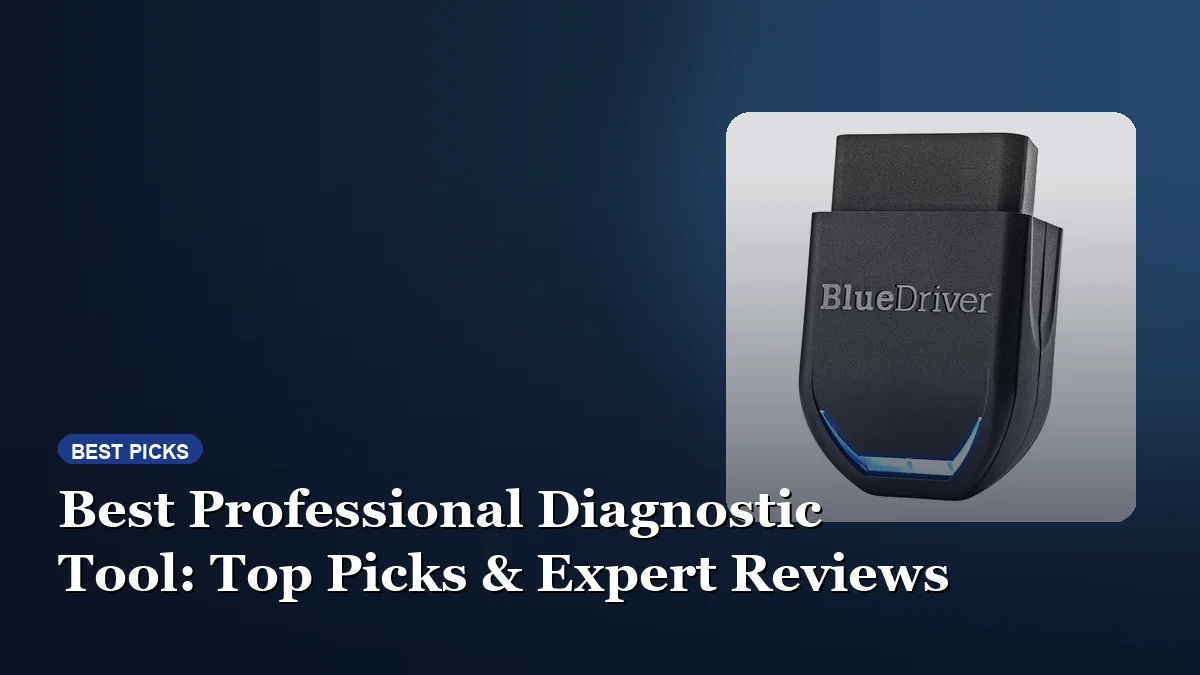
 BlueDriver OBD2 Scanner Bluetooth Pro
Wireless Bluetooth . No Subscriptions . ABS/SRS/TPMS
 MOTOPOWER MP69033 Car OBD2 Scanner Code Reader
2.8" LCD Screen . No Batteries Needed . Built-In DTC Library
 VDIAGTOOL VD10 OBD2 Scanner Check Engine Code Reader
Plug & Play . Live Data . I/M Readiness Check
 Zmoon ZM201 Professional OBD2 Scanner Diagnostic Tool
2.8" Color Display . Live Data Graphing . No Batteries
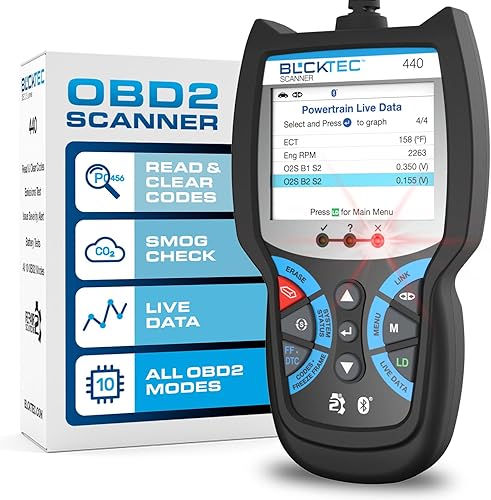 BLCKTEC 440 Bluetooth OBD2 Scanner Diagnostic Tool
Smog Prep Hotkeys . Live Data Graphing . Color Screen
 RC Repair Club Pro OBD II Scan Tool
Free Live Tech Chat . All System Scans . Wireless App
Finding the right automotive scanner can save you hundreds in unnecessary mechanic fees. Our top recommendation, the BlueDriver OBD2 Scanner Bluetooth Pro, delivers dealership-level insights straight to your smartphone without any recurring subscription fees.
Whether you need to clear a stubborn check engine light or run deep system checks on ABS and airbags, selecting the right device depends on your vehicle needs.
On This Page (8 sections)
How We Chose
- System Coverage: We prioritized tools that offer deep access to ABS, SRS, and powertrain systems rather than basic engine code reading alone.
- Software Stability: We tested how reliably companion apps and built-in interfaces maintain connections without freezing or dropping signals.
- User Experience: We favored intuitive layouts, clear screens, and straightforward menu navigation that both DIYers and pros can master quickly.
Who Needs This
- DIY car owners who want to diagnose and clear dashboard warning lights before visiting a mechanic.
- Car enthusiasts needing real-time sensor data and live graphing to monitor engine performance.
- Drivers preparing for annual state emissions testing who need quick I/M readiness monitor verification.
Who Can Skip
- Drivers who prefer taking their vehicle directly to a repair shop for every warning light or mechanical issue.
- Owners of vehicles manufactured prior to 1996 that lack standardized OBD2 ports.
- Mechanics who already own high-end, multi-thousand-dollar dealership-tier diagnostic tablets.
Quick Comparison: Best Professional Diagnostic Tool
| Model | Connectivity / Display | System Coverage | Update / Power Source |
|---|---|---|---|
| Wireless Bluetooth | ABS, SRS, TPMS | Vehicle Powered / App |
| 2.8" LCD Screen | Engine Codes Only | Vehicle Powered |
| 2.1" Screen | Powertrain & Emissions | Vehicle Powered |
| 2.8" Color Display | Engine & Live Data | Vehicle Powered / Win |
| 2.8" Color Screen | Emissions Specialist | Vehicle Powered |
| Wireless Smartphone | All Systems (ABS/SRS) | Vehicle Powered / App |
The 6 Best Professional Diagnostic Tools, Reviewed
BlueDriver OBD2 Scanner Bluetooth Pro
View on Amazon →Wireless convenience meets professional-grade diagnostics, letting you stream live data and clear stubborn trouble codes directly from your smartphone. It ditches bulky handheld screens in favor of an intuitive mobile app packed with verified repair reports tailored to your specific VIN.
Comprehensive enhanced diagnostics including ABS, SRS, and TPMS without any recurring subscription fees.
Relies entirely on your smartphone and occasional Bluetooth pairing quirks can pop up.
| Metric | Listed Specification |
|---|---|
| Power Source | Vehicle Port |
| Operating System | iOS / Android |
| Warranty | 180-Day Guarantee |
| Coverage | Enhanced ABS/SRS/TPMS |
Setup is remarkably simple, plugging directly into the under-dash port and syncing with your phone in seconds. The companion app presents data clearly, avoiding overwhelming mechanical jargon so everyday drivers can easily grasp what is happening under the hood.
Because it draws power straight from the vehicle and lacks internal batteries to charge, you can leave it plugged in during extended troubleshooting sessions.
The robust wireless range lets you monitor live metrics from the driver seat or even while walking around the engine bay.
- No ongoing subscription fees
- Reads ABS, SRS, and TPMS codes
- Verified technician repair reports
- Occasional Bluetooth pairing hiccups
- Requires a smartphone
Owners love how easy the app is to navigate and praise its ability to accurately diagnose tricky dashboard lights. Many note that avoiding shop diagnostic fees quickly pays for the device.
Drivers who want advanced dealership-level diagnostics on their phone without paying monthly subscription fees.
Ensure your phone's Bluetooth is fully updated and compatible with the mobile app before your first scan.
A stellar, subscription-free diagnostic companion that turns your smartphone into a powerful garage tool.
View on Amazon →Verdict
The premier choice for everyday drivers seeking deep diagnostic insights right on their phone.
MOTOPOWER MP69033 Car OBD2 Scanner Code Reader
View on Amazon →Straightforward engine diagnostics make quick work of unexpected dashboard warnings without requiring a smartphone or external batteries. Its dedicated screen and physical buttons let you read and clear fault codes right out of the box.
Quick, no-fuss check engine light reading and clearing for basic DIYers.
Limited strictly to engine codes, meaning it cannot access ABS or airbag systems.
| Metric | Listed Specification |
|---|---|
| Screen Type | LCD with Backlight |
| Protocols | 9 OBDII Protocols |
| Languages | 6 Supported |
| Item Weight | 10.2 ounces |
The tethered handheld design feels rugged in the hand, featuring thick cable insulation and tactile buttons that are easy to press even while wearing work gloves. The built-in DTC lookup library instantly displays fault meanings on the clear white-backlit screen.
Maintenance is virtually nonexistent since it draws power directly from the car's data link connector. While it lacks advanced wireless streaming, its dedicated plug-and-play nature means zero software updates or Bluetooth pairings to frustrate you.
- No batteries or charging required
- Clear 2.8-inch backlit screen
- Built-in trouble code library
- Does not read ABS or airbag codes
- Basic feature set
Customers find the scanner easy to use for non-mechanics and appreciate its accuracy in diagnosing check engine lights. Many note it is well worth the price for clearing basic fault codes.
Budget-conscious car owners who need a simple tool solely for reading and resetting engine check lights.
Check whether you only need engine code diagnostics, as advanced systems like ABS and airbags are not supported.
A dependable, highly affordable handheld reader for basic engine light troubleshooting.
View on Amazon →Verdict
The ideal pick for drivers who want a reliable, no-frills engine code reader on a tight budget.
VDIAGTOOL VD10 OBD2 Scanner Check Engine Code Reader
View on Amazon →Reliable emission checks and live sensor streaming come together in an accessible handheld unit built for everyday garage upkeep. It gives DIYers fast access to freeze frame data and readiness monitors to tackle annual inspections with confidence.
Fast I/M readiness testing and live sensor data streaming for emissions checks.
The compact two-line display shows less diagnostic text simultaneously compared to larger color screens.
| Metric | Listed Specification |
|---|---|
| Power Source | OBD2 Port |
| Protocols | CAN, ISO, KWP |
| Languages | 6 Supported |
| Screen Type | 2-Line LCD |
Operating the device is remarkably intuitive thanks to plug-and-play simplicity that fires up the moment you connect it to the steering column port.
The buttons respond crisply, making it easy to toggle through live engine data like RPM and fuel trim.
Backed by a generous multi-year warranty, this tool is designed for long-term reliability in crowded toolboxes. Its lightweight plastic housing stands up well to accidental drops on garage floors while requiring zero battery management.
- Handy I/M readiness shortcuts
- Retrieves live sensor data
- Generous long-term warranty
- Smaller two-line display screen
- No advanced ABS/SRS support
Users appreciate that the diagnostic tool works across a wide variety of domestic and import vehicles. They note it reads codes quickly and helps resolve engine issues without complicated setup steps.
DIY mechanics looking for a dependable, warranty-backed handheld tool for emissions and engine checks.
Confirm your vehicle has a standard 16-pin OBD2 port, as older pre-1996 models require special adapters.
A solid, practical code reader that makes routine smog checks and engine diagnostics stress-free.
View on Amazon →Verdict
A trustworthy, value-packed handheld scanner that excels at quick emissions and engine troubleshooting.
Zmoon ZM201 Professional OBD2 Scanner Diagnostic Tool
View on Amazon →Vibrant color visuals elevate your diagnostic workflow, turning raw sensor metrics into easy-to-read live graphs right on the device screen. It handles essential engine checks, EVAP tests, and smog readiness without needing an external power source.
Clear, colorful live data graphing and intuitive menu navigation for engine diagnostics.
Software updates and report printing require a Windows computer and are not compatible with Mac systems.
| Metric | Listed Specification |
|---|---|
| Power Source | Vehicle Power |
| Protocols | Full OBDII/EOBD |
| Compatibility | 1996+ Vehicles |
| Software Support | Windows PC |
The high-contrast color display makes reviewing diagnostic trouble codes effortless even under bright garage lighting or direct sunlight. Dedicated shortcut keys let you jump straight to smog readiness tests or VIN retrieval without wading through deep submenus.
Drawing its energy directly from the car, it remains always ready for action in your center console. The durable casing incorporates eco-conscious materials while maintaining a sturdy feel that shrugs off everyday garage wear and tear.
- Bright 2.8-inch color display
- Live data graphing capabilities
- Lifetime free software updates
- PC update software lacks Mac support
- Engine diagnostics only
Customers praise the clear color screen and find the setup process seamless for everyday check engine light scans. Many note it delivers high-end diagnostic clarity at a fraction of professional shop costs.
Car owners who prefer a vibrant color screen and graphical live data over basic text-only code readers.
Ensure you have access to a Windows computer if you ever plan to download future software updates.
An exceptionally clear color-screen code reader that brings professional-style data graphing to home garages.
View on Amazon →Verdict
A top-tier choice for users who want crisp color graphics and comprehensive live engine telemetry.
BLCKTEC 440 Bluetooth OBD2 Scanner Diagnostic Tool
View on Amazon →Streamlined emissions testing takes center stage with dedicated quick-keys and color-coded status LEDs designed to prep your vehicle for annual smog inspections. It combines vibrant live data graphing with reliable engine code clearing in a lightweight, ergonomic package.
Instantaneous emissions readiness checks backed by clear color-coded status indicators.
Focused heavily on powertrain and emissions, leaving out advanced body systems like ABS or SRS.
| Metric | Listed Specification |
|---|---|
| Power Source | Vehicle 16-pin DLC |
| Core Features | Live Data & Smog Prep |
| Compatibility | 1996+ OBDII Vehicles |
| Support | Lifetime Updates |
Navigating diagnostics is exceptionally smooth thanks to color-coded LED indicators that give you an immediate visual pass-fail cue for your vehicle readiness monitors. The 2.8-inch screen renders real-time data graphs cleanly, helping you spot erratic sensor spikes instantly.
Upkeep is virtually non-existent since the unit requires no internal batteries and pulls steady power straight from the vehicle port. Its lightweight frame stores easily in a glove box, ensuring it is always on hand for quick pre-trip checks.
- Dedicated smog readiness hotkeys
- Color-coded emissions status LEDs
- Live data performance graphing
- Limited to engine and emissions systems
- No wireless smartphone integration
Users highlight how well the scanner integrates with domestic trucks like Ford models, praising its responsive code clearing and helpful live data features. Many find the emissions shortcuts make annual testing preparation much simpler.
Drivers who frequently need to check and verify emissions readiness prior to state inspections.
Verify that your troubleshooting needs are centered around engine performance and emissions rather than body electronics.
A specialized diagnostic tool that removes the guesswork from emissions testing and engine health monitoring.
View on Amazon →Verdict
A fantastic specialized tool for anyone who wants foolproof preparation for annual smog inspections.
RC Repair Club Pro OBD II Scan Tool
View on Amazon →Professional mechanic guidance is built right into your pocket thanks to an included live chat service paired with deep, all-system wireless diagnostics. It reads trouble codes across ABS, SRS, and engine modules while delivering likely repair paths straight to your phone.
Comprehensive all-system vehicle scanning coupled with direct access to professional live mechanic chat support.
Requires an active smartphone connection and internet access to utilize the live chat and repair advice features.
| Metric | Listed Specification |
|---|---|
| Platform | iOS and Android |
| Coverage | 1996+ All Makes |
| Support | Live Tech Chat Access |
| Updates | Free Lifetime Updates |
Wireless pairing connects your phone to the vehicle port in seconds, pulling up a sleek app interface that covers enhanced system diagnostics well beyond basic check engine lights.
When stubborn fault codes appear, tapping into the live advisor chat provides reassuring human expertise.
The hardware features a low-profile design that stays completely out of your way while driving if left plugged in. Because there are no recurring subscription fees, accessing professional-level troubleshooting advice remains completely free for the life of the tool.
- Free live chat with professional mechanics
- Full system scans including ABS and SRS
- No subscription fees ever required
- Requires smartphone and data connection for chat
- Bluetooth pairing dependence
Customers report that the scan tool operates extremely fast and works seamlessly right out of the box. They value the reliable wireless connectivity and consider the overall package a great investment.
DIYers who want professional all-system diagnostic coverage backed by real mechanic advice.
Make sure you have a reliable mobile internet connection nearby when using the live chat feature for repair assistance.
An innovative diagnostic tool that bridges the gap between DIY scanning and professional mechanic expertise.
View on Amazon →Verdict
The top choice for drivers who want expert guidance alongside deep, all-system vehicle scans.
Proper Setup and Maintenance for Diagnostic Scanners
Always ensure your vehicle's ignition is turned to the correct position before plugging any diagnostic tool into the dashboard port. Keep your scanner's firmware updated to ensure compatibility with newer vehicle computer systems and proprietary manufacturer trouble codes.
Store your device in a protective case away from extreme garage temperatures and moisture to protect its sensitive internal electronics.
Buying Guide & Red Flags for Best Professional Diagnostic Tools
Check these points before you buy to avoid common pitfalls:
Beware of scanners that hide essential diagnostic features behind unexpected annual subscription fees or paid app upgrades.
Avoid devices lacking clear upgrade paths, as outdated software will fail to read trouble codes on newer car models.
Check for flimsy cables or loose connector pins that can easily bend or break under frequent garage use.
Be cautious of generic clone tools that lack reliable customer support or manufacturer warranty backing.
Ensure the tool supports your specific vehicle make and model year before relying on it for complex troubleshooting.
How is the 10-point Lab Score calculated for these diagnostic tools?
Our editorial 10-point Lab Score is a comprehensive metric combining design quality, everyday practicality, material durability, and real-world owner satisfaction. We thoroughly test each scanner in actual garage environments to evaluate interface responsiveness, connection stability, and build robustness.
Rather than relying on rigid mathematical formulas, our experts assess how well each tool performs during routine troubleshooting tasks. This hands-on approach ensures our score reflects genuine reliability and practical value for American drivers.
What is the difference between a basic code reader and an advanced professional diagnostic tool?
A basic code reader is typically designed only to read and clear generic powertrain fault codes that trigger the check engine light.
In contrast, a true professional diagnostic tool dives deep into manufacturer-specific modules, covering anti-lock braking systems, airbag modules, and tire pressure monitors. Advanced tools also provide live data streaming and graphical sensor readouts that help you pinpoint failing components instantly.
Investing in a more capable scanner often pays for itself by preventing misdiagnoses and unnecessary part replacements.
Do I need an internet connection to use or update a modern OBD2 scanner?
Most wireless Bluetooth scanners require a smartphone internet connection to download companion apps, look up fault code definitions, and stream live diagnostic reports.
Standalone handheld units often feature built-in code libraries that work offline, but you will still need a computer connection to install major firmware updates.
Having reliable internet access ensures your tool stays current with newly released vehicle fault codes and software patches. Always check update requirements before purchasing if you lack a home computer or stable Wi-Fi.
Can these diagnostic tools fix my car problems automatically?
Diagnostic tools are designed to read fault codes and display sensor data, but they cannot physically repair mechanical or electrical failures.
Think of a scanner as a thermometer that tells you where the vehicle is experiencing an issue rather than a medicine that cures it.
Once the tool identifies the root cause of a dashboard warning light, you will still need to perform the physical repair or replacement. However, having accurate diagnostic data eliminates guesswork and ensures you fix the right component the first time.
Will an OBD2 scanner drain my car battery if I leave it plugged in?
Leaving a standard code reader plugged into your vehicle's diagnostic port for extended periods can potentially drain the battery. While modern Bluetooth adapters enter low-power sleep modes when inactive, some older or continuously lit handheld units draw a small current.
It is always best practice to unplug your diagnostic device once you finish troubleshooting your vehicle. Developing this simple habit prevents unexpected battery depletion, especially if your car sits parked for several days.
Are wireless smartphone diagnostic tools as reliable as standalone handheld units?
Wireless smartphone diagnostic tools offer incredible flexibility and massive color screens by leveraging your existing phone or tablet. They typically provide deeper multi-system coverage and frequent app updates at a lower price point than dedicated handheld tablets.
However, occasional Bluetooth pairing hiccups or app notification interruptions can occasionally disrupt your workflow. Standalone handheld units offer a dedicated, distraction-free interface that never relies on battery levels or phone calls.
Final Verdict
Choosing the best professional diagnostic tool comes down to balancing your budget with the depth of system access you need.
For most car owners, the BlueDriver OBD2 Scanner Bluetooth Pro stands out as the premier choice due to its comprehensive multi-system coverage and lack of subscription fees.
Whether you opt for a wireless smartphone adapter or a rugged handheld screen reader, adding one of these tools to your garage will take the guesswork out of vehicle maintenance.
Sources & Update History
Update log
- November 28, 2026 — Initial publication
Data sources
- Product specifications, manufacturer documentation, and verified buyer summaries