 By
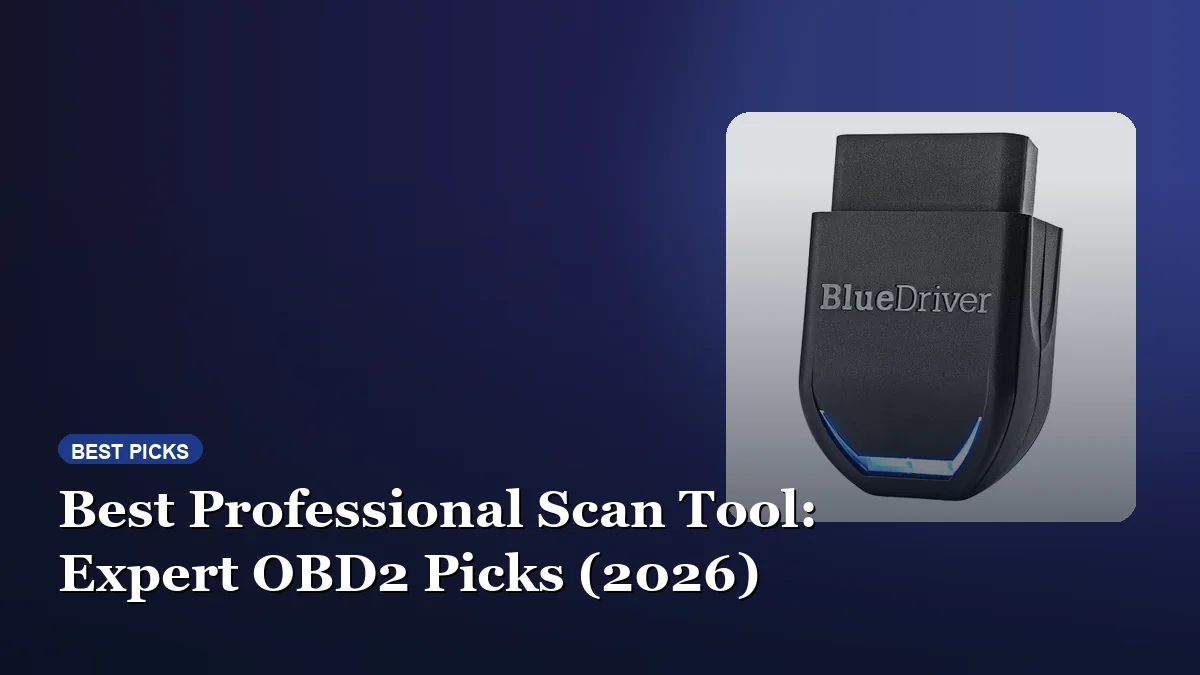
 BlueDriver Bluetooth OBD2 Diagnostic Scan Tool and Code Reader
Wireless Bluetooth app-based diagnostic tool with verified fixes.
 XTOOL A30M Bidirectional Full System OBD2 Diagnostic Scan Tool
Full system wireless scanner with active tests and lifetime updates.
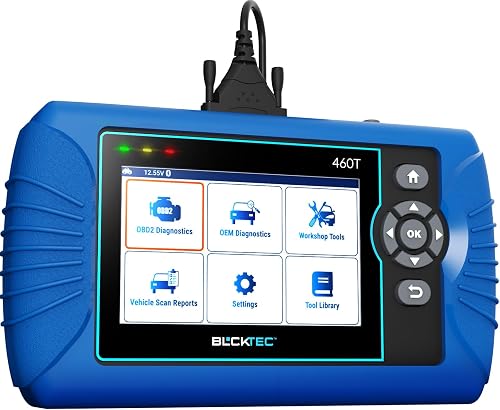 BLCKTEC 460T All System OBD2 Diagnostic Scanner and Code Reader
Standalone handheld scanner with 12 reset functions and live graphing.
 LAUNCH AIOBD Elite Bluetooth Bidirectional OBD2 Diagnostic Scan Tool
Wireless bidirectional scanner with AI repair guidance and 15 resets.
 CrysGuard V519 Professional OBD2 and CAN Code Reader Scan Tool
Standalone OBD2 code reader with battery voltage monitoring and live graphs.
 EDIAG H361 Bidirectional OBD2 Diagnostic Scanner with Touchscreen
Standalone touchscreen diagnostic tablet with bidirectional active tests.
The BlueDriver Bluetooth OBD2 Diagnostic Scan Tool stands out as our top pick for its brilliant mix of wireless convenience and verified repair reports.
Whether you are clearing a stubborn check engine light or deep-diving into live sensor data, finding the right scanner saves both time and repair shop fees. Read on to discover which model fits your garage and diagnostic needs best.
On This Page (8 sections)
How We Chose
- Wireless Performance: We prioritize models offering rock-solid Bluetooth or reliable standalone tablet connectivity for seamless diagnostic sessions.
- Diagnostic Depth: We test whether tools go beyond basic code reading to offer full-system scans, active testing, and maintenance resets.
- Value & Updates: We favor scan tools that deliver transparent software update policies without locking essential repair functions behind pricey paywalls.
Who Needs This
- DIY mechanics who want to accurately diagnose check engine lights and monitor live engine sensors at home.
- Car enthusiasts working across multiple vehicle makes who need deep system access and oil or brake service resets.
- Budget-conscious vehicle owners looking to avoid steep diagnostic labor fees by catching minor faults early.
Who Can Skip
- Drivers who only ever need a basic plug-and-play code reader to clear simple emissions codes once a year.
- Professional master technicians who already rely on multi-thousand-dollar factory-level diagnostic mainframes.
- Vehicle owners completely uninterested in looking up diagnostic trouble codes or monitoring live data streams.
Quick Comparison: Best Professional Scan Tool
| Model | Platform / Interface | Connection / Power | Key Diagnostic Feature |
|---|---|---|---|
| iOS & Android | Wireless Bluetooth | Verified Repair Reports |
| iOS & Android | OBD2 Port Wireless | 26+ Bidirectional Resets |
| 4.3-inch Display | Vehicle Powered | 12+ Service Resets |
| Linux Tablet | Bluetooth 5.0 | AI Repair Guidance |
| 2.8-inch Screen | Vehicle Battery | Battery Health Monitor |
| Android 8.1 Touch | Battery Powered | Active Component Tests |
The 6 Best Professional Scan Tools, Reviewed
BlueDriver Bluetooth OBD2 Diagnostic Scan Tool and Code Reader
View on Amazon →Turning your smartphone into a capable garage assistant, this wireless scanner bypasses bulky cords by linking straight to your phone via Bluetooth. It bridges the gap between basic code readers and expensive shop tablets by offering enhanced module checks and technician-verified repair reports tailored directly to your vehicle.
Delivering clear, technician-verified repair reports matched straight to your vehicle's VIN.
Lacks advanced bidirectional control features found on dedicated shop-grade tablets.
| Metric | Listed Specification |
|---|---|
| Power Source | Vehicle Port |
| Operating System | iOS/Android App |
| Vehicle Fit | Gas 1996+ & Select Trucks |
| Warranty | 180-Day Money Back |
Setup is remarkably straightforward—just plug the compact module into your dashboard port and pair it through the mobile app.
The interface is clean and responsive, making it easy to read live data streams or check smog readiness without flipping through thick manuals.
Because it relies entirely on your smartphone or tablet, long-term upkeep is minimal since software updates download automatically over the air.
The lack of subscription fees means you can run diagnostics as often as needed without worrying about recurring annual charges.
- No subscription fees ever
- Wireless smartphone integration
- Verified fix database included
- Occasional Bluetooth pairing quirks
- Limited to basic diagnostics on some makes
Customers find the OBD2 scanner to be a great tool that works fantastically and is easy to use with a user-friendly app. They appreciate its value, noting it has saved them thousands of dollars in diagnostic and repair costs.
Everyday drivers and DIYers wanting a reliable, subscription-free way to decode dashboard warning lights.
Double-check specific enhanced diagnostic coverage for your exact vehicle make and model year.
A dependable wireless scanner that makes troubleshooting check engine lights straightforward for any driver.
View on Amazon →Verdict
This intuitive tool earns our top spot by combining robust diagnostic depth with zero ongoing subscription costs.
XTOOL A30M Bidirectional Full System OBD2 Diagnostic Scan Tool
View on Amazon →Bringing workshop-level command to your home garage, this wireless diagnostic tool lets you send direct instructions to vehicle components like fuel pumps and windows. It stands out by offering robust bidirectional testing alongside lifetime software updates, letting you tackle complex repairs without paying recurring fees.
Executing active bidirectional component tests to quickly isolate mechanical failures.
Requires separate paid accounts for certain advanced gateway security systems like FCA AutoAuth.
| Metric | Listed Specification |
|---|---|
| Power Source | OBD II Port |
| OS Compatibility | iOS & Android |
| Active Tests | 26+ Resets |
| Warranty | 2 Year Manufacturer |
The wireless Bluetooth connection provides solid freedom of movement, allowing you to trigger window motors or wipers while standing outside the vehicle.
The app interface handles up to eight live data streams simultaneously, rendering clean real-time graphs for spotting intermittent engine quirks.
Built for long-term versatility, the hardware requires minimal physical maintenance beyond keeping the dongle clean and stored securely. Because software updates come at no extra cost, the tool adapts smoothly as you service newer vehicle models over the years.
- Full bidirectional active testing
- Lifetime free software updates
- Simultaneous multi-stream live graphing
- FCA AutoAuth requires separate fee
- Bluetooth pairing can occasionally drop
Customers find the scan tool to be a high-quality device that performs as well as more expensive bidirectional scanners. They appreciate its user-friendly interface and value for money, noting significant savings on professional diagnostics.
Hands-on DIYers seeking advanced active testing capabilities without a steep ongoing subscription cost.
Verify whether your specific vehicle year requires a separate gateway authorization account for full access.
A feature-packed bidirectional scanner that delivers high-end diagnostic power for home mechanics.
View on Amazon →Verdict
For advanced troubleshooting and active component testing on a budget, this versatile wireless tool is hard to beat.
BLCKTEC 460T All System OBD2 Diagnostic Scanner and Code Reader
View on Amazon →Designed as a dedicated standalone unit, this handheld diagnostic tool features a bright physical screen and rapid auto-scanning capabilities. It cuts down diagnostic legwork by automatically pulling vehicle identification data and pairing with a cloud-connected mobile app for comprehensive repair guidance.
Automatically pulling vehicle data and scanning all electronic control units right out of the box.
Some advanced service reset functions may not be fully supported across all vehicle makes and models.
| Metric | Listed Specification |
|---|---|
| Power Source | Vehicle Port |
| Dimensions | 7.75" x 1.5" x 4.4" |
| OS Compatibility | iOS/Android App Sync |
| Language Support | English, French, Spanish |
The physical button layout and crisp screen make it easy to use outdoors in direct sunlight without struggling with a smartphone screen.
Plugging it in triggers an automatic VIN fetch and full system scan immediately, saving valuable time during quick pre-purchase inspections.
Constructed for rugged garage environments, the tool feels solid in the hand and handles regular use without software lag.
Storing scan reports in the cloud via the companion app ensures you can easily reference or print vehicle histories long after the repair is finished.
- Dedicated handheld screen layout
- Automatic VIN and ECU scanning
- Free lifetime software updates
- Reset feature availability varies
- App sync required for deep repair info
Customers find the OBD2 scanner works well, noting it successfully diagnoses stubborn engine codes and simplifies routine maintenance. They appreciate its solid value and fast code-reading performance in the garage.
Home mechanics who prefer a standalone physical tool over managing app-based smartphone connections.
Check the online compatibility tool to ensure your specific vehicle supports all desired reset functions.
A reliable standalone scanner that brings professional-grade all-system diagnostics to your home workbench.
View on Amazon →Verdict
This robust handheld unit offers an excellent balance of physical convenience and deep diagnostic reach.
LAUNCH AIOBD Elite Bluetooth Bidirectional OBD2 Diagnostic Scan Tool
View on Amazon →Blending wireless convenience with intelligent software assistance, this compact diagnostic adapter pairs with your phone to deliver active testing and deep system scans. It streamlines the repair process by integrating artificial intelligence tools that help point you toward exact fault locations and technical service bulletins.
Integrating AI-guided repair intelligence directly into wireless component testing workflows.
Full software updates transition to a paid model after the initial inclusion period expires.
| Metric | Listed Specification |
|---|---|
| Power Source | Corded / OBD Port |
| Dimensions | 3.54" x 1.1" x 6.3" |
| Operating System | Linux Dongle / App |
| Warranty | 2-Year Manufacturer |
The Bluetooth 5.0 connection maintains a steady link across a standard garage, allowing you to trigger cooling fans or door locks remotely through the mobile app.
The four-in-one graphical live data stream updates smoothly, helping you monitor critical parameters like coolant temperature without stuttering.
Maintenance is straightforward since the pocket-sized hardware takes up virtually no storage space in your glove compartment. The build quality feels resilient against accidental drops, and the companion app organizes past diagnostic logs cleanly for future reference.
- AI-powered repair guidance and tips
- Reliable Bluetooth 5.0 wireless range
- Comprehensive module scan coverage
- Free software access period is limited
- Advanced gateway features need separate accounts
Tech-savvy DIYers looking for intelligent diagnostic prompts alongside active component testing.
Confirm the exact duration of complimentary software updates and check model-specific reset limitations.
An intelligent wireless scanner that makes advanced troubleshooting feel accessible and structured.
View on Amazon →Verdict
Backed by smart repair algorithms and solid wireless performance, this tool bridges the gap between amateur and pro repairs.
CrysGuard V519 Professional OBD2 and CAN Code Reader Scan Tool
View on Amazon →Keeping things refreshingly simple, this dedicated handheld scanner requires zero smartphone pairing, apps, or external batteries to operate. It plugs straight into your dashboard to deliver instant access to a massive built-in trouble code library, complete with integrated battery voltage testing and pre-inspection smog readiness checks.
Providing instant, app-free code reading with a built-in battery health monitor.
Lacks advanced bidirectional active testing and deep electronic module resets.
| Metric | Listed Specification |
|---|---|
| Power Source | Vehicle Battery Port |
| Dimensions | 3.74" x 3.42" x 6.1" |
| Operating System | Standalone Windows Base |
| Weight | 8.2 Ounces |
Operation is completely foolproof—just plug the integrated cable into your vehicle port and the screen instantly lights up ready for action.
The physical tactile buttons are easy to click even while wearing work gloves, making it a breeze to navigate through live data streams and freeze frame menus.
Weighing just a few ounces, the unit tucks easily into a center console or toolbox drawer for roadside emergencies. Upkeeping the device is hassle-free, requiring only an occasional USB-C connection to a computer for downloading future software updates.
- Zero setup or smartphone required
- Built-in battery voltage diagnostics
- Massive offline trouble code library
- No advanced bidirectional controls
- Smaller screen limits data viewing
Customers find the OBD2 scanner to be of great quality and easy to use. They appreciate its reliable functionality during engine work and note it effectively clears stored fault codes while offering excellent value.
Drivers who want a straightforward, corded tool that works instantly without apps or subscriptions.
Ensure you only need standard code reading, emissions testing, and battery checks rather than deep system programming.
A no-nonsense plug-and-play scanner that delivers essential diagnostic checks with zero fuss.
View on Amazon →Verdict
For quick code clearing and basic health checks without tech headaches, this budget-friendly reader is a reliable glovebox companion.
EDIAG H361 Bidirectional OBD2 Diagnostic Scanner with Touchscreen
View on Amazon →Delivering true tablet-class diagnostics, this standalone touchscreen unit combines a responsive display interface with powerful bidirectional control capabilities. It lets you dive deep into core vehicle modules without leaning on a smartphone, making it an ideal choice for serious DIYers and independent backyard mechanics.
Running deep four-system diagnostics and active component tests through a dedicated touchscreen.
Larger physical footprint compared to compact pocket dongles or basic code readers.
| Metric | Listed Specification |
|---|---|
| Power Source | Battery / OBD Cable |
| Dimensions | 8.9" x 1.3" x 5.1" |
| Processor | 4-Core 1.8 GHz |
| Resets | 16 Maintenance |
The generous six-inch screen provides plenty of room to view combined waveform graphs without feeling cramped. Powered by an Android operating system and physical shortcut buttons, navigation feels snappy and familiar right out of the box.
Built with a rugged, drop-resistant housing, the tablet stands up well to accidental bumps around a busy garage. The expandable internal storage provides ample space for saving detailed diagnostic reports and lifetime software updates without running out of room.
- Large 6-inch responsive touchscreen
- Full bidirectional active testing
- Lifetime free software updates
- Requires separate gateway accounts for newer models
- Bulkier than pocket-sized dongles
Dedicated garage hobbyists who want a standalone touchscreen tablet with advanced diagnostic control.
Check if your specific vehicle model requires an external security gateway subscription for full functionality.
A powerful touchscreen tablet that brings professional workshop capability straight to your home garage.
View on Amazon →Verdict
Offering uncompromising diagnostic depth and a true tablet experience, this is a top-tier choice for serious mechanics.
How to Setup and Maintain Your Diagnostic Scanner
Always ensure your vehicle ignition is turned to the correct position before plugging any diagnostic tool into the OBD2 port beneath the dashboard.
Keep your scanner software updated regularly via Wi-Fi or smartphone app syncing to maintain accurate vehicle database coverage for newer car models.
Buying Guide & Red Flags for Best Professional Scan Tools
Check these points before you buy to avoid common pitfalls:
Beware of generic code readers that only pull powertrain codes while ignoring crucial ABS, SRS, and transmission modules.
Avoid tools with hidden subscription fees that require costly annual renewals just to unlock basic maintenance resets.
Check for potential compatibility bottlenecks with newer vehicle gateway security protocols like FCA AutoAuth before purchasing.
Be cautious of clunky, unresponsive touchscreens or buggy apps that drop wireless Bluetooth connections mid-diagnostic scan.
Confirm whether advanced bidirectional controls require a separate paid software tier before attempting active component testing.
What does the 10-point editorial Lab Score evaluate?
Our 10-point editorial Lab Score is a rigorous rating system combining design quality, everyday practicality, material durability, and real-world owner satisfaction.
We thoroughly test each scan tool in practical garage environments to see how well it handles live data streaming and routine maintenance resets.
Rather than relying on simple specification lists, our experts evaluate interface responsiveness, software update stability, and overall build resilience. This holistic approach ensures every score truly reflects how dependable and user-friendly the diagnostic device will be during actual automotive repairs.
What is the difference between a basic code reader and a full professional scan tool?
A basic code reader simply plugs into your vehicle to retrieve and clear generic powertrain diagnostic trouble codes when a check engine light appears.
In contrast, a comprehensive professional scan tool dives into all electronic control units, including ABS, SRS, transmission, and body modules. Professional-grade models also offer live data graphing, maintenance service resets, and sometimes even bidirectional active testing capabilities.
Investing in a more advanced diagnostic scanner allows you to pinpoint exact mechanical or electrical faults instead of merely guessing based on a basic error code.
Do I need an internet connection to use a modern OBD2 scanner?
Most modern OBD2 scanners can read and clear basic diagnostic trouble codes without any active internet connection or cellular service.
However, you will definitely need a stable Wi-Fi network or smartphone connection when downloading initial software updates, checking database definitions, or pulling verified repair reports.
Some wireless app-based scanners rely entirely on your phone's internet data connection to fetch live repair intelligence and technician fixes. Keeping your software updated ensures your device recognizes newer vehicle models and expanded diagnostic protocols.
Can a professional scan tool program new keys or reset immobilizers?
While some advanced shop-grade tablets and specialized diagnostic tools feature key programming and immobilizer reset functions, most consumer-tier professional scanners do not support this.
Key programming often requires specialized factory security credentials, manufacturer tokens, or high-level security bypasses that standard diagnostic scanners intentionally omit.
If immobilizer programming or key cutting is your primary goal, you should carefully review the manufacturer specifications before purchasing any diagnostic tool. Standard multi-system scanners focus primarily on electronic module diagnostics, live sensor data, and routine maintenance light resets.
Will an OBD2 scan tool work on older pre-1996 vehicles?
Standard OBD2 diagnostic scan tools are specifically designed to work on passenger vehicles manufactured from 1996 and newer for the US market.
Vehicles built prior to 1996 utilized various proprietary pre-OBD2 diagnostic ports, unique computer protocols, and manufacturer-specific pinouts that standard modern scanners cannot read.
If you regularly work on classic or vintage cars, you would need specialized adapter cables or older legacy diagnostic equipment to interface with those older systems.
Always verify your target vehicle's diagnostic port compatibility before attempting to plug in a standard modern scan tool.
How do software updates work for automotive diagnostic scanners?
Software updates for diagnostic scanners are typically delivered either through a dedicated smartphone application or directly over a Wi-Fi connection on standalone tablets.
Many manufacturers provide lifetime free software updates to ensure your device maintains accurate diagnostic coverage as new vehicle models hit the market.
Other brands might include a specific promotional period of free updates before transitioning to an optional paid subscription model for newer car databases. Always check the manufacturer's update policy to understand whether you will face ongoing fees down the road.
Final Verdict
Choosing the best professional scan tool ultimately depends on whether you prefer the smartphone portability of the BlueDriver Bluetooth OBD2 Diagnostic Scan Tool or the standalone convenience of a touchscreen tablet.
By evaluating your vehicle repair needs and checking for essential features like live data and maintenance resets, you can easily select a reliable diagnostic partner for your garage.
Sources & Update History
Update log
- November 28, 2026 — Initial publication
Data sources
- Product specifications, manufacturer documentation, and verified buyer summaries