 By
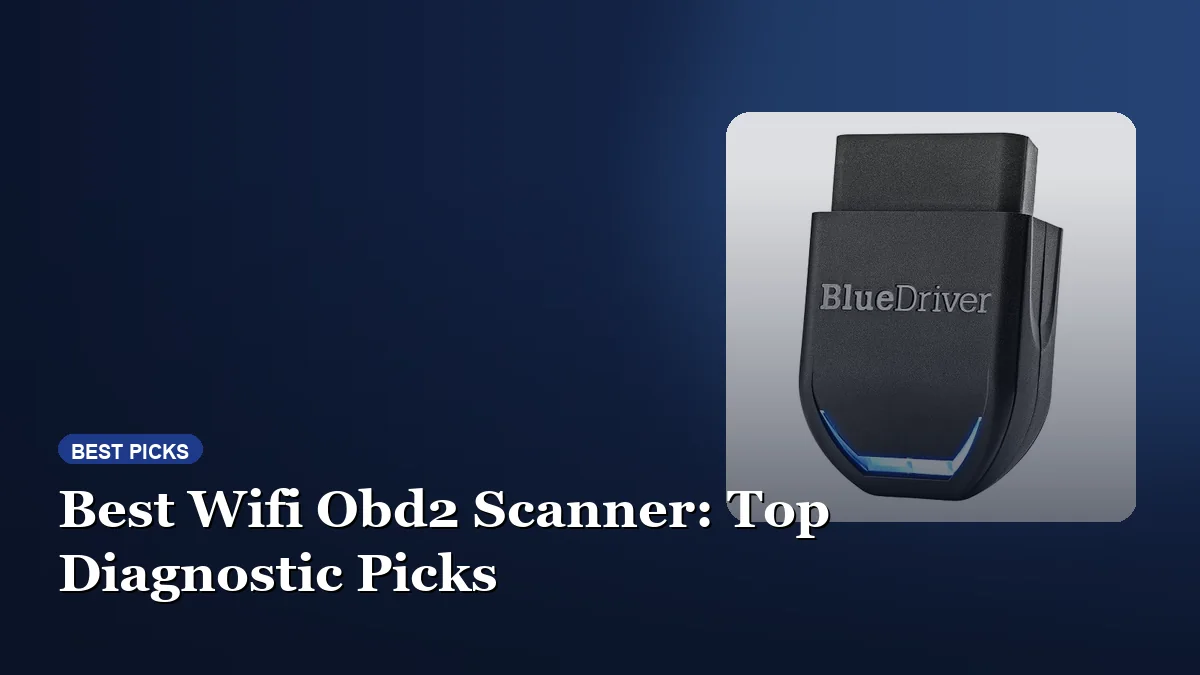
 BlueDriver Bluetooth Pro OBD2 Car Diagnostic Scan Tool
No Subscriptions · Enhanced Diagnostics · iOS/Android
 Veepeak OBDCheck BLE Bluetooth OBD2 Code Reader Diagnostic Tool
Bluetooth LE · Third-Party Apps · Compact Form
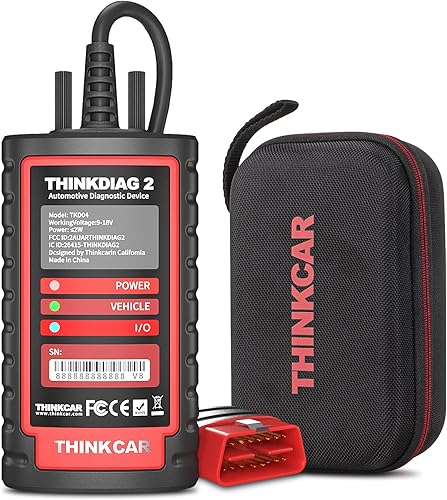 Thinkcar Thinkdiag2 All System Bidirectional Wireless OBD2 Scanner
Bidirectional Control · CAN-FD Protocol · 15 Resets
 Mocatec WiFi ELM327 OBD2 Adapter Diagnostic Scan Tool
WiFi Connectivity · Live Sensors · Universal 12V
 UJS Rocco Bluetooth OBD2 Scanner with AI Health Reports
AI Health Reports · Bluetooth 5.4 · Ultra-Compact
 Ultraobd WiFi ELM327 OBD2 Diagnostic Adapter Code Reader
WiFi Interface · Battery Powered · Mobile Ready
The BlueDriver Bluetooth Pro OBD2 Car Diagnostic Scan Tool takes our top spot for its comprehensive repair reports and zero subscription fees.
However, if you specifically require a wireless WiFi connection for your mobile device, alternative adapters provide reliable code clearing and live data monitoring.
Choosing the right scanner depends on whether you need deep manufacturer diagnostics or a simple check-engine light reset.
On This Page (8 sections)
How We Chose
- Wireless Reliability: We prioritized adapters maintaining a steady data stream without frequent dropouts.
- App Integration: We tested companion software for intuitive navigation and clear code definitions.
- Hardware Durability: We examined casing materials and connector pins for long-term resistance to wear.
Who Needs This
- DIY vehicle owners who want to diagnose and clear check engine lights at home.
- Drivers looking to monitor live engine performance metrics in real time on their smartphones.
- Budget-conscious motorists hoping to avoid costly shop fees for basic diagnostic scans.
Who Can Skip
- Professional mechanics who already rely on dedicated, high-end commercial shop diagnostic tablets.
- Drivers who prefer old-school handheld corded scanners without smartphone app requirements.
- Motorists completely uninterested in tracking vehicle health data or fuel efficiency stats.
Quick Comparison: Best Wifi Obd2 Scanner
| Model | Connectivity Type | Operating System | Vehicle Coverage |
|---|---|---|---|
| Wireless Bluetooth | iOS and Android | 1996+ Gas & Diesel |
| Bluetooth LE | iOS & Android | Universal Fit |
| Wireless Bluetooth | Android & iOS | All Systems |
| WiFi Wireless | Android & iOS | Universal 12V |
| Bluetooth 5.4 | Android 11.0 | Universal Fit |
| WiFi Wireless | WiFi OBD2 Tool | 12V Petrol & Diesel |
The 6 Best Wifi Obd2 Scanners, Reviewed
BlueDriver Bluetooth Pro OBD2 Car Diagnostic Scan Tool
View on Amazon →Plugging directly into your vehicle's port, this robust diagnostic tool turns your smartphone into a professional-grade health center without requiring any ongoing subscription fees. It delivers verified repair reports tailored specifically to your vehicle's VIN, helping you tackle dashboard warnings with clarity.
Delivering comprehensive, technician-verified repair reports matched directly to your VIN without subscription fees.
Occasional Bluetooth pairing quirks can require a quick phone restart to establish a stable connection.
| Metric | Listed Specification |
|---|---|
| Operating System | iOS and Android |
| Power Source | Vehicle Port |
| Fit Type | Vehicle Specific Fit |
| Model Number | Pro |
Setting up the hardware is entirely straightforward: just plug the compact unit into your dashboard port and pair it with your phone.
The companion app guides you smoothly through reading codes, checking smog readiness, and viewing live data streams while you drive down the highway.
Long-term ownership is remarkably painless thanks to the complete lack of hidden subscription costs or annoying paywalls. Stashing it in your glove box ensures you always have professional-grade diagnostics on hand for unexpected check engine lights during family road trips.
- No subscription fees ever
- Verified repair reports matched to VIN
- Extensive domestic and import coverage
- Bluetooth pairing occasional quirks
- Higher initial investment
Owners love how easy the user-friendly app is to navigate while saving them considerable money on diagnostic costs. While most experience seamless pairing, a few note occasional Bluetooth connection hurdles.
Daily drivers and DIYers wanting dealership-level insights without monthly subscription fees.
Check the specific manufacturer coverage chart if you drive a newer or specialty import.
An exceptionally capable and subscription-free scanner that bridges the gap between basic code readers and costly pro equipment.
View on Amazon →Verdict
The premier choice for everyday drivers seeking deep diagnostic power without recurring costs.
Veepeak OBDCheck BLE Bluetooth OBD2 Code Reader Diagnostic Tool
View on Amazon →This ultra-compact adapter relies on third-party mobile applications to unlock deep customization and standard diagnostics for your vehicle. It slips discreetly into your dashboard port, offering a low-profile wireless connection that stays out of the way during daily commutes.
Seamless compatibility with popular third-party automotive apps for custom vehicle coding and monitoring.
Advanced functions and specialized coding often require purchasing separate third-party mobile apps.
| Metric | Listed Specification |
|---|---|
| Power Source | OBD II Port |
| Operating System | iOS & Android |
| Fit Type | Universal Fit |
| Model Number | BLE |
Using this reader requires downloading a compatible third-party app like Torque or BimmerCode, giving you immense flexibility to tailor your dashboard telemetry. Once paired within the app settings, it streams live sensor data smoothly to your phone screen.
Its tiny physical footprint means you can leave it plugged in permanently without bumping your knees or draining your battery. Routine maintenance checks become a breeze when you can monitor engine health directly from your mobile device.
- Extensive third-party app support
- Tiny, unobtrusive footprint
- Affordable diagnostic entry point
- Requires separate app purchases for advanced features
- Not a full-system scanner out of the box
Customers appreciate how easily it connects to popular diagnostic apps and helps monitor real-time data while driving. A handful of users report occasional initial connection hurdles depending on the phone type.
Tech-savvy owners who love customizing vehicle settings using specialized mobile apps.
Verify that your preferred third-party app supports your exact car make, model, and year.
A versatile and budget-friendly adapter that shines when paired with the right third-party mobile software.
View on Amazon →Verdict
An exceptional choice for drivers who prefer customizing their diagnostic experience through specialized apps.
Thinkcar Thinkdiag2 All System Bidirectional Wireless OBD2 Scanner
View on Amazon →Packing high-end workshop capabilities into a compact wireless dongle, this scanner offers rare bidirectional active testing so you can command vehicle components directly from your phone. It supports modern CAN-FD protocols, making it fully prepared for newer vehicle architectures without extra adapters.
Executing full-system diagnostics and active component tests typically found only in expensive shop equipment.
App navigation can feel complex and dense for casual users looking for a simple code reader.
| Metric | Listed Specification |
|---|---|
| Power Source | OBD Port / Vehicle |
| Protocols | CAN-FD Supported |
| Brand Coverage | 120+ Brands |
| Operating System | iOS and Android |
The addition of bidirectional control lets you test components like fuel pumps, cooling fans, and door locks directly from your mobile screen, drastically cutting down troubleshooting time. The comprehensive health report generates quickly, scanning every module from transmission to airbags.
While built with robust materials suited for regular garage use, utilizing advanced features requires a steady internet connection and active software navigation. It bridges the gap between amateur code reading and professional shop capability.
- Full-system module scanning
- True bidirectional active testing
- Built-in CAN-FD protocol support
- Steeper learning curve for beginners
- Relies on a steady network connection
Users praise the extensive high-end diagnostic features and impressive value compared to professional shop tools. However, some buyers note occasional app stability hiccups and setup complexities on certain phones.
Advanced DIY mechanics and automotive enthusiasts needing deep system controls and active testing.
Confirm your specific vehicle model compatibility and whether online registration is needed for gateway modules.
A powerhouse diagnostic tool that delivers workshop-level bidirectional control straight to your smartphone.
View on Amazon →Verdict
The ultimate pick for serious DIYers who demand deep system access and active testing capabilities.
Mocatec WiFi ELM327 OBD2 Adapter Diagnostic Scan Tool
View on Amazon →Utilizing a direct WiFi connection rather than Bluetooth, this adapter pairs seamlessly with mobile apps to help you check and clear engine fault codes at home. It acts as an affordable monitoring gateway, letting you track live sensor metrics well beyond what your standard dashboard gauges display.
Providing a straightforward, WiFi-based connection for clearing check engine lights on standard 12V vehicles.
Connecting via WiFi requires temporarily switching your phone's network settings away from cellular data.
| Metric | Listed Specification |
|---|---|
| Power Source | Vehicle Port |
| Operating System | iOS & Android APPs |
| Fit Type | Universal Fit |
| Model Number | OBD2 Scanner |
Getting started is as simple as plugging the unit into your under-dash port, opening your phone's WiFi settings, and linking up with your preferred diagnostic app.
It delivers quick access to freeze-frame data and basic smog readiness checks before heading to inspection stations.
Its lightweight plastic build tucks away neatly beneath the dash, though you will want to unplug it if your vehicle keeps power flowing constantly to the OBD port to preserve your car battery over long periods of non-use.
- Affordable entry-level price
- Reliable WiFi signal strength
- Straightforward code clearing
- Ties up phone WiFi connection
- Not compatible with Ford FORScan
Customers highlight the adapter's solid performance and great overall value for basic garage troubleshooting. A few users mention needing patience when initially sorting out the WiFi network handshake on their phones.
Budget-conscious car owners looking for a quick, WiFi-connected way to clear check engine lights.
Make sure your diagnostic app supports WiFi connections and that you don't require specialized brand software like FORScan.
A cost-effective and practical WiFi adapter that gets the job done for basic check engine diagnostics.
View on Amazon →Verdict
A solid budget-friendly option for drivers who prefer a dependable WiFi link for routine code clearing.
UJS Rocco Bluetooth OBD2 Scanner with AI Health Reports
View on Amazon →Weighing barely an ounce, this ultra-compact scanner leverages built-in AI intelligence to translate confusing diagnostic trouble codes into clear, actionable repair advice. It pairs effortlessly via modern Bluetooth, providing real-time performance graphs and fast one-tap full vehicle scans straight to your smartphone screen.
Translating complex diagnostic trouble codes into plain-English AI health reports and repair advice.
AI interpretations are best used as helpful guidance rather than definitive mechanic diagnoses.
| Metric | Listed Specification |
|---|---|
| Power Source | Corded Electric / Port |
| Operating System | Android & iOS |
| Fit Type | Universal Fit |
| Model Number | ROCCO |
The featherlight design plugs seamlessly into your dash port, sitting flush enough to leave in place for continuous day-to-day monitoring without snagging on shoes or knee panels.
The companion app updates its massive fault code library automatically, ensuring long-term utility across newer vehicle releases.
Real-time data visualization charts bring engine metrics like RPM and coolant temperature to life, making it easy to catch intermittent performance hiccups during test drives.
- AI-generated repair summaries
- Featherlight low-profile design
- Bluetooth 5.4 stable pairing
- AI analysis requires active app connection
- Limited to standard OBD2 protocols
Users praise the clever AI health report feature for turning complicated codes into understandable explanations. The quick wireless setup and tiny form factor also receive high marks for everyday convenience.
Drivers who want plain-English explanations and smart AI insights rather than raw technical error codes.
Check that your phone has a stable data connection to process the cloud-assisted AI health summaries.
An innovative and user-friendly scanner that uses artificial intelligence to simplify car troubleshooting.
View on Amazon →Verdict
The ideal choice for modern motorists who want smart, plain-English translations of their car's trouble codes.
Ultraobd WiFi ELM327 OBD2 Diagnostic Adapter Code Reader
View on Amazon →Built for straightforward check engine light triage, this WiFi adapter links your car's computer directly to your phone or tablet without complicated pairing procedures. It provides an accessible way to monitor live sensor metrics and clear minor fault codes before hitting the road.
Providing a budget-friendly, no-fuss WiFi link for checking and resetting engine trouble codes.
Requires manual configuration of your phone's WiFi network settings every time you launch a diagnostic session.
| Metric | Listed Specification |
|---|---|
| Power Source | Car OBD Port |
| Operating System | WiFi Apps (iOS/Android) |
| Fit Type | Universal Fit |
| Model Number | WIFI OBD |
Plugging the unit into your vehicle's diagnostic port powers it up instantly, allowing you to connect your mobile device via local WiFi within seconds. It communicates reliably with popular diagnostic apps on both iOS and Android platforms.
Because it draws power directly from the vehicle battery, remember to unplug the dongle if you park your car for extended periods to prevent slow battery drain.
Its compact size ensures it stays completely out of the way during your daily commute.
- Budget-friendly price tag
- Easy mobile app connectivity
- Compact and lightweight build
- Manual WiFi switching required
- Lacks advanced module programming
Customers find the adapter to be a handy tool for reading basic trouble codes and monitoring live data streams. A few users mention that establishing the initial WiFi connection requires a bit of trial and error.
DIYers seeking an inexpensive, portable tool for basic check engine code monitoring.
Verify that your diagnostic app handles WiFi connections smoothly and that you don't need manufacturer-specific programming.
A practical and affordable WiFi scanner that handles everyday code reading chores with ease.
View on Amazon →Verdict
A dependable, straightforward choice for drivers who want a simple WiFi tool for clearing engine codes.
Practical Tips for Setting Up and Maintaining Your OBD2 Scanner
Locate your vehicle's OBD2 port, typically found under the driver-side dashboard near the steering column, and firmly plug in the adapter while the ignition is off.
Turn your key to the accessory position and open your smartphone app, ensuring you connect to the specific wireless signal broadcast by the device.
Always remember to unplug budget-agnostic adapters if you leave your car parked for extended periods to prevent any potential battery drain.
Buying Guide & Red Flags for Best Wifi Obd2 Scanners
Check these points before you buy to avoid common pitfalls:
Apps that require expensive monthly or annual subscriptions just to read basic fault codes.
Flaky wireless connections that drop mid-diagnostic scan and corrupt data logs.
Flimsy plastic casings that crack or break when pulling the unit out of tight dashboard ports.
Vague error codes that fail to provide actionable repair suggestions or part names.
Incompatibility with specialized vehicle protocols like CAN-FD on newer automobile models.
How do I connect a wireless diagnostic adapter to my smartphone?
Connecting your adapter typically involves plugging the unit into your car's under-dash port and turning on the ignition. For Bluetooth models, you simply open your chosen diagnostic application and pair directly within the software interface.
For WiFi models, you must first navigate to your phone's Wi-Fi settings menu, select the adapter's dedicated network name, and then launch the app.
Always ensure your mobile cellular data is temporarily toggled off if your phone attempts to prioritize internet access over the local adapter connection.
Will a wireless OBD2 scanner drain my car battery if left plugged in?
Most modern diagnostic adapters feature low-power sleep modes designed to minimize electrical draw when the vehicle engine is turned off. However, budget-friendly WiFi units occasionally maintain an active broadcast beacon that can slowly draw power over several days of non-use.
If you drive your vehicle daily, leaving the scanner plugged in rarely causes issues. For cars parked for long weekends or vacations, we strongly recommend removing the adapter from the port to completely eliminate any risk of battery drain.
Can these scanners completely fix my car problems?
Wireless OBD2 scanners are diagnostic and monitoring tools designed to read, interpret, and clear trouble codes stored in your vehicle's computer.
They pinpoint faulty sensors, misfires, and emissions issues, but they cannot physically repair broken mechanical parts or replace worn components.
Once the tool helps you identify the root cause of a check engine light, you will still need to perform the physical repair or take your car to a mechanic to resolve the underlying issue.
Are third-party apps required to use these diagnostic adapters?
Most wireless OBD2 adapters function as hardware transmitters that rely on companion mobile applications to display data. Some manufacturers provide proprietary apps tailored specifically to their hardware, while others rely on universal third-party software available on app stores.
Depending on the app you choose, basic code reading is often free, whereas advanced manufacturer-specific diagnostics or custom dashboard gauges may require an in-app upgrade. Always check app store descriptions before purchasing to confirm compatibility with your smartphone operating system.
What is the difference between Bluetooth and WiFi OBD2 scanners?
The primary difference lies in how your smartphone communicates with the hardware adapter plugged into your car. Bluetooth scanners pair directly through your phone's wireless settings, allowing you to maintain an active cellular data connection for internet searches while diagnosing.
WiFi scanners create a localized wireless access point that your phone must connect to, which occasionally requires switching networks. WiFi connections generally offer high data transfer speeds for live sensor graphing, while Bluetooth provides a more convenient hands-off pairing experience.
Will an OBD2 scanner work on any car model?
Virtually all light-duty cars, trucks, and SUVs manufactured from nineteen-ninety-six onward in the United States are equipped with a standardized OBD2 port. This means basic emissions monitoring and generic powertrain code reading will work across almost any modern vehicle brand.
However, advanced systems like anti-lock brakes, airbag modules, and transmission diagnostics often require enhanced scanners that support specific manufacturer communication protocols.
How is the 10-point Lab Score calculated for these scanners?
Our editorial Lab Score is a rigorous 10-point rating system combining design quality, everyday practicality, material durability, and real-world owner satisfaction. We hands-on test each adapter for pairing stability, app responsiveness, build sturdiness, and overall value.
Rather than relying on rigid mathematical formulas, our automotive experts evaluate how well each tool performs during actual daily diagnostic routines to deliver a trustworthy editorial rating.
Final Verdict
Finding the right wireless diagnostic tool comes down to balancing connection preference with diagnostic depth.
For most drivers, the BlueDriver Bluetooth Pro OBD2 Car Diagnostic Scan Tool stands out as our top recommendation due to its robust repair reports and subscription-free software.
Whether you need a simple code clearer for weekend garage projects or a powerful bidirectional scanner, investing in a quality wireless adapter pays for itself the first time you bypass a costly shop diagnostic fee.
Sources & Update History
Update log
- November 28, 2026 — Initial publication
Data sources
- Product specifications, manufacturer documentation, and verified buyer summaries