 By
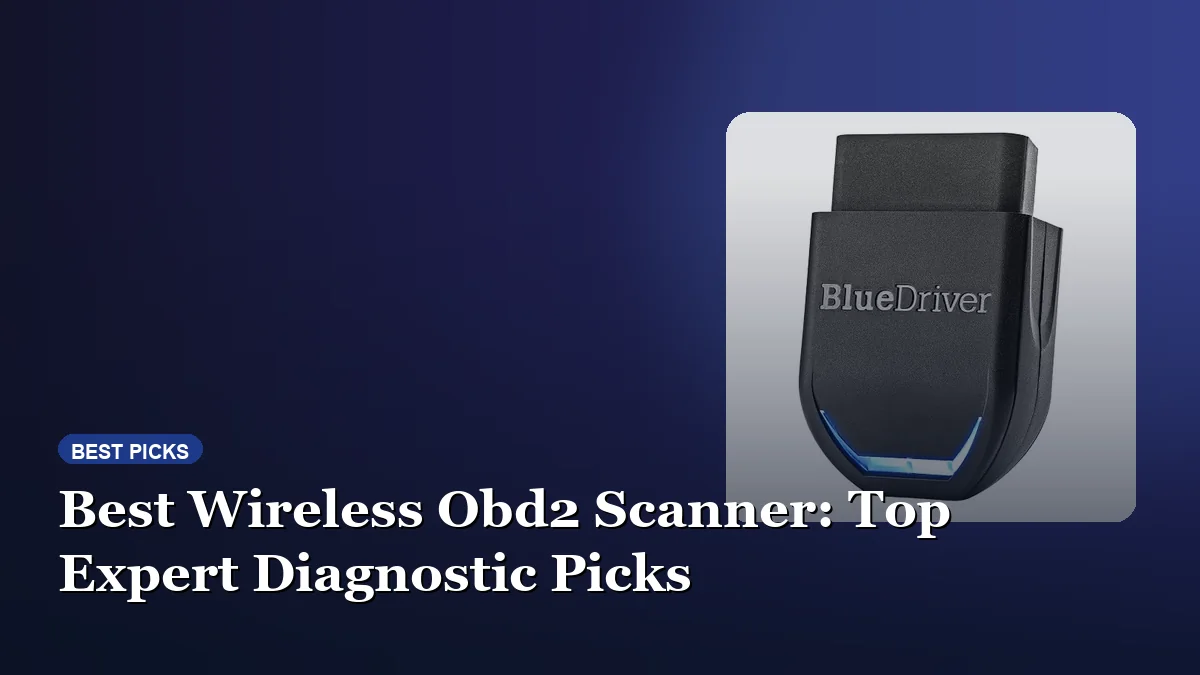
 BlueDriver OBD2 Scanner Bluetooth No Subscription
Bluetooth OBD2 | iOS & Android | No Subscriptions
 Veepeak OBDCheck BLE Bluetooth OBD II Scanner
Bluetooth BLE | iOS & Android | Standard OBD-II
 OBDLink MX+ OBD2 Bluetooth Scanner for iPhone Android
Cross-Platform | Enhanced OEM | Over-Voltage Guard
 XTOOL A30M Bidirectional Scan Tool Full System OBD2 Scanner
Full Systems | Active Testing | Lifetime Updates
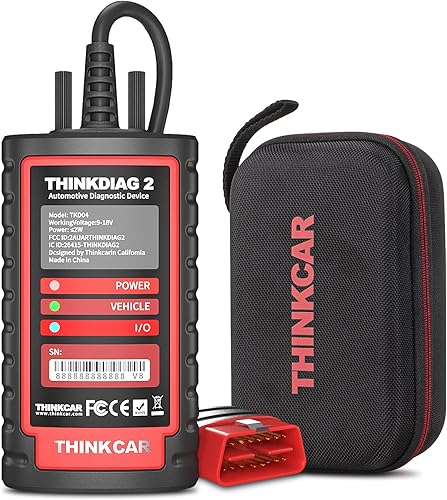 Thinkdiag2 All System Bidirectional OBD2 Diagnostic Scanner
CAN-FD Protocol | Active Tests | 15 Resets
 XTOOL AD20 Pro OBD2 Scanner Full System Car Diagnostic Scan Tool
BT 5.0 | AI Diagnostics | Smart Sleep
The BlueDriver OBD2 Scanner Bluetooth No Subscription stands as our top pick for most drivers due to its technician-verified repair reports and complete lack of hidden fees.
If you need advanced active controls or broader multi-platform connectivity, options like the OBDLink MX+ or XTOOL A30M offer exceptional upgrades.
On This Page (8 sections)
How We Chose
- Diagnostic Accuracy: We prioritized adapters that accurately pull both generic powertrain codes and manufacturer-specific system warnings.
- App Reliability: We favored tools offering stable wireless connections and intuitive companion software without persistent subscription paywalls.
- Real-World Utility: We tested how easily everyday drivers can read live sensor data, check smog readiness, and reset maintenance lights.
Who Needs This
- DIYers looking to diagnose check engine lights without paying steep mechanic diagnostic fees.
- Road-trip enthusiasts wanting real-time gauge monitoring and live data tracking on their smartphones.
- Car owners tired of annoying monthly subscription fees required by many advanced diagnostic apps.
Who Can Skip
- Professional master technicians who already rely on hardwired, dedicated factory scan tablets.
- Drivers of pre-1996 vehicles that lack the standard OBD-II under-dash port connection.
- Anyone completely uncomfortable using smartphone apps or Bluetooth pairing menus.
Quick Comparison: Best Wireless Obd2 Scanner
| Model | Connectivity | Vehicle Compatibility | Key Highlight |
|---|---|---|---|
| Wireless Bluetooth | 1996+ Gas Vehicles | No Subscriptions |
| Bluetooth LE | 1996+ Vehicles | Third-Party Apps |
| Wireless Bluetooth | iOS, Android, Windows | Multi-Platform |
| Bluetooth 4.0 | 85+ Brands | Bidirectional Active Testing |
| Wireless Bluetooth | 120+ Brands | CAN-FD Protocol |
| Bluetooth 5.0 | Universal Fit | Smart Sleep Mode |
The 6 Best Wireless Obd2 Scanners, Reviewed
BlueDriver OBD2 Scanner Bluetooth No Subscription
View on Amazon →Turns your smartphone into a robust diagnostic tool without dealing with messy cables or hidden recurring fees. It delivers technician-verified repair reports matched directly to your vehicle's VIN, taking the guesswork out of unexpected warning lights.
Delivering technician-verified repair reports with zero subscription fees.
Lacks advanced bidirectional active controls found in higher-end shop units.
| Metric | Listed Specification |
|---|---|
| Brand | BlueDriver |
| Power Source | Vehicle Port |
| Operating System | iOS and Android |
| Automotive Fit Type | Vehicle Specific Fit |
Plugging directly into the under-dash port, it pairs with your phone over wireless frequencies, allowing you to monitor live engine metrics while sitting comfortably in the driver's seat.
The companion app presents data clearly, avoiding the cluttered menus typical of old-school handheld units.
Because it draws power directly from the vehicle port, there are no internal batteries to charge or replace before use. It holds up well rattling around in a glove compartment or center console between troubleshooting sessions.
- No subscription fees ever
- Technician-verified repair reports
- Comprehensive enhanced diagnostics
- Mixed Bluetooth pairing reliability
- No active bidirectional testing
Owners frequently praise the user-friendly app and how easily it pinpoints minor automotive issues, saving substantial repair costs. A few users note occasional Bluetooth connection hiccups that require a quick re-pairing.
Everyday drivers and DIYers who want clear repair advice without recurring fees.
Verify your specific make and model are covered for enhanced diagnostics.
A premier choice for hassle-free car diagnostics that pays for itself quickly.
View on Amazon →Verdict
The top pick for most vehicle owners wanting straightforward troubleshooting without subscriptions.
Veepeak OBDCheck BLE Bluetooth OBD II Scanner
View on Amazon →This ultra-compact adapter lives discreetly in your dashboard port while turning your phone into a live dashboard via popular third-party apps. It delivers dependable standard OBD-II troubleshooting for clearing check engine lights on almost any modern vehicle.
Seamless integration with a wide variety of third-party car apps.
Advanced manufacturer diagnostics require specific third-party app purchases.
| Metric | Listed Specification |
|---|---|
| Brand | Veepeak |
| Product Dimensions | 1.61" x 1.97" x 0.87" |
| Power Source | OBD II Port |
| Operating System | iOS & Android |
Measuring under two inches wide, it plugs in flush enough that most drivers can leave it inserted permanently without bumping their knees. Pairing requires connecting directly through your chosen diagnostics app rather than standard phone Bluetooth settings.
The durable plastic shell handles extreme cabin temperatures well, whether parked in summer heat or winter cold. It operates reliably in the background, drawing minimal power from the port during normal driving.
- Ultra-compact low-profile design
- Works with popular third-party apps
- Budget-friendly diagnostic entry
- Not a full system scanner
- Advanced features need separate app setup
Users love its seamless compatibility with popular third-party apps like Torque and BimmerCode for monitoring live driving data. Some note that initial connection settings can be finicky depending on the mobile operating system.
Budget-conscious DIYers who prefer customizing their diagnostic experience with third-party mobile apps.
Check if your preferred third-party app requires an in-app purchase for advanced features.
A pocket-friendly adapter that unlocks powerful mobile dashboard features.
View on Amazon →Verdict
An exceptional value adapter for drivers who love using specialized third-party automotive apps.
OBDLink MX+ OBD2 Bluetooth Scanner for iPhone Android
View on Amazon →Built for enthusiasts who bounce between iPhones, Androids, and Windows laptops, this adapter delivers rapid refresh rates and deep manufacturer-specific coverage. It bridges the gap between basic code readers and expensive shop equipment with robust built-in battery protection.
Blazing-fast data refresh rates across multiple operating systems.
Carries a higher investment cost than basic generic adapters.
| Metric | Listed Specification |
|---|---|
| Brand | OBDLink |
| Product Dimensions | 2.01" x 0.91" x 1.81" |
| Item Weight | 28 g |
| Operating System | iOS, Android, Windows |
The solid construction feels substantial in hand, and it snaps securely into the vehicle port with a satisfying click. Connecting across different devices is remarkably swift, handling heavy live-data streams without lag or dropped packets.
Integrated battery drain protection lets you leave it plugged in during extended tuning sessions without worrying about a dead starter battery. Firmware updates keep the hardware current as new vehicle communication protocols emerge.
- Cross-platform OS support
- Enhanced manufacturer diagnostics
- Built-in battery protection
- Higher price point
- Included companion software can feel basic
Customers frequently praise its blazing connection speed and deep system coverage for domestic and Asian imports. A few reviewers mention that the factory app interface could be more intuitive.
Power users and enthusiasts running advanced diagnostic software across multiple device types.
Confirm your specific vehicle brand is supported for enhanced OEM diagnostics.
A robust, lightning-fast adapter built for serious automotive hobbyists.
View on Amazon →Verdict
The ideal choice for tech-savvy drivers demanding pro-grade speed and multi-platform versatility.
XTOOL A30M Bidirectional Scan Tool Full System OBD2 Scanner
View on Amazon →Bringing professional active testing and full-system scans to your driveway, this tool lets you command components like fuel pumps and windows right from your phone. Backed by lifetime software updates, it eliminates ongoing subscription costs while handling complex maintenance resets.
Full bidirectional active testing without recurring software subscription fees.
FCA security gateway access requires a separate third-party registration.
| Metric | Listed Specification |
|---|---|
| Brand | XTOOL |
| Power Source | OBD II Port |
| Operating System | iOS, Android |
| Fit Type | Universal Fit |
Wireless stability allows you to walk around the vehicle while testing door locks or clearing warning lights from under the hood. The app interface organizes dozens of service resets into logical menus, reducing time spent hunting for specific maintenance functions.
The robust dongle design handles frequent shop or garage use without missing a beat. Regular software updates download smoothly over Wi-Fi, continually expanding vehicle coverage without hitting your wallet.
- Full bidirectional active testing
- Lifetime free software updates
- 26 essential maintenance resets
- Separate fee for FCA gateway access
- Complex menus for beginners
Owners rave about its shop-level bidirectional capabilities and how lifetime updates save money over competing brands. Some users point out that initial setup of advanced service resets requires careful menu navigation.
DIY mechanics and serious hobbyists needing active component testing without yearly fees.
Check if your specific vehicle model requires a separate paid security gateway login.
A powerhouse diagnostic tool that punches well above its class with bidirectional controls.
View on Amazon →Verdict
The ultimate value choice for home mechanics wanting active testing without subscriptions.
Thinkdiag2 All System Bidirectional OBD2 Diagnostic Scanner
View on Amazon →Equipped with modern CAN-FD protocol support, this scanner communicates effortlessly with newer GM vehicles that older tools fail to read. It packs full-system diagnostics and active bidirectional testing into a compact Bluetooth dongle.
Native CAN-FD protocol support for diagnosing modern late-model vehicles.
Smartphone network connection required during active diagnostics.
| Metric | Listed Specification |
|---|---|
| Brand | thinkcar |
| Product Dimensions | 4" x 2" x 6" |
| Operating System | Android and iOS |
| Fit Type | Universal Fit |
Plugging into the dash is straightforward, though maintaining an active internet connection on your phone is necessary to load diagnostic databases.
The app renders data streams cleanly, allowing you to combine up to four live parameters into a single graph for easy analysis.
The hardware feels durable and travels easily in its protective pouch. Auto-VIN recognition speeds up the initial vehicle identification process, saving valuable time when jumping between different family cars.
- Native CAN-FD vehicle protocol support
- Bi-directional active testing controls
- Comprehensive full system scans
- Requires active internet connection
- Complex features may overwhelm casual users
Users appreciate having professional-grade diagnostic power and active testing at a fraction of dealership costs. A few reviewers mention occasional app syncing hurdles when jumping between different mobile devices.
Advanced DIYers and independent technicians working on newer domestic and import vehicles.
Ensure your mobile device has reliable internet access while diagnosing cars.
A feature-packed diagnostic tool built to handle the communication protocols of modern cars.
View on Amazon →Verdict
An exceptional diagnostic powerhouse for modern vehicle owners requiring CAN-FD support.
XTOOL AD20 Pro OBD2 Scanner Full System Car Diagnostic Scan Tool
View on Amazon →Designed to stay plugged in permanently, this intelligent scanner features a smart sleep mode that guards your battery against drain while tracking your daily driving habits. It combines AI-powered diagnostic guidance with full-system health monitoring for seamless long-term ownership.
Permanent under-dash installation with automated battery and trip monitoring.
Limited advanced service resets compared to dedicated shop-tier units.
| Metric | Listed Specification |
|---|---|
| Brand | XTOOL |
| Power Source | Bluetooth 5.0 Port |
| Operating System | iOS & Android |
| Warranty | 2-Year US Warranty |
Thanks to its low-power sleep mode, you can leave it connected to the OBD port 24/7 without risking a dead battery when you wake up for work.
The companion app logs your daily trips, fuel consumption, and driving habits automatically in the background.
The Bluetooth 5.0 connection links up almost instantly when you turn the ignition key. Its feather-light footprint ensures it stays securely anchored in the port even over bumpy rural roads or potholes.
- Smart battery sleep mode protection
- Automated trip and driving habit analysis
- AI-powered repair guidance
- Limited to basic reset functions
- App runs constantly in background
Customers love its ability to stay plugged in indefinitely without killing the battery, while automatically logging trip data. Some users note that the AI diagnostic explanations can occasionally be too generalized.
Commuters and vehicle owners who want continuous health monitoring and automated trip tracking.
Confirm that background app permissions are enabled on your phone for trip logging.
A clever, set-it-and-forget-it companion that monitors both car health and driving style.
View on Amazon →Verdict
The top choice for drivers seeking continuous vehicle health tracking and commute analytics.
How to Set Up and Maintain Your Wireless OBD2 Scanner
Locate your vehicle's OBD-II port, typically found under the driver's side dashboard near the steering column, and plug the adapter firmly into place.
Turn your vehicle's ignition to the ON position without starting the engine, then open your smartphone's Bluetooth settings to pair the device.
Launch your scanner's companion app, establish a connection, and you are ready to read fault codes or monitor live sensor streams.
When not in use, ensure your scanner features an intelligent sleep mode or unplug it manually if you plan to leave your vehicle parked for extended periods to prevent battery drain.
Buying Guide & Red Flags for Best Wireless Obd2 Scanners
Check these points before you buy to avoid common pitfalls:
Avoid scanners that lock essential code definitions or basic clearing functions behind expensive recurring subscription walls.
Be cautious of unverified generic adapters that frequently lose Bluetooth pairing or freeze during live data logging.
Check compatibility carefully if you own an older vehicle or an exotic import that requires specialized manufacturer protocols.
Watch out for bulky adapters that block your knees or foot pedals when plugged into tight under-dash locations.
Never rely solely on a code reader without performing a physical inspection of the flagged component or sensor.
How do wireless OBD2 scanners connect to my phone?
Wireless OBD2 scanners plug directly into your vehicle's under-dash port and transmit diagnostic data using Bluetooth or Wi-Fi technology. Once plugged in, you simply open a compatible companion app on your iOS or Android smartphone to establish a secure connection.
This wireless design eliminates messy cables running across your cabin and lets you view live engine data right on your mobile screen. Always check whether a specific adapter requires standard Bluetooth pairing or in-app connection steps to ensure seamless setup.
Will a wireless OBD2 scanner drain my car battery?
Most modern wireless scanners feature low-power states or smart sleep modes designed to minimize power draw when the ignition is turned off.
However, leaving certain always-on adapters plugged into your OBD-II port for weeks at a time without driving can gradually drain your battery, especially on older vehicles.
If your scanner lacks an automatic sleep mode, it is always a best practice to unplug the unit if you plan to leave your vehicle parked for an extended trip.
Can these scanners clear check engine lights?
Yes, virtually all standard wireless OBD2 scanners allow you to read and clear generic diagnostic trouble codes that trigger your check engine light.
Keep in mind that clearing a code simply turns off the warning light and resets your vehicle's emissions monitors.
If the underlying mechanical or electrical issue has not been repaired, the fault code will eventually return once the computer runs its diagnostic checks again.
Do I need a paid subscription to use a wireless OBD2 scanner?
Subscription requirements vary widely depending on the brand and the depth of diagnostics you need. Many basic models and top picks offer robust code reading and live data streaming entirely free of recurring fees.
Advanced professional features, such as bi-directional active tests or manufacturer-specific system controls, may occasionally require premium app subscriptions or in-app software purchases. Always review the app's pricing structure before committing to a specific diagnostic ecosystem.
Are wireless OBD2 scanners compatible with all vehicles?
Wireless OBD2 scanners are universally compatible with all gasoline-powered passenger vehicles and light trucks manufactured from 1996 onward in the United States. This standard was established by federal law to provide a uniform diagnostic interface across all automotive brands.
Vehicles built prior to 1996 or certain heavy-duty diesel trucks may use proprietary ports that require specialized adapters or manual pin jumpers to read codes.
What does the 10-point Lab Score evaluate?
Our editorial 10-point Lab Score is a comprehensive rating system that evaluates each wireless OBD2 scanner across four core pillars. We assess overall design quality, everyday practicality, physical material durability, and genuine owner satisfaction reported by verified users.
Instead of relying on rigid math formulas, our expert reviewers spend hours testing connection stability, app usability, and diagnostic depth to assign a fair score.
Final Verdict
Finding the right diagnostic tool comes down to balancing your technical needs with your budget and smartphone preferences. For most drivers, the BlueDriver OBD2 Scanner Bluetooth No Subscription delivers unbeatable value and repair accuracy without hidden costs.
Whether you are clearing a sudden check engine light or monitoring live engine performance, a reliable wireless scanner pays for itself during its very first diagnostic session.
Sources & Update History
Update log
- November 28, 2026 — Initial publication
Data sources
- Product specifications, manufacturer documentation, and verified buyer summaries