Bluedriver vs. Foxwell: Which Fits Your Setup Better?
BlueDriver and Foxwell represent divergent diagnostic architectures. Mobile-first app interfaces clash directly against dedicated handheld utility.

Choose BlueDriver for seamless smartphone integration and fluid wireless data streaming. Opt for Foxwell when you require dedicated standalone hardware without smartphone dependency.
Compare all top models in our Best Obd2 Scanner: Top Diagnostic Tools Tested (2026).
Side-by-Side Breakdown
| Criteria | Bluedriver | Foxwell | Edge |
|---|---|---|---|
| Peak Performance & Output | App-driven mobile processing | Dedicated standalone hardware MCU | Foxwell |
| Duty Cycle & Consistency | Smartphone Bluetooth link | Direct hardwired OBDII tether | Foxwell |
| Operating Noise & Vibration | Completely silent wireless dongle | Solid tactile keypad feedback | Bluedriver |
| Portability & Footprint | Ultra-compact pocket connector | Rugged molded handheld unit | Bluedriver |
| Maintenance & Service Life | Continuous app store updates | Standalone firmware memory flashes | Foxwell |
| Power Requirements | Vehicle port parasitic draw | Dual internal and port power | Foxwell |
| Best Ideal Use-Case | DIY mobile diagnostics & sharing | Professional standalone bench work | Bluedriver |
Architectural Design and Core Engineering Principles
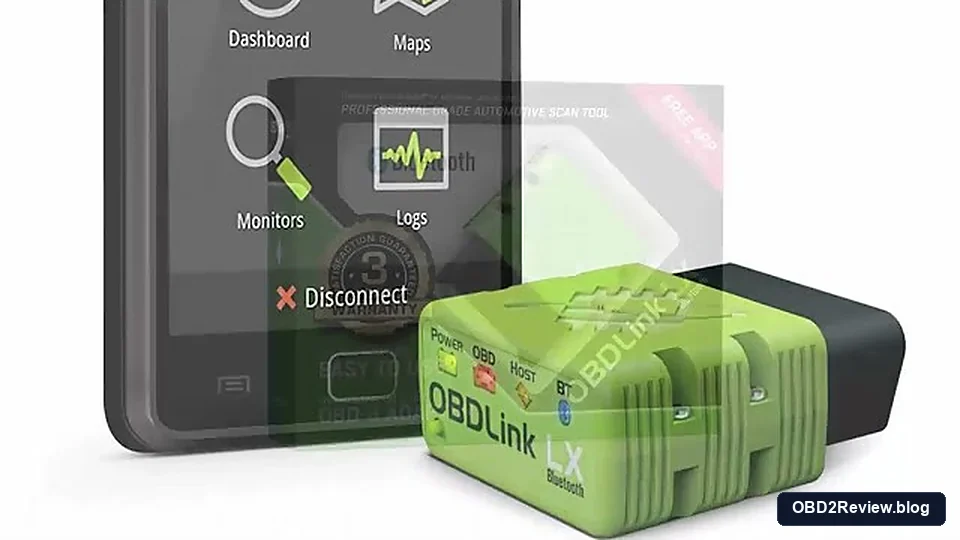
Modern automotive troubleshooting demands tools that balance processing power with user accessibility. BlueDriver relies on a Bluetooth dongle that offloads complex computing tasks directly to your mobile device.
Conversely, as detailed in our foxwell nt301 review, Foxwell engineers build standalone units featuring dedicated microprocessors. This fundamental hardware split determines how each device handles intensive live data streams.
BlueDriver relies on a Bluetooth Low Energy module paired with a companion smartphone application to process vehicle data remotely, shifting heavy computation loads directly to your mobile device's processor.
Foxwell architecture uses a dedicated microprocessing unit running an embedded real-time operating system on a standalone physical handset, ensuring isolated diagnostic execution without relying on external wireless tethering.
- BlueDriver utilizes mobile device RAM and processors.
- Foxwell operates independently from external smartphones.
- Standalone designs isolate diagnostic tools from phone calls.
Internal Processing Capabilities
Evaluating internal architecture reveals stark differences in operational speed. Foxwell hardware processes raw OBD-II PID requests natively inside its dedicated motherboard chipset.
BlueDriver packetizes the same diagnostic data wirelessly, sending payloads via Bluetooth to your phone for rendering and analysis.
- Native chipsets reduce translation bottlenecks.
- Wireless bridges introduce minor transmission overhead.
Interface Ergonomics and Hardware Form Factor
Physical ergonomics heavily influence daily usability in shop environments. BlueDriver remains a minimalist dongle that sits flush inside the vehicle dashboard port without cluttering the cabin space.
Noted in our foxwell nt301 lab review, these units feature thick rubberized grips and physical navigation buttons. Their integrated color screens are designed to survive greasy hands and accidental drops.
The BlueDriver dongle features an ultra-low-profile molded polymer enclosure that plugs flush into the under-dash OBD2 port, preventing accidental knee strikes during tight cabin entries or testing maneuvers.
Foxwell designs feature ruggedized standalone handsets incorporating tactile physical buttons and large color screens, optimized for gloved operation and high-glare environments where smartphone displays frequently fail.
- Flush-mount dongles prevent accidental knee strikes.
- Handheld units provide drop-resistant elastomer casing.
- Physical buttons function reliably with work gloves.
Display Technology and Screen Layouts
Screen quality dictates how quickly technicians interpret live sensor graphs. Foxwell color displays present clear graphical waveforms directly on dedicated screens without glare issues.
BlueDriver leverages high-resolution smartphone screens, offering pinch-to-zoom capabilities and crisp visual rendering that easily surpasses standard dedicated scanner displays.
- Dedicated screens ensure instant boot-up times.
- Smartphone displays offer superior pixel density.
Diagnostic Depth and Enhanced System Coverage
Comprehensive coverage extends far beyond basic emission readiness monitors. BlueDriver software unlocks manufacturer-specific enhanced diagnostics for ABS, airbag, and transmission modules seamlessly.
As highlighted in the foxwell nt710 review, these scanners offer deep bi-directional control options. Technicians can easily actuate fuel pumps, solenoids, and cooling fans directly through the menu interface.
Enhanced diagnostics require deep manufacturer-specific protocol translation to pull abs and airbag codes alongside standard powertrain emissions data across various international automotive architectures and bus networks.
Advanced bidirectional controls allow technicians to execute active component tests directly from the hardware interface, verifying relay switching, actuator movements, and sensor responses without manual jumper wires.
- Enhanced modules reveal hidden factory trouble codes.
- Bi-directional controls test component functionality actively.
- Standardized protocols ensure broad vehicle compatibility.
Manufacturer Specific Module Access
Accessing proprietary networks requires robust protocol translation layers. Both platforms communicate effectively with standard CAN, KWP2000, and ISO9141 vehicle communication networks.
Foxwell often provides deeper actuation menus for European and Asian imports right out of the box without requiring separate application purchases.
- Standard protocols cover basic powertrain modules.
- Proprietary gateways require advanced software packages.
Data Streaming Latency and Refresh Rates
Real-time sensor monitoring requires rapid refresh rates to catch intermittent faults. Wired Foxwell connections deliver zero-latency data packet delivery straight to the viewing screen.
BlueDriver maintains a stable Bluetooth connection, though heavy data logging sessions can occasionally introduce millisecond delays compared to hardwired connections.
Wireless OBD2 adapters often experience packet transmission bottlenecks over standard Bluetooth radio frequencies, resulting in noticeable graph stutter when streaming multiple high-frequency live PIDs simultaneously.
Hardwired serial connections on standalone diagnostic tools deliver superior refresh rates per second, rendering smooth real-time sensor graphs essential for accurate intermittent fault isolation and diagnostic troubleshooting.
- Hardwired links eliminate wireless packet dropouts.
- Bluetooth protocols allow untethered cabin mobility.
- High sample rates capture rapid voltage spikes.
Live Graphing Performance
Visualizing multiple PIDs simultaneously taxes processing pipelines. Foxwell processors render multiple graphing channels smoothly using dedicated onboard graphic chips.
BlueDriver offloads graphing chores to your phone GPU, resulting in remarkably fluid multi-parameter trend lines during extended test drives.
- Dedicated GPUs prevent interface stuttering.
- Phone processors handle high-resolution rendering easily.
Firmware Update Paths and Software Support
According to our foxwell nt650 elite review, keeping diagnostic tools current prevents compatibility gaps on newer vehicles. Foxwell updates typically require connecting the device to a computer via USB.
BlueDriver handles updates automatically through standard mobile app store downloads, ensuring your diagnostic database stays current without manual computer intervention.
BlueDriver handles database expansions seamlessly via over-the-air app updates, downloading fresh vehicle definition patches straight through standard cellular or Wi-Fi networks connected to your smartphone.
Foxwell units require a pc client utility or direct SD card transfer to install heavy firmware packages, ensuring stable standalone performance without depending on mobile operating system compatibility.
- App store integrations simplify software updates.
- USB desktop updates ensure stable firmware management.
- Regular database patches support newly released vehicles.
Subscription Models and Licensing Fees
Software licensing structures impact long-term tool ownership costs significantly. BlueDriver includes lifetime software updates and comprehensive vehicle coverage without recurring annual subscription fees.
Certain Foxwell advanced models include free lifetime updates, while specific professional variants may require paid renewals for expanded heavy-duty coverage.
- Lifetime updates reduce total cost of ownership.
- Conditional subscriptions unlock specialized diagnostic tiers.
Power Draw, Thermal Metrics and Durability
Harsh automotive environments test the thermal limits of electronic testing equipment. Foxwell enclosures dissipate internal heat effectively during prolonged diagnostic sessions under hot dashboards.
BlueDriver draws minimal parasitic power from the diagnostic port, staying remarkably cool even when left plugged in continuously for remote vehicle tracking.
Parasitic battery drain remains a critical consideration when leaving diagnostic hardware plugged into the obd2 diagnostic port over extended parking intervals without an active engine running.
Industrial-grade housing materials and drop-resistant rubber boots protect standalone scan tools from grease, chemical exposure, and accidental workshop floor impacts during intense daily service operations.
- Low parasitic draw prevents overnight battery drainage.
- Rugged thermal plastics resist under-dash heat.
- Solid-state internal components withstand persistent vibration.
Battery Management During Diagnostics
Extended key-on engine-off testing puts immense strain on vehicle batteries. Dedicated handhelds warn users of dropping input voltages to prevent unexpected module programming failures.
Mobile applications alert users through phone UI overlays, ensuring technicians monitor system voltage alongside live sensor data streams.
- Voltage monitoring protects sensitive control modules.
- Low battery warnings prevent incomplete code clears.
Choosing the Right Tool for Your Specific Workflow
Selecting the ideal diagnostic tool depends entirely on your daily repair environment. DIY mechanics valuing portable convenience and easy report sharing will prefer the smartphone-driven architecture.
Professional technicians requiring dedicated hardware resilience and rapid bi-directional testing will find the standalone handheld unit vastly superior for daily shop operations.
Mobile-integrated adapters suit DIYers prioritizing portability and cloud-based report sharing, allowing instant email export of diagnostic trouble codes directly from the roadside to customers.
Dedicated handheld units serve professional bay technicians needing uninterrupted diagnostic sessions free from phone notifications, battery depletion issues, or unstable wireless pairing protocols in busy garages.
- Match tool architecture to your primary workspace.
- Consider whether smartphone integration helps or hinders.
- Evaluate required module actuation capabilities carefully.
Making the Final Investment Decision
Weighing these engineering tradeoffs ensures long-term diagnostic satisfaction. Both options deliver exceptional value within their respective design parameters and target markets.
Assess your hardware preferences, update habits, and module coverage needs before making your final purchasing decision.
- Prioritize features you use on every job.
- Avoid paying for unnecessary professional functions.
Frequently Asked Questions
Can BlueDriver perform bi-directional controls like Foxwell scanners?
BlueDriver focuses primarily on reading codes, live data, and enhanced module diagnostics. Foxwell units typically offer more advanced bi-directional actuation controls for testing vehicle components directly.
Do both scanners require ongoing subscription fees for updates?
Neither tool forces mandatory recurring subscriptions for basic functionality. BlueDriver includes lifetime app updates, while Foxwell provides free updates on most standard diagnostic tiers.
How do these tools handle connection stability during test drives?
Foxwell relies on a secure physical cable connection that never drops data. BlueDriver maintains a reliable Bluetooth link, though extended range limits can occasionally interrupt logging.
Which scanner is better suited for professional mechanic shop environments?
Foxwell stands out in professional shops due to its rugged standalone housing. Standalone handhelds withstand greasy hands and heavy daily abuse better than mobile phones.
Are repair reports easy to share with customers using these devices?
BlueDriver excels at generating clean PDF repair reports directly through your smartphone. Foxwell units require transferring files to a computer or printer for physical report generation.