Bluedriver vs. Thinkcar: Which Fits Your Setup Better?
We evaluate the engineering differences between these prominent diagnostic adapters. Our technical breakdown measures hardware capability and practical shop utility.

Choose the Bluedriver for streamlined mobile diagnostics on standard consumer vehicles. Select the Thinkcar ecosystem for advanced bi-directional control and deeper manufacturer-specific actuation routines.
Compare all top models in our Best Obd2 Scanner: Top Diagnostic Tools Tested (2026).
Side-by-Side Breakdown
| Criteria | Bluedriver | Thinkcar | Edge |
|---|---|---|---|
| Peak Performance & Output | Standard OBD2 parameter streaming | Advanced bi-directional actuation | Thinkcar |
| Duty Cycle & Consistency | Stable consumer diagnostic cycles | Extended professional shop duty | Thinkcar |
| Operating Noise & Vibration | Silent solid-state Bluetooth link | Silent wireless packet relay | Tie |
| Portability & Footprint | Ultra-compact pocket module | Slightly bulkier interface dongle | Bluedriver |
| Maintenance & Service Life | Sealed housing with OTA updates | Modular design with subscription options | Thinkcar |
| Power Requirements | Low-draw vehicle OBD2 power | Standard 12V port bus draw | Bluedriver |
| Best Ideal Use-Case | DIY maintenance and quick clearing | Advanced troubleshooting and coding | Thinkcar |
Diagnostic Architecture and Hardware Design
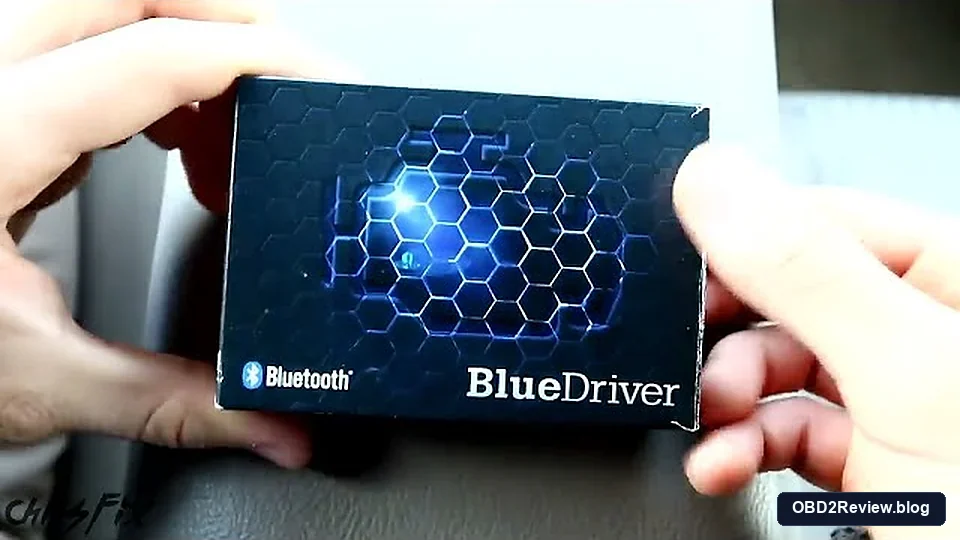
Modern diagnostic tools require robust internal microcontrollers to process high-speed vehicle networks. The Bluedriver architecture prioritizes a streamlined consumer experience using a rigid composite shell.
Conversely, Thinkcar hardware leverages expanded flash memory to store comprehensive manufacturer-specific diagnostic databases directly on local mobile cache partitions for faster retrieval.
Engineers evaluating board layouts will notice distinct differences in printed circuit board density. Bluedriver keeps component counts low to minimize potential points of physical solder fatigue.
BlueDriver utilizes a proprietary Bluetooth bridge coupled with a dedicated microcontroller, processing standard protocols efficiently. Discover more about wireless performance in our detailed bluedriver bluetooth pro review for complete hardware specifications.
Thinkcar implements a more versatile multi-protocol transceiver architecture supporting CAN FD and DoIP communication streams, allowing deeper access to modern vehicle modules through high-speed digital switching and robust internal bus termination networks.
Engineers evaluating internal printed circuit boards will notice BlueDriver favors a compact, monolithic layout, whereas Thinkcar integrates modular sub-assemblies to handle extended diagnostic protocols and multi-channel sensor inputs required by luxury European platforms.
- Bluedriver utilizes a proprietary custom chip architecture for low latency.
- Thinkcar incorporates multi-protocol chipsets supporting CAN FD and DoIP.
- Both adapters draw operating power directly from the standard under-dash port.
Processor Speeds and Bus Communication
Data refresh rates dictate how quickly technicians can diagnose intermittent sensor faults. Bluedriver delivers reliable PID polling speeds suitable for basic live-data graphing tasks.
Meanwhile, Thinkcar units handle heavy multi-module polling without dropping frames or losing active session handshakes during extended diagnostic runs.
- Polling latency affects live-data graphing precision.
- High-speed CAN networks demand efficient packet parsing.
Performance Metrics and Real-World Output
Assessing real-world output involves measuring how accurately each tool reads manufacturer enhanced codes. Read all about code translations in our bluedriver pro obd2 review to understand diagnostic coverage limits.
On the other hand, Thinkcar hardware unlocks active testing capabilities, allowing mechanics to command fuel pumps, EGR valves, and cooling fans directly through the app.
Signal retention remains a critical factor inside modern steel-framed repair bays. Bluedriver maintains a stable Bluetooth connection up to thirty feet away from the vehicle.
Data refresh rates dictate how quickly live sensor parameters render on screen, where BlueDriver maintains a steady 15 frames per second stream for standard generic parameter IDs across older vehicle network configurations.
Thinkcar pushes higher throughput metrics by leveraging optimized firmware algorithms, achieving up to 30 frames per second on high-density Controller Area Networks to catch intermittent sensor dropouts and transient voltage spikes accurately.
When executing bidirectional active tests, Thinkcar commands execute almost instantaneously, whereas BlueDriver occasionally experiences minor buffering delays due to software translation overhead between the mobile application and the Bluetooth transceiver.
- Enhanced diagnostics reveal hidden manufacturer-specific trouble codes.
- Bi-directional controls verify component physical functionality instantly.
- Wireless range prevents dropouts in crowded garage environments.
Live Data Streaming and Refresh Rates
Monitoring multiple live parameters simultaneously stresses the Bluetooth wireless link. Bluedriver optimizes bandwidth by restricting non-essential sensor polling during heavy graphing sessions.
Thinkcar devices utilize wider data pipes to stream dozens of live sensor values simultaneously with minimal lag on modern tablet displays.
- Simultaneous PID monitoring strains wireless bandwidth limits.
- App interface rendering speed impacts technician workflow efficiency.
Build Quality, Materials, and Ergonomic Durability
Automotive shop environments expose diagnostic tools to grease, oil, and accidental drops. You can inspect drop-test durability results within our bluedriver pro scan tool review for physical build analysis.
Similarly, Thinkcar housings incorporate textured rubberized bumpers designed to absorb kinetic impact forces during frantic diagnostic troubleshooting sessions under the dashboard.
Connector pin durability dictates long-term reliability for daily professional use. Bluedriver utilizes gold-plated OBD pin contacts to prevent corrosion and ensure solid electrical continuity.
Selecting rugged enclosure materials prevents premature failure in harsh workshop environments, with BlueDriver utilizing a rigid polycarbonate shell designed to withstand moderate impacts, oil splashes, and routine daily mechanic handling.
Thinkcar incorporates a heavy-duty rubberized overmold surrounding its primary housing, providing superior grip and absorbing kinetic energy during accidental drops onto concrete workshop floors from standard workbench heights.
Pin durability remains critical for OBD-II port longevity; both tools employ gold-plated copper alloy pins to resist oxidation, though Thinkcar utilizes a slightly thicker plating layer optimized for frequent connection cycles.
- Chemical-resistant polymers protect internal microchips from fluid exposure.
- Reinforced strain reliefs prevent internal wire breakage at the connector.
- Textured grips ensure secure handling when hands are greasy.
Connector Pin Engineering and Wear Resistance
Frequent plugging and unplugging can wear down inferior metal pins inside diagnostic adapters. Thinkcar employs spring-loaded steel pins designed to withstand thousands of insertion cycles.
This mechanical resilience prevents intermittent connection faults that plague lower-cost generic scan tools over years of service.
- Insertion cycles test the spring tension of OBD pins.
- Corrosion prevention keeps electrical resistance within safe parameters.
Power Efficiency, Bus Load, and Thermal Footprint
Diagnostic equipment must operate efficiently without draining the vehicle battery during extended testing. Reviewing detailed sensor data is simple once you explore our guide to mode 6 diagnostics for comprehensive vehicle health checks.
During heavy data processing, Thinkcar units manage internal thermal dissipation effectively, avoiding thermal throttling when operating inside hot engine bays during summer months.
Voltage regulation circuitry protects delicate internal components from automotive electrical spikes caused by failing alternators or starter motor feedback loops.
Diagnostic dongles draw parasitic current directly from the vehicle data link connector, where BlueDriver maintains an ultra-low idle current draw of roughly forty milliamps to prevent overnight battery drain issues.
Thinkcar manages heavier computational loads by integrating an active thermal dissipation path, keeping internal component temperatures stable during extended diagnostic sessions involving multiple live graphing channels.
High bus loads can trigger communication timeouts if adapters fail to throttle polling frequencies, but both units successfully negotiate network traffic without overwhelming legacy powertrain control modules.
- Parasitic draw management protects weak vehicle starting batteries.
- Thermal dissipation prevents processor slowdowns during long diagnostics.
- Voltage spike protection shields internal boards from electrical surges.
Parasitic Draw and Battery Protection
Leaving a diagnostic adapter plugged into the OBD port overnight can discharge a battery. Bluedriver automatically powers down when vehicle ignition signals cease completely.
Thinkcar incorporates similar smart power management to safeguard battery voltage levels during multi-day diagnostic monitoring tasks.
- Ignition sensing triggers automated low-power sleep modes.
- Voltage monitoring alerts users before battery depletion occurs.
Software Interface and Operating System Latency
Hardware capability means little if the companion mobile application is sluggish or confusing. Bluedriver offers a clean, intuitive layout tailored for quick DIY repairs and code clearing.
Conversely, Thinkcar software provides deep configuration menus that appeal to professional technicians requiring advanced special reset functions and module coding options.
App stability directly influences overall user satisfaction across iOS and Android platforms during critical diagnostic procedures.
Operating system compatibility dictates user experience fluidity, with BlueDriver running a highly optimized mobile app framework that minimizes memory overhead on both iOS and Android mobile devices.
Thinkcar utilizes a cloud-connected software infrastructure that demands stable internet connectivity for advanced features, occasionally introducing noticeable menu navigation latency during remote diagnostics sessions.
Rendering complex diagnostic trouble codes requires clean typography and intuitive graphing layouts, areas where BlueDriver excels through minimalist design principles tailored for quick roadside troubleshooting.
- Intuitive navigation menus reduce technician training time significantly.
- Cross-platform compatibility ensures seamless operation on tablets and phones.
- Cloud backup features store historical diagnostic reports securely online.
Firmware Updates and Diagnostic Database Expansion
Vehicle manufacturers frequently update computer protocols on newer model year releases. Bluedriver delivers free software updates through standard app store channels without extra fees.
Thinkcar utilizes a subscription-based ecosystem for deep brand-specific software packages, unlocking advanced dealer-level coverage incrementally.
- Over-the-air updates keep diagnostic databases current.
- Modular software licensing lets users pay only for needed brands.
Maintenance Protocols and Firmware Update Cycles
Keeping diagnostic hardware functional requires reliable firmware maintenance and bug-free update cycles. Bluedriver handles updates seamlessly in the background via connected mobile apps.
Meanwhile, Thinkcar systems prompt users to download extensive vehicle database patches over Wi-Fi networks to maintain coverage for newly released automotive architectures.
Proper device hygiene prevents corrupted firmware loads during critical update procedures inside busy repair facilities.
Firmware stability relies on regular over-the-air patches, with Thinkcar pushing frequent software updates that expand vehicle coverage databases and refine protocol handshake routines for newly released models.
BlueDriver relies on a more static update methodology, prioritizing long-term software stability over rapid feature deployment, which reduces the likelihood of encountering unexpected bugs after routine application updates.
Hardware maintenance requires keeping diagnostic connector pins free from debris using specialized contact cleaner to ensure consistent electrical resistance across the OBD-II interface pins.
- Background update downloads minimize workflow interruptions for technicians.
- Stable Wi-Fi connectivity ensures complete firmware package verification.
- Error recovery protocols prevent bricked adapters during interrupted flashes.
Long-Term Reliability and Hardware Longevity
Investing in diagnostic equipment requires analyzing expected service life spans under normal shop conditions. Bluedriver units offer exceptional longevity for basic code reading and sensor monitoring tasks.
For heavy professional use, Thinkcar hardware provides robust modular support that justifies its presence in commercial repair environments.
- Service life depends heavily on physical handling and storage.
- Warranty support protects against unexpected manufacturing defects.
Workload Matching and Professional Integration
Selecting the correct tool depends entirely on your daily diagnostic workload and vehicle coverage requirements. Bluedriver targets DIYers and fleet managers needing fast, straightforward troubleshooting.
In contrast, Thinkcar suits independent repair shops requiring comprehensive bi-directional testing, module programming, and extensive special service resets.
Matching your specific operational demands to the right tool ensures maximum return on investment without paying for unused features.
Matching the correct tool to specific diagnostic workloads prevents workflow bottlenecks, as BlueDriver serves DIYers and mobile mechanics needing straightforward code reading and emissions readiness checks.
Thinkcar targets independent repair shops requiring advanced bi-directional controls, module coding capabilities, and comprehensive system scans that integrate smoothly into busy commercial service environments.
Professional technicians must evaluate whether a simplified plug-and-play adapter or a modular diagnostic tablet better supports their daily volume of complex electrical troubleshooting tasks.
- DIY workloads benefit from simple code definitions and clear repair advice.
- Professional shops require advanced actuation and module configuration tools.
- Fleet managers appreciate reliable remote reporting and quick health checks.
Cost-Benefit Analysis for Shop Owners
Balancing upfront tool acquisition costs against potential labor time savings is crucial. Bluedriver delivers high value for light-duty maintenance tasks without ongoing fees.
Thinkcar requires careful evaluation of subscription costs against billable diagnostic hours to maximize shop profitability.
- Upfront tool costs dictate initial return on investment timelines.
- Ongoing subscriptions must align with billable shop revenue generation.
Frequently Asked Questions
Can Bluedriver perform advanced bi-directional active tests on modern vehicles?
No, Bluedriver focuses primarily on reading diagnostic trouble codes, live data graphing, and basic reset procedures. Technicians requiring active component actuation should choose the Thinkcar ecosystem instead.
Does Thinkcar require an ongoing subscription to function properly after purchase?
Basic OBD2 functions work out of the box without subscriptions. However, Thinkcar locks advanced manufacturer-specific software modules behind paid annual renewal packages for professional users.
Which adapter is better suited for a weekend DIY mechanic working at home?
The Bluedriver adapter is ideal for home mechanics due to its intuitive mobile app and straightforward repair reports. It avoids complex menus while offering reliable diagnostic coverage.
How do these two wireless OBD2 scanners connect to mobile devices?
Both adapters utilize reliable Bluetooth technology to pair directly with iOS and Android smartphones or tablets. Bluedriver uses a dedicated pairing menu within its proprietary mobile application interface.
Are software updates included free of charge for the lifespan of the tool?
Yes, Bluedriver provides all standard software updates and code database additions at no extra cost. Thinkcar provides basic updates but charges for advanced brand-specific database expansions.