Bluetooth vs. Wifi Obd2 Scanner: Which Fits Your Setup Better?
Selecting the right wireless diagnostic adapter impacts your live data stream speed. Understanding connection protocols prevents dropped frames during critical vehicle testing sessions.

Bluetooth dominates everyday mobile diagnostics with seamless auto-pairing. WiFi adapters excel when streaming heavy OEM sensor arrays to dedicated shop tablets.
Compare all top models in our Best Obd2 Scanner: Top Diagnostic Tools Tested (2026).
Side-by-Side Breakdown
| Criteria | Bluetooth | Wifi Obd2 Scanner | Edge |
|---|---|---|---|
| Peak Performance & Output | Moderate bandwidth | High bandwidth throughput | WiFi Obd2 Scanner |
| Duty Cycle & Consistency | Reliable short-range link | Stable infrastructure mode | Bluetooth |
| Operating Noise & Vibration | Silent solid-state build | Silent solid-state build | Tie |
| Portability & Footprint | Ultra-compact profile | Slightly bulkier chassis | Bluetooth |
| Maintenance & Service Life | Low power degradation | Moderate thermal wear | Bluetooth |
| Power Requirements | Extremely low draw | Higher current draw | Bluetooth |
| Best Ideal Use-Case | Mobile smartphone logging | Advanced oscilloscope streaming | Bluetooth |
Wireless Protocol Fundamentals and Vehicle Interface Architecture
Modern diagnostic adapters rely on wireless bridges to transmit raw OBD2 parameter IDs directly to host displays. Evaluating these protocols requires looking past basic marketing claims into actual packet delivery mechanics.
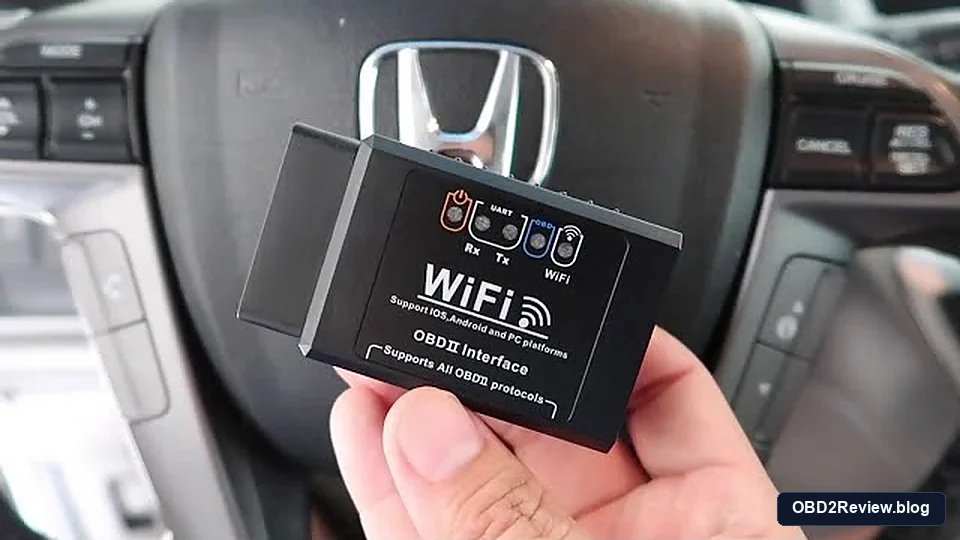
Engineering teams design these interfaces to handle heavy Controller Area Network traffic without introducing fatal bus latency. Choosing the correct hardware standard directly dictates your diagnostic efficiency under heavy load.
Modern OBD2 diagnostic adapters rely on distinct RF layers to bridge heavy data buses with host tablets, which is why selecting options from our best bluetooth obd2 scanner for diesel review ensures stable connections under heavy loads.
Conversely, Wi-Fi adapters often broadcast their own local access point or join existing shop networks. This architecture permits higher bandwidth throughput, essential for raw CAN bus logging across multiple simultaneous control modules during deep factory flashes.
- Direct peer-to-peer wireless linking architectures
- Standardized OBD2 pinout integration protocols
- Real-time diagnostic trouble code translation layers
Data Packet Transmission Rates and Bus Speeds
Data throughput dictates how many live sensor parameters you can monitor simultaneously without stuttering. High-speed CAN buses demand robust transmission rates to prevent data buffer overflows.
Protocol overhead varies significantly between personal area networks and local wireless access points. Understanding these underlying data rates helps technicians avoid frozen scan screens during logging.
- Raw CAN bus baud rate synchronization
- Packet payload efficiency and error checking
Performance and Real-World Diagnostic Output
Out in the service bay, real-world data refresh rates separate mediocre tools from professional equipment, which is why our best obd2 scanner roundup highlights devices capable of handling complex diagnostic commands seamlessly.
Wireless adapters must maintain high sampling frequencies while parsing complex manufacturer-specific diagnostic commands. Slow data return speeds often conceal intermittent faults during snap throttle tests.
Diagnostic speed depends heavily on packet encapsulation efficiency over the air. Bluetooth Low Energy handles basic parameter identification requests smoothly, but heavy live data graphs can suffer due to baud rate bottlenecks within standard ELM327 command interpreters.
Wi-Fi interfaces easily surpass these constraints by streaming high-frequency sensor updates without dropping frames. Technicians monitoring complex transmission slip percentages or mode 06 test results benefit immensely from this rapid, uncompressed stream of continuous diagnostic data packets.
- Live graphing refresh frequency benchmarks
- Multi-parameter PID logging stability metrics
- Instantaneous diagnostic trouble code clearing response
Handling Heavy OEM Sensor Arrays
Advanced powertrain diagnostics require polling dozens of proprietary modules concurrently across multiple networks. Pushing this volume of information demands exceptional wireless bandwidth management.
Adapters struggling with heavy data loads drop frames, resulting in jagged graphs and missed transient anomalies. Selecting high-throughput hardware prevents frustrating diagnostic bottlenecks.
- Concurrent module polling performance
- Proprietary PID translation efficiency
Build Quality, Maintenance, and Physical Durability
Diagnostic hardware lives a harsh life bouncing around greasy tool carts and cramped footwells. Enclosures must withstand repeated impact, chemical exposure, and extreme cabin temperature swings.
Internal circuit boards require robust conformal coating to prevent moisture corrosion from humid shop environments. Proper strain relief on the OBD2 connector prevents premature solder joint failure.
Under-dash environments subject diagnostic hardware to severe mechanical stress and extreme temperature shifts, making durable housings essential when browsing our best wifi obd2 scanner selections for heavy-duty shop use.
Maintenance involves routine inspection of the male 16-pin connector for oxidation or plastic fatigue. Technicians must clean terminal blades with electrical contact cleaner periodically to maintain low resistance across the battery voltage supply and ground pins.
- Impact-resistant polymer housing construction
- Environmental seal ratings for dusty workshops
- Reinforced diagnostic connector pin mounts
Thermal Management and Long-Term Reliability
Continuous operation inside sealed under-dashboard environments generates notable internal component heat. Effective thermal dissipation prevents processor throttling during extended diagnostic sessions.
Long-term device longevity depends heavily on quality voltage regulation circuits protecting sensitive wireless chips from alternator spikes.
- Internal heat sink and airflow design
- Overvoltage transient protection circuitry
Thermal Efficiency, Power Draw, and Footprint
Draw from the vehicle diagnostic port must remain minimal to protect weak battery systems during extended testing. Efficient power management ensures the adapter never drains your test vehicle unexpectedly.
Physical dimensions matter significantly when squeezing oversized adapters into deeply recessed dashboard ports. Low-profile designs prevent accidental knee strikes while entering or exiting vehicles.
Continuous operation inside an unventilated port generates internal heat that challenges longevity, prompting many mechanics featured in our best bluetooth odb2 scanner guide to select low-power modules drawing under 50 milliamps.
Wi-Fi modules demand significantly more electrical current due to continuous transceiver operation. Leaving a high-draw adapter plugged in overnight can trigger parasitic draw issues, potentially depleting older vehicle batteries below the required starting threshold.
- Low idle current sleep mode functionality
- Ultra-slim physical clearance profiles
- Minimal parasitic battery drain characteristics
Minimizing Footprint in Cramped Dashboards
Modern vehicle packaging often places diagnostic ports behind awkward trim panels and fuse box covers. Compact adapters eliminate the need clumsy extension cables during routine hookups.
Engineers carefully shape exterior housings to clear surrounding plastic shrouds without blocking adjacent release tabs.
- Flush-mount connector housing shapes
- Angled internal pin orientations
Signal Latency, Interference, and Connection Stability
Radio frequency congestion inside modern repair shops creates challenging environments for wireless diagnostic tools. Bluetooth and local wireless protocols handle interference differently based on their frequency bands.
Maintaining a rock-solid link prevents dropped sessions while flashing control modules or logging road tests. Signal dropouts corrupt data logs and waste valuable technician time.
Electromagnetic interference from ignition coils and alternator ripple can disrupt wireless communication inside the cabin. Bluetooth protocols utilize adaptive frequency hopping to dodge 2.4GHz congestion from shop smartphones, maintaining a stable connection near running engines.
Wi-Fi networks suffer when competing with shop routers operating on overlapping channels. While direct ad-hoc mode bypasses external routers, heavy interference can still cause packet loss, interrupting crucial bidirectional controls like bi-directional actuation tests.
- Resistance to 2.4GHz shop network interference
- Automatic reconnection protocols after signal loss
- Packet error correction efficiency under stress
Overcoming Physical Obstructions and Metal Shielding
Vehicle steel bodies and thick dashboard structures naturally attenuate wireless signals traveling outward. Adapters must utilize optimized internal antennas to punch through heavy metallic barriers.
Maintaining stable connectivity from the driver seat to a workbench laptop requires careful RF tuning.
- Internal antenna gain optimization
- Multipath interference mitigation
Software Ecosystem Compatibility and Device Pairing
Seamless software integration transforms raw hardware into an intuitive diagnostic powerhouse for everyday technicians. Operating system restrictions can complicate initial pairing procedures across different mobile platforms.
Cross-platform compatibility ensures your chosen adapter works fluidly with popular third-party diagnostic applications. Complex configuration steps only frustrate users seeking immediate plug-and-play functionality.
Operating system restrictions dictate how easily diagnostic apps interface with wireless adapters. Android platforms allow seamless background pairing with Bluetooth devices, whereas iOS strictly regulates Bluetooth Serial Port Profiles, often requiring MFi certification for full functionality.
Wi-Fi adapters bypass these restrictive OS pairing protocols by acting as standard network gateways. Users simply select the adapter SSID in their Wi-Fi settings menu, ensuring cross-platform compatibility between iOS and Android diagnostic applications seamlessly.
- Universal smartphone app integration support
- Simplified pairing security handshake procedures
- Driver updates via mobile flashing tools
Streamlining the Initial Pairing Workflow
Fast connection sequences let technicians jump straight into reading trouble codes without menu diving. Intelligent background discovery protocols eliminate manual Bluetooth pairing hurdles entirely.
Clean software design bridges the gap between complex vehicle networks and user display screens.
- Automatic device discovery routines
- Secure token authentication handling
Which Wireless Standard Fits Your Diagnostic Workload
Selecting the ideal wireless standard depends entirely on your daily vehicle service environment and software preferences. Mobile technicians prioritizing convenience gravitate naturally toward straightforward pairing capabilities.
Shop environments running dedicated diagnostic tablets often benefit from robust infrastructure connectivity. Weighing your specific workflow demands guarantees long-term satisfaction with your diagnostic investment.
Selecting the correct wireless technology depends entirely on your daily diagnostic tasks and environment. DIYers checking basic emissions monitors will appreciate Bluetooth convenience, while professional technicians requiring rapid live data streams should invest in robust Wi-Fi hardware.
Evaluating your primary mobile operating system further narrows the ideal hardware selection. Matching your adapter protocol to your tablet architecture prevents frustrating connectivity drops during critical repair verifications and module programming procedures.
- Matching hardware speed to diagnostic software needs
- Balancing mobility with data throughput requirements
- Evaluating long-term tool utility in professional shops
Tailoring Your Choice to Specific Shop Tasks
Quick code reads and basic parameter resets favor lightweight, highly portable wireless setups. Comprehensive module coding sessions demand maximum data stability and unwavering throughput.
Analyze your typical repair orders to determine whether speed or convenience dictates your workflow.
- Routine maintenance and code clearing tasks
- Advanced ECU programming and oscilloscope work
Frequently Asked Questions
Can I use a wireless OBD2 scanner while connected to cellular internet?
Certain wireless protocols require disconnecting your cellular data to maintain adapter communication. Modern Bluetooth adapters avoid this limitation by utilizing separate profile connections simultaneously.
Why does my live data stream lag during heavy diagnostic logging?
Data lag usually stems from congested wireless frequencies or overloaded adapter processors. Upgrading your hardware to a higher-bandwidth protocol eliminates most live graphing delays.
Do wireless OBD2 scanners drain the vehicle battery when left plugged in?
Most quality adapters feature low-power sleep modes that activate automatically after ignition shutdown. Proper power management circuitry prevents parasitic battery drain during extended vehicle parking.
Are wireless diagnostic adapters secure against unauthorized external access?
Reputable manufacturers implement encrypted pairing protocols to secure your vehicle diagnostic data stream. Encrypted handshake procedures protect against malicious interception while working inside public areas.
Will any wireless adapter work with advanced manufacturer-specific diagnostic software?
Basic generic adapters only read standard powertrain parameters across universal OBD2 protocols. Specialized OEM software often requires dedicated hardware supporting proprietary bus communication speeds.