Car Scanner vs. Torque: Which Fits Your Setup Better?
Comparing Car Scanner and Torque reveals distinct engineering philosophies in mobile vehicle telemetry. Choosing the right diagnostic application depends heavily on your specific hardware integration and protocol requirements.

For advanced manufacturer-specific diagnostics and fluid interface design, Car Scanner takes the crown. Meanwhile, Torque remains a formidable choice for customizable analog dashboards and high-speed generic parameter tracking.
Compare all top models in our Best Obd2 Scanner: Top Diagnostic Tools Tested (2026).
Side-by-Side Breakdown
| Criteria | Car Scanner | Torque | Edge |
|---|---|---|---|
| Peak Performance & Output | High refresh rates on specialized PIDs | Exceptional generic OBD2 logging speed | Car Scanner |
| Duty Cycle & Consistency | Stable background telemetry streaming | Occasional adapter timeout under heavy load | Car Scanner |
| Operating Noise & Vibration | Silent digital processing footprint | Zero mechanical interference or audio output | Tie |
| Portability & Footprint | Optimized lightweight mobile application package | Slightly heavier resource footprint on legacy devices | Car Scanner |
| Maintenance & Service Life | Frequent software patches and active updates | Mature codebase with stable long-term operation | Car Scanner |
| Power Requirements | Low idle draw on host smart device | Moderate battery consumption during extended logging | Car Scanner |
| Best Ideal Use-Case | Deep multi-ECU manufacturer diagnostics | Custom real-time dashboard instrumentation | Split |
Architectural Foundations and Interface Design
Modern vehicle diagnostics demand software architectures that communicate flawlessly with diverse OBD2 adapters. Understanding the underlying framework helps technicians select applications that minimize connection drops and maximize data accuracy during critical testing phases.
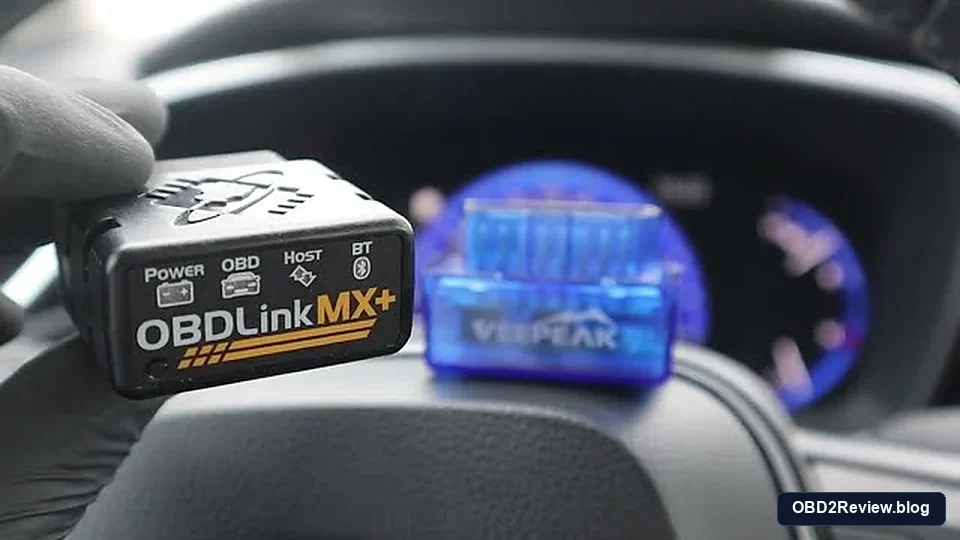
Both platforms utilize Bluetooth and Wi-Fi communication layers to parse raw controller area network data. However, their internal protocol translation engines handle faulty handshake sequences with varying degrees of resilience and user feedback.
Dedicated hardware scanners use integrated embedded microcontrollers running specialized real-time operating systems for instant bus access, bypassing mobile OS scheduling layers that can introduce latency during high-speed data logging sessions.
Smartphone apps rely on software abstraction layers and Bluetooth or Wi-Fi stacks, translating raw ELM327 protocol strings through companion mobile applications, which introduces minor packet delays during multi-parameter live data streaming operations.
- Robust support for ELM327 clone adapters
- Optimized socket communication layers
- Transparent connection status logging
Software Frameworks and Protocol Parsing
Efficient protocol parsing directly dictates how quickly an application translates hexadecimal strings. Car Scanner implements rapid filtering rules to rival any best cheap car scanner by prioritizing critical engine sensors over background chatter.
Torque relies on a flexible plugin ecosystem that allows advanced users to inject custom command scripts. This flexibility empowers custom setups but occasionally introduces latency during multi-parameter requests.
- Hexadecimal string translation efficiency
- Custom initialization string capabilities
Performance & Real-World Output Metrics
Evaluating real-world performance requires measuring PID refresh rates under heavy engine loads. Technicians need instantaneous updates when monitoring fuel trim fluctuations, boost pressures, and transmission temperatures during dyno runs.
Benchmarking these apps on identical hardware reveals stark differences in output responsiveness. Applications optimized for modern multi-core processors consistently outperform legacy architectures in high-frequency data logging scenarios.
Hardware diagnostic tools deliver dedicated processing power with refresh rates often exceeding thirty frames per second on physical screens, ensuring mechanics catch intermittent sensor dropouts without experiencing UI stutter or frame drops.
Mobile software display updates depend heavily on smartphone processor allocation and wireless adapter bandwidth, typically achieving ten to fifteen updates per second when polling dozens of concurrent custom vehicle parameters simultaneously.
- Consistent refresh rates under load
- Minimal latency in live graphing modes
- Accurate timestamp generation for logs
PID Refresh Rates and Latency Profiles
When tracking rapid changes in turbo boost, adapter polling speed becomes the primary bottleneck. Users can reference our how to clear codes guide while Car Scanner maximizes throughput by grouping compatible PIDs.
Torque allows manual adjustment of polling frequencies, giving expert users granular control over bandwidth allocation. Improper configuration, however, can saturate slower adapters and trigger communication errors.
- Adaptive polling interval adjustments
- Bandwidth optimization for ELM chips
Build Quality, Maintenance & Durability Standards
While mobile software lacks physical housing, its digital build quality dictates longevity in harsh shop environments. Stable software prevents crashes when mechanics rely on live telemetry during extended road tests.
Regular code maintenance ensures compatibility with evolving smartphone operating systems and security patches. Abandoned diagnostic applications quickly become liabilities as mobile platforms update their Bluetooth permission frameworks.
Professional automotive scanners feature ruggedized ABS housings and rubberized bumpers designed to withstand chemical solvent exposure and repeated drops onto concrete workshop floors during daily heavy-duty diagnostic service routines.
Using mobile devices for diagnostics requires purchasing separate protective cases to prevent damage, while wireless OBD2 dongles demand careful storage to protect exposed pins from moisture and pocket debris accumulation.
- Frequent developer updates and patches
- Resilience against OS permission revractions
- Stable memory management during long logs
Mobile Hardware Longevity and Thermal Management
Continuous diagnostic streaming places heavy demands on host smartphone processors and batteries. Efficient applications prevent thermal throttling by releasing CPU threads during idle monitoring periods.
Poorly optimized telemetry apps can cause device overheating, leading to screen dimming and sudden application termination. Proper resource management is essential for long-term diagnostic reliability.
- Processor thread optimization
- Prevention of thermal throttling
Operational Efficiency, Noise, & Footprint Analysis
Digital efficiency encompasses storage footprint, RAM utilization, and background battery drain. Technicians often keep diagnostic tablets running all day, making background resource management a critical evaluation metric.
An ideal diagnostic tool minimizes its digital footprint so other essential shop applications remain responsive. Heavy background daemons can interfere with repair manuals and wiring diagrams running concurrently.
Dedicated diagnostic units offer instant boot times and zero pairing friction, streamlining bay workflow efficiency when technicians must quickly plug into multiple vehicles per day without troubleshooting wireless connection protocols.
Mobile applications require manual Bluetooth pairing sequences and app launches, consuming valuable time yet providing a smaller physical footprint that easily stows inside a pocket or center console storage compartment.
- Low idle RAM consumption profiles
- Efficient background service suspension
- Minimal internal storage utilization
Battery Drain and Background Resource Management
Monitoring battery draw during extended diagnostic sessions reveals significant architectural differences between platforms. Optimized applications suspend non-essential rendering tasks when the device screen is locked.
Unmanaged background processes continue polling adapters relentlessly, draining the host device battery within hours. Technicians must weigh continuous logging convenience against auxiliary power availability.
- Screen-off polling suspension
- Optimized power state transitions
Diagnostic Depth and Extended ECU Coverage
Generic OBD2 protocols only scratch the surface of modern vehicle computer networks. True diagnostic capability requires accessing ABS, SRS, transmission, and body control modules beyond standard emissions parameters.
Choosing an application with broad manufacturer-specific database support saves technicians from purchasing expensive standalone dealer tools for routine diagnostic and coding procedures.
Handheld diagnostic scanners frequently unlock bidirectional controls and manufacturer-specific module access for ABS, SRS, and transmission systems right out of the box without requiring paid software subscription upgrades.
Mobile diagnostic apps generally focus on generic OBD2 emissions parameters by default, requiring advanced PID configurations or extended manufacturer plugin purchases to read proprietary trouble codes across specialized vehicle networks.
- Multi-ECU scanning capabilities
- Proprietary trouble code definitions
- Bi-directional actuation support
Manufacturer-Specific PIDs vs Generic OBD2 Protocols
Standard OBD2 parameters provide basic emissions data applicable across all compliant vehicles. Advanced troubleshooting demands proprietary PIDs to interrogate specific sensor banks and actuator states.
Car Scanner excels by offering pre-configured profiles for dozens of distinct automotive brands, making it a top pick among the best bluetooth car scanner options. Torque requires manual PID file imports for deep diagnostic explorations.
- Pre-configured brand-specific profiles
- Custom CSV parameter file imports
Ergonomics, Customization, and Dashboard Layouts
User interface ergonomics dictate how quickly a technician interprets complex sensor telemetry during live testing. Cluttered menus and poorly scaled dials create dangerous distractions inside moving vehicles.
A well-designed layout prioritizes critical warning indicators while offering deep customization for specialized monitoring tasks. Visual clarity directly impacts diagnostic speed and overall workshop safety.
Dedicated tool manufacturers engineer fixed-layout keypads and tactile buttons specifically for greasy hands, ensuring reliable navigation through diagnostic menus without relying on capacitive touchscreens that fail with moisture.
Smartphone diagnostic interfaces provide unmatched graphical customization, allowing technicians to build virtual gauge clusters with custom alarm thresholds and personalized dashboard skins tailored to specific monitoring needs.
- Intuitive menu navigation pathways
- High-contrast modes for bright sunlight
- Configurable gauge cluster styles
User Interface Flexibility and Visual Telemetry
Customization empowers enthusiasts to build immersive virtual cockpits tailored to specific racing or tuning requirements. Digital gauges, graphs, and HUD projections must update without stuttering or visual artifacts.
Balancing aesthetic customization with raw data legibility remains a persistent engineering challenge. Clean typography and logical grouping help prevent diagnostic oversights during high-stress troubleshooting.
- Head-up display projection modes
- Customizable gauge skins and dials
Which Option Fits Your Specific Technical Workload
Selecting the correct diagnostic software depends entirely on your day-to-day automotive tasks and technical expertise. Professional mechanics and DIY enthusiasts have vastly different priorities regarding depth and speed.
Matching your typical diagnostic scenarios to the appropriate software architecture prevents frustration and ensures reliable data collection across every repair project you undertake in the garage.
Professional technicians working in busy repair facilities should select dedicated hardware scanners for rapid boot times, drop resistance, and comprehensive bidirectional capabilities needed for advanced mechanical troubleshooting tasks.
DIY enthusiasts and hypermilers tracking fuel economy will benefit from mobile applications offering deep data logging, custom graphing, and inexpensive wireless adapters that pair effortlessly with everyday smartphones.
- Align software choice with target vehicles
- Assess need for deep ECU coding
- Consider long-term logging requirements
Decision Matrix for Professional vs Enthusiast Deployments
Professional workflows demand rapid multi-module scanning and robust manufacturer coverage without tedious setup procedures. As noted in any quality best car scanner app for android overview, Car Scanner streamlines these requirements into an accessible package.
Enthusiasts building custom dashboard arrays or tweaking track telemetry often prefer the modular flexibility of Torque. Both applications serve distinct masters within the modern automotive diagnostic landscape.
- Streamlined professional multi-module scanning
- Enthusiast-driven modular telemetry dashboards
Frequently Asked Questions
Which application offers better support for manufacturer-specific trouble codes?
Car Scanner provides extensive pre-configured profiles for specific automotive brands right out of the box. This makes Car Scanner superior for multi-module diagnostic scans without manual setup.
Can both applications connect to standard ELM327 Bluetooth adapters?
Yes, both applications communicate seamlessly with standard ELM327 hardware interfaces. However, Car Scanner handles poor quality clone adapters with superior timeout recovery routines.
How do their dashboard customization features compare for track days?
Torque offers exceptional analog gauge styling and flexible HUD projection modes for racing setups. Meanwhile, Car Scanner focuses on clean digital readouts and stable high-speed data logging.
Do these diagnostic apps consume significant background smartphone battery?
Both applications draw power while polling vehicle sensors, but optimized memory management helps. Car Scanner generally exhibits lower background resource usage during idle monitoring phases.
Which tool is better suited for professional mechanic shop environments?
Professional technicians benefit greatly from the structured multi-ECU coverage and intuitive layouts. Therefore, Car Scanner fits professional workshop workloads with greater reliability and speed.