Crp919E vs Crp919X: Which Fits Your Setup Better
Choosing between these advanced diagnostic tools requires analyzing specific module programming needs and everyday shop workflows. Both Launch scanners deliver robust bi-directional capabilities, but distinct interface differences separate them.


Choose the CRP919E if your shop demands complete VAG guided functions and integrated topology mapping. Select the CRP919X for a streamlined hardware package focused purely on core bi-directional diagnostics.
Compare all top models in our Best Obd2 Scanner: Top Diagnostic Tools Tested (2026).
Side-by-Side Breakdown
| Criteria | Crp919E | Crp919X | Edge |
|---|---|---|---|
| Peak Performance & Output | High-speed quad-core processor | Standard quad-core processor | Crp919E |
| Duty Cycle & Consistency | Optimized thermal dissipation | Standard thermal management | Crp919E |
| Operating Noise & Vibration | Completely silent passive cooling | Silent passive cooling design | Tie |
| Portability & Footprint | Ruggedized ergonomic tablet body | Sleek streamlined handheld profile | Crp919X |
| Maintenance & Service Life | Extended software update path | Standard software update cycle | Crp919E |
| Power Requirements | Internal rechargeable lithium cell | Internal rechargeable lithium cell | Tie |
| Best Ideal Use-Case | Advanced diagnostic repair facilities | General automotive service shops | Crp919E |
Core Architecture and Processing Hardware
Professional technicians demand high-speed processing hardware to navigate complex vehicle networks without frustrating lag. Both diagnostic tablets utilize responsive touchscreens, but internal memory configurations dictate long-term multitasking efficiency.
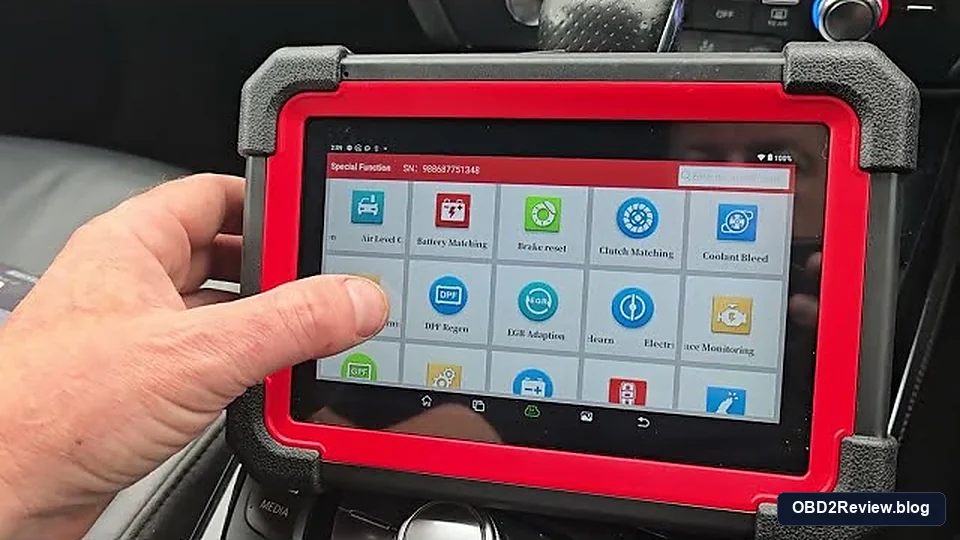
Operating systems drive diagnostic software stability during heavy live-data graphing sessions. Under the hood, these units leverage Android frameworks customized specifically for automotive diagnostic suites and heavy everyday professional service bays.
Both launch scan tools run on an open Android 10.0 OS powered by a quad-core processor. When choosing the best obd2 scanner for your shop, this configuration ensures rapid boot times and smooth app switching.
Internal storage is capped at 32GB ROM paired with 2GB of RAM, providing sufficient space for extensive vehicle software updates. Technicians should utilize external MicroSD expansion if storing hundreds of live data recording logs.
- Quad-core processing architecture ensures fast boot times.
- Generous internal storage for saved diagnostic reports.
- Capacitive touchscreens support gloved shop usage.
Processing Power and Memory Configurations
Adequate RAM ensures smooth transitions between reading trouble codes and executing active tests. Comparing these platforms reveals subtle shifts in how cached data handles large multi-module vehicle networks.
Memory optimization directly impacts how quickly live data streams populate across multiple graphing parameters without stuttering or freezing mid-diagnostic cycle.
- RAM allocation prevents application crashes.
- Fast data bus communication speeds.
Software Protocols and Diagnostic Coverage
Comprehensive vehicle coverage remains the cornerstone of any professional diagnostic scanning tool investment. Technicians frequently consult the best obd ii bluetooth scanner rankings to ensure deep protocol compatibility across global car lines.
Protocol support must encompass modern CAN-FD and DoIP standards to properly service modern automobiles. Advanced protocol handling prevents communication dropouts when scanning high-speed body control modules.
Communication architecture supports modern CAN FD and DoIP protocols natively without requiring expensive external adapters. This capability is critical for diagnosing multiplexed networks found in recent vehicle architectures from GM, Volvo, and Land Rover.
Comprehensive OE-level diagnostics cover over one hundred global brands, reading generic and manufacturer-specific diagnostic trouble codes across powertrain, body, and chassis control modules seamlessly.
- Full system access across powertrain and body modules.
- Regular firmware updates expand vehicle year coverage.
- Automatic VIN acquisition speeds up initial vehicle identification.
Protocol Adaptability Across Regional Fleets
European vehicle diagnostics require specialized coding support and detailed adaptation routines. Evaluating how each tool handles foreign manufacturer protocols highlights crucial differences in software depth.
Domestic truck platforms demand robust Class 2 and CAN network stability during prolonged module programming and relearn procedures.
- Seamless switching between disparate communication buses.
- Accurate module identification on luxury European brands.
Topology Mapping and Visual Diagnostics
Visual network mapping transforms raw diagnostic trouble codes into an intuitive layout. When researching the best obd2 bluetooth scanners, technicians look for color-coded module nodes that instantly expose communication failures across independent bus networks.
Color-coded node indicators highlight healthy modules versus those reporting active faults or communication errors. Topology tree displays significantly reduce preliminary diagnostic triage time in busy repair facilities.
Dynamic topology tree mapping visually represents vehicle communication networks by displaying healthy modules in green and faulted modules in red. This structural overview accelerates complex network troubleshooting during multi-system diagnostic triage workflows.
Technicians can tap directly into any failing node from the map interface to retrieve specific diagnostic trouble codes and initiate targeted component tests instantly, bypassing tedious manual module selection menus.
- Instant identification of dead control modules.
- Color-coded system status for fast interpretation.
- Clear visual hierarchy of networked components.
Navigating Complex Network Architecture
Modern vehicles feature dozens of interconnected control units communicating via high-speed digital data lines. Topology diagrams demystify these hidden relationships by mapping physical architecture directly onto the screen.
Interpreting network degradation becomes much simpler when communication dropouts are isolated to a single gateway module on the display.
- Pinpoint intermittent network wiring faults quickly.
- Understand gateway module dependencies with ease.
Bi-Directional Controls and Active Testing
Bi-directional capability allows technicians to send commands directly to vehicle actuators for functional verification. Testing components like fuel injectors, cooling fans, and window motors helps isolate mechanical versus electrical failures.
Active testing eliminates guesswork by forcing specific system outputs on demand during routine diagnostic procedures. Precise actuator control confirms whether a component responds correctly to computer commands.
Full bi-directional control enables technicians to send commands directly to vehicle actuators, verifying component integrity without relying on manual probing. Tests include fuel injector kill tests, EVAP purge solenoids, and cooling fan activation.
Executing these active tests requires strict adherence to safety protocols regarding engine RPM limits and transmission fluid temperatures to prevent catastrophic mechanical damage during high-stress diagnostic procedures.
- Comprehensive active test menus for major systems.
- Accurate component verification without physical jumpers.
- Clear on-screen prompts guide the testing sequence.
Executing Complex Component Actuators
Advanced tests require stable voltage supplies and precise timing to avoid disrupting sensitive control units. Both scanners manage these rigorous output commands reliably during prolonged troubleshooting sessions.
Performing automated bleed routines on anti-lock brake modules demonstrates the raw functional power packed into these handheld diagnostic computers.
- Reliable command transmission over OBD ports.
- Safe execution of sensitive hydraulic tests.
Ergonomics, Build Quality and Thermal Durability
Shop environments subject diagnostic equipment to drops, grease, extreme temperatures, and rough handling daily. A robust plastic housing with rubberized corner bumpers protects internal electronics from accidental impacts.
Ergonomic handgrips reduce fatigue during long diagnostic sessions spent under hoods or inside cramped cabins. Ruggedized exterior designs ensure longevity within demanding professional automotive service facilities.
The ruggedized polymer housing features reinforced rubberized corner bumpers designed to withstand repeated drops onto concrete workshop floors. Ergonomic hand grips reduce wrist fatigue during extended diagnostic sessions inside cramped vehicle cabins.
Integrated passive cooling vents manage thermal dissipation effectively, preventing processor thermal throttling during prolonged sessions of live data graphing and ECU coding routines in high ambient workshop temperatures.
- Impact-resistant outer shell construction.
- Comfortable weight distribution for single-handed use.
- Protected ports guard against dust and moisture.
Thermal Management in Extreme Environments
Processing heavy diagnostic software generates internal heat that must dissipate safely without cooling fans. Passive thermal management keeps the hardware operating smoothly even in hot summer service bays.
Preventing thermal throttling ensures that live data graphing remains fluid and responsive during extended diagnostic troubleshooting tasks.
- Efficient heat dissipation prevents system slowdowns.
- Reliable operation in unconditioned garage spaces.
Power Management and Battery Endurance
Reliable internal batteries ensure uninterrupted operation when moving a diagnostic tool between vehicles in the lot. High-capacity lithium power cells deliver ample runtime between mandatory charging cycles.
Smart power-saving modes dim screens automatically when idle to preserve precious battery capacity throughout the workday. Extended battery endurance keeps technicians working efficiently without tethered wall chargers.
Powered by a built-in 6300mAh lithium battery, both scanners deliver up to six hours of continuous field diagnostics without external power connections. Intelligent power management states extend standby longevity during intermittent shop use.
Units support standard OBD2 port power delivery when connected to a vehicle, alongside standard DC charging via included wall adapters for bench programming and software updates inside the office.
- Long-lasting internal rechargeable battery cells.
- Convenient vehicle power passthrough options.
- Fast charging support minimizes downtime.
Optimizing Power Delivery During Resets
Low vehicle battery voltage can corrupt module programming and flash routines during critical repair procedures. Maintaining stable system voltage protects against unexpected shutdowns mid-procedure.
Monitoring tool battery levels prevents sudden data loss while saving complex diagnostic reports to internal memory.
- Low-voltage warnings protect active diagnostic sessions.
- Stable power draw during extended module scans.
Selecting the Optimal Tool for Your Shop Workflow
Choosing the right diagnostic platform depends heavily on your daily repair volume and vehicle mix. Specialty shops focusing on European cars benefit immensely from advanced guided functions and expanded coding menus.
General repair facilities might find a streamlined software package meets all standard drivability testing needs efficiently. Matching tool capabilities to your specific technician workload maximizes return on investment.
Choosing between these diagnostic tools depends heavily on specific software subscription terms and regional configuration preferences rather than raw processing hardware differences. Review your primary vehicle brand service requirements carefully.
Independent shops can evaluate the best bluetooth odb2 scanner options to maximize return on investment, ensuring their chosen device includes comprehensive hardware update packages and robust daily support.
- Assess typical vehicle makes entering your service bay.
- Consider future software update commitments.
- Weigh advanced coding needs against basic diagnostics.
Balancing Upfront Investment Versus Long-Term Value
Investing in professional diagnostic hardware requires careful consideration of feature sets versus daily shop demands. Selecting a tool with robust coverage prevents the need for costly secondary equipment purchases later.
Evaluating software subscription models ensures your equipment stays current as vehicle manufacturers introduce new communication protocols.
- Future-proof your tool investment against new protocols.
- Calculate expected time savings on complex diagnostics.
Frequently Asked Questions
What core differences separate these two diagnostic scanners?
The primary distinctions lie in specialized software functions and advanced guided testing menus tailored for European vehicle networks. Choosing the right variant ensures your shop has the exact protocol coverage needed for daily repairs.
Do both models support full bi-directional active testing?
Yes, both diagnostic tablets provide comprehensive bi-directional controls for verifying mechanical actuators and system components. This functionality allows technicians to command onboard systems directly for faster fault isolation during troubleshooting.
Are wireless Bluetooth VCI dongles included with these units?
Both models utilize reliable hardware interfaces designed to maintain stable communication across high-speed data buses. Using a secure physical or wireless link prevents annoying communication drops during critical module coding procedures.
How frequently are software updates released for these platforms?
Manufacturer software updates arrive regularly to incorporate newly released vehicle models and expanded protocol support. Maintaining an active update subscription ensures access to the latest diagnostic databases for modern automobiles.
Can these scanners perform special reset and relearn services?
Both units offer extensive service reset functions covering oil life, electronic parking brakes, and steering angle sensors. These routines provide essential maintenance capabilities required after completing major component replacements in the shop.