Foxwell Nt301 vs. Bluedriver: Which Fits Your Setup Better?
Choosing between dedicated standalone hardware and wireless smartphone integration defines your entire diagnostic workflow. This engineering breakdown evaluates performance, durability, and usability to guide your tool investment.

For standalone reliability in greasy shop environments, the Foxwell NT301 excels as the clear winner. If you prefer advanced wireless graphing and instant report sharing, the BlueDriver takes the crown.
Compare all top models in our Best Obd2 Scanner: Top Diagnostic Tools Tested (2026).
Side-by-Side Breakdown
| Criteria | Foxwell Nt301 | Bluedriver | Edge |
|---|---|---|---|
| Peak Performance & Output | Fast standalone processor | Advanced app-based graphics | BlueDriver |
| Duty Cycle & Consistency | Continuous wired power | Dependent on phone battery | Foxwell Nt301 |
| Operating Noise & Vibration | Silent physical feedback | Silent wireless transmission | Tie |
| Portability & Footprint | Bulky tethered handheld | Pocket-sized Bluetooth dongle | BlueDriver |
| Maintenance & Service Life | Rugged industrial chassis | Reliable solid-state dongle | Foxwell Nt301 |
| Power Requirements | OBD2 port powered | OBD2 port powered | Tie |
| Best Ideal Use-Case | Quick standalone code clearing | In-depth live data graphing | Split |
Diagnostic Architecture and Hardware Foundations
The Foxwell NT301 utilizes a standalone handheld architecture featuring a dedicated color screen and physical buttons. This configuration eliminates external device dependencies during critical roadside diagnostic procedures.
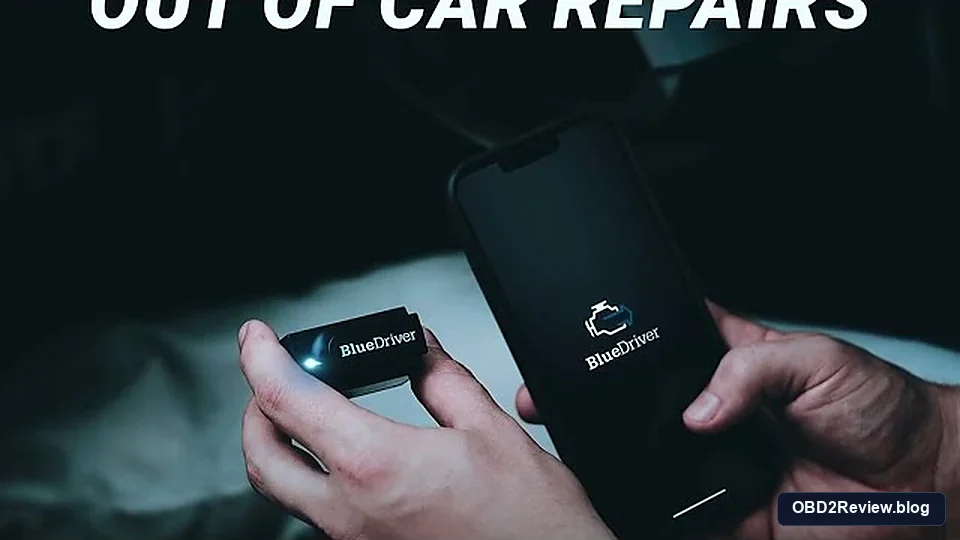
Conversely, the BlueDriver employs a compact Bluetooth dongle that pairs directly with iOS and Android mobile devices. This design leverages your smartphone processing power to render high-resolution diagnostic dashboards.
As outlined in our Foxwell NT301 OBD2 scanner review, the device utilizes an embedded microcontroller architecture optimized for dedicated bare-metal firmware execution, eliminating operating system latency during cold bootups.
Conversely, the BlueDriver system relies on a Bluetooth Low Energy module to offload all computational workloads to your smartphone. This design reduces internal hardware complexity while requiring a robust mobile device processor.
- Foxwell relies on dedicated physical buttons for oily hands.
- BlueDriver utilizes mobile touchscreens for data navigation.
- Both units draw operational power directly from the vehicle port.
Standalone Handheld Ergonomics
Physical keypads prevent frustrating touchscreen inputs when technicians wear heavy mechanical work gloves. The textured grip profile ensures the tool stays securely anchored during aggressive engine bay testing.
Integrated strain reliefs protect the attached OBD2 cable from repeated bending fatigue. Such mechanical resilience prevents premature conductor failure inside active commercial automotive repair facilities.
- Textured rubberized side grips prevent accidental drops.
- Heavy-duty strain relief guards against cable fracture.
Wireless App-Driven Integration
Pairing a wireless dongle via Bluetooth removes physical tethering limitations entirely from the equation. Technicians can monitor live sensor parameters while walking completely around the vehicle perimeter.
Smartphone processing power handles complex graphing computations with remarkable speed and fluidity. High-density pixel arrays render intricate sensor waveforms much clearer than standard handheld screens.
- Eliminates dangling cables inside the driver footwell.
- Leverages high-resolution smartphone graphical processors.
Powertrain Coverage and Live Data Stream Capabilities
Reading basic powertrain trouble codes represents only a fraction of modern diagnostic requirements. Both scanners pull comprehensive generic and enhanced diagnostic trouble codes across most global vehicle platforms.
Live sensor streaming allows technicians to evaluate closed-loop fuel trims and oxygen sensor voltages. Real-time data refresh rates dictate how quickly intermittent powertrain anomalies appear on screen.
When polling standard powertrain control modules, both diagnostic tools deliver reliable access to generic OBD-II parameter IDs. However, the Foxwell unit excels at displaying multi-parameter live graphing directly on its monochrome screen.
The BlueDriver application transforms your smartphone display into a digital dashboard supporting customizable gauges and logging. Users can export high-frequency sensor logs as CSV files for advanced diagnostic analysis on workshop PCs.
- Both tools support standard OBD2 protocol suites seamlessly.
- Live graphing helps isolate intermittent electrical sensor faults.
- Enhanced manufacturer diagnostics require stable communication links.
Evaluating Real-Time Sensor Refresh Speeds
Highlighted in our best handheld scanner guide, the Foxwell NT301 streams multiple PID parameters simultaneously without noticeable interface lag. Its dedicated processor manages data queues efficiently for uninterrupted troubleshooting.
BlueDriver processes live sensor streams through its wireless application interface with impressive fidelity. Wireless packet transmission occasionally introduces minor latency during extreme multi-sensor logging runs.
- Foxwell maintains steady wired data transmission rates.
- BlueDriver provides colorful, customizable digital gauge layouts.
Build Quality, Field Durability, and Thermal Resilience
For advanced work, alternatives like those detailed in our Foxwell NT710 review complement heavy-duty shop environments. The hardware features a polymer shell designed to withstand drops.
The BlueDriver dongle utilizes a minimalist, solid-state enclosure that plugs flush into the dashboard port. Its lack of moving parts minimizes mechanical wear points during frequent storage cycles.
Professional workshop environments demand ruggedized enclosures capable of withstanding frequent impacts and fluid exposure. The Foxwell handheld features a rubberized perimeter bumper and tactile keypad designed for greasy hands and drop resistance.
The BlueDriver dongle adopts a compact, low-profile form factor that remains safely tucked beneath the lower dashboard. Its robust thermoplastic shell withstands extreme vehicle cabin temperatures without compromising internal circuit integrity.
- Drop-resistant plastics protect internal circuit boards.
- Flush-mount dongles prevent accidental knee strikes under dashes.
Environmental Tolerance in Extreme Weather
Operating diagnostic equipment in freezing winter conditions challenges liquid crystal display performance. The Foxwell screen maintains legible contrast levels during sub-zero outdoor diagnostic evaluations.
Smartphone screens paired with BlueDriver can experience thermal throttling or battery drain outdoors. Keeping your mobile device temperature controlled during prolonged diagnostics remains essential.
- Handheld displays resist cold-weather fading effectively.
- Mobile devices require careful thermal management outside.
Interface Latency, Refresh Rates, and Power Draw
Parasitic electrical draw from diagnostic tools can drain weak vehicle batteries during extended testing. Both units draw minimal current, but wired handhelds operate independently of external batteries.
Interface responsiveness dictates how fast technicians navigate through complex menu trees and freeze-frame data. Zero latency ensures critical diagnostic codes are identified immediately upon initial system scanning.
Hardwired diagnostic tools like the Foxwell draw minimal operating current directly from the vehicle data link connector. This eliminates battery drain concerns during extended diagnostic sessions while maintaining consistent refresh rates.
Wireless adapters introduce nominal packet transmission delays governed by local radio frequency interference in the cabin. Furthermore, leaving a Bluetooth dongle plugged in overnight can cause parasitic draw on aging vehicle batteries.
- Wired scanners avoid smartphone battery depletion concerns.
- Wireless adapters require active Bluetooth pairing connections.
- Fast menu navigation accelerates daily shop productivity.
Power Management and Battery Protection
Leaving a Bluetooth dongle plugged into the diagnostic port overnight risks gradual battery discharge. Smart auto-sleep protocols help mitigate parasitic drain across modern vehicle electrical networks.
Standalone units power down automatically or derive steady current directly from the vehicle. This eliminates unexpected power loss in the middle of crucial emission readiness checks.
- Auto-sleep functions protect vehicle battery voltage.
- Wired connections guarantee continuous power delivery.
Diagnostic Reporting, Cloud Syncing, and Firmware Updates
Generating professional repair reports enhances communication between service advisors and vehicle owners. BlueDriver excels by allowing instant PDF report sharing via email or messaging applications.
Updating diagnostic database software ensures compatibility with newly released vehicle model years. The Foxwell NT301 connects via USB to a Windows computer for free lifetime firmware updates.
Updating the Foxwell handheld requires a direct USB connection to a Windows computer running dedicated manufacturer software. This wired update methodology ensures secure firmware flashing without relying on unstable internet connections.
The BlueDriver ecosystem leverages seamless cloud synchronization to back up freeze-frame data and repair reports automatically. Technicians can instantly email comprehensive diagnostic summaries directly to clients from their mobile devices.
- BlueDriver compiles comprehensive repair reports instantly.
- Foxwell offers straightforward USB firmware update utilities.
- Cloud-based databases provide verified fix suggestions.
Software Update Protocols and Usability
Managing firmware updates via dedicated desktop applications ensures your tool stays current. Foxwell provides accessible update packages without hidden subscription fees or recurring licensing costs.
Mobile applications update automatically through standard smartphone app store distribution channels. This seamless process delivers bug fixes and database expansions without manual computer intervention.
- Desktop utilities manage wired firmware installations.
- App stores handle wireless software patches automatically.
Diagnostic Troubleshooting Workflows for Professional Technicians
Streamlined workflows reduce diagnostic billing times in busy commercial automotive repair environments. Mechanics demand intuitive menu structures that bypass unnecessary diagnostic steps during high-volume jobs.
Quick readiness keypads on the Foxwell NT301 verify emissions status with one single press. This dedicated shortcut saves valuable seconds when inspecting vehicles for state compliance.
Efficient bay workflows depend on rapid menu navigation and immediate access to readiness monitors during state inspections. The physical button layout on the Foxwell allows gloved technicians to cycle through diagnostic menus quickly.
Mobile-first interfaces shine when technicians need to cross-reference diagnostic trouble codes with verified repair database fixes instantly. BlueDriver integrates directly with a massive database containing millions of experienced technician fixes.
- One-touch I/M readiness keys accelerate emission checks.
- Streamlined menus reduce technician training requirements.
- Efficient workflows maximize daily bay throughput.
Interpreting Diagnostic Trouble Codes
Clear fault code definitions displayed directly on screen eliminate manual reference book lookups. Our detailed Foxwell NT301 review provides concise textual explanations alongside standard alphanumeric trouble codes.
BlueDriver links detected trouble codes directly to a massive crowd-sourced repair database. This added context helps technicians prioritize likely repair paths based on verified fixes.
- On-screen code definitions speed up initial diagnosis.
- Database links provide real-world repair suggestions.
Final Selection Criteria and Long-Term Value Analysis
Selecting the correct diagnostic instrument depends heavily on your specific mechanical workflow preferences. DIYers seeking smartphone integration will appreciate the polished interface of the wireless contender.
Professionals prioritizing dedicated, rugged hardware without device pairing hassles lean toward the wired handheld. Both options deliver exceptional value within their respective design paradigms.
Selecting the optimal diagnostic instrument depends heavily on your daily service environment and hardware preferences. Technicians prioritizing standalone reliability often choose the Foxwell for its dedicated offline functionality and robust build.
Conversely, enthusiasts seeking deep repair database integration and graphical data logging will appreciate the smartphone-driven architecture. Long-term value ultimately hinges on whether you prefer dedicated handheld hardware or wireless convenience.
- Match tool architecture to your daily repair environment.
- Consider long-term software update support before buying.
- Evaluate whether wired or wireless fits your diagnostic style.
Making Your Ultimate Purchase Decision
Evaluate your tolerance for tethered cables versus maintaining charged mobile devices in the shop. Each scanner serves distinct user preferences while maintaining robust diagnostic code coverage.
Investing in reliable automotive test equipment guarantees accurate troubleshooting for years to come. Choose the instrument that complements your mechanical troubleshooting habits most effectively.
- Assess your workspace and device management habits.
- Prioritize core features that align with your repairs.
Frequently Asked Questions
Can both scanners read ABS and airbag codes?
Neither of these entry-level diagnostic tools supports advanced chassis or airbag module scanning. You will need an upgraded professional bidirectional scanner for comprehensive SRS and ABS diagnostics.
Do these tools require paid subscription renewals?
Neither scanner enforces annoying mandatory software subscription fees for basic functionality. You get free lifetime firmware updates and unlocked diagnostic databases right out of the box.
Will the Foxwell NT301 work on older OBD1 vehicles?
These diagnostic instruments are strictly engineered for standard OBD2 compliant vehicles manufactured from 1996 onward. Older pre-1996 models require specialized adapter cables and proprietary diagnostic software.
How does BlueDriver connect to my smartphone?
The BlueDriver module pairs directly with your iOS or Android device via reliable Bluetooth technology. This wireless connection enables instant live graphing without cumbersome cables.
Which scanner is better for complete beginners?
Both options feature extremely user-friendly interfaces designed for automotive novices. The Foxwell offers standalone simplicity while the BlueDriver provides graphical guidance.