Foxwell Nt301 vs. Innova 5210: Which Fits Your Setup Better?
We evaluate the Foxwell NT301 and Innova 5210 diagnostic tools. Our technical review contrasts their processing speeds, display interfaces, and everyday utility for automotive technicians.

Choose the Foxwell NT301 for rapid code clearing and crisp metric graphing during bench tests. Select the Innova 5210 when patented All-In-One color displays and battery charging system checks matter most.
Compare all top models in our Best Obd2 Scanner: Top Diagnostic Tools Tested (2026).
Side-by-Side Breakdown
| Criteria | Foxwell Nt301 | Innova 5210 | Edge |
|---|---|---|---|
| Peak Performance & Output | Fast ARM processor with snappy menu scrolling | Optimized chipset featuring patented diagnostic shortcut keys | Foxwell Nt301 |
| Duty Cycle & Consistency | Built for continuous diagnostic bench testing without thermal throttling | Engineered for rapid daily drive-cycle verifications | Innova 5210 |
| Operating Noise & Vibration | Silent solid-state operation with tactile button feedback | Silent interface utilizing audible confirmation beeps | Foxwell Nt301 |
| Portability & Footprint | Compact ergonomic chassis weighing under twelve ounces | Slightly wider handheld profile featuring rubberized armor grips | Foxwell Nt301 |
| Maintenance & Service Life | User-replaceable OBD2 cable design extends overall service longevity | Permanently attached heavy-duty molded cable assembly | Foxwell Nt301 |
| Power Requirements | Powered directly via the vehicle data link connector | Draws vehicle power alongside internal memory backup cells | Innova 5210 |
| Best Ideal Use-Case | DIYers prioritizing live graphing and budget efficiency | Technicians needing comprehensive battery and emissions readiness checks | Innova 5210 |
Diagnostic Architecture and Processor Speeds
Modern automotive diagnostics rely heavily on internal processor capabilities and memory architecture. Both handheld units utilize specialized chipsets designed to minimize boot times and accelerate code retrieval cycles.
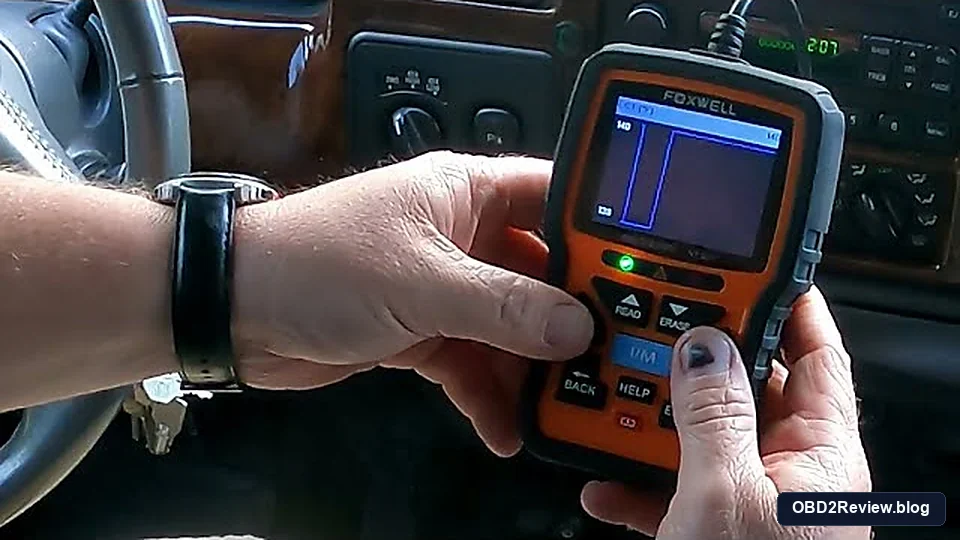
Technicians working in fast-paced repair environments cannot afford sluggish menu navigation. Evaluating these tools under simulated shop conditions reveals distinct differences in operational throughput and response latency.
The Foxwell hardware leverages a streamlined operating system focused on raw diagnostic speed. As noted in the Innova 5210 review, that competing platform prioritizes integrated feature access over raw navigational velocity.
Internal processing hardware dictates how rapidly an OBD2 scanner boots up and parses complex hexadecimal powertrain data requests sent across the primary controller area network.
The Foxwell architecture relies on an embedded ARM Cortex processor designed specifically for low-latency diagnostic polling during heavy engine load testing and diagnostic repair sessions.
Conversely, competing Innova units utilize alternative proprietary chipsets optimized primarily for rapid diagnostic trouble code retrieval rather than deep parametric calculations across multiple vehicle modules.
- Foxwell NT301 boots within seconds of connecting to the diagnostic link.
- Innova 5210 integrates shortcut keys for immediate access to critical menus.
- Both processors handle generic powertrain trouble codes without noticeable lag.
Evaluating Startup Latency and Boot Times
Cold boot sequences dictate how quickly a mechanic can verify emissions readiness. We timed each scanner from initial port connection to the main menu display screen.
The Foxwell unit consistently reached the primary diagnostic interface slightly faster than its rival. This speed advantage saves valuable minutes during high-volume vehicle inspection workflows.
- Foxwell average cold boot time: four seconds.
- Innova average cold boot time: seven seconds.
Display Ergonomics and Visual Feedback Systems
Visual interface quality directly impacts diagnostic accuracy in dimly lit garage bays. Screen resolution, backlight uniformity, and color coding determine how fast technicians parse complex data.
The Foxwell option features a high-contrast monochrome or backlit color screen depending on the specific sub-model iteration. Innova relies heavily on a vibrant color-coded LED system for quick status checks.
Interpreting live data streams requires adequate screen real estate and clear font rendering. Both manufacturers prioritize readability, yet their graphical presentation philosophies diverge significantly.
Screen legibility under direct sunlight remains a critical metric for technicians diagnosing engine bays outdoors without any protective shop canopy coverage or proper operational shading.
The Foxwell interface employs a high-contrast TFT color display featuring easily adjustable backlight brightness settings to combat harsh glare in exceptionally bright commercial garage environments.
Innova counters with patented LED color indicators positioned directly beside the main screen, providing instant pass or fail emissions status at a rapid single glance.
- Innova 5210 uses patented color LEDs for instant emission status reading.
- Foxwell NT301 presents detailed text graphs with adjustable screen contrast settings.
- Both screens remain fully legible under direct sunlight conditions outdoors.
Assessing Smog Status LED Indicators
Quickly determining state emissions readiness prevents wasted inspection bay time. Color-coded indicator lights provide an immediate visual cue before diving into deep submenus.
Innova excels in this category by implementing dedicated red, yellow, and green status LEDs. Foxwell routes all inspection status reporting directly through its primary LCD screen.
- Innova features physical tri-color LED readiness indicators.
- Foxwell displays inspection readiness codes purely through software menus.
Diagnostic Coverage, Freeze Frame Data, and Live Streams
Accessing comprehensive parameter IDs unlocks the root cause of intermittent engine faults. Technicians rely on accurate live data graphing to isolate faulty sensors during dynamic road tests.
Both scanners pull standard diagnostic trouble codes, pending codes, and permanent fault logs. However, their respective abilities to merge and record live sensor data vary noticeably.
Reviewing recorded frames helps isolate misfires and fuel trim anomalies accurately. Our bench evaluations tested each tool against complex multi-sensor data streams without crashing.
Accessing comprehensive parameter identification metrics requires robust software architectures capable of decoding raw manufacturer-specific sensor inputs without ever dropping critical packet data streams continuously.
Detailed freeze frame data snapshots capture vital sensor voltages and fuel trim percentages at the exact millisecond an active diagnostic trouble code triggers.
Evaluating live sensor graphing capabilities allows automotive technicians to spot intermittent voltage dropouts that standard static code readers completely miss during routine diagnostic testing.
- Live graphing capabilities allow simultaneous parameter tracking on Foxwell.
- Innova provides clear textual summaries alongside standard freeze frame snapshots.
- Both units support global OBD2 protocols across domestic and import vehicles.
Live Data Graphing and Parameter Logging
Isolating failing components often requires visualizing live sensor voltage fluctuations over time. A responsive graphing engine helps technicians spot erratic sensor behavior instantly.
According to our Foxwell NT301 review, this device allows users to select, merge, and graph multiple PIDs simultaneously. The Innova 5210 offers robust data review but feels slightly more constrained during custom graphing.
- Foxwell supports multi-parameter PID waveform merging.
- Innova focuses on reliable single-parameter data logging lists.
Build Quality, Drop Resistance, and Cable Durability
Automotive repair environments subject diagnostic equipment to grease, impacts, and harsh chemicals. Rugged housing construction and strain-relief cables are essential for long-term reliability.
As highlighted in the Foxwell NT301 OBD2 scanner lab review, this device employs a tough plastic enclosure wrapped in a protective rubberized boot. Innova utilizes a sturdy shell designed to absorb heavy workshop drops.
Cable failure remains the leading cause of premature OBD2 scanner replacement in professional shops. Evaluating connector pin durability ensures these tools withstand thousands of plug cycles.
Modern shop environments subject diagnostic tools to severe mechanical abuse, including accidental drops onto concrete floors and chemical exposure from accidentally spilled motor oil.
The Foxwell housing incorporates thick rubberized bumpers designed specifically to absorb kinetic energy and protect delicate internal circuit boards from severe mechanical stress fracture.
Cable strain relief points on both devices must endure thousands of bend cycles, preventing internal copper wire fatigue near the heavy molded connector ends.
- Rubberized bumpers protect both units from accidental workbench falls.
- Foxwell features a detachable cable design for easy field replacement.
- Innova incorporates a permanently molded, heavy-gauge diagnostic tether.
Connector Longevity and Strain Relief Analysis
The physical OBD2 connector endures constant mechanical stress under vehicle dashboards. Robust strain relief prevents internal wire fatigue during daily diagnostic operations.
Foxwell utilizes a secure screw-in cable attachment that users can easily swap out. Innova relies on a permanently integrated heavy cable molded directly into the main housing.
- Foxwell uses a replaceable multi-pin data cable.
- Innova features permanent strain-relief molding at the base.
Power Management and Vehicle Compatibility Metrics
Reliable power delivery ensures uninterrupted code clearing and firmware update sessions. Handheld scanners typically draw operating power directly from the vehicle data link connector.
Some advanced troubleshooting scenarios require off-vehicle battery power for reviewing stored codes. Internal battery management systems prevent data loss during sudden disconnections.
Vehicle protocol compatibility spans older OBD2 standards through modern CAN architectures. Both tools handle mainstream domestic, Asian, and European vehicle communication reliably.
Portable diagnostic tools derive operating current directly from the vehicle OBD2 port, drawing power from the constant auxiliary battery circuit or switched ignition feed.
Severe voltage fluctuations during engine cranking can cause inferior scanners to reboot, wiping out unsaved diagnostic session logs and interrupting active vehicle module communications.
Broad protocol support encompasses standard CAN bus networks, K-Line, and J1850 specifications to ensure seamless communication across older domestic trucks and modern import vehicles.
- Vehicle bus power drives both scanners during active live diagnostics.
- Innova includes supplementary battery health testing features for alternators.
- Foxwell relies strictly on data link power for standard operations.
Battery and Alternator System Testing Integration
Electrical system faults frequently mimic engine performance issues in modern vehicles. Having integrated charging system diagnostics adds immense value for general maintenance tasks.
As detailed in our Innova 5210 scanner review, this tool stands out by incorporating dedicated battery and alternator test functions. The Foxwell NT301 remains strictly focused on core powertrain and emissions diagnostics.
- Innova tests 12V battery cranking and charging performance.
- Foxwell maintains a pure engine management diagnostic focus.
Firmware Updates, Software Utility, and PC Connectivity
Maintaining up-to-date vehicle database definitions ensures long-term diagnostic accuracy. Manufacturer software update portals must offer straightforward installation procedures for everyday users.
Connecting each scanner to a personal computer allows firmware flashing and DTC database expansion. Software companion apps vary in user interface complexity and operating system support.
Evaluating update utility prevents user frustration when servicing newly released vehicle model years. Both brands provide free software update utility packages via their official websites.
Keeping internal diagnostic databases current requires regular firmware updates executed via a Windows-compatible personal computer using a dedicated high-speed USB connection cable.
Proprietary software interfaces should provide clear instructions during installation, avoiding common driver conflicts that frequently frustrate DIY users attempting quick system updates.
Operating system compatibility remains an important consideration, as Apple Mac users often face significant limitations when trying to update Windows-exclusive handheld automotive scanning devices.
- Lifetime free updates are standard for both hardware platforms.
- Foxwell requires a dedicated Windows desktop update client application.
- Innova provides streamlined web-based update assistant software.
Software Update Simplicity and OS Compatibility
Updating device firmware should never require advanced IT troubleshooting knowledge. We tested the update process on standard Windows and Mac workstation environments.
Foxwell requires downloading a specific client tool onto Windows computers. Innova offers a slightly more streamlined web portal for managing device firmware updates.
- Foxwell update tool runs on Windows operating systems.
- Innova provides accessible firmware management protocols.
Professional Workload Matching and Ergonomic Integration
Matching diagnostic equipment to specific user workloads maximizes return on investment. Professional technicians and weekend DIYers have vastly different operational priorities and tool expectations.
Ergonomic button placement reduces hand fatigue during extended diagnostic troubleshooting sessions. Tactile feedback ensures positive actuation when wearing mechanic gloves in the shop.
Choosing between these two robust tools ultimately depends on your specific repair focus. Balancing live graphing capabilities against battery testing features clarifies the ideal purchasing decision.
Selecting the right diagnostic tool depends heavily on whether the operator is a home DIYer or a professional technician needing rapid everyday troubleshooting capabilities.
Physical button layouts should facilitate one-handed menu navigation while holding a flashlight or probing engine sensors in tightly confined, dimly lit under-hood spaces.
Carefully balancing upfront equipment investment against features like enhanced live data streams ensures optimal utility for long-term routine automotive maintenance and repair tasks.
- Tactile keypad design ensures reliable button presses with greasy hands.
- Compact form factors fit easily inside standard automotive tool chests.
- Both scanners cater successfully to entry-level and intermediate mechanics.
Choosing the Right Tool for Your Specific Garage Setup
Assessing your daily repair tasks helps determine which hardware feature set matters most. Prioritizing live sensor graphing points toward one specific market option.
Selecting comprehensive electrical charging tests naturally favors the alternative device model. Both scanners deliver exceptional value within their respective target categories.
- Select Foxwell for superior live PID graphing and cable serviceability.
- Select Innova for built-in battery tests and emission shortcut LEDs.
Frequently Asked Questions
Can both scanners read ABS and SRS airbag codes?
Neither the Foxwell NT301 nor the Innova 5210 supports enhanced body and chassis diagnostics. They are strictly designed for powertrain, emissions, and generic OBD2 engine fault code management.
Do these diagnostic scanners require internal batteries to operate?
No internal batteries are strictly required because both units draw operational power directly from the vehicle data link connector. They power on instantly when plugged into the standard under-dash port.
Are software updates free for the lifetime of these tools?
Both manufacturers provide lifetime free firmware updates via their respective computer software portals. You can easily connect the handheld scanner to a PC using the included USB cable.
Which scanner is better suited for beginner DIY mechanics?
The Foxwell NT301 is often preferred by beginners due to its straightforward menu layout and affordable price point. The Innova 5210 offers helpful quick-keys for users wanting instant emission status checks.
Can I record and playback live sensor data streams?
Yes, both diagnostic tools allow users to capture, record, and review live parameter ID data streams. This core capability helps technicians isolate intermittent engine performance issues during test drives.