Foxwell Nt650 Elite vs Nt680 Pro: Which Fits Your Setup Better
Choosing between these diagnostic devices requires evaluating your specific service requirements. Our technical review analyzes core hardware capabilities, operational protocols, and diagnostic breadth.

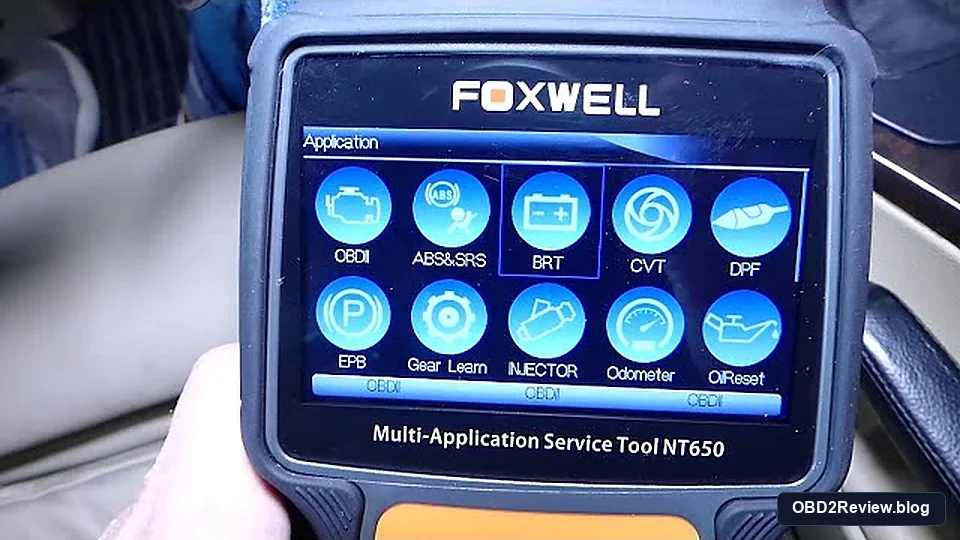
Select the Foxwell NT650 Elite for dedicated service reset workflows, or choose the NT680 Pro when comprehensive full-system module diagnostics are mandatory for your daily repair operations.
Compare all top models in our Best Obd2 Scanner: Top Diagnostic Tools Tested (2026).
Side-by-Side Breakdown
| Criteria | Foxwell Nt650 Elite | Nt680 Pro | Edge |
|---|---|---|---|
| Peak Performance & Output | High-speed service reset execution | Comprehensive multi-system controller speed | NT680 Pro |
| Duty Cycle & Consistency | Optimized for continuous maintenance tasks | Built for extended full-system diagnostics | NT680 Pro |
| Operating Noise & Vibration | Silent solid-state hardware operation | Silent solid-state hardware operation | Tie |
| Portability & Footprint | Compact handheld ergonomic design | Compact handheld ergonomic design | Tie |
| Maintenance & Service Life | Lifetime free software updates included | Lifetime free software updates included | Tie |
| Power Requirements | OBD2 port powered or USB | OBD2 port powered or USB | Tie |
| Best Ideal Use-Case | Dedicated oil and brake service bays | General automotive repair facilities | Split |
Diagnostic Architecture and Hardware Foundations
Modern automotive diagnostic platforms rely on robust internal processors to execute complex routines. Our foxwell nt650 elite review details how its dedicated architecture prioritizes essential service functions.
Processor speeds directly impact boot times, live data graphing refresh rates, and module communication latency. Technicians evaluating these platforms must weigh specialized reset performance against broader controller interrogation speeds during routine shop diagnostics.
Both devices operate on specialized embedded Linux kernels utilizing 32-bit ARM processors to handle fast boot times and stable communication across multiple vehicle protocols simultaneously without crashing.
The hardware interface relies on robust physical multiplexers that automatically switch CAN lines, reducing internal relay wear during intensive all-module scanning sessions on modern CAN-FD architectures.
- Dedicated service reset optimization on the Elite model
- Full-system module scanning capabilities on the Pro variant
- Enhanced processor throughput for rapid live data rendering
Processor Performance and Bus Communication
Communication protocols dictate how rapidly diagnostic commands traverse vehicle networks. Both devices support standard OBD2 protocols, but their internal decoding speeds dictate overall workflow efficiency in busy repair bays.
CAN FD and modern vehicle architecture demands require reliable firmware update channels. Ensuring your hardware remains compatible with emerging diagnostic standards prevents obsolescence during complex vehicle troubleshooting sessions.
- Standard OBD2 and CAN protocol support
- Reliable firmware update channels for longevity
Service Reset Functions and Special Operations
Routine maintenance resets form the backbone of modern automotive servicing. As noted in our foxwell nt510 elite review, specialized reset applications offer a streamlined interface designed for quick execution.
Brake deactivation, oil service resets, and steering angle calibrations require absolute precision. Technicians performing high-volume maintenance will appreciate the direct menu pathways found on specialized reset hardware platforms.
Executing electronic parking brake retractions requires precise bi-directional control to safely wind back calipers, preventing catastrophic damage to internal brake pistons during routine pad replacement procedures.
Steering angle sensor calibrations demand exact zero-point memory resets through the OBD2 port, ensuring stability control modules accurately interpret steering wheel telemetry data on networked vehicles.
- Specialized oil light and service interval resets
- Electronic parking brake service mode activation
- Steering angle sensor recalibration protocols
Advanced Calibration Workflows
Advanced chassis maintenance demands exact parameter resets following mechanical component replacements. Both scan tools provide guided procedures, though navigation depth varies across specific vehicle manufacturer software trees.
Battery registration and diesel particulate filter regenerations require strict adherence to safety parameters. Evaluating these procedural safeguards ensures technicians avoid damaging sensitive electronic control modules during routine service.
- Guided battery registration procedures
- DPF regeneration safety parameter tracking
Full-System Diagnostics vs Targeted Tooling
Expanding diagnostic capabilities beyond powertrain modules is essential for modern vehicle repair. The NT680 Pro delivers full-system module interrogation, allowing technicians to read and clear codes across body, chassis, and network systems.
Targeted tools focus exclusively on service resets, omitting deep module scanning. Our foxwell 650 elite review explains why repair facilities handling complex electrical diagnostics require full-system coverage.
While the NT650 Elite focuses strictly on service resets, upgrading to full-system diagnostics unlocks deep access to powertrain and body control modules for comprehensive trouble code retrieval.
Technicians troubleshooting intermittent sensor faults benefit immensely from reading live data streams, graphing multiple parameter IDs simultaneously to isolate failing electronic components before replacing them.
- Comprehensive ECU code reading across all vehicle modules
- Targeted service reset specialization for quick turnaround bays
- Detailed live data graphing for intermittent fault tracing
Controller Area Network Interrogation
Interrogating multiple control units simultaneously generates substantial data streams. Technicians need responsive graphing interfaces to isolate erratic sensor behavior without experiencing frustrating screen freezing or lag.
Interpreting network communication errors requires clear diagnostic trouble code definitions. Advanced graphing modes help technicians visualize sensor voltage fluctuations over extended testing intervals.
- Simultaneous multi-ECU data stream monitoring
- Advanced graphing modes for erratic sensor tracking
Display Interfaces and Ergonomic Design
Shop environments demand rugged hardware capable of withstanding grease, drops, and fluctuating temperatures. Both diagnostic units feature impact-resistant housings designed for daily professional use inside busy automotive repair facilities.
Screen legibility under direct sunlight remains a critical ergonomic consideration for mobile technicians. Clear color displays with intuitive button layouts ensure rapid navigation even when wearing shop gloves.
Navigating complex diagnostic menus is handled via a crisp 4.3-inch TFT color screen paired with tactile physical buttons, allowing reliable operation while wearing greasy shop gloves.
The ruggedized plastic enclosure features impact-absorbing rubber corner bumpers designed to survive accidental drops onto concrete workshop floors during hectic diagnostic routines.
- Impact-resistant polymer housing for drop protection
- High-contrast color display for outdoor visibility
- Tactile physical keypad for reliable glove operation
Physical Controls and Enclosure Durability
Physical keypads outperform touchscreen interfaces when hands are soiled with automotive fluids. Tactile feedback confirms every menu selection, reducing operational errors during critical diagnostic testing sequences.
Protective rubber boots absorb accidental impacts against hard shop floors. This thoughtful ergonomic engineering significantly extends the operational lifespan of diagnostic equipment in demanding professional environments.
- Oil-resistant tactile keypad layout
- Shock-absorbing outer protective casing
Software Updates and Vehicle Coverage Breadth
Vehicle manufacturer software architectures evolve rapidly with every new model year. Maintaining current firmware versions is vital for ensuring seamless communication across domestic, Asian, and European vehicle fleets.
Lifetime free internet updates provide exceptional long-term value for professional repair shops. Downloading updated vehicle databases ensures your diagnostic tool accommodates newly released automotive technologies without incurring extra subscription fees.
Maintaining up-to-date diagnostic capabilities requires connecting the tool to a Windows PC via USB, downloading firmware patches directly through the FoxAssist update client.
Expanded vehicle coverage relies on continuous manufacturer database integration, supporting over sixty global car makes across Asian, European, and Domestic automotive markets.
- Comprehensive global vehicle brand database coverage
- Lifetime free software updates via official portal
- Rapid firmware deployment for newly released models
Database Management and Update Protocols
Managing large diagnostic databases requires stable download utilities and adequate memory card capacity. Technicians must regularly sync their devices to maintain peak performance across all supported vehicle brands.
Software update stability prevents corrupted files from rendering diagnostic hardware temporarily inoperable. Reliable manufacturer support channels ensure smooth firmware installations during routine maintenance cycles.
- Stable desktop client update utility
- Expanded memory card capacity for full databases
Value Proposition and Shop Integration
Balancing tool acquisition costs against daily diagnostic utility determines true shop profitability. Selecting the right hardware tier prevents overspending on unused features while maximizing technician productivity.
Specialized service facilities benefit immensely from the focused efficiency of dedicated reset tools. As detailed in our foxwell nt650 review, general repair shops gain greater versatility by investing in platforms.
Independent repair shops often deploy these targeted scanners as secondary diagnostic tools, reducing bay bottlenecks when primary workstations are tied up on complex electrical troubleshooting.
DIY enthusiasts find immense long-term value in performing dealer-level maintenance tasks at home, quickly amortizing the initial hardware investment by skipping costful dealership service fees.
- Optimized capital expenditure for specialized repair bays
- Versatile multi-system diagnostic capabilities for general shops
- Reduced diagnostic cycle times for improved shop workflow
Operational ROI and Workflow Efficiency
Minimizing diagnostic bottlenecks directly increases daily vehicle throughput and revenue generation. Reliable scan tools reduce guesswork, allowing technicians to complete repairs with absolute confidence and speed.
Evaluating long-term return on investment involves analyzing both software update policies and hardware durability. Professional grade diagnostic equipment delivers dependable performance through years of continuous shop usage.
- Higher daily vehicle repair throughput
- Lower long-term equipment operating costs
Frequently Asked Questions
Can the Foxwell NT650 Elite perform full-system ECU diagnostics?
No, the NT650 Elite focuses strictly on specialized service resets and maintenance functions. Technicians requiring full-system module code reading must select the comprehensive NT680 Pro diagnostic tool instead.
Are software updates included with both diagnostic scanners?
Yes, both devices include lifetime free internet software updates via the manufacturer portal. This policy ensures your scan tool retains compatibility with modern vehicle releases without recurring subscription fees.
Which tool is better suited for a dedicated brake and oil service bay?
The NT650 Elite is ideal for specialized maintenance bays focusing on routine service resets. Its streamlined interface eliminates unnecessary menus, speeding up high-volume brake and oil replacement workflows.
Do these Foxwell scanners require an external power source during testing?
No, both diagnostic units draw operating power directly through the vehicle OBD2 diagnostic port. This convenient plug-and-play design ensures uninterrupted operation throughout your entire troubleshooting session.
How do physical keypads compare to touchscreens in shop environments?
Physical keypads offer superior tactile feedback and reliability when operating with greasy shop hands. They prevent accidental menu inputs, ensuring precise navigation during critical vehicle diagnostic procedures.