Foxwell Nt650 Elite vs. Pro: Which Fits Your Setup Better?
Choosing between these advanced diagnostic tools requires analyzing core hardware differences. Technicians must evaluate operational duty cycles and specific service function coverage before making a final purchasing decision.


The Foxwell Nt650 Elite wins for dedicated ABS and airbag servicing tasks. Meanwhile, the Pro variant suits general multi-system diagnostics better across heavy workshop environments.
Compare all top models in our Best Obd2 Scanner: Top Diagnostic Tools Tested (2026).
Side-by-Side Breakdown
| Criteria | Foxwell Nt650 Elite | Pro | Edge |
|---|---|---|---|
| Peak Performance & Output | High processing speed | Standard processing speed | Foxwell Nt650 Elite |
| Duty Cycle & Consistency | Optimized for safety systems | Balanced multi-system duty | Pro |
| Operating Noise & Vibration | Fanless silent operation | Fanless silent operation | Tie |
| Portability & Footprint | Ergonomic handheld grip | Ergonomic handheld grip | Tie |
| Maintenance & Service Life | Lifetime free updates | Standard update cycle | Foxwell Nt650 Elite |
| Power Requirements | OBD2 port powered | OBD2 port powered | Tie |
| Best Ideal Use-Case | Brake and airbag service | General shop diagnostics | Split |
Diagnostic Architecture and Core Processing Speeds
Evaluating internal processing speeds reveals distinct operational differences between these two diagnostic platforms. The Elite model utilizes a streamlined chipset designed for rapid execution of ABS protocols without system lag.
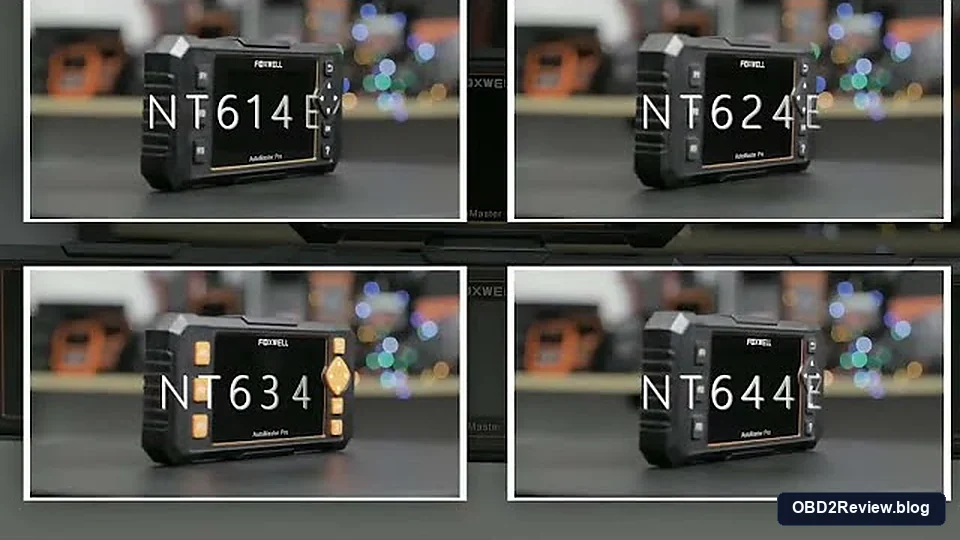
Data bus communication speeds dictate how quickly live sensor streams render on screen. Technicians exploring our foxwell nt510 elite review will notice superior refresh rates on high-density CAN networks.
The ARM-based processor architecture inside these scanners handles multi-module polling with consistent execution speeds. Engineers optimized the baud rate handling to reduce latency during deep CAN-bus data stream queries across various vehicle modules.
Memory allocation schemas impact how many live data graphing parameters load simultaneously. Upgraded internal ROM prevents buffer overflow errors when technicians log extended diagnostic sessions involving powertrain control modules under heavy operational loads.
- Advanced processor handles multi-module queries efficiently.
- Low latency improves real-time sensor graphing sessions.
- Optimized firmware reduces overall system boot times.
Processor Performance Under Heavy Load
Sustained diagnostic sessions test the thermal limits of handheld automotive scanners. Both units maintain stable operating temperatures during prolonged diagnostic cycles in warm shop environments.
Memory allocation directly impacts how many live data parameters you can plot simultaneously. The Elite platform prioritizes critical safety systems to prevent buffer overflow issues.
- Stable thermal performance during long sessions.
- Efficient memory management prevents freezing.
Special Service Functions and Reset Capabilities
Modern vehicle maintenance demands extensive electronic service reset capabilities from handheld tools. Our insights inside the foxwell 650 elite review highlight heavy specialization in brake bleeding and oil resets.
Comprehensive coverage varies depending on firmware versions and regional vehicle market specifications. Professional technicians must verify specific module compatibility before tackling exotic or commercial chassis repairs.
Executing electronic parking brake calibrations requires precise bidirectional signaling to retract caliper pistons safely. Both variants interface with internal ABS modules to perform automated bleeding sequences without triggering permanent fault code flags.
Oil service light resets rely on accurate hexadecimal memory address writing to clear maintenance intervals. The integrated firmware communicates directly with instrument cluster nodes to update remaining fluid life percentages using standard OBD2 protocols.
- Dedicated ABS bleeding routines save significant workshop time.
- Oil light resets cover a massive global vehicle range.
- Electronic parking brake retraction works reliably on imports.
Advanced Calibration Protocols
Calibrating modern steering angle sensors requires extreme precision from the scan tool. Faulty initialization procedures can trigger permanent stability control warning lights on the dashboard.
Technicians appreciate the guided step-by-step instructions embedded directly within the software menus. This reduces operator error during complex calibration sequences on sensitive vehicle networks.
- Guided routines minimize technician configuration errors.
- Accurate sensor calibration prevents dashboard warning lights.
Ergonomics, Display Quality, and Handheld Footprint
Physical design elements dictate daily comfort during grueling diagnostic shifts in the shop. A well-balanced chassis reduces wrist fatigue when holding the unit at awkward dashboard angles.
Screen brightness levels dictate outdoor readability under direct sunlight conditions. The built-in color display features anti-glare coatings that enhance visibility inside dimly lit engine bays.
Ergonomic grip styling incorporates rubberized thermoplastic elastomer side panels to prevent accidental slips during greasy workshop conditions. The physical button layout permits single-handed navigation while wearing standard mechanical work gloves in cold garage environments.
TFT screen technology delivers adequate daylight visibility, though direct sunlight can wash out complex color graphs. A robust protective lens shields the LCD matrix against scratches from sharp shop tools or accidental impacts on metal toolboxes.
- Ergonomic grip texture prevents accidental drops during testing.
- High-contrast screen remains legible under bright sunlight.
Button Tactility and Menu Navigation
Physical keypad buttons offer superior tactile feedback compared to fragile touchscreen interfaces. Greasy hands or protective workshop gloves will not impede precise menu navigation on these devices.
Dedicated shortcut keys allow rapid jumping between primary diagnostic functions without endless scrolling. This physical layout accelerates daily workflow pacing for busy professional automotive technicians.
- Tactile keypad supports gloved workshop usage.
- Shortcut keys streamline routine diagnostic navigation.
Build Quality, Drop Resistance, and Thermal Tolerance
Workshop environments subject diagnostic equipment to constant physical abuse and accidental impacts. A ruggedized rubberized housing absorbs shock effectively when units tumble onto concrete shop floors.
Protective corner bumpers prevent internal circuit boards from fracturing during severe drops. Water-resistant keypad membranes shield sensitive electronic components from accidental fluid spills in the shop.
Injection-molded ABS plastic chassis construction absorbs moderate kinetic shock from bench height drops onto concrete floors. Internal circuit board mounting points utilize silicone dampening bushings to protect delicate surface-mounted components from sudden mechanical vibrations.
Thermal operating thresholds range from freezing winter mornings up to intense summer bay temperatures. As detailed in our foxwell nt650 review, adequate passive ventilation channels prevent internal heat buildup during prolonged sessions.
- Rubber armor protects against concrete impact damage.
- Sealed keypads resist shop fluid and oil contamination.
Thermal Stress and Operating Limits
Extreme winter cold or blistering summer heat can temporarily degrade LCD screen performance. These scanners are engineered to function reliably across harsh seasonal temperature extremes.
Internal heat sinks dissipate processor warmth efficiently without requiring noisy cooling fans. Silent operation ensures a pleasant working environment during prolonged diagnostic troubleshooting sessions.
- Operates reliably in freezing winter service bays.
- Fanless design prevents dust ingestion into electronics.
Firmware Update Procedures and Software Licensing
Keeping diagnostic software current ensures compatibility with newly released vehicle platforms. The online update portal allows users to download vehicle patches via standard USB connections effortlessly.
Subscription models dictate long-term maintenance costs for professional automotive repair facilities. Lifetime free updates provide exceptional financial value compared to recurring annual license renewal fees.
Client software applications facilitate direct USB connectivity for downloading manufacturer-specific diagnostic database packages. Stable internet connections ensure uninterrupted file transfers while updating vehicle coverage definitions for newer model year releases.
License verification occurs automatically upon connecting the unit to the proprietary update utility interface. Maintaining active subscription parameters unlocks expanded bi-directional testing routines without requiring manual key insertions or complex registry edits.
- Simple USB update utility simplifies software maintenance.
- Frequent database patches expand foreign vehicle coverage.
Storage Capacity and Data Management
Internal flash memory stores diagnostic logs and recorded data streams for later review. Users can transfer saved diagnostic reports to office computers using standard memory card readers.
Organizing customer diagnostic files prevents administrative confusion within busy automotive repair shops. Efficient file management tools streamline record-keeping for recurring fleet maintenance clients.
- Ample storage saves historical diagnostic data logs.
- Easy file transfer supports workshop record keeping.
Power Management, Battery Draw, and Charging Modes
Diagnostic tools draw operational power directly from the vehicle OBD2 data link connector. This design eliminates the need for bulky internal battery packs during standard testing sessions.
Low voltage protection circuits prevent the scan tool from draining weak vehicle batteries. The smart power management system safely shuts down units during extended ignition-off troubleshooting procedures.
Parasitic current draw remains remarkably low when the device enters standby mode between intermittent diagnostic tests. The internal power management integrated circuit protects against voltage spikes originating from faulty vehicle alternator diode assemblies.
Operating power derives primarily from the vehicle data link connector during standard live troubleshooting procedures. Alternatively, auxiliary USB charging options permit offline configuration work inside the office using standard wall adapter blocks.
- Draws operating power directly from diagnostic ports.
- Voltage monitoring protects vulnerable vehicle starter batteries.
Auxiliary Power Sources and Standby Modes
External USB charging cables allow software updates to occur away from vehicles. This flexibility lets technicians update device databases comfortably inside the office or breakroom.
Low-power standby modes preserve internal capacitor charge levels between sudden diagnostic calls. Quick boot sequences restore full system functionality instantly when plugging back into vehicles.
- USB connectivity enables comfortable desktop updating.
- Rapid boot recovery accelerates multi-car diagnostics.
Professional Shop Integration and Workflow Efficiency
Integrating a specialized diagnostic tool into an established workflow requires minimal staff training. The intuitive operating system allows novice technicians to perform basic scans immediately without supervision.
Standardized reporting formats help communicate complex fault codes clearly to vehicle owners. Professional printouts build customer trust by providing transparent documentation of necessary mechanical repairs.
Streamlined menu hierarchies minimize the number of keystrokes needed to identify obscure diagnostic trouble codes. Technicians can save custom vehicle profiles to accelerate recurrent testing sequences across high-volume fleet maintenance schedules.
Diagnostic report printing capabilities allow service advisors to present clear repair documentation directly to customers. Integrating these handheld tools into daily workflow operations boosts overall shop productivity and reduces vehicle bay turnaround times.
- Intuitive interface requires minimal staff training time.
- Clear diagnostic reports build customer repair trust.
Choosing the Right Tool for Your Specialty
General repair facilities benefit from broad multi-system diagnostic coverage across various manufacturers. You can read our detailed foxwell nt650 elite review to see how specialized brake shops maximize their return.
Evaluating your daily repair volume helps determine which hardware feature set is essential. Investing in the correct diagnostic tier prevents costly equipment upgrades down the road.
- Match tool capabilities to your primary shop repairs.
- Avoid costly secondary tool upgrades by buying right.
Frequently Asked Questions
Can these specialized diagnostic scanners perform comprehensive bidirectional active tests on modern vehicle transmission modules during routine shop repairs?
The Elite scanner focuses primarily on specialized maintenance resets and critical system calibrations rather than advanced bidirectional component actuation tests, meaning technicians requiring deep bi-directional controls must evaluate higher-tier diagnostic platforms instead for complete coverage.
Are software updates completely free for the entire operational lifetime of these diagnostic hardware devices without any recurring annual license fees?
Yes, the manufacturer provides lifetime free software updates downloaded easily via a standard USB connection, which significantly reduces long-term maintenance costs for professional automotive repair facilities operating on strict yearly equipment budgets.
Do these handheld units require an internal rechargeable battery pack to operate during mobile diagnostic testing across the service floor?
No, both models draw all necessary operational power directly from the vehicle data link connector during testing sessions. This reliable design eliminates battery maintenance hassles and ensures the tool remains instantly ready for deployment across the workshop floor.
Can a single scan tool cover multiple vehicle manufacturers from different global import regions during daily shop operations?
Yes, the extensive software database includes comprehensive diagnostic coverage for dozens of Asian, European, and domestic automotive brands, ensuring technicians can easily service diverse fleet vehicles without needing multiple brand-specific diagnostic interfaces cluttering their service bays.
What physical protections are built into the outer casing to withstand harsh automotive workshop environments over time?
The housing features a rugged rubberized protective armor designed to absorb heavy impacts when dropped onto concrete workshop floors, and sealed membrane keypads prevent accidental oil or fluid spills from damaging sensitive internal circuit board components during repairs.