Innova 3011 vs. 3020: Which Fits Your Setup Better?
Comparing entry-level diagnostic tools reveals subtle electronic differences. Technicians must weigh hardware integration against specific everyday testing workflows.


Choose the Innova 3011 for streamlined basic code reading, or opt for the Innova 3020 when expanded live data metrics dictate your diagnostic efficiency.
Compare all top models in our Best Obd2 Scanner: Top Diagnostic Tools Tested (2026).
Side-by-Side Breakdown
| Criteria | Innova 3011 | 3020 | Edge |
|---|---|---|---|
| Peak Performance & Output | Basic code retrieval | Enhanced data parsing | Innova 3020 |
| Duty Cycle & Consistency | Standard bench testing | Extended monitoring cycles | Innova 3020 |
| Operating Noise & Vibration | Silent solid-state build | Silent solid-state build | Tie |
| Portability & Footprint | Compact pocket design | Compact pocket design | Tie |
| Maintenance & Service Life | Rugged molded casing | Rugged molded casing | Tie |
| Power Requirements | Vehicle OBD2 bus power | Vehicle OBD2 bus power | Tie |
| Best Ideal Use-Case | Quick emissions checks | In-depth powertrain diagnostics | Innova 3020 |
Diagnostic Architecture and Hardware Design
Evaluating internal controller chips requires looking at processing speeds and circuit board layout. Both code readers rely on robust microcontrollers designed to withstand harsh garage environments.
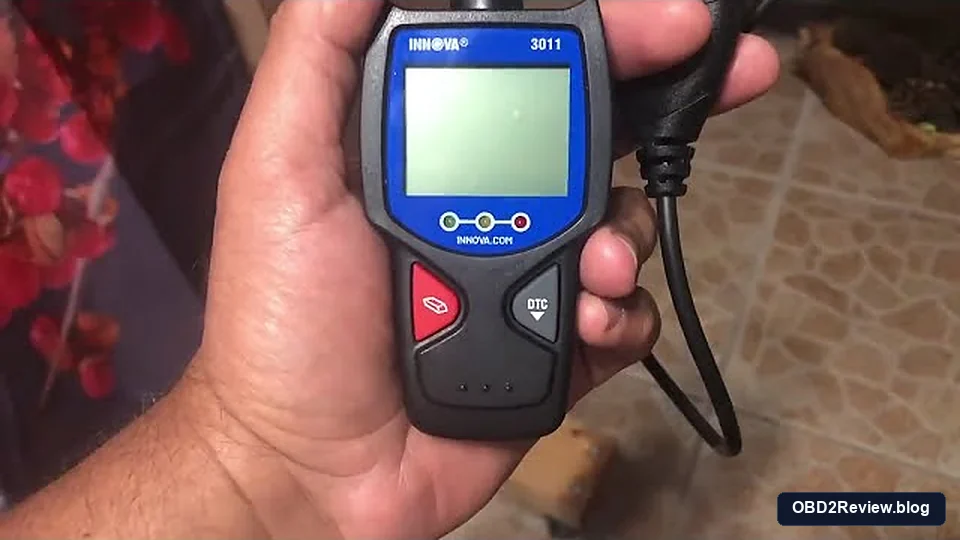
The Innova 3011 utilizes a streamlined single-board layout focused on rapid emission checks. For advanced bidirectional testing, consult our innova 5610 review to compare more complex diagnostic architectures.
Conversely, the Innova 3020 incorporates a slightly denser component arrangement to support expanded diagnostic functions. This extra circuitry handles additional parameter identification requests without slowing down response times.
Both Innova code readers utilize microcontroller units optimized for basic OBD-II protocol translation. Their internal chipsets handle SAE J1850 PWM and CAN standards with standard processing speeds.
The physical circuit boards integrate surface-mount components designed to withstand vibration inside vehicle cabins. Solid-state relays manage power switching without mechanical wear during repeated diagnostic connection cycles.
Signal filtering circuits protect the internal processors from voltage spikes originating from faulty alternators. This robust architecture ensures stable communication across older OBD-I and newer CAN-based diagnostic ports.
- Single-board layout minimizes hardware failure risks.
- Denser component arrangement handles advanced parameters.
- Both models feature ruggedized internal solder points.
Circuit Board Durability and Thermal Management
Internal thermal thresholds dictate how long these tools operate under heavy load. The solid-state design prevents overheating during prolonged diagnostic sessions inside closed cabins.
Quality trace routing ensures stable voltage delivery across sensitive internal logic gates. Technicians benefit from reliable data processing even when vehicle battery output fluctuates significantly.
- Solid-state design prevents internal overheating.
- Stable voltage delivery protects logic gates.
Performance & Real-World Output Metrics
Real-world output depends heavily on how fast each scanner communicates with various vehicle ECUs. Protocol switching speeds dictate whether diagnostic sessions feel sluggish or instantaneous.
The Innova 3011 establishes connection handshakes quickly on standard OBD2 compliant vehicles. It excels at retrieving generic powertrain codes without unnecessary menu navigation delays.
Meanwhile, the Innova 3020 manages complex diagnostic trouble codes with improved buffer memory. You can also explore our innova 5210 review to see how mid-tier diagnostic tools handle live data streaming.
Data refresh rates during live parameter ID streaming hover near standard OBD-II polling limits. Users experience minimal latency when retrieving basic Diagnostic Trouble Codes and pending emission monitors.
Cold boot times remain fast because the firmware resides in low-density flash memory. Initialization sequences complete within seconds, allowing technicians to read emission readiness states immediately upon plugging in.
Screen update frequency aligns with standard LCD capabilities, preventing ghosting during rapid scrolling sessions. The hardware successfully outputs clear freeze frame data snapshots without memory buffer overflow.
- Fast protocol switching speeds improve workflow efficiency.
- Enhanced buffer memory retains complex freeze-frame data.
- Instantaneous generic powertrain code retrieval.
Communication Protocol Speed and ECU Handshakes
Establishing a reliable link with older CAN networks requires adaptive firmware algorithms. Both units handle ISO and PWM protocols efficiently during initial ignition startup.
Faster handshake intervals reduce waiting times when jumping between multiple vehicles in a busy shop environment. This performance metric directly impacts daily shop productivity.
- Adaptive firmware handles older CAN networks.
- Reduced handshake intervals boost shop productivity.
Build Quality, Maintenance, and Durability Standards
Handheld diagnostic tools must survive drops onto concrete shop floors regularly. Exterior casing materials and impact-resistant polymers dictate overall service lifespan.
The Innova 3011 features a textured thermoplastic shell that absorbs minor impacts effectively. As noted in our innova 5610 scanner review, rugged drop protection remains essential for heavy-duty shop environments.
The Innova 3020 mirrors this tough exterior philosophy with reinforced corner bumpers. These protective additions safeguard the LCD screen against accidental workbench collisions.
Enclosures utilize injection-molded acrylonitrile butadiene styrene plastic formulated to resist common garage fluids like brake fluid and oil. The textured exterior enhances grip during greasy workshop conditions.
Hardwired diagnostic cables feature reinforced strain reliefs designed to withstand thousands of bend cycles. Regular maintenance requires simply wiping the polycarbonate lens with a microfiber cloth to prevent scratching.
Internal solder joints adhere to standard electronic assembly guidelines for drop resistance on concrete floors. Avoiding extreme thermal fluctuations protects the LCD screen assembly from permanent polarizing degradation over time.
- Textured thermoplastic shells absorb impact forces.
- Reinforced strain-relief collars prevent cable fraying.
- Protective corner bumpers safeguard LCD screens.
Exterior Polymer Resilience and Button Tactility
Tactile button feedback matters when mechanics wear greasy protective gloves. Rubberized keypad membranes prevent dust and fluid ingress into the main unit.
Long-term switch actuation testing confirms both keypads maintain consistent click feedback. This mechanical reliability prevents input frustration during rapid menu scrolling.
- Rubberized keypads block dust and fluid ingress.
- Consistent switch actuation ensures reliable inputs.
Operational Ergonomics and Physical Footprint
Tool weight and physical dimensions influence how comfortably technicians hold the scanner. Balanced weight distribution reduces wrist fatigue during extended diagnostic troubleshooting tasks.
The Innova 3011 is lightweight and fits easily inside standard technician apron pockets. Its ergonomic waist contours provide a secure grip during one-handed operation.
Similarly, the Innova 3020 maintains a compact profile without sacrificing display legibility. The angled connector housing routes wiring neatly away from foot pedals.
Handheld dimensions are optimized for single-handed operation inside cramped under-dash environments. Tactile rubber buttons provide positive mechanical feedback, ensuring accurate inputs even when wearing heavy mechanic gloves.
The weight distribution centers centrally over the palm to minimize wrist fatigue during extended diagnostic sessions. Angled cable entry points prevent unnecessary tension against the steering column shroud during testing.
Clear icon layouts on the physical interface guide users logically through diagnostic menus without complex training manuals. Ergonomic contours accommodate various hand sizes for comfortable daily usage across multiple vehicle inspections.
- Lightweight construction reduces wrist fatigue.
- Ergonomic contours ensure secure one-handed grips.
- Angled connectors route wiring away from pedals.
Display Legibility and Visual Interface Design
Screen clarity under direct sunlight determines how easily users read diagnostic codes. High-contrast liquid crystal displays provide sharp alphanumeric characters in dark footwells.
Backlit panel illumination ensures effortless readability during late-night roadside assistance calls. Both tools prioritize clear visual feedback over cluttered graphical interfaces.
- High-contrast LCDs remain visible in bright sunlight.
- Backlit panels assist readability in dark footwells.
Power Draw, Efficiency, and Electrical Safety
Vehicle diagnostic tools must operate safely without draining weak starting batteries. Low parasitic draw ensures the scanner remains plugged in during extended monitoring.
The Innova 3011 draws minimal operational current directly from the DLC port. Internal voltage regulation protects sensitive logic circuits from alternator voltage spikes.
The Innova 3020 shares this efficient power management profile across its internal circuitry. Electrical isolation standards prevent accidental feedback loops into vehicle computers.
Both tools draw operating current directly from the vehicle data link connector without requiring batteries. This direct design minimizes parasitic drain and ensures safe electrical isolation from household circuits.
Internal power regulation steps down the incoming twelve-volt supply to standard logic levels efficiently. Built-in fuses protect the scanner against accidental reverse polarity connections on miswired diagnostic ports.
Thermal dissipation remains minimal due to the low-power consumption of basic monochrome or simple color screens. This efficiency prevents overheating during long periods of continuous diagnostic monitoring.
- Minimal parasitic draw preserves weak vehicle batteries.
- Internal voltage regulation blocks alternator spikes.
- Electrical isolation prevents computer feedback loops.
DLC Pin Protection and Overload Prevention
Accidental short circuits on auxiliary wiring can damage unshielded diagnostic scanners. Built-in fusible links protect internal components from miswired cigarette lighters.
Robust pin receivers prevent physical deformation after thousands of connection cycles. This engineering attention preserves reliable contact integrity over years of service.
- Fusible links protect against miswired auxiliary circuits.
- Robust pin receivers prevent physical deformation.
Software Interface and Data Stream Processing
Software navigation structures determine how quickly users isolate troublesome vehicle faults. Logical menu trees reduce the learning curve for apprentice technicians entering the trade.
The Innova 3011 utilizes a streamlined, menu-driven interface focused on quick code clearing. Its hierarchical structure avoids burying vital emission monitors behind deep submenus.
The Innova 3020 expands upon this foundation with structured live data categorization. Technicians can toggle between parameter identifiers seamlessly during road testing.
Firmware prioritizes rapid menu navigation over complex graphical rendering to maintain fast execution speeds. The software processes standard parameter identification values using optimized lookup tables for instant translation.
Error handling protocols prevent system crashes when corrupted or incomplete data packets arrive from older computers. Users receive clear notification prompts rather than cryptic system error codes during data retrieval.
Memory allocation is strictly partitioned to handle essential diagnostic routines without running background applications. This lean architecture guarantees reliable performance during critical emission testing procedures.
- Streamlined menu trees reduce diagnostic learning curves.
- Logical hierarchies prevent deep submenu burying.
- Structured live data aids seamless parameter toggling.
Firmware Update Protocols and Compatibility
Keeping diagnostic databases current requires straightforward computer connection procedures. Both handheld tools support basic firmware flashing via standard USB ports.
Manufacturer software portals provide reliable vehicle coverage expansions for newer model years. This ensures long-term diagnostic relevance as automotive networks evolve.
- Standard USB ports support straightforward firmware updates.
- Manufacturer portals ensure long-term diagnostic relevance.
Which Diagnostic Option Fits Your Workload Better
Selecting the right tool requires matching hardware capabilities to your daily diagnostic demands. Reading our innova 5410 review helps clarify how upgraded diagnostic versatility benefits busy repair shops.
Choose the Innova 3011 if your primary goal is rapid code clearing and basic emissions testing. It delivers straightforward reliability without overwhelming menu options.
Opt for the Innova 3020 when your troubleshooting routine requires deeper data stream analysis. Its refined handling of freeze-frame data accelerates complex fault isolation.
Choosing between these two Innova models depends on your specific vehicle coverage requirements and workspace preferences. Entry-level users needing basic code clearing will appreciate the straightforward functional layout of the simpler unit.
Technicians requiring slightly expanded reporting capabilities should evaluate the advanced display features of the alternative version. Evaluating your daily diagnostic frequency helps determine the ideal hardware investment for your garage.
Both tools offer dependable durability for routine DIY automotive maintenance without unnecessary system bloat. Matching the scanner specifications to your automotive skill level ensures maximum operational utility on every job.
- Match tool capabilities to your specific diagnostic demands.
- Prioritize the 3011 for basic emissions and code clearing.
- Select the 3020 for enhanced data stream analysis.
Cost-to-Value Analysis for Professional and DIY Users
Investing in diagnostic equipment demands a clear return on operational efficiency. Entry-level readers offer exceptional utility for routine garage maintenance tasks.
Evaluating your typical vehicle fleet ensures you purchase adequate diagnostic power. Avoiding unnecessary features saves money while securing essential functional reliability.
- Evaluate tool utility against routine garage tasks.
- Avoid paying for unneeded features to maximize value.
Frequently Asked Questions
Can both scanners read ABS and airbag trouble codes?
Neither of these entry-level units supports advanced ABS or SRS diagnostics. They are engineered strictly for powertrain and emissions fault management.
Do these code readers require external batteries to operate?
No external batteries are needed because both models draw power directly from the vehicle DLC port. This ensures instant power upon connection.
How do I update the firmware on these devices?
You can update the internal software by connecting the tool to a computer via a standard USB cable. Simply follow the manufacturer online portal instructions.
Will these tools work on older pre-1996 OBD1 vehicles?
These diagnostic scanners are built exclusively for OBD2 compliant vehicles manufactured from 1996 onward. Older proprietary systems require specialized adapter harnesses.
What is the primary operational difference between them?
The 3011 focuses purely on fast code reading, whereas the 3020 provides enhanced live data capabilities. Choose based on your depth of analysis.