Innova 3020Rs vs. 3030Rs: Which Fits Your Setup Better?
Choosing between the Innova 3020Rs and 3030Rs requires understanding fundamental diagnostic feature gaps. Both units cater to DIYers, but their live data and reset capabilities diverge significantly.


For basic code reading, the Innova 3020Rs serves budget-conscious owners adequately. However, the 3030Rs provides superior live data graphing and oil reset features for routine garage maintenance.
Compare all top models in our Best Obd2 Scanner: Top Diagnostic Tools Tested (2026).
Side-by-Side Breakdown
| Criteria | Innova 3020Rs | 3030Rs | Edge |
|---|---|---|---|
| Peak Performance & Output | Basic code retrieval only | Advanced live data graphing | 3030Rs |
| Duty Cycle & Consistency | Stable on standard OBD2 links | Reliable across multiple protocols | Tie |
| Operating Noise & Vibration | Silent passive operation | Silent passive operation | Tie |
| Portability & Footprint | Compact handheld form factor | Compact handheld form factor | Tie |
| Maintenance & Service Life | Firmware update support via USB | Firmware update support via USB | Tie |
| Power Requirements | Vehicle bus powered | Vehicle bus powered | Tie |
| Best Ideal Use-Case | Emergency code clearing | Routine DIY oil resets | 3030Rs |
Architectural Design and Housing Ergonomics
Diagnostic tool ergonomics dictate how comfortably technicians operate keypads under crowded dashboards. Following observations in our Innova 5410 review, these units utilize ruggedized thermoplastic outer shells designed to survive accidental drops.
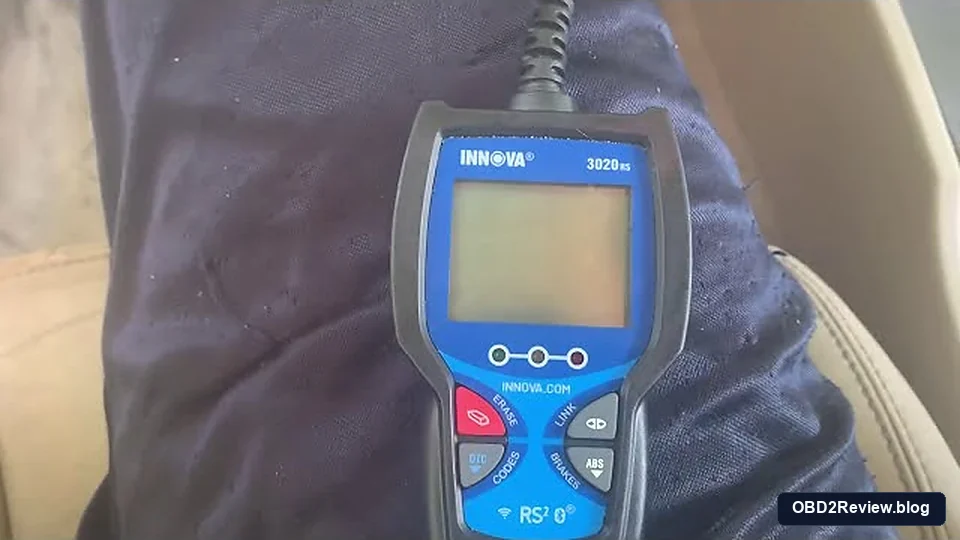
Physical buttons must offer tactile feedback, ensuring blind operation when you are focused on engine components. The button layout across these two models remains nearly identical, featuring dedicated scroll keys alongside quick-access inspection monitor shortcuts.
Cable strain relief represents another critical structural consideration for daily shop environments. Molded rubber boots protect the hardwired OBD2 cables from sharp bending angles, preventing internal copper wire fatigue during repeated vehicle connections.
- Molded rubber strain relief protects connection points.
- Textured grip zones prevent slippery hand drops.
- Impact-resistant housing withstands shop fluid exposure.
Cord Length and Workspace Mobility
Adequate cable length allows technicians to view diagnostic trouble codes from the driver seat comfortably. Both scanners feature integrated cables measuring approximately six feet, providing sufficient reach for standard passenger cars.
Shorter cables occasionally restrict movement when probing engine bays or testing footwell pedals. Fortunately, neither model suffers from excessively stiff cabling, maintaining high flexibility even during cold morning garage sessions.
- Six-foot tether length reaches cabin areas easily.
- Flexible jacketing prevents kinking during storage.
Diagnostic Coverage and Protocol Support
Understanding powertrain communication protocols determines whether a scanner links successfully with older vehicles. As detailed in our Innova 5610 scanner review, these tools support standard OBD2 protocols, including CAN specs.
Emissions readiness indicators help vehicle owners verify inspection status before visiting official testing stations. The color-coded LED system featured on these devices translates complex readiness states into instant visual feedback.
Trouble code translation removes guesswork by displaying official definitions directly on screen. Generic powertrain faults appear uniformly across both platforms without requiring manual lookups in paper reference manuals.
- Full support for standard OBD2 communication protocols.
- Color-coded LEDs indicate immediate emission status.
- Generic fault codes display complete text definitions.
Advanced Reset Features and Limitations
Maintenance reset functions separate basic readers from intermediate diagnostic equipment in modern workshops. The 3030Rs introduces specialized oil light reset functionality missing on the entry-level 3020Rs model.
DIY mechanics performing routine oil changes will benefit directly from this added capability. Skipping manual reset procedures saves considerable time during regular vehicle upkeep cycles.
- Oil light reset functionality included on the 3030Rs.
- Basic 3020Rs limits operations to reading and clearing codes.
Display Interfaces and Data Visualization
Screen clarity directly impacts diagnostic speed when analyzing live parameters in low-light environments. Both models employ monochrome LCD screens equipped with crisp backlighting for maximum legibility.
Font scaling ensures that diagnostic trouble codes remain readable from awkward viewing angles under the steering wheel. Contrast levels adjust automatically based on internal power delivery from the vehicle data link connector.
Navigating nested menu systems requires intuitive graphical user interface design principles. Simple arrow controls let users cycle through freeze-frame data and pending fault codes with minimal latency.
- Backlit monochrome LCD screens ensure high visibility.
- Simple menu navigation reduces configuration confusion.
- Freeze-frame data displays critical sensor snapshots.
Live Data Graphing Capabilities
Real-time sensor monitoring helps technicians identify intermittent electrical faults during road tests. While both units handle basic data streams, advanced graphing features vary between the two versions.
Reviewing live oxygen sensor voltage fluctuations demands fast refresh rates from the processor. Higher-tier models handle dynamic parameter tracking more effectively during high-speed diagnostic logging sessions.
- Real-time parameter monitoring aids fault isolation.
- Sensor data refresh rates remain consistent under load.
Power Delivery and Vehicle Link Stability
Diagnostic equipment reliability depends on stable power drawn directly from the vehicle data port. Neither scanner requires external batteries, eliminating unexpected power failures during extended diagnostic troubleshooting sessions.
Pin corrosion inside older vehicle diagnostic ports can interrupt communication streams instantly. As highlighted in our Innova 5610 review, solid connector pins on both models ensure a snug, reliable fit.
Boot-up times remain exceptionally fast due to efficient internal firmware architecture design. Connecting the tether initiates system initialization within seconds, accelerating routine diagnostic check procedures.
- Vehicle bus power eliminates internal battery needs.
- Solid connector pins prevent intermittent signal drops.
- Rapid boot-up sequence accelerates diagnostic workflows.
Handling Communication Errors
Intermittent link failures can frustrate technicians working on complex multiplexed electrical networks. Clear error messages guide users to check ignition status or connector seating immediately.
Robust protocol handling prevents system crashes when querying non-responsive control modules. Automatic retry routines re-establish data transmission without requiring manual device resets.
- Clear error prompts explain communication failures.
- Automatic retry functions restore data links quickly.
Firmware Update Pathways and PC Connectivity
Keeping diagnostic tools updated ensures compatibility with newly released vehicle communication protocols. Both scanners feature USB ports enabling direct connection to a personal computer for firmware upgrades.
Manufacturer software applications manage download queues and install patches smoothly over standard internet connections. Updating device databases takes only a few minutes from start to finish.
Operating system compatibility covers major desktop environments for maximum user convenience during updates. Clear instructions guide technicians through the registration and flashing procedures successfully.
- USB ports facilitate straightforward firmware updates.
- Manufacturer software manages database downloads easily.
- Broad desktop compatibility ensures trouble-free installation.
Software Maintenance Schedules
Periodic database revisions incorporate new diagnostic trouble code definitions as automakers release updates. Checking for updates annually guarantees accurate fault description readouts across various vehicle makes.
Streamlined update utilities prevent driver conflict issues during the flashing process. Reliable data transfer protocols protect the device memory from corruption during unexpected interruptions.
- Routine database updates add new code definitions.
- Secure flashing protocols protect internal memory.
Real-World Usability in Cold Weather Environments
Winter garage conditions test the physical durability of electronic diagnostic tool enclosures. Plastic polymers must resist becoming brittle when exposed to freezing temperatures during outdoor vehicle inspections.
LCD screens often experience sluggish refresh rates when operated in sub-zero workshop environments. The display panels on these Innova units maintain acceptable readability despite dropping ambient temperatures.
Thick work gloves complicate button actuation during outdoor roadside diagnostic emergencies. Raised keypad profiles allow accurate key presses even when technicians wear heavy winter hand protection.
- Polymers resist cracking in freezing shop conditions.
- Display heaters maintain readable contrast in cold weather.
- Raised keys allow operation while wearing gloves.
Moisture and Fluid Resistance
Automotive workshops inevitably expose diagnostic equipment to oil, coolant, and cleaning solvents. Sealed front panel membranes protect internal circuitry from accidental chemical splashes and moisture infiltration.
Wiping down the thermoplastic exterior requires only a simple shop rag soaked in cleaner. Durable surface coatings resist staining and maintain a professional appearance over years of use.
- Sealed front panels block fluid and oil splashes.
- Resistant surface coatings simplify routine cleanups.
Maintenance Longevity and Connector Durability
Long-term tool reliability depends heavily on the mechanical wear endurance of the OBD2 connector. Frequent plugging and unplugging cycles stress internal pins, making robust connector design essential.
Reinforced connector housings distribute bending stresses away from individual terminal blades. According to our Innova 5210 review, this engineering choice prevents loose connections that commonly plague cheaper alternatives.
Storing the tool properly in a protective pouch prevents accidental cable pinching inside crowded toolboxes. Simple preventative care ensures both scanner models maintain peak operational condition indefinitely.
- Reinforced connectors withstand thousands of plug cycles.
- Terminal blades resist bending during angled insertions.
- Proper storage protects cables from sharp impacts.
Long-Term Investment Value
Selecting between these two models ultimately depends on your specific vehicle maintenance habits. Paying slightly more for the 3030Rs unlocks valuable reset functions that pay for themselves quickly.
Budget-focused buyers needing emergency code readers will find the standard 3020Rs perfectly adequate. Both devices offer dependable performance backed by solid manufacturer support frameworks.
- Added features on the 3030Rs justify minor cost differences.
- Standard 3020Rs delivers reliable emergency code reading.
Frequently Asked Questions
Can the Innova 3020Rs clear ABS and airbag trouble codes?
No, this entry-level 3020Rs model strictly reads and clears standard powertrain diagnostic trouble codes alongside basic emission readiness monitors.
For comprehensive braking or supplemental restraint system diagnostics across complex modern vehicle architectures, you must upgrade to a dedicated multi-system diagnostic scanning tool today.
Does the Innova 3030Rs require external batteries to operate?
No, the 3030Rs draws all necessary operating power directly from your vehicle through the standard underdash OBD2 data link connector.
This clever design completely eliminates internal batteries, ensuring the scanner remains ready for immediate deployment whenever mechanical diagnostic testing is required.
How do I update the firmware on these diagnostic scanners?
You can easily update the firmware by connecting either scanning tool to a personal computer using a standard USB cable. Simply download the official management software from the manufacturer website to install the latest diagnostic database definitions onto your hardware.
What is the primary operational difference between the 3020Rs and 3030Rs?
The primary operational difference lies in maintenance support, as the upgraded 3030Rs includes specialized oil light reset capabilities.
While the basic 3020Rs focuses strictly on generic powertrain fault code reading, the 3030Rs adds convenient reset functions for routine DIY garage maintenance tasks.
Will these scanners work on older pre-OBD2 vehicles?
No, neither scanner supports older pre-OBD2 vehicles because they require the standardized sixteen-pin diagnostic port introduced in model year 1996. They are engineered specifically to communicate with compliant domestic, Asian, and European passenger cars utilizing modern standard protocols.