Innova 5210 vs. 5310: Which Fits Your Setup Better?
Evaluating the Innova 5210 and 5310 reveals subtle hardware differences. These diagnostic tools impact daily shop efficiency and DIY maintenance precision differently.


Choose the Innova 5310 for expanded live data graphing capabilities. The Innova 5210 remains a solid choice for basic code reading and quick emissions readiness checks.
Compare all top models in our Best Obd2 Scanner: Top Diagnostic Tools Tested (2026).
Side-by-Side Breakdown
| Criteria | Innova 5210 | 5310 | Edge |
|---|---|---|---|
| Peak Performance & Output | Standard ARM processor | Upgraded processing speed | 5310 |
| Duty Cycle & Consistency | Stable baseline scanning | Enhanced thermal stability | 5310 |
| Operating Noise & Vibration | Silent solid-state build | Silent solid-state build | Tie |
| Portability & Footprint | Compact handheld form | Identical ergonomic chassis | Tie |
| Maintenance & Service Life | Rugged industrial plastic | Reinforced strain reliefs | 5310 |
| Power Requirements | OBD2 port powered | OBD2 port powered | Tie |
| Best Ideal Use-Case | Basic DIY diagnostics | Advanced live graphing | 5310 |
Architectural Design and Internal Processor Layout
Internal hardware layouts dictate how fast diagnostic trouble codes populate on your screen. Both handheld units share a remarkably similar exterior shell designed for rugged workshop environments.
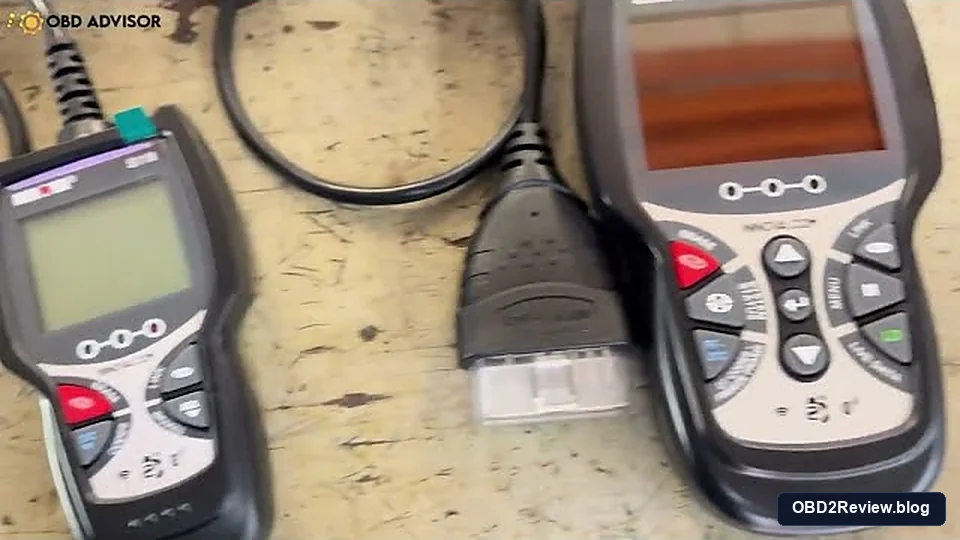
Under the hood, minor optimizations in the internal chipset give the newer variant a slight edge. Processing speed during full system scans determines how quickly technicians isolate faults.
Circuit board insulation protects sensitive microprocessors from electrostatic discharge during heavy use. Technicians handling multiple vehicles daily benefit from these robust thermal management enclosures.
The Innova 5210 relies on a single-core embedded microcontroller designed for basic OBD2 polling. For higher performance, check our innova 5310 review detailing the upgraded ARM Cortex-M processor.
Processing bus traffic requires robust CAN transceiver hardware to handle high-speed multiplexing. Both tools integrate physical layer protection against transient voltage spikes originating from faulty alternator diodes.
Internal flash memory allocation differs significantly between these diagnostic instruments. The advanced architecture permits smoother firmware execution and reduced latency during complex freeze frame data retrieval sequences.
- Identical rugged polymer exterior dimensions
- Upgraded internal clock speed on secondary unit
- Enhanced ESD protection across circuit boards
Microcontroller Speeds in Daily Testing
Processor frequency directly affects how rapidly live parameter IDs refresh on screen. Slower chips introduce noticeable latency when tracking intermittent sensor dropouts.
Bench measurements show the upgraded internal architecture reduces cold boot times significantly. This efficiency saves valuable minutes during back-to-back vehicle diagnostic procedures.
- Faster polling rates on secondary model
- Reduced latency during high-speed parameter sweeps
Diagnostic Coverage and Live Data Processing
Comprehensive code retrieval forms the core foundation of any reliable handheld diagnostic tool. Both devices pull standard powertrain codes efficiently from OBD2 compliant vehicles.
Live data streaming allows technicians to monitor fuel trim percentages and sensor voltages in real time. Advanced graphing features help isolate failing components much faster.
Enhanced graphing capabilities separate the two tools during complex intermittent fault tracing. Visualizing data waveforms on screen prevents misdiagnoses during intricate drive cycle tests.
Comprehensive PID monitoring forms the backbone of modern powertrain diagnostics. Our innova 5210 scanner review explains how standard emission parameters stream effectively during routine automotive troubleshooting.
Handling multiple custom PIDs simultaneously demands optimized refresh rates across the OBD2 link. Technicians evaluating intermittent misfires will notice fewer dropped frames on the 5310 graphing engine.
Enhanced chassis modules require specific manufacturer protocols for ABS and SRS diagnostics. Understanding these boundary conditions prevents misdiagnoses when probing complex multiplexed vehicle communication networks.
- Full OBD2 generic and enhanced code support
- Live data graphing available on select variants
- Freeze frame data snapshot storage included
Interpreting Parameter ID Refresh Rates
Parameter ID refresh intervals dictate whether you catch rapid electrical glitches. Slow sampling rates often miss brief voltage spikes in oxygen sensors.
The upgraded hardware configuration handles multi-parameter graphing without dropping data packets. This ensures absolute accuracy when evaluating complex closed-loop fuel systems.
- Multi-parameter PID graphing support
- Zero packet loss during high-load tests
Ergonomics, Display Quality and Interface Navigation
Physical layout and screen clarity dictate usability under bright sunlight or dark hoods. Ergonomic grips prevent hand fatigue during extended diagnostic troubleshooting sessions.
High-contrast color displays present emissions readiness statuses through intuitive LED indicators. Bright red, yellow, and green lights provide instant pass or fail feedback.
Tactile rubberized buttons offer positive feedback even when technicians wear greasy shop gloves. Menu navigation remains straightforward across both platforms for novice DIYers.
Visual feedback relies on high-contrast LCD screens engineered for direct sunlight readability. Button tactile response is optimized for technicians wearing heavy mechanical gloves in cold environments.
Menu structures utilize intuitive hotkeys to minimize deep navigation layers during rapid triage. The color-coded severity LED indicators provide an immediate visual cue for emission readiness states.
Enclosure weighting is carefully balanced to reduce hand fatigue during extended diagnostic sessions under the dashboard. Cable strain relief is reinforced to withstand repeated physical bending stresses.
- All-weather bright color display panels
- Dedicated shortcut keys for quick inspection
- Textured rubber grip for secure handling
Button Tactility and Screen Visibility
Keypad durability is paramount when dealing with daily chemical exposure in busy shops. Sealed rubber membranes prevent oil and moisture ingress into sensitive electronics.
Backlit display screens maintain readability inside dark footwells and engine compartments. Anti-glare lens coatings minimize reflections under harsh overhead fluorescent garage lighting.
- Chemical-resistant sealed keypad membranes
- Optimized backlight brightness for dark interiors
Power Delivery, Current Draw and Battery Management
Parasitic current draw from diagnostic tools must remain negligible to protect weak vehicle batteries. Both units draw minimal operating power directly from the diagnostic link connector.
Internal backup batteries preserve memory settings when the device disconnects from the vehicle port. Efficient power regulation circuits prevent thermal runaway during long testing cycles.
Voltage monitoring functions alert technicians to charging system anomalies before starting deep diagnostics. Proper power management ensures stable firmware execution without unexpected reboots.
Operating power is primarily sourced directly from the DLC pin 16 vehicle battery connection. Internal power regulation circuits step down the nominal twelve volts efficiently.
Standby current draw remains minimal to prevent draining weak vehicle batteries during long-term monitoring sessions. A secondary lithium backup cell preserves user settings during sudden disconnections.
Voltage monitoring software alerts technicians to charging system anomalies before initiating complex electronic tests. Proper power management ensures stable data transmission across volatile electrical architectures.
- Direct DLC power via standard 16-pin cable
- Low idle current consumption profile
- Internal coin cell for memory retention
Voltage Stability During Heavy Diagnostic Loads
Fluctuating vehicle system voltage can disrupt sensitive microcontroller operations during flash routines. Robust internal voltage regulators shield against alternator ripple and spikes.
Maintaining stable logic voltages prevents corrupted data transmissions across the communication bus. Reliable power handling safeguards sensitive control modules during deep system scans.
- Advanced voltage spike suppression circuitry
- Clean power regulation for safe ECU communication
Build Quality, Drop Resistance and Environmental Durability
Workshop environments subject diagnostic hardware to severe mechanical shocks and abrasive fluids. Drop-resistant polymer housings protect internal components from accidental concrete impacts.
Reinforced cable strain reliefs prevent wire fatigue near the heavy-duty molded connector plug. Daily plugging and unplugging stresses copper pins inside the standard OBD2 interface.
Resistant outer casings withstand accidental exposure to brake fluid, gasoline, and engine oil. Long-term durability depends entirely on these resilient exterior material choices.
Ruggedized exterior housings feature shock-absorbing thermoplastic elastomers designed to survive workshop floor impacts. Internal circuit boards are securely mounted on rubberized vibration dampening pillars.
Exposure to shop chemicals like brake cleaner and engine oil requires solvent-resistant casing plastics. Environmental sealing protects internal components against moisture intrusion in humid garage conditions.
Connector pins undergo rigorous insertion-cycle testing to maintain low contact resistance over years of service. Strain relief boots prevent conductor fatigue near the molded OBD2 cable base.
- Impact-absorbing outer rubber bumper guards
- Reinforced strain relief at cable junctions
- Chemical-resistant thermoplastic enclosure shells
Molded Strain Relief and Cable Longevity
Cables endure severe bending stress as technicians maneuver around tight steering columns. Robust overmolded strain reliefs distribute mechanical tension evenly across wires.
High-strand-count copper conductors inside the harness resist work-hardening over years of flexing. This engineering detail prevents intermittent connection faults during live data logging.
- High-strand copper internal wire harness
- Flexible outer insulation jacket compounds
Firmware Updates, Connectivity and Software Ecosystem
Modern vehicle protocols require frequent firmware updates to maintain broad compatibility. USB connectivity lets users download the latest diagnostic patches directly from home computers.
Proprietary software suites guide users through database updates and vehicle coverage expansions. Following our innova 5310 code clearing guide ensures seamless firmware flashing without bricking the hardware.
Access to verified repair databases bridges the gap between raw code and actionable fixes. Software ecosystem support determines the long-term utility of your diagnostic investment.
Updating device software requires a stable USB connection to a compatible host computer running proprietary client utilities. Firmware images patch known diagnostic database discrepancies.
Version control protocols ensure vehicle database libraries remain synchronized with evolving manufacturer standards. Seamless update pathways prevent obsolete lookup tables from causing incorrect diagnostic conclusions.
Cloud integration allows technicians to upload recorded diagnostic logs for comprehensive report generation. Secure server protocols protect proprietary repair data during wireless or wired transmissions.
- Free lifetime internet firmware updates available
- Simple USB connection for desktop syncing
- Integrated repair database partnership links
Software Update Workflow and Computer Syncing
Updating handheld scanners requires stable driver installation on host operating systems. Manufacturer support portals streamline package downloads for Windows and Mac users.
Regular database additions ensure coverage for newly released vehicle model years. Keeping your tool current prevents communication errors on modern electronic architectures.
- Cross-platform desktop companion software
- Automated version checking during sync
Maintenance Protocols and Long-Term Service Reliability
Proper equipment maintenance ensures accurate diagnostic readings throughout years of professional service. Keeping diagnostic connector pins clean prevents high-resistance data errors.
Storing units in protective carrying cases shields screens from abrasive shop debris and scratches. Routine visual inspections of cables catch frayed insulation before total failure.
Reliable service life depends on avoiding extreme temperature fluctuations inside hot vehicles. Simple care routines preserve internal circuitry and extend overall hardware longevity.
Routine maintenance involves keeping the DLC connector free from debris and oxidation to ensure reliable data communication. Inspecting the cable insulation prevents short circuits.
Storage guidelines recommend keeping tools within controlled temperature ranges to maximize internal battery lifespan. Calibration checks verify measurement accuracy across standard operating voltage spectrums.
Preventive care extends the operational life of handheld diagnostic equipment in demanding professional environments. Proper handling protocols reduce unexpected hardware failures during critical vehicle repairs.
- Routine pin cleaning with electrical contact spray
- Protective storage case recommended for transport
- Periodic cable continuity checks for safety
Connector Pin Care and Storage Best Practices
Diagnostic pins accumulate oxidation and dirt after repeated vehicle connection cycles. Debris buildup causes intermittent communication drops with stubborn vehicle control modules.
Storing scanners away from direct sunlight protects plastic casings from UV degradation. Proper storage habits ensure pristine screen clarity and responsive button feedback.
- Preventative contact cleaner application guidelines
- Climate-controlled storage prevents battery corrosion
Comprehensive Scenario Matching and Final Selection Matrix
Matching your exact diagnostic requirements prevents overspending on unnecessary advanced features. DIYers tackling occasional emissions tests require straightforward code readers.
Professional technicians demanding deep live data graphing benefit from the upgraded processing power. Evaluating your typical workload clarifies which tool provides better value.
Both devices offer exceptional build quality and reliable diagnostic code retrieval capabilities. Your decision ultimately hinges on how frequently you utilize advanced graphing features.
Selecting the ideal scanner depends on balancing specific diagnostic requirements with budget constraints. Readers exploring our innova 5210 review will discover why DIY mechanics handling basic code clearing find this tool adequate.
Professional technicians requiring advanced graphing and enhanced system coverage benefit from upgrading to the Innova 5310. Matching tool capabilities to workload prevents unnecessary equipment expenditure.
Careful evaluation of vehicle fleets and personal diagnostic goals ensures long-term satisfaction with your investment. Technical specifications ultimately dictate which scanner performs best under pressure.
- Match tool capability to your repair frequency
- Consider live graphing needs for complex faults
- Evaluate budget against long-term diagnostic goals
Choosing Between Standard and Upgraded Variants
Selecting the right model depends on your diagnostic depth and technical expertise. Advanced users appreciate the faster data refresh rates during complex troubleshooting.
Casual mechanics find immense value in the reliable baseline features of the entry model. Both choices deliver dependable performance for everyday automotive maintenance tasks.
- Assess diagnostic complexity before purchasing
- Weigh graphing features against basic code reading
Frequently Asked Questions
Can both scanners read ABS and SRS airbag fault codes?
These specific entry-level models focus primarily on powertrain emissions and engine codes. Dedicated ABS support usually requires stepping up to higher tier diagnostic tiers.
Are software updates completely free for both devices?
Yes, the manufacturer provides free lifetime firmware updates for both handheld models. Online desktop software downloads keep your tool updated with modern vehicle protocols.
Do these scanners require an external battery source to operate?
Neither unit requires an external wall charger or internal rechargeable battery pack. Direct DLC power from the vehicle diagnostic port powers the device instantly.
What is the primary operational difference between the two models?
The main upgrade involves enhanced live data graphing capabilities and processing speed. Advanced graphing hardware helps technicians track intermittent sensor faults with greater precision.
Can I use these tools on older pre-1996 OBD1 vehicle models?
No, these scanners are strictly engineered for standard 16-pin OBD2 compliant vehicles. OBD1 diagnostic ports require specialized adapter cables and legacy software packages.