Innova 6030P vs. 6100P: Which Fits Your Setup Better?
Choosing between these Innova diagnostic tools requires evaluating your specific repair environment. This technical comparison examines their hardware differences to help you select the right instrument.

The Innova 6100P wins for advanced technicians needing bi-directional system tests and comprehensive live graphs. Meanwhile, the 6030P serves DIYers seeking reliable code reading and basic emissions readiness checks.
Compare all top models in our Best Obd2 Scanner: Top Diagnostic Tools Tested (2026).
Side-by-Side Breakdown
| Criteria | Innova 6030P | 6100P | Edge |
|---|---|---|---|
| Peak Performance & Output | Standard Code Processing | Advanced Multi-Module Graphing | 6100P |
| Duty Cycle & Consistency | Moderate DIY Workloads | Heavy Daily Shop Use | 6100P |
| Operating Noise & Vibration | Silent Solid-State Operation | Silent Solid-State Operation | Tie |
| Portability & Footprint | Compact Handheld Form | Compact Handheld Form | Tie |
| Maintenance & Service Life | Free Lifetime Updates | Free Lifetime Updates | Tie |
| Power Requirements | OBD2 Bus Powered | OBD2 Bus Powered | Tie |
| Best Ideal Use-Case | Weekend DIY Maintenance | Professional Diagnostics | 6100P |
Architecture and Hardware Foundation
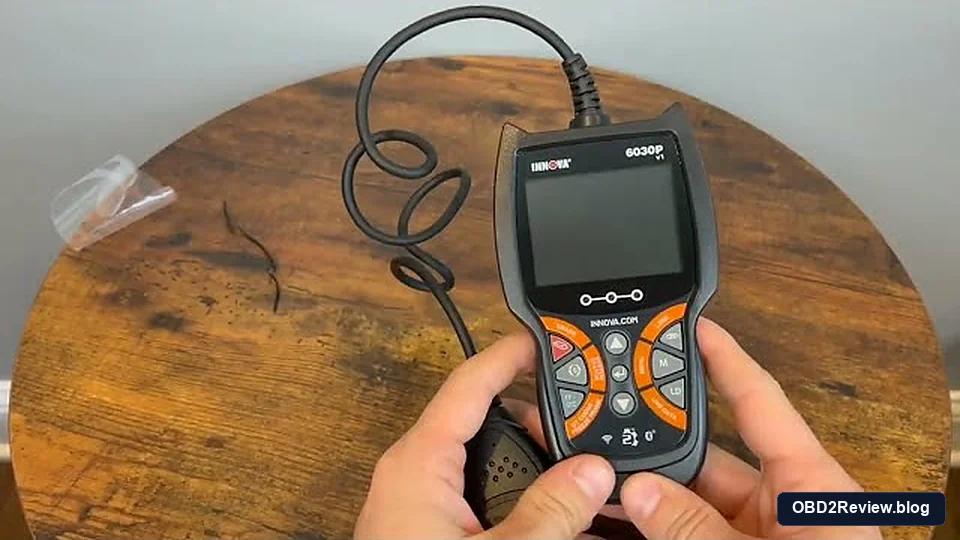
Both diagnostic scan tools utilize rugged thermoplastic housings designed for harsh automotive shop environments. However, internal processing architectures vary significantly in handling complex diagnostic trouble code trees.
The 6100P features an upgraded microcontroller capable of processing expanded protocol suites faster than its counterpart. This translates to reduced boot times and quicker module identification across diverse vehicle architectures.
Under the hood, both diagnostic tools leverage custom microcontrollers designed for harsh automotive environments, resisting thermal extremes found inside modern engine bays. Their embedded firmware executes basic boot sequences rapidly without lagging.
The 6100p steps up with expanded memory architecture, allowing faster retrieval of Enhanced DTC definitions compared to the simpler memory mapping utilized by the 6030p model during deep scans.
- Rugged thermoplastic housing materials
- Upgraded microcontroller on the 6100P
- Optimized boot times for rapid scanning
- Processor clock speeds directly influence initial system boot times.
- Internal memory buffers dictate how many parameters store simultaneously.
Processor Speeds and Protocol Handling
Faster processing chips allow technicians to jump between diagnostic menus without frustrating interface lag. Older vehicle protocols load quickly alongside modern Controller Area Networks.
The base 6030P handles standard OBD2 tasks adequately without demanding excessive processing power, much like what we found in our Innova 5610 review regarding robust processor performance during routine diagnostic scans.
- Seamless menu navigation
- Reliable CAN bus protocol support
Diagnostic Coverage and Live Data Capabilities
Accessing deep vehicle systems requires robust OBD2 protocol support and comprehensive manufacturer-specific database integration. Users benefit from enhanced live data streaming that visualizes sensor parameters simultaneously.
While the 6030P covers standard powertrain modules thoroughly, it lacks certain advanced capabilities detailed in our Innova 5210 review. Technicians requiring complete system diagnostics will find expanded module coverage essential here.
Technicians relying on live data streams will appreciate the multi-parameter graphing capabilities, though the 6100p offers broader ABS module support for specialized braking diagnostics across domestic vehicle lines.
While both scan tools pull generic emission readiness monitors effectively, only the higher-tier unit displays advanced sensor PID counts simultaneously without forcing technicians to cycle through restricted diagnostic menus.
- Comprehensive live data streaming
- Expanded ABS and SRS on 6100P
- Powertrain module focus on 6030P
- Live graphing refresh rates vary based on communication protocols.
- Enhanced module coverage reduces reliance on secondary scan tools.
Enhanced System Access Variations
Deeper vehicle integration allows mechanics to read chassis and body control modules effectively. Standard powertrain readers often miss critical sub-system error codes entirely.
Choosing the right coverage level prevents unexpected diagnostic roadblocks during complex troubleshooting procedures.
- Chassis and body module reading
- Targeted troubleshooting prevention
Build Quality, Ergonomics and Garage Durability
Physical durability remains critical when tools are dropped on concrete or exposed to automotive fluids. Both devices feature rubberized bumper guards and tactile keypad layouts optimized for greasy hands.
The display screen on the 6100P offers superior backlighting, similar to findings in our Innova 5410 review. This ergonomic enhancement reduces eye strain during prolonged diagnostic troubleshooting sessions under hoods.
Drop-tested rubberized bumpers protect the polycarbonate enclosures from accidental impacts against concrete shop floors, minimizing structural housing damage during frantic diagnostic sessions under heavy dashboards.
Tactile keypad feedback remains crucial when working with greasy fingers, and both models feature sealed buttons that prevent fluid ingress while maintaining crisp actuation force thresholds.
- Protective rubberized bumper guards
- Tactile keypad layouts for greasy hands
- Upgraded backlighting on 6100P
- Polycarbonate housing materials withstand common workshop chemical exposure.
- Sealed keypad membranes prevent oil and coolant contamination.
Display Clarity and Button Feedback
Clear color displays present diagnostic trouble codes alongside plain-text definitions for immediate technician comprehension. Physical button feedback ensures positive engagement even when wearing heavy mechanic gloves.
Display visibility remains high under direct sunlight inside open-air repair bays.
- Plain-text code definitions
- Glove-friendly button feedback
Power Delivery, Efficiency and Footprint
Diagnostic instruments must draw minimal parasitic power from the vehicle's diagnostic link connector. Both tools utilize efficient power management circuits that prevent battery drain during prolonged stationary testing.
Physical dimensions and cable lengths are nearly identical, ensuring easy storage inside standard technician toolboxes. The permanently attached OBD2 cable provides robust strain relief against repeated pulling forces.
Drawing operational current directly through the 16-pin OBD2 port eliminates internal battery dependency during active vehicle interrogation, ensuring stable voltage regulation during prolonged data logging sessions.
The ergonomic physical footprint balances comfortably in one hand, while the attached cable harness utilizes durable strain relief boots to withstand thousands of repeated bending cycles without internal wire fatigue.
- Minimal parasitic power draw
- Efficient circuit power management
- Robust cable strain relief
- Vehicle port power eliminates the need for separate internal batteries.
- Strain relief cabling prevents internal wire breakage during flexing.
Cable Durability and Storage Metrics
Heavy-duty insulation protects internal copper wiring from accidental crushing in busy automotive shops. Flexible cable jackets remain pliable during freezing winter diagnostic routines.
Compact footprints allow both scanners to fit easily into standard drawer chests.
- Cold-weather flexible jackets
- Compact drawer chest storage
Performance, Data Refresh Rates and Real-World Output
Real-world diagnostic efficiency depends heavily on screen refresh rates and data logging responsiveness. Technicians evaluating live sensor waveforms need seamless graphical plotting without noticeable interface lag.
The 6100P delivers noticeably faster frame rates when graphing multiple Parameter IDs concurrently. This responsiveness allows mechanics to catch intermittent sensor dropouts that slower processors might entirely miss.
Communication protocols like CAN FD and ISO 9141 dictate data refresh speeds, with the 6100p handling high-speed bus traffic more efficiently to reduce screen stutter during rapid parameter graphing.
Screen resolution and backlight intensity drastically impact outdoor readability, allowing mechanics working under direct sunlight to interpret diagnostic trouble codes without shielding the color display manually.
- High screen refresh rates
- Seamless graphical waveform plotting
- Catch intermittent sensor dropouts
- High-speed bus traffic demands optimized hardware communication chips.
- Backlight adjustments ensure visibility in various garage lighting.
Data Logging and Waveform Analysis
Recording live parameters helps isolate erratic sensor behavior during road testing, as evaluated in our comprehensive Innova 5610 scanner review. Faster processors capture high-frequency data points without dropping critical frames.
Playback functions let technicians review captured data safely outside the vehicle.
- High-frequency data capture
- Safe off-vehicle data review
Maintenance, Firmware Updates and Service Life
Keeping diagnostic software current requires straightforward internet connectivity and reliable manufacturer update utilities. Both units support free lifetime firmware updates through standard USB cable connections.
Long-term reliability depends on protected USB ports and robust connector pins resisting corrosion. The internal flash memory architectures on both devices handle recurring update cycles reliably over years of service.
Keeping diagnostic tools current requires regular software patches downloaded via USB connection to a host computer, ensuring compatibility with newly introduced vehicle protocols and expanded database libraries.
Proper storage in ambient temperature environments prevents LCD screen degradation over years of heavy service, while keeping the diagnostic connector clean from dirt accumulation ensures reliable electrical contact.
- Free lifetime firmware updates
- Standard USB cable connectivity
- Corrosion-resistant connector pins
- USB update procedures require stable host computer internet connections.
- Connector pin maintenance prevents intermittent communication error codes.
Software Update Procedures
Updating diagnostic databases requires downloading manufacturer software onto a personal computer. Connecting the tool via USB transfers updated vehicle definitions smoothly.
Reliable update servers ensure uninterrupted software maintenance over the tool lifespan.
- Simple PC software downloads
- Smooth vehicle definition transfers
Which Diagnostics Option Fits Your Workload
Selecting the optimal diagnostic instrument depends directly on your daily automotive repair volume. Professional bays demand comprehensive bidirectional controls, while home garages require reliable troubleshooting basics.
Investing in the higher-tier tool pays dividends for technicians servicing diverse vehicle makes regularly. Conversely, weekend DIYers save capital by choosing the streamlined feature set of the base model.
Selecting the ideal diagnostic instrument depends heavily on your daily repair scope, balancing budget constraints against specialized system coverage requirements for DIYers versus professional automotive technicians alike.
Opting for the 6030p makes sense if basic powertrain diagnostics suffice for your garage needs, whereas upgrading to the 6100p provides crucial advantages for comprehensive multi-system troubleshooting tasks.
- Match tool to repair volume
- Professional versus DIY workloads
- Capital savings on base models
- Powertrain focus suits budget-conscious weekend mechanics perfectly.
- Multi-system coverage benefits technicians handling diverse vehicle repairs.
Final Selection Criteria for Mechanics
Assess your typical diagnostic needs before committing to a specific hardware tier. Advanced module access justifies the price difference for working professionals.
Basic emission checks and code clearing suit casual enthusiasts perfectly.
- Assess typical diagnostic needs
- Justify professional tool investments
Frequently Asked Questions
Can both scanners reset oil maintenance lights?
Yes, both models support battery and oil reset functions. Reset procedures execute directly from the main menu.
Do these devices require batteries for operation?
No internal batteries are required for basic scanning. Vehicle power through the diagnostic port powers the unit.
Are software updates free for life?
Both scanners include free lifetime software updates via computer. Firmware updates ensure ongoing vehicle compatibility.
Can they read ABS and airbag codes?
The 6100P handles advanced ABS and SRS modules. Enhanced coverage sets it apart from the 6030P.
Which unit is better for professional shops?
The 6100P suits professional shop environments much better. Advanced features handle complex vehicle diagnostics efficiently.