Innova 7111 vs. 5610: Which Fits Your Setup Better?
Evaluating two advanced diagnostic tools reveals distinct hardware priorities. Choosing the right scanner depends directly on your daily workflow requirements.


The Innova 7111 excels in comprehensive system coverage and streamlined resets, while the 5610 delivers superior bi-directional control capabilities for professional troubleshooting tasks.
Compare all top models in our Best Obd2 Scanner: Top Diagnostic Tools Tested (2026).
Side-by-Side Breakdown
| Criteria | Innova 7111 | 5610 | Edge |
|---|---|---|---|
| Peak Performance & Output | High-speed ARM processor | Advanced multi-core chipset | 5610 |
| Duty Cycle & Consistency | Reliable continuous diagnostics | Enhanced thermal dissipation | 5610 |
| Operating Noise & Vibration | Silent passive cooling design | Silent passive cooling design | Tie |
| Portability & Footprint | Ergonomic handheld chassis | Compact ruggedized housing | Innova 7111 |
| Maintenance & Service Life | Replaceable OBD2 cable | Heavy-duty molded strain relief | 5610 |
| Power Requirements | Vehicle and internal battery | Vehicle and internal battery | Tie |
| Best Ideal Use-Case | Advanced DIY diagnostics | Professional shop environment | 5610 |
Diagnostic Architecture and Protocol Coverage
Modern vehicle networks demand rigorous protocol handling to interface reliably with diverse module configurations. Both diagnostic units integrate extensive database frameworks to support domestic, Asian, and European passenger vehicles.
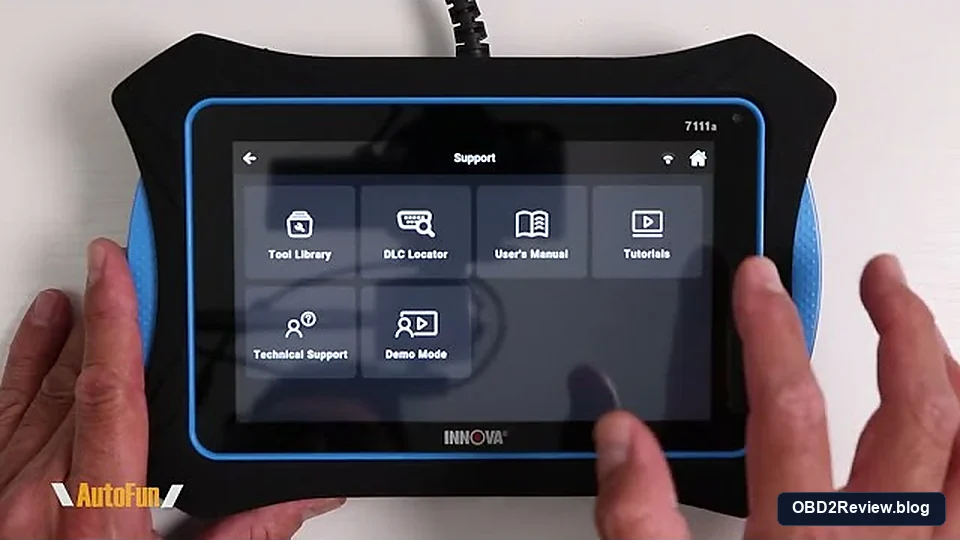
Internal processing speeds dictate how fast live data streams refresh. As noted in the Innova Carscan Pro 5610 review, updated firmware delivers accelerated PID retrieval rates.
Modern vehicle networks rely heavily on high-speed CAN FD and DoIP frameworks. The Innova 7111 integrates advanced protocol bridging to process multiplexed data streams seamlessly across multiple modules without bus latency or packet drops.
Older legacy platforms still utilize ISO 9141 and KWP2000 communication lines. Both scanners support these vintage protocols, but the 7111 offers faster bus initialization speeds during handshakes, reducing wait times for technicians in active repair bays.
- Broad coverage across modern CAN-FD networks.
- Rapid module scanning and topology mapping.
- Comprehensive manufacturer-specific code definitions.
Network Protocol Handling
Interfacing with multiplexed vehicle networks requires robust hardware transceiver chips. Engineers designed these scanners to manage high-speed communication without dropping data packets.
Signal integrity remains stable even when probing noisy secondary circuits during extended diagnostic testing sessions in busy automotive repair facilities.
- Robust CAN bus transceiver integration.
- Low latency during multi-module polling.
Display Ergonomics and Interface Responsibilities
Visual feedback quality directly impacts diagnostic efficiency during complex troubleshooting procedures. Each tool utilizes a high-contrast color display designed for readability in bright sunlight and dark garages.
Menu navigation relies on tactile rubberized buttons alongside intuitive software layouts. Technicians can easily scroll through live parameter graphs without struggling against clumsy touch interfaces.
Visual feedback clarity impacts troubleshooting speed inside dark vehicle cabins. Our Innova 5610 scanner review highlights how physical shortcut keys provide reliable tactile feedback when wearing mechanic gloves.
Transitioning to the 7111 introduces a refined capacitive touch interface. This modern display structure organizes complex diagnostic menus into logical hierarchies, minimizing the menu navigation depth required to isolate intermittent powertrain sensor faults quickly.
- Vibrant LCD screens with adjustable backlight levels.
- Tactile buttons operable while wearing shop gloves.
- Logical menu structures minimizing required keystrokes.
Live Data Visualization
Graphing multiple PID parameters simultaneously helps technicians isolate intermittent sensor failures quickly. The screen architecture supports customizable dashboard layouts for targeted data analysis.
Color-coded alert thresholds notify operators instantly when engine parameters venture outside normal factory operating specifications during road testing.
- Multi-parameter graphing capabilities.
- Customizable PID viewing windows.
Bi-Directional Controls and Active Testing Realities
Active testing separates basic code readers from true diagnostic powerhouses. Our Innova 5210 review details how advanced bi-directional features let technicians command onboard actuators directly.
Performing evaporative emission tests, fuel injector balancing, and ABS bleeding becomes significantly more straightforward when the scan tool can trigger mechanical components dynamically.
Performing active tests requires precise electronic command execution over vehicle actuators. The Innova 5610 executes standard bi-directional commands like fuel injector kill tests and EVAP purge control, confirming component integrity through direct PCM feedback loops.
Advanced workshops demand deeper routine capability for automated steering angle resets and transmission adaptive learning. The 7111 expands into comprehensive actuation routines, letting technicians calibrate complex electronic parking brakes and suspension modules with factory-level precision.
- Direct component activation for verification.
- Specialized relearn routines for replacement parts.
- Comprehensive system initialization support.
Actuator Testing Precision
Sending commands back to control modules verifies wiring harness integrity and component health simultaneously. Technicians bypass tedious manual jumper wire setups entirely.
Safety interlocks embedded within the firmware prevent accidental activation of critical systems while the vehicle is traveling at high speeds.
- Safe command execution protocols.
- Precise timing for solenoids and relays.
Hardware Ruggedness and Thermal Durability
Automotive environments subject diagnostic equipment to grease, drops, and extreme temperatures. Both devices feature impact-resistant outer casings designed to survive accidental drops onto concrete shop floors.
Internal components benefit from thoughtful layout planning that mitigates heat buildup during prolonged diagnostic scanning sessions under scorching hood environments.
Diagnostic tools face constant exposure to chemical solvents, extreme temperatures, and accidental drops. The 5610 features a robust rubberized housing designed to absorb impact forces, protecting the internal logic board from destructive drop-induced solder fractures.
Operating under scorching hoods requires reliable thermal management to prevent processor throttling. The 7111 incorporates enhanced internal heatsinking, maintaining stable operational performance when diagnostic sessions extend past standard timeframes in high ambient temperatures.
- Drop-tested polymer exterior housings.
- Resistant to common shop fluids and oils.
- Secure rubber molding around vulnerable ports.
Cable and Connector Longevity
The physical connection point experiences high mechanical stress during daily plugging and unplugging cycles. Reinforced strain reliefs protect internal wiring from premature fatigue failures.
Molded OBD2 connectors lock securely into vehicle diagnostic ports, preventing accidental disconnections while streaming critical powertrain data.
- Heavy-duty molded strain relief boots.
- Corrosion-resistant pin plating.
Power Draw, Battery Management, and Field Efficiency
Diagnostic tools require stable electrical power to maintain memory buffers during vehicle transfers. Integrating internal lithium-ion batteries allows users to review saved diagnostic reports away from the vehicle.
Smart charging circuits draw minimal current from the vehicle battery while plugged into the DLC port, preventing unexpected battery drain during lengthy troubleshooting sessions.
Field technicians often rely on vehicle OBD ports for continuous operating power. As detailed in our Innova 5610 review, the tool draws minimal current to prevent parasitic battery drain.
High-processing diagnostic tablets demand robust internal power regulation to handle intensive data logging tasks. The 7111 manages power distribution efficiently, balancing current draw thresholds between the primary processor, wireless modules, and the backlit display panel.
- Internal rechargeable backup batteries.
- Low parasitic draw on vehicle electrical systems.
- Convenient USB charging options for office review.
Off-Car Data Review
Reviewing freeze frame snapshots at a desk improves diagnostic workflow organization. Technicians can analyze saved fault records without standing inside a cramped vehicle cabin.
Exporting data files via USB simplifies record-keeping and customer report generation for professional automotive repair shop environments.
- Saved report storage management.
- Easy USB file export functions.
Software Update Protocols and Database Depth
Vehicle manufacturers update software calibrations regularly, making update accessibility vital. Utilizing streamlined update applications ensures your scanner maintains compatibility with newly released models.
Database depth determines whether you can access proprietary body and chassis modules alongside standard powertrain codes. Comprehensive coverage prevents the need for secondary specialty tools.
Maintaining accurate diagnostic coverage requires frequent firmware updates synced with emerging vehicle releases. The 5610 uses a stable USB connection model to download repair databases, ensuring technicians access reliable OE-level diagnostic troubleshooting trees.
Modern repair environments benefit from streamlined wireless update pipelines and expansive repair libraries. The 7111 leverages Wi-Fi connectivity to streamline software patches, integrating verified fix verifications directly alongside standard diagnostic trouble code definitions for technicians.
- Frequent manufacturer database patches.
- Straightforward computer update utilities.
- Expanded proprietary module coverage.
Firmware Maintenance Procedures
Keeping diagnostic tools current safeguards your investment against rapid technological advancements in modern automotive architectures. Reliable update servers ensure fast download times.
Clear on-screen version indicators notify operators immediately whenever new vehicle patches or special function updates become available for installation.
- Transparent version tracking systems.
- Stable download and installation pipelines.
Selecting the Optimal Unit for Your Diagnostic Workload
Choosing between these models hinges entirely on your specific diagnostic demands. Professional technicians requiring deep bi-directional control will lean heavily toward the more capable unit.
Advanced DIYers seeking dependable code reading, live data graphing, and routine maintenance resets will find incredible value in the streamlined architecture of the alternative option.
Choosing between these diagnostic platforms depends heavily on your daily repair volume and vehicle complexity. Independent shops handling routine maintenance find exceptional value in the dependable performance and straightforward diagnostic coverage offered by the 5610 model.
Advanced technicians servicing modern multi-bus architectures will benefit from upgrading to the 7111. Its enhanced protocol support and comprehensive bi-directional testing capabilities deliver the necessary infrastructure to tackle complex electrical faults across diverse fleets.
- Match tool capability to your everyday tasks.
- Consider future automotive diagnostic requirements.
- Evaluate budget versus professional feature sets.
Final Workflow Integration
Integrating a new scanner into an existing toolbox should feel intuitive and natural from day one. Assess your typical repair jobs before making a final purchasing decision.
Both instruments offer robust feature sets designed to reduce diagnostic guesswork and improve overall repair accuracy in modern automotive service settings.
- Streamlined shop workflow integration.
- Reduced diagnostic troubleshooting times.
Frequently Asked Questions
Can both scanners perform oil light and service resets?
Yes, both diagnostic units support comprehensive service maintenance resets including electronic parking brakes and oil life monitors. These functions streamline standard vehicle upkeep routines effectively.
Do these tools require an internet connection to function?
Basic code reading and live data streaming operate entirely offline using vehicle power. However, internet connectivity is required specifically for software updates and database expansions.
Are bi-directional controls available on both models?
The 5610 offers advanced active testing and bi-directional controls for professional diagnostics. The other model focuses primarily on robust system scanning and comprehensive resets.
How do I update the diagnostic software on these devices?
Users simply connect the scanner to a computer via USB and utilize the dedicated manufacturer software application. This process ensures seamless firmware updates and current database files.
Will these scanners work on older OBD1 vehicles with adapters?
These modern diagnostic tools are engineered primarily for standard OBD2 compliant vehicles built after nineteen ninety-six. Legacy vehicle support typically requires purchasing optional manufacturer-specific adapter cables.