Mx808 vs. Ds808: Which Fits Your Setup Better?
Choosing between the Autel MX808 and DS808 requires analyzing hardware architecture and specific diagnostic software packages. This technical guide contrasts their capabilities for modern automotive service bays.


The DS808 wins for comprehensive topology mapping and extended hardware capabilities in busy shops. Meanwhile, the MX808 excels as a highly portable service tool for mobile technicians.
Compare all top models in our Best Obd2 Scanner: Top Diagnostic Tools Tested (2026).
Side-by-Side Breakdown
| Criteria | Mx808 | Ds808 | Edge |
|---|---|---|---|
| Peak Performance & Output | Standard quad-core processing | Advanced quad-core with extended RAM | Ds808 |
| Duty Cycle & Consistency | High reliability for quick resets | Sustained heavy diagnostic multitasking | Ds808 |
| Operating Noise & Vibration | Completely passive silent cooling | Passive cooling with robust chassis | Tie |
| Portability & Footprint | Compact handheld tablet housing | Slightly heavier ruggedized enclosure | Mx808 |
| Maintenance & Service Life | Standard subscription lifecycle | Enterprise-grade component durability | Ds808 |
| Power Requirements | Internal 3.7V lithium-polymer cell | Larger capacity internal battery | Ds808 |
| Best Ideal Use-Case | Mobile quick-service technicians | Full-service automotive repair shops | Split |
Hardware Architecture and Processing Power
Processor speeds dictate how fast diagnostic trouble codes clear from memory modules. Both devices utilize robust quad-core processors, but internal memory configurations create subtle operational speed variances during heavy diagnostic routines.
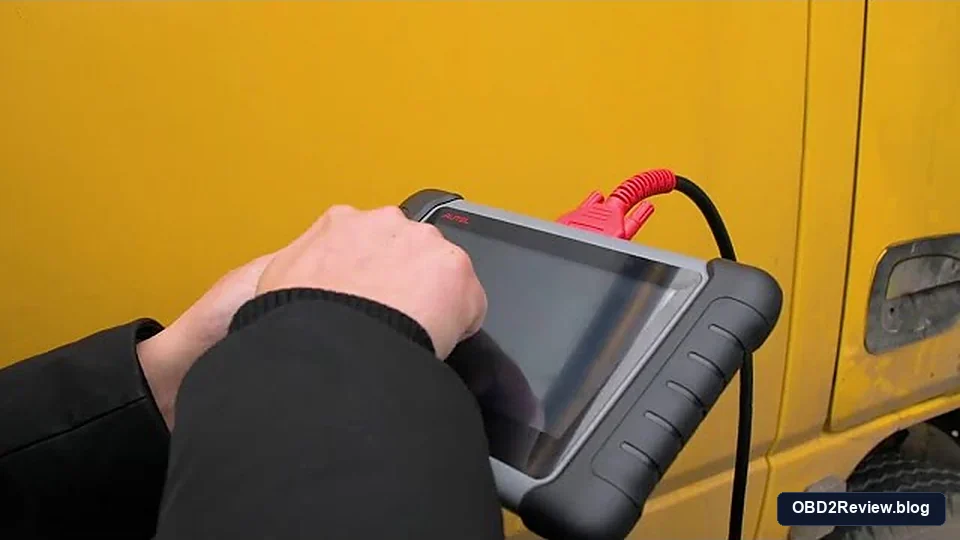
System RAM directly impacts how smoothly graphing live data streams renders on screen. The hardware differences become noticeable when multitasking between module scans and reviewing complex freeze-frame environmental data records.
Thermal management inside advanced diagnostic tablets relies heavily on passive dissipation. You can read our maxicheck mx808 review for detailed insights into long-term system reliability during heavy shop testing.
Both diagnostic tools utilize quad-core processors running Android operating systems, ensuring snappy navigation through complex diagnostic menus, live data graphing, and module topology maps without noticeable latency during intense troubleshooting sessions.
Internal storage is limited to 64GB solid-state memory, which requires technicians to manage diagnostic logs, heavy vehicle database updates, and captured freeze-frame files efficiently to prevent performance degradation over years of heavy usage.
RAM allocation sits at 2GB DDR memory, creating occasional bottlenecks when running multiple heavy automotive graphing parameters simultaneously alongside background vehicle communication tasks, requiring periodic cache clearing for optimal processing speed.
- Quad-core SoC architectures power both diagnostic systems reliably.
- RAM allocations favor smoother multitasking on the higher tier unit.
- Passive thermal cooling prevents overheating during extended diagnostic sessions.
Internal Storage and Boot Speed Comparisons
Boot times directly affect bay efficiency when vehicles roll into the shop unexpectedly. Solid-state internal storage ensures both diagnostic tools reach the primary operating menu within a matter of seconds.
Database management requires substantial non-volatile memory space for expansive vehicle manufacturer software. Regular firmware updates demand careful storage monitoring to prevent memory bottlenecks during deep diagnostic sweeps.
- Solid-state flash memory ensures rapid operating system initialization.
- Storage capacity dictates how many legacy vehicle packages remain active.
Diagnostic Coverage and Protocol Support
Modern vehicle networks demand comprehensive protocol compatibility across domestic, Asian, and European brands. As detailed in our Autel MaxiCOM MX808 review, these scanners handle standard OBD2 protocols effortlessly.
Reading raw hexadecimal data streams requires sophisticated software translation layers built into the tablet firmware. Technicians rely on these deep translations to pinpoint intermittent sensor failures within modern powertrain modules.
Gateway access protocols for newer vehicle architectures are fully integrated into both tool platforms. This ensures seamless communication without triggering security lockout codes on protected body control modules.
Comprehensive vehicle coverage includes support for OBD-II protocols alongside legacy manufacturer-specific diagnostic lines, allowing technicians to interface seamlessly with older OBD1 adapter kits and modern high-speed Controller Area Network architectures.
Advanced protocol handling incorporates DoIP and CAN FD compatibility on newer hardware revisions, facilitating rapid module communication for contemporary vehicles utilizing high-bandwidth diagnostic pathways mandated by modern automotive electronic control units.
Automated VIN scanning technology quickly decodes vehicle identification numbers to instantly configure the correct diagnostic software module, drastically reducing setup time when jumping between diverse makes and models in busy repair bays.
- Full support for standard OBD2 protocols across all vehicle makes.
- Advanced controller area network parsing speeds up module identification.
- Secure gateway compatibility handles modern encrypted vehicle security modules.
Controller Area Network Bus Performance
High-speed CAN bus communication speeds up the initial vehicle auto-detection sequence significantly. Technicians save valuable diagnostic time when the scanner queries all available electronic control units simultaneously.
Faulty wiring harnesses introduce resistance that disrupts CAN bus data packets. Advanced diagnostic firmware helps technicians isolate network communication dropouts by monitoring frame error counters directly.
- Simultaneous ECU querying reduces total pre-scan waiting times.
- Bus error counter monitoring isolates network wiring faults quickly.
Bi-Directional Control and Active Testing
Active testing capabilities allow technicians to send commands directly to vehicle actuators. This vital diagnostic feature verifies whether a component failure stems from internal mechanical binding or faulty electrical wiring.
Running actuation tests on fuel injectors, cooling fans, and ABS pumps requires stable communication links. Both tools execute these bi-directional commands accurately, though interface responsiveness varies slightly under heavy loads.
Verifying component operation without tearing down dashboard assemblies saves countless hours of labor. Technicians leverage these active controls to confirm repair success before buttoning up the vehicle interior.
True bi-directional capability allows technicians to transmit actuation commands directly to vehicle computers, enabling precise testing of fuel injectors, cooling fans, and ABS pump motors without removing physical components.
Performing active tests requires strict adherence to safety interlocks, ensuring hood latches and door switches are closed before commanding transmission gear shifts or high-pressure fuel pump activations in workshop environments.
Component isolation troubleshooting becomes significantly faster using output controls, verifying whether a diagnostic trouble code stems from faulty wiring harnesses, degraded sensors, or failing internal electronic control modules.
- Direct component actuation verifies physical hardware functionality accurately.
- Bi-directional testing isolates electrical faults from mechanical failures.
- Real-time actuator response monitoring confirms successful repair procedures.
Actuator Testing Procedures in the Bay
Fuel pressure regulator tests require precise command timing from the diagnostic interface. Choosing the right tool from our best obd2 scanner guide ensures technicians can cycle internal fuel pump controllers safely.
Cooling fan relay activation tests confirm circuit continuity from the engine computer. These targeted active tests eliminate guesswork when diagnosing intermittent overheating conditions on modern vehicles.
- Precise timing ensures accurate fuel pressure regulator actuation tests.
- Relay activation verifies complete circuit continuity from the PCM.
Service Reset Functions and Special Procedures
Routine maintenance resets represent the highest daily volume for general repair shops. Both diagnostic platforms pack dozens of specialized service functions including oil life resets and electronic parking brake releases.
Calibrating steering angle sensors after front-end alignment work requires absolute software precision. The integrated calibration routines walk technicians through step-by-step steering wheel positioning procedures flawlessly.
Battery registration protocols ensure charging systems adapt to new AGM replacement units properly. Skipping this critical reset procedure can lead to premature battery degradation and persistent charging system warning lights.
Essential maintenance operations include specialized routines like electronic parking brake retraction, steering angle sensor calibration, and diesel particulate filter regeneration procedures required during routine brake jobs and major tune-ups.
Battery management system registration procedures ensure proper charging rate adaptation whenever an aging lead-acid or AGM battery is replaced, preventing premature alternator failure and electrical system voltage fluctuations.
Oil life monitor resets clear persistent service reminders by writing new calibration values directly to the instrument cluster memory, eliminating the need for manual pedal-tapping sequences or complex dashboard button combinations.
- Extensive library of routine maintenance reset and relearn functions.
- Steering angle calibration routines ensure precise alignment completion.
- Battery registration protocols optimize modern charging system longevity.
EPB and Diesel Particulate Filter Regeneration
Retracting rear brake calipers for pad service requires specialized service software. The electronic parking brake mode safely opens the caliper pistons without damaging sensitive electric motors.
Diesel particulate filter regeneration procedures burn off accumulated soot within exhaust catalysts. Initiating a forced stationary regen requires monitoring exhaust gas temperatures closely via live data parameters.
- Safe electronic caliper retraction prevents expensive motor damage.
- Forced DPF regeneration clears trapped soot safely in the shop.
Display Technology and Ergonomic Form Factor
Screen visibility inside brightly lit service bays directly impacts daily technician comfort. Both tablets feature vibrant touchscreen displays with responsive capacitive digitizers for effortless menu navigation.
Protective rubberized housings safeguard the hardware against accidental drops onto concrete workshop floors. The ergonomic weight distribution prevents hand fatigue during extended diagnostic troubleshooting sessions under dashboards.
Viewing angle clarity ensures multiple technicians can inspect live data graphs simultaneously. High contrast ratios make critical diagnostic parameters readable even under direct overhead fluorescent shop lighting.
The physical build features a 7-inch touchscreen encased in ruggedized rubberized housing designed to absorb accidental drops and withstand harsh automotive shop conditions filled with grease, oil, and solvent exposure.
Display legibility remains acceptable under direct sunlight through adjustable backlight controls, though technicians working outdoors may occasionally seek shade to inspect detailed multi-parameter live data graphs clearly.
Ergonomic weight distribution allows for comfortable one-handed operation during extended diagnostic sessions, reducing hand fatigue when climbing into cramped driver footwells to access under-dash OBD ports.
- Responsive capacitive touchscreens streamline fast menu navigation.
- Ruggedized housings protect internal electronics from workshop impacts.
- High contrast display panels remain readable in bright shop lighting.
Touchscreen Responsiveness and Glove Operation
Technicians frequently wear thin mechanic gloves while handling diagnostic shop equipment. The digitizer sensitivity accommodates standard workshop handwear without requiring stylus inputs for basic navigation.
Screen scratch resistance protects the glass panel against abrasive grease and metallic dust. Oleophobic coatings minimize fingerprint smudges during greasy hands-on diagnostic testing procedures.
- Digitizers support smooth operation while wearing mechanic gloves.
- Oleophobic coatings resist stubborn grease and fingerprint smudges.
Connectivity Options and Wireless Capabilities
Wireless VCI modules untether the technician from the driver seat during road tests. This freedom allows real-time data logging while monitoring live sensor parameters under actual driving loads.
Wi-Fi connectivity streamlines the software update process directly on the shop floor. Technicians can download massive manufacturer database packages without tethering the tablet to an external computer.
Stable Bluetooth pairing ensures zero data packet loss during intense diagnostic logging sessions. Options featured in our best bluetooth obd2 scanner roundup provide reliable wireless ranges for mechanics working outside the cabin.
Wireless communication relies on a Bluetooth VCI dongle that plugs directly into the vehicle data link connector, freeing technicians from restrictive tethered cables while moving around the service bay.
Stable connectivity ranges allow users to maintain data stream monitoring from outside the vehicle cabin, which proves invaluable during road testing or dynamic brake evaluations requiring a second pair of hands.
Built-in Wi-Fi adapters facilitate seamless over-the-air updates and quick technical support ticket submissions, enabling repair shops to download fresh manufacturer patches without transferring files manually via external SD cards.
- Wireless VCI modules enable safe live data road testing.
- Direct Wi-Fi connectivity simplifies firmware and database updates.
- Stable Bluetooth pairing prevents frustrating communication dropouts.
Data Logging and Wi-Fi Update Workflows
Recording live parameter IDs helps catch intermittent vehicle driveability anomalies. Technicians can export these recorded logs easily via Wi-Fi for remote engineering analysis or customer review.
Background update notifications alert shop foremen when new vehicle patches arrive. Automated update scheduling keeps the entire tool fleet current without disrupting daily workflow schedules.
- Live PID data logging captures elusive intermittent driveability faults.
- Automated update alerts maintain current software coverage effortlessly.
Update Framework and Software Subscription Value
Automotive manufacturers release updated control module coding constantly throughout production cycles. Staying competitive requires continuous software updates that expand vehicle coverage and fix known diagnostic bugs.
Subscription models dictate the long-term cost of ownership for professional scan tools. Evaluating update frequency against specific shop needs ensures optimal return on diagnostic equipment investments.
Even after software subscriptions expire, core diagnostic functions remain fully operational. This perpetual baseline coverage ensures the hardware never becomes completely obsolete in active service shops.
Software maintenance depends on an active subscription model that delivers continuous bug fixes, expanded coverage for newly released vehicle models, and enhanced special reset functions directly to the diagnostic tablet.
Expired software subscriptions do not lock out basic OBD2 features, but users will lose access to brand-new diagnostic protocols and advanced bi-directional control updates until renewal fees are processed through official channels.
Managing diagnostic licenses requires careful attention to expiration timelines, ensuring critical repair capabilities remain uninterrupted when servicing unfamiliar foreign and domestic vehicles entering the independent workshop.
- Regular software updates expand coverage for newly released vehicles.
- Subscription renewal models align with professional shop operating budgets.
- Expired subscriptions retain core diagnostic and reset capabilities.
Long-Term Cost of Ownership Analysis
Factoring in update costs helps shop owners calculate total diagnostic equipment ROI. Durability and hardware longevity play massive roles in determining overall lifetime value across years of service.
Investing in robust professional scanning equipment reduces outsourced diagnostic fees significantly. Shops recover their initial hardware investment quickly through increased in-house repair capabilities and efficiency.
- Equipment ROI improves through expanded in-house diagnostic capabilities.
- Hardware durability ensures reliable multi-year workshop performance.
Frequently Asked Questions
What is the main functional difference between these two diagnostic tools?
The primary distinction lies in hardware performance depth and extended software packages. The higher-tier model offers enhanced multitasking speeds and more comprehensive workshop support.
Can both scanners perform bi-directional active testing procedures?
Yes, both devices support core bi-directional active controls for verifying component operation. However, processing speed during complex actuator tests favors the advanced model.
Are software updates required to maintain basic OBD2 scanning capabilities?
Active subscriptions are not required for standard OBD2 diagnostics. Core system functionality remains fully operational even after your software update period officially expires.
Do these tablets support secure gateway access for newer vehicles?
Modern secure gateway protocols are fully integrated into both diagnostic platforms. Seamless module communication is maintained without triggering vehicle security lockout codes.
Which tool is better suited for mobile automotive technicians?
The compact form factor makes the lightweight model ideal for mobile service work. Ultimate portability helps mobile technicians move quickly between various job sites.