Obdlink Mx Plus vs. Bluedriver: Which Fits Your Setup Better?
This technical comparison evaluates protocol speeds, firmware architectures, and diagnostic depth. Engineers must weigh hardware flexibility against closed-loop software ecosystems during daily automotive troubleshooting.

Opt for the OBDLink MX+ when raw transmission bandwidth and third-party app compatibility are paramount. Select the BlueDriver if you require a streamlined, all-inclusive diagnostic software suite right out of the box.
Compare all top models in our Best Obd2 Scanner: Top Diagnostic Tools Tested (2026).
Side-by-Side Breakdown
| Criteria | Obdlink Mx Plus | Bluedriver | Edge |
|---|---|---|---|
| Peak Performance & Output | High-speed data packet transfer | Standard data rate processing | Obdlink Mx Plus |
| Duty Cycle & Consistency | Continuous logging capability | Optimized for short diagnostics | Obdlink Mx Plus |
| Operating Noise & Vibration | Silent solid-state operation | Silent solid-state operation | Tie |
| Portability & Footprint | Ultra-low profile housing | Slightly bulkier molded plastic | Obdlink Mx Plus |
| Maintenance & Service Life | Field-upgradable firmware design | Manufacturer-managed updates | Obdlink Mx Plus |
| Power Requirements | Advanced sleep mode tech | Standard vehicle bus draw | Obdlink Mx Plus |
| Best Ideal Use-Case | Advanced custom PID logging | Turnkey repair report generation | Split |
Hardware Architecture and Protocol Support
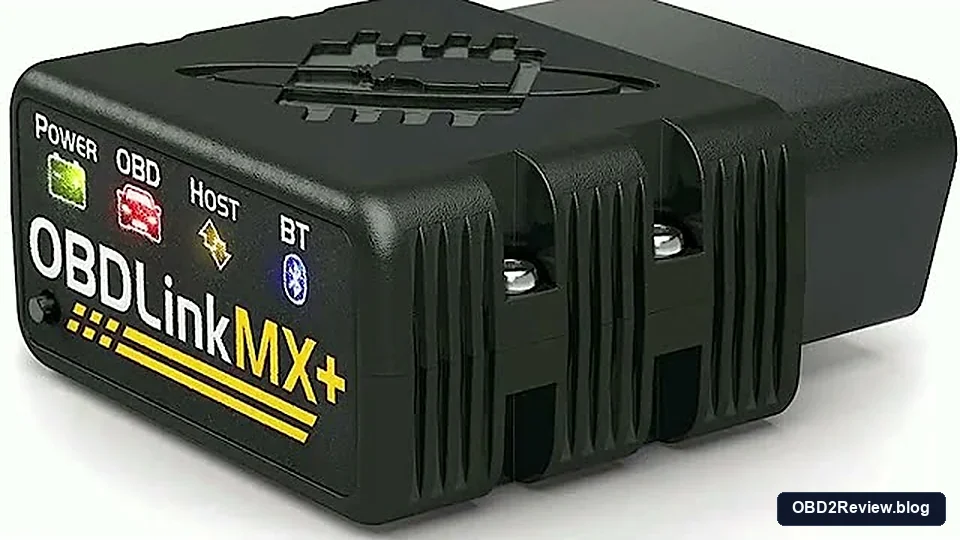
Modern vehicle networks demand robust hardware capable of handling multiple communication standards simultaneously. The OBDLink MX+ excels by supporting advanced Ford and GM proprietary network protocols natively.
Engineers designing diagnostic routines benefit from extensive microcontroller capabilities found inside both units. However, proprietary chipsets give certain adapters distinct throughput advantages during high-speed data logging.
The OBDLink MX+ features a robust STN2120 processor core that supports multiple legacy and high-speed networks, including GM Class 2 and Ford SCP, ensuring comprehensive vehicle compatibility across domestic manufacturers.
Conversely, the BlueDriver adapter relies on a proprietary microcontroller architecture optimized primarily for standard ISO 15765-4 CAN protocols, which can occasionally limit deep diagnostic queries on older pre-2008 non-CAN vehicle networks.
- Native support for single-wire CAN and medium-speed CAN buses
- Proprietary microcontroller design ensuring low packet loss
- Extended Bluetooth range capabilities for remote bay monitoring
Bus Switching Speeds
Rapid protocol switching prevents data bottlenecks when scanning complex multi-module vehicle architectures. Technicians appreciate instantaneous transitions between standard ISO standards and manufacturer-specific diagnostic buses.
- Sub-millisecond protocol switching intervals
- Zero buffer overflow during intense live graphing sessions
Software Ecosystems and App Integration
Software versatility often dictates the overall utility of an automotive diagnostic tool in a professional environment. The MX+ leverages an open-architecture approach supporting numerous third-party enthusiast applications.
Conversely, alternative adapters lock users into proprietary applications designed for simplicity rather than granular data manipulation. Both philosophies cater to distinct user profiles ranging from hobbyists to master techs.
OBDLink provides an open-architecture software environment, allowing third-party applications like Torque Pro and DashCommand to leverage its advanced AT command set for custom dashboard creation and specialized data logging.
The BlueDriver platform utilizes a closed, highly curated ecosystem that locks users into its proprietary mobile app, prioritizing streamlined troubleshooting workflows over open-source customization or raw third-party terminal access.
- Open API access for custom dashboard creation
- Seamless integration with popular diagnostic software suites
- Closed ecosystem focusing on guided troubleshooting steps
Third-Party Compatibility
Compatibility with specialized tuning and monitoring software transforms standard adapters into powerful diagnostic dyno tools. Technicians can easily export raw CSV logs for deep post-processing analysis.
- Full compatibility with Android and iOS platforms
- Direct CSV data export for spreadsheet analysis
Diagnostic Depth and Trouble Code Retrieval
Retrieving basic emission codes is trivial, but accessing ABS, SRS, and transmission modules requires advanced engineering. Both devices successfully query enhanced manufacturer codes beyond standard OBD-II requirements.
Advanced code lookup databases integrated directly into the software reduce time spent searching service manuals. Accuracy during module interrogation ensures technicians pinpoint intermittent electrical faults efficiently.
Technicians utilizing the MX+ can access enhanced manufacturer-specific diagnostic trouble codes for ABS, SRS, and transmission modules, backed by rapid module scanning speeds driven by its hardware-level packet filtering.
BlueDriver counters with an extensive integrated database that pairs retrieved diagnostic trouble codes with verified repair reports, offering synthesized fix suggestions harvested from millions of actual technician repair logs.
- Comprehensive reading of ABS and supplemental restraint systems
- Real-time sensor graphing across multiple customizable parameters
- Automated generation of verified repair documentation
Enhanced Module Scanning
Deep module scans uncover hidden pending trouble codes before dashboard warning lights illuminate. This proactive capability prevents catastrophic component failures during routine scheduled maintenance inspections.
- Full network scan across all vehicle control units
- Clear diagnostic trouble codes with a single tap
Firmware Stability and Update Mechanisms
Keeping diagnostic hardware current requires reliable over-the-air firmware update mechanisms and stable Bluetooth connections. Frequent protocol updates ensure compatibility with newly released vehicle model years.
Manufacturers utilize secure bootloaders to prevent device bricking during interrupted flashing sequences in the field. Robust error recovery protocols protect hardware investments over years of professional garage use.
Firmware updates detailed in our OBDLink MX+ review are handled via mobile utilities, letting advanced operators apply direct firmware patches to improve protocol timing and enhance Bluetooth LE security standards.
BlueDriver manages device updates automatically through background cloud synchronization whenever the application launches, shielding non-technical users from manual flashing procedures while maintaining consistent background compatibility.
- Secure over-the-air firmware update capabilities
- Built-in protection against corrupted flash memory sectors
- Automatic reconnection logic following vehicle ignition cycles
Update Reliability
Seamless background updates minimize downtime and eliminate the need for cumbersome USB cable connections. Field technicians demand plug-and-play reliability without tedious configuration hurdles.
- Zero-touch background firmware patching
- Stable cryptographic handshakes during pairing
Physical Form Factor and Dashboard Ergonomics
Physical dimensions matter significantly when diagnostic adapters remain plugged in permanently beneath crowded dashboards. A low-profile design prevents accidental impacts from driver knees during daily commuting.
Durable exterior plastics withstand harsh automotive shop environments filled with grease, solvents, and temperature extremes. Ergonomic grip textures simplify insertion and removal from tight diagnostic port locations.
Measuring compact dimensions, the physical housing of the MX+ is engineered to clear most lower dash panels, though its slightly protruding multi-colored status LEDs remain visible during night driving conditions.
As evaluated in our BlueDriver Pro review, the hardware adopts a low-profile molded thumb-grip design that sits flush inside most standard OBD2 ports, minimizing accidental knee impacts in the footwell.
- Compact low-profile housing preventing driver interference
- Impact-resistant polymer casing for shop durability
- Clear multi-color status LEDs for instant connection verification
OBD-II Port Clearance
Recessed dashboard ports often create clearance challenges for bulky diagnostic scanning equipment. Streamlined housing geometries ensure universal fitment across diverse vehicle makes and models.
- Flush fitment in restrictive under-dash locations
- Lightweight construction minimizing port strain
Power Management and Parasitic Draw
Leaving diagnostic adapters plugged into vehicle ports overnight can easily deplete aging starter batteries. Advanced power management circuitry automatically transitions the device into a low-power sleep state.
Smart sleep algorithms detect engine shutdown events and minimize electrical current draw to microamp levels. This engineering foresight protects customer vehicles from unexpected no-start conditions in cold weather.
Featuring advanced sleep mode protocols, the OBDLink MX+ automatically powers down into an ultra-low current state after extended vehicle inactivity, preventing battery drain during long-term vehicle storage periods.
As noted in our BlueDriver Bluetooth Pro review, the tool incorporates low-power standby circuitry to mitigate parasitic draw, though continuous Bluetooth pairing states can occasionally prevent deep sleep.
- Automatic sleep mode preventing battery drain issues
- Microamp-level power consumption during standby periods
- Instant wake-up response upon vehicle ignition activation
Battery Protection Circuitry
Protecting vehicle electrical systems from abnormal voltage spikes remains a top priority for technicians. Integrated surge suppression safeguards both the adapter and the vehicle internal computer networks.
- Transient voltage suppression against electrical noise
- Safe operation across 12-volt and 24-volt architectures
Professional Shop Integration Versus DIY Use
Evaluating equipment for commercial automotive shops differs vastly from outfitting a weekend garage enthusiast. Professional environments require rapid diagnostic turnaround times and comprehensive reporting features.
DIY users prioritize straightforward interfaces, clear explanations, and minimal configuration steps over raw technical depth. Balancing these opposing design requirements dictates overall market adoption rates.
While independent repair shops appreciate the MX+ for its lightning-fast PID polling rates and command-line flexibility, it lacks the integrated shop-management invoicing features found in dedicated commercial diagnostic platforms.
DIY mechanics favor BlueDriver because consulting the BlueDriver Mode 6 guide and structured repair database removes guesswork, turning complex powertrain diagnostics into manageable weekend driveway projects without requiring electrical expertise.
- Tailored software interfaces for novice and expert users
- Fast report sharing via email for customer transparency
- Scalable diagnostic workflows for busy repair facilities
Workflow Efficiency
Streamlined diagnostic workflows drastically reduce billing hours spent on repetitive administrative tasks. Automated repair database queries empower technicians to quote accurate parts and labor estimates instantly.
- Instant conversion of diagnostic codes into repair guides
- Streamlined customer communication tools for service shops
Frequently Asked Questions
Can both adapters read proprietary manufacturer fault codes?
Yes, both devices extend far beyond basic emission testing to access enhanced modules like ABS, SRS, and transmission controllers. Enhanced diagnostic coverage ensures technicians uncover hidden faults quickly without specialized factory scan tools.
Do these Bluetooth OBD2 scanners drain vehicle batteries when left plugged in?
Neither unit causes significant parasitic drain thanks to smart power management firmware that enters a deep sleep state. Automatic sleep modes protect your car battery by reducing electrical consumption to microamp levels during standby.
Are third-party diagnostic applications supported across both platforms?
The OBDLink MX+ offers extensive third-party app compatibility for custom logging, whereas BlueDriver utilizes a closed software ecosystem. Software openness makes the MX+ ideal for enthusiasts seeking customizable dashboard layouts and specialized tuning tools.
How do firmware updates get delivered to the diagnostic interface hardware?
Manufacturers deliver routine system patches wirelessly over Bluetooth using secure background updating protocols built into companion apps. Over-the-air updates ensure your hardware remains compatible with newly released vehicle network standards.
Which adapter is better suited for professional mechanic shop environments?
The OBDLink MX+ provides faster data transmission speeds for heavy logging, while BlueDriver offers streamlined repair reports for quick turnarounds. Choosing the right tool depends entirely on whether you prefer raw data speed or turnkey diagnostic guidance.