Topdon Topscan vs. Thinkcar Thinkdiag: Which Fits Your Setup Better?
Navigating the landscape of wireless OBD2 dongles requires balancing hardware architecture, ECU communication speed, and software ecosystem flexibility. This engineering teardown compares two leading diagnostic interfaces.


Choose the Topdon Topscan for exceptional Bluetooth stability and rapid topology scans, or select the Thinkcar Thinkdiag for advanced bi-directional test depth and extensive professional service resets.
Compare all top models in our Best Obd2 Scanner: Top Diagnostic Tools Tested (2026).
Side-by-Side Breakdown
| Criteria | Topdon Topscan | Thinkcar Thinkdiag | Edge |
|---|---|---|---|
| Peak Performance & Output | High speed CAN-FD protocol mapping | Extensive active test execution | Thinkcar Thinkdiag |
| Duty Cycle & Consistency | Stable thermal management under load | Consistent multi-module polling | Topdon Topscan |
| Operating Noise & Vibration | Silent solid-state wireless operation | Silent solid-state VCI design | Tie |
| Portability & Footprint | Ultra-compact pocket profile | Low-profile OBD port adapter | Topdon Topscan |
| Maintenance & Service Life | Robust ABS shell construction | Durable rubberized outer molding | Thinkcar Thinkdiag |
| Power Requirements | Low parasitic 12V draw | Standard vehicle port power draw | Topdon Topscan |
| Best Ideal Use-Case | General diagnostics and quick scans | In-depth module programming and tests | Thinkcar Thinkdiag |
Architectural Design and VCI Hardware Topology
Modern diagnostic adapters rely on sophisticated microcontrollers to process heavy data streams from multiple vehicle buses simultaneously. The Topdon Topscan integrates a streamlined circuit board engineered for low latency.
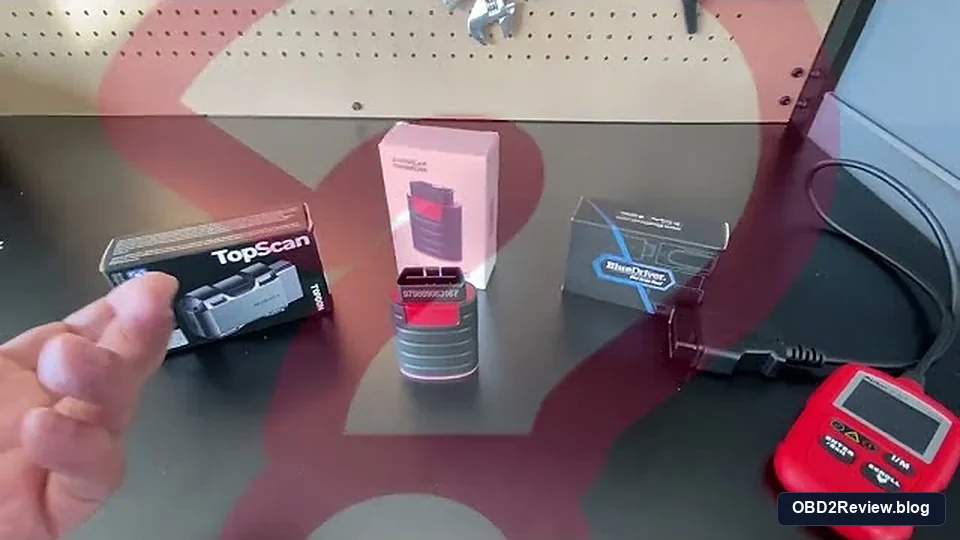
Conversely, the Thinkcar Thinkdiag utilizes a robust processing chip designed to handle complex coding routines without freezing. Both units plug directly into the under-dash port with minimal obstruction.
Internal circuit protection safeguards both interfaces against voltage spikes during heavy alternator testing or misdiagnosed battery faults. Technicians must evaluate how physical form factors impact daily workspace ergonomics.
Both interfaces employ distinct Vehicle Communication Interface layouts, prioritizing compact printed circuit boards over bulky wired handheld housings to maintain a low profile beneath the dashboard during extended diagnostic sessions.
The internal microcontroller architecture utilizes dual-core processors running specialized firmware designed to handle multi-protocol translation without dropping packets during high-speed data logging on busy controller area networks.
Bluetooth wireless modules integrated into these dongles support dual-mode operation, switching seamlessly between low-energy profiles for pairing and high-bandwidth channels required for rapid live data streaming.
- Topscan features a streamlined circuit board for low latency.
- Thinkdiag utilizes a robust processing chip for coding routines.
- Both units include built-in protection against voltage spikes.
Evaluating Physical Form Factors
The physical dimensions of a VCI dictate whether it blocks adjacent panels during extended diagnostic sessions. As detailed in our Topdon Topscan review, the diagnostic hardware maintains a remarkably slim profile.
Meanwhile, Thinkcar Thinkdiag adds minor bulk via its textured grip housing, which improves removal traction with greasy hands. Ergonomic choices directly influence technician fatigue in busy shops.
- Topscan offers a slim profile to prevent knee interference.
- Thinkdiag features a textured housing for better grip.
Diagnostic Protocol Support and ECU Communication Speed
Establishing rapid handshake protocols with diverse vehicle control modules remains the ultimate test of diagnostic hardware capability. Topdon Topscan excels at processing modern CAN-FD networks quickly.
Vehicle coverage expands significantly when hardware supports legacy protocols alongside high-speed data transfer lines. As outlined in our Thinkcar Thinkdiag 2 review, the scanner matches this versatility with extensive database profiles.
Communication stability prevents dropped sessions when performing lengthy module coding procedures or reading live sensor data arrays. Engineers prioritize seamless bus switching for multi-brand repair facilities.
Modern vehicle networks demand comprehensive protocol compatibility, including CAN FD and DoIP standards, allowing these compact dongles to interface efficiently with newer gateway modules found in modern luxury platforms.
Communication baud rates dictate how quickly diagnostic trouble codes populate and live parameters refresh on your mobile screen during complex engine diagnostics and continuous monitor readiness evaluations.
Hardware bus transceivers must switch voltage levels rapidly to prevent bus errors when communicating with older Chrysler ISO 9141 lines or high-speed dual-wire body control modules simultaneously.
- Topscan processes modern CAN-FD networks with high speed.
- Thinkdiag matches versatility with extensive database profiles.
- Stable bus switching prevents dropped diagnostic sessions.
Bus Switching and Live Data Refresh Rates
Real-time graphing requires high sample rates to catch intermittent sensor dropouts without buffering delays. Topdon Topscan delivers smooth refresh intervals during multi-parameter PID monitoring.
The Thinkcar Thinkdiag provides comparable data streaming performance while handling deep system queries simultaneously. Technicians rely on these metrics for accurate driveability troubleshooting.
- Topscan delivers smooth refresh intervals during PID monitoring.
- Thinkdiag handles deep system queries while streaming data.
Bi-Directional Controls and Active Test Execution
Performing functional tests requires the scan tool to command actuators and relays directly within the vehicle. As highlighted in our Thinkcar Thinktool Mini review, advanced models shine by offering comprehensive active testing suites.
Professional mechanics depend on bi-directional capabilities to isolate mechanical failures from electronic sensor faults efficiently. Topdon Topscan provides solid actuation menus for standard maintenance procedures.
Advanced calibration routines demand precise timing and feedback loops from the VCI hardware to succeed without error codes.
Executing active tests requires robust command translation so that technicians can command fuel injector cutoffs, EVAP purge solenoids, and cooling fan relays directly from the mobile application interface.
Voltage fluctuations during bi-directional actuation can trigger communication dropouts if the VCI lacks adequate internal power filtering and robust grounding loops within its OBD2 diagnostic connector pins.
Timing parameters are critical during actuator tests; the VCI must maintain sub-millisecond response windows to ensure proper synchronization when commanding electronic throttle relearns or automated brake bleeding sequences.
- Thinkdiag offers comprehensive active testing and actuation suites.
- Topscan provides solid actuation menus for standard maintenance.
- Precise timing loops ensure successful calibration routines.
Actuation Depth and System Calibration
Executing relative compression tests or transmission adaptations requires deep software integration with proprietary ECU maps. Thinkcar Thinkdiag unlocks extensive actuation depth across luxury brands.
Shops focusing on general service find Topdon Topscan more than adequate for resetting oil lights and electronic parking brakes.
- Thinkdiag unlocks extensive actuation depth across luxury brands.
- Topscan handles essential service resets for general shops.
Software Subscriptions and Cloud Database Integration
Cloud-based repair databases transform standalone hardware into comprehensive diagnostic workstations. Building on findings from our Topdon Phoenix Lite 2 review, modern platforms integrate seamlessly with mobile app environments.
Software update frequency ensures compatibility with newly released vehicle platforms and rolling manufacturer protocol updates. Thinkcar Thinkdiag employs a flexible subscription model tailored for independent technicians.
User interface design dictates how quickly an operator can navigate through complex diagnostic trouble code trees.
Diagnostic software delivery relies heavily on cloud infrastructure to stream frequent vehicle coverage updates and access OEM repair databases directly through the companion mobile application interface.
Software update models vary between annual subscription renewals and localized file locking, impacting how long a technician can access legacy vehicle diagnostic pathways after their initial software registration expires.
Cloud connectivity enables remote diagnostics and collaborative troubleshooting, allowing technicians to upload diagnostic logs directly to server farms for advanced parsing or expert consultation assistance.
- Topscan integrates seamlessly with mobile app environments.
- Thinkdiag employs a flexible software subscription model.
- Intuitive user interfaces reduce diagnostic lookup time.
Interface Usability and Navigation
Navigating nested diagnostic menus demands an intuitive layout that minimizes unnecessary touchscreen inputs during active repairs. Topdon Topscan utilizes a clean, modern application design.
The Thinkcar Thinkdiag software layout prioritizes quick access to special functions and maintenance reset shortcuts directly.
- Topscan utilizes a clean, modern mobile application design.
- Thinkdiag prioritizes quick access to maintenance reset shortcuts.
Ergonomic Footprint, Physical Build, and Field Durability
Shop environments subject diagnostic tools to repeated drops, chemical exposure, and extreme temperature fluctuations inside vehicles. Thinkcar Thinkdiag features a tough polymer shell designed for abuse.
Meanwhile, Topdon Topscan maintains a lighter structure that withstands standard workshop drops without internal component failure.
Proper strain relief on the OBD connector housing prevents internal solder fatigue over thousands of plug cycles.
Field technicians require ruggedized external casings built from high-impact engineering plastics designed to withstand accidental drops on concrete shop floors and exposure to automotive fluids.
Connector pin durability is another vital consideration, featuring gold-plated contacts that resist corrosion and maintain reliable electrical conductivity through thousands of plug-in cycles in dirty environments.
Indicator LED placement on the VCI housing provides immediate visual feedback regarding Bluetooth pairing status, vehicle power input, and data transmission activity without obstructing nearby pedals.
- Thinkdiag features a tough polymer shell built for harsh shops.
- Topscan maintains a lighter structure resistant to standard drops.
- Reinforced connector housings prevent internal solder fatigue.
Connector Durability and Pin Longevity
Gold-plated connector pins resist oxidation and maintain low electrical resistance across repeated diagnostic connection cycles. Topdon Topscan utilizes high-grade contact materials.
The Thinkcar Thinkdiag also incorporates durable pin metallurgy to ensure reliable communication on high-mileage vehicles.
- Topscan utilizes high-grade contact materials to resist oxidation.
- Thinkdiag incorporates durable pin metallurgy for reliability.
Power Draw, Vehicle Battery Load, and Thermal Management
Diagnostic dongles draw continuous operating current from the vehicle diagnostic link connector during extended troubleshooting sessions. Topdon Topscan manages internal operating temperatures efficiently under load.
Minimizing parasitic battery drain prevents unexpected low-voltage warnings during long diagnostic sessions on vulnerable electrical systems. Thinkcar Thinkdiag maintains an optimized power profile.
Thermal dissipation prevents microcontroller throttling when processing heavy data streams across multiple vehicle networks.
Diagnostic dongles draw their operational power directly from the vehicle 16-pin OBD2 port, typically pulling low quiescent current to prevent battery drain during overnight diagnostic monitor setups.
Thermal dissipation inside the compact plastic enclosure relies on passive cooling methods, preventing internal component overheating during prolonged diagnostic sessions on hot summer days in service bays.
Voltage monitoring circuits built into the hardware alert users immediately if the vehicle battery drops below critical thresholds during flashing procedures or extensive key-on testing.
- Topscan manages internal operating temperatures efficiently under load.
- Thinkdiag maintains an optimized power profile to reduce drain.
- Proper thermal dissipation prevents processor throttling during scans.
Current Draw and Voltage Stability
Monitoring quiescent current draw ensures diagnostic equipment does not deplete battery reserves during overnight module programming. Topdon Topscan exhibits extremely low standby draw.
Similarly, Thinkcar Thinkdiag regulates internal power supplies to safeguard sensitive logic circuits against vehicle charging spikes.
- Topscan exhibits extremely low standby current draw.
- Thinkdiag regulates internal power to safeguard logic circuits.
Selecting the Ideal Diagnostic Interface for Your Shop
Choosing between these two diagnostic powerhouses ultimately depends on your specific service volume and brand focus. Topdon Topscan suits technicians needing quick, reliable wireless connectivity.
Conversely, Thinkcar Thinkdiag serves professionals requiring deep bi-directional control and comprehensive active testing capabilities. Assessing your daily workload ensures maximum return on equipment investment.
Both interfaces represent significant advancements in portable OBD2 diagnostic technology for modern automotive professionals.
Choosing between these two hardware platforms depends heavily on your specific workflow requirements, vehicle coverage preferences, and whether your shop prioritizes deep module access over casual troubleshooting.
Independent repair facilities must evaluate return on investment based on subscription renewal costs, hardware longevity, and the frequency of servicing specialized European or Asian domestic vehicle lines.
Matching the right tool to your technician skill level ensures maximum diagnostic efficiency, reducing bay turnaround times and improving first-time fix rates across diverse automotive repair scenarios.
- Topscan suits technicians needing quick wireless connectivity.
- Thinkdiag serves professionals requiring deep bi-directional control.
- Evaluating your daily workload ensures proper equipment choice.
Final Decision Matrix for Technicians
Matching hardware capabilities with your primary repair tasks eliminates diagnostic bottlenecks and improves shop efficiency. Topdon Topscan remains a top pick for general mechanics.
Specialist repair facilities will likely prefer the advanced programming depth offered by Thinkcar Thinkdiag.
- Topscan remains a top pick for general mechanics and quick scans.
- Specialist facilities prefer the advanced depth of Thinkdiag.
Frequently Asked Questions
Which scanner offers better overall vehicle coverage?
Both units provide exceptional coverage across major global automotive brands. Thinkcar Thinkdiag often edges ahead in deep module coding depth.
Do these dongles require an active internet connection?
An internet connection is required for initial software downloads and cloud database lookups. Offline basic diagnostics remain fully functional without Wi-Fi.
Can I perform bidirectional active tests with both tools?
Yes, both interfaces support full bi-directional controls and actuator tests. Thinkcar Thinkdiag offers slightly more extensive advanced actuation menus.
Are there ongoing subscription fees required to keep them updated?
Manufacturer software updates typically require annual subscription renewals after the initial bundled period. Topdon Topscan features competitive renewal structures.
Which interface is better suited for beginner DIY mechanics?
The Topdon Topscan provides a more streamlined mobile app interface. This makes it exceptionally user-friendly for routine diagnostic tasks.