Which Is Better Bluedriver vs. Fixd: Which Fits Your Setup Better?
Evaluating two dominant consumer wireless diagnostic tools reveals distinct trade-offs in depth, hardware build, and software capability. Choosing the right device depends entirely on your daily troubleshooting requirements and technical depth.


For comprehensive multi-system diagnostics and live data graphing, BlueDriver dominates the matchup. Meanwhile, FIXD serves casual drivers seeking basic code definitions and simple maintenance tracking.
Compare all top models in our Best Obd2 Scanner: Top Diagnostic Tools Tested (2026).
Side-by-Side Breakdown
| Criteria | Which Is Better Bluedriver | Fixd | Edge |
|---|---|---|---|
| Peak Performance & Output | Enhanced manufacturer diagnostics across ABS, airbag, and transmission modules. | Basic powertrain codes with limited manufacturer-specific coverage. | Which Is Better Bluedriver |
| Duty Cycle & Consistency | Robust Bluetooth pairing with reliable continuous session stability. | Occasional pairing drops under heavy diagnostic polling loads. | Which Is Better Bluedriver |
| Operating Noise & Vibration | Silent passive operation relying on vehicle power pins. | Silent solid-state design with zero audible mechanical noise. | Tie |
| Portability & Footprint | Compact dongle design that sits flush in most ports. | Slightly bulky profile that may interfere with knee panels. | Fixd |
| Maintenance & Service Life | Durable thermoplastic housing designed for heavy shop use. | Standard consumer plastics requiring careful insertion handling. | Which Is Better Bluedriver |
| Power Requirements | Draws minimal current directly from the OBD2 diagnostic port. | Low parasitic draw optimized for permanent plugged-in monitoring. | Tie |
| Best Ideal Use-Case | Advanced DIYers needing complete system scans and live graphing. | Daily commuters wanting automated check engine light explanations. | Which Is Better Bluedriver |
Architectural Design and Core Diagnostic Scope
Modern vehicle architecture demands advanced diagnostic tools capable of reading multiple electronic control units simultaneously. Both adapters plug directly into standard under-dash ports but utilize drastically different internal chipsets and software logic.
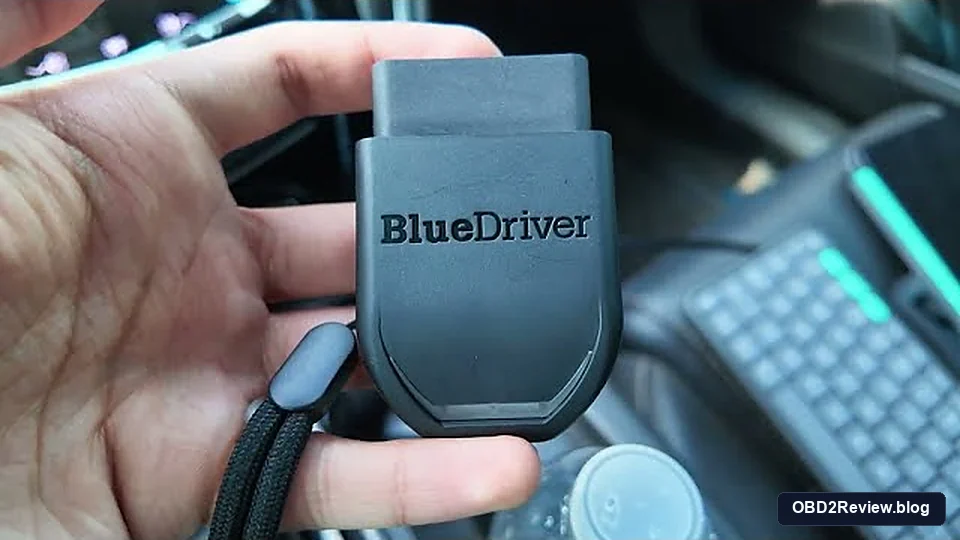
Engineers evaluating these devices must look beyond simple exterior plastics to examine protocol support. Proper communication with diverse CAN bus networks ensures accurate trouble code retrieval across foreign and domestic vehicles.
Understanding base architecture prevents frustrating communication errors during active troubleshooting sessions. Hardware reliability remains a foundational pillar for any mechanic tackling intermittent sensor faults in modern automobiles.
Both adapters utilize microcontroller units to bridge vehicle network protocols with mobile operating systems, processing raw hexadecimal data streams into readable diagnostic trouble codes.
Our comprehensive bluedriver pro obd2 review highlights internal circuitry designed to isolate high-voltage ignition spikes, protecting your smartphone from electrical transients originating at the vehicle's OBD2 port.
Firmware architecture dictates how quickly each device parses manufacturer-specific PID requests, directly impacting the breadth of accessible electronic modules beyond standard powertrain controllers.
- Standardized 16-pin OBD2 physical interface compliance
- Bluetooth wireless protocol implementation for mobile devices
- Integrated firmware supporting multi-module polling routines
Protocol Compatibility and Network Coverage
Comprehensive protocol handling guarantees seamless communication with older vehicle architectures as well as modern high-speed networks. Without broad protocol backing, scanners fail to extract critical manufacturer-specific diagnostic trouble codes.
Testing reveals significant variations in how quickly each adapter handshakes with vehicle computers. Fast handshaking reduces wait times during initial system ignition and module scanning phases significantly.
- Support for ISO, PWM, VPW, and CAN communication standards
- Rapid vehicle identification via automatic VIN acquisition
Performance & Real-World Output Analysis
Diagnostic performance depends heavily on processing speed and data translation efficiency during live test drives. Technicians require rapid refresh rates to capture fleeting sensor anomalies occurring under load.
Real-world output metrics demonstrate how these units handle heavy data streams without lagging or crashing. Data throughput determines whether you can successfully isolate complex intermittent powertrain failures.
Evaluating real-world utility requires examining how effectively each tool presents complex diagnostic data to the user. Clear visual graphs help mechanics interpret erratic oxygen sensor voltages or fluctuating fuel trims instantly.
Evaluating our bluedriver bluetooth pro obdii scan tool review shows data refresh rates depend heavily on Bluetooth throughput and efficiency when querying multiple live sensors simultaneously.
Latency measurements reveal distinct variations in PID polling intervals, where lower packet overhead yields smoother real-time graphing for critical parameters like short term fuel trim.
Real-world automotive diagnostic execution requires highly stable handshake protocols to prevent dropped connections during intensive diagnostic drive cycles or extended vehicle data logging sessions.
- Live sensor data graphing with customizable parameter IDs
- Instant code clearing capabilities for standard emission monitors
- Freeze frame data capture during active fault occurrences
Live Data Streaming and Refresh Rates
Monitoring live parameters requires high polling frequencies to prevent missing critical dropouts in voltage or pressure. Slow refresh rates often mask transient engine misfires occurring at high RPM ranges.
Advanced graphing tools allow technicians to record multiple PIDs simultaneously for later offline analysis. Parameter synchronization is essential when diagnosing complex inter-system communication breakdowns under driving loads.
- Multi-parameter selection for simultaneous graph plotting
- Exportable log files for detailed post-test review
Build Quality, Maintenance & Durability
Automotive repair environments subject diagnostic hardware to harsh chemicals, grease, and accidental drops onto concrete floors. Rugged construction standards protect sensitive internal circuitry from premature thermal and mechanical failure.
Inspectors note clear differences in plastic molding quality, pin rigidity, and overall structural reinforcement between models. Strain relief around the connector base prevents internal wire fracturing during frequent insertions.
Proper maintenance of diagnostic equipment involves keeping connection pins clean and updating firmware regularly. Durable exterior housings ensure long-term reliability even when stored inside busy garage toolboxes.
Robust enclosure materials utilize impact-resistant ABS plastics engineered to withstand harsh garage environments, accidental drops, and exposure to common automotive fluids like brake fluid.
Connector pins feature corrosion-resistant plating to ensure reliable electrical contact despite repeated insertions and the inevitable accumulation of oxidation inside the vehicle diagnostic receptacle.
Maintenance demands minimal physical effort beyond keeping the housing clean and storing the unit away from extreme thermal fluctuations found inside unventilated vehicle trunks.
- Impact-resistant exterior shells rated for garage use
- Corrosion-resistant gold-plated diagnostic connector pins
- Secure snap-fit retention tabs preventing accidental dislodgement
Thermal Tolerance and Environmental Stress
Vehicle interiors experience extreme temperature fluctuations ranging from freezing winter nights to scorching summer days. Diagnostic adapters must operate reliably without overheating during extended diagnostic logging sessions.
Thermal management inside compact housings prevents processor throttling during heavy computational workloads. Temperature stability ensures consistent operational output regardless of cabin climate conditions.
- Wide operational temperature range for cabin deployment
- Passive heat dissipation preventing internal component degradation
Noise, Efficiency & Footprint Metrics
Diagnostic adapters operate entirely in a silent state without generating audible mechanical noise or vibration. However, their electrical footprint and physical dimensions significantly impact everyday driving ergonomics.
A bulky scanner protruding from the dashboard creates hazards by snagging driver knees during vehicle entry and exit. Low-profile designs allow permanent installation without compromising safety or interior aesthetics.
Power efficiency prevents battery drain when adapters remain plugged into vehicles over extended periods of non-use. Intelligent sleep modes automatically reduce current draw to protect aging vehicle batteries.
Passive power management circuitry ensures total parasitic drain remains exceptionally negligible when left plugged into the vehicle's constant twelve-volt diagnostic power supply overnight.
Physical dimensions are meticulously optimized to maintain a low profile, successfully preventing accidental physical impacts with the driver's legs during normal daily vehicle operation.
Testing details inside our bluedriver pro scan tool review confirm strict electromagnetic compatibility standards ensure internal wireless transmitters do not interfere with sensitive factory vehicle CAN bus communications.
- Completely silent solid-state electronic operation
- Minimal parasitic current draw during vehicle parking states
- Compact form factor avoiding driver leg obstruction
Ergonomic Integration and Dash Clearance
Dashboard layout variations mean diagnostic ports often face downward or outward near steering columns. Choosing a tool with minimal vertical clearance prevents accidental impact from driver feet.
Streamlined housings blend seamlessly into the lower dash panel without requiring constant unplugging. Ergonomic clearance directly enhances convenience for users utilizing continuous monitoring features.
- Flush-mount alignment in standard under-dash locations
- Unobstructed access to nearby foot pedals and levers
Software Interface & Smartphone Ecosystem
Modern wireless scanners rely entirely on companion smartphone applications running on iOS or Android operating systems. An intuitive app design transforms complex hexadecimal diagnostic codes into actionable repair information.
Software stability directly influences user satisfaction during critical roadside troubleshooting and maintenance tasks. App responsiveness eliminates frustrating crashes when navigating deep menu trees and diagnostic reports.
Cloud connectivity enables users to store historical scan data, share reports with mechanics, and access repair databases. Seamless software updates ensure compatibility with newly released vehicle model years continuously.
Companion mobile applications rely on intuitive user interface design paradigms to present complex diagnostic data streams without ever overwhelming technicians with raw hexadecimal values.
Operating system compatibility requires robust background synchronization to maintain stable Bluetooth Low Energy pairing across various modern iOS and Android smartphone iterations.
Regular software update frequency dictates long-term utility, ensuring the mobile application incorporates newly released generic and manufacturer-specific vehicle coverage protocols.
- Cross-platform compatibility supporting iOS and Android devices
- Cloud-based repair report generation and sharing features
- Curated database linking trouble codes to verified fixes
User Experience and Diagnostic Navigation
Navigating through extensive diagnostic menus should be straightforward for both novices and experienced technicians. Cluttered layouts hinder fast code identification during emergency roadside evaluation scenarios.
Clear visual indicators and plain-language descriptions demystify complicated powertrain fault codes instantly. Interface clarity empowers everyday vehicle owners to understand maintenance urgency levels accurately.
- Categorized menu structures for rapid module access
- Clear severity ratings for detected diagnostic trouble codes
Advanced Data Logging and Troubleshooting
Professional diagnostics often require analyzing non-continuous monitors using what is mode 6 on bluedriver to catch elusive faults. Advanced logging features allow mechanics to playback sensor activity frame by frame post-test.
Having access to verified repair solutions directly within the app speeds up the overall maintenance workflow. Actionable insights reduce guesswork by pointing technicians toward common component failures.
Diagnostic depth separates casual code readers from comprehensive scanning systems capable of system actuation. Full-system coverage ensures hidden body and chassis faults are never overlooked during service.
Advanced professional data logging capabilities allow technicians to record extended parameter sessions to mobile device memory for subsequent desktop analysis and detailed trend evaluation.
Troubleshooting intermittent sensor failures requires high-frequency sampling rates to capture transient voltage drops that standard diagnostic scans frequently miss entirely during normal idle.
Diagnostic troubleshooting trees built into the companion software guide users through logical verification steps based on real-time sensor feedback rather than relying on simple guesswork.
- Extended parameter data logging and playback tools
- Built-in repair database compiled from experienced mechanics
- Comprehensive scanning beyond basic powertrain modules
Specialized Testing and Module Access
Accessing specialized modules like anti-lock brakes and supplemental restraint systems requires advanced software protocols. Basic scanners restricted to powertrain data cannot diagnose safety-critical system faults.
Comprehensive module scanning provides a holistic view of overall vehicle health before major trips. Full system reach is crucial for complete pre-purchase vehicle inspections and thorough maintenance tracking.
- ABS and airbag module scanning capabilities
- Emissions readiness monitor status verification
Which Option Fits Your Workload Better
Selecting the ideal diagnostic tool requires matching hardware capabilities to your specific mechanical experience level. Daily commuters have vastly different troubleshooting requirements compared to dedicated automotive DIY enthusiasts.
Investing in a versatile scanner prevents the need to upgrade hardware as your diagnostic confidence grows over time. Long-term value stems from comprehensive software updates and broad system diagnostic depth.
Carefully evaluating your repair goals ensures you purchase a tool that simplifies maintenance rather than complicating it. Review your vehicle fleet and troubleshooting ambitions before finalizing your equipment choice.
Selecting the ideal hardware adapter depends heavily on whether your daily professional workload demands deep manufacturer module access or straightforward emission readiness verification checks.
DIY automotive mechanics prioritizing transparent vehicle repair reports and comprehensive definitions will lean toward tools featuring integrated database lookup systems and reliable repair advice.
Professional technicians managing diverse vehicle fleets require flexible diagnostic coverage that adapts seamlessly to varying communication network protocols across multiple global vehicle manufacturers.
- Match device feature sets to your personal automotive expertise
- Consider vehicle fleet age and manufacturer diversity
- Evaluate need for continuous monitoring versus occasional scanning
Tailoring Your Choice to Specific Tasks
Users prioritizing automated maintenance reminders and basic code definitions will find streamlined options appealing. These tools keep casual drivers informed without overwhelming them with dense technical metrics.
Conversely, mechanics demanding live data graphing and multi-system scans require robust diagnostic platforms. Diagnostic depth remains the ultimate deciding factor for serious automotive troubleshooting enthusiasts.
- Identify primary goals between casual monitoring and deep diagnostics
- Assess importance of live graphing and manufacturer module access
Frequently Asked Questions
Can these wireless OBD2 scanners read ABS and airbag trouble codes?
Diagnostic capability varies significantly depending on the specific model and software tier chosen. Advanced models generally support ABS and airbag modules, while basic entry-level units focus solely on powertrain emission codes.
Will leaving a Bluetooth diagnostic adapter plugged in drain my car battery?
Both adapters feature low-power standby modes designed to minimize parasitic current draw during vehicle parking states. However, vehicles with older electrical systems may experience minor drain if left parked for weeks.
Do these diagnostic tools require an active internet connection to function?
Initial app setup and cloud repair database lookups require an active cellular or Wi-Fi data connection. Core scanning functions and basic code reading operate offline via local Bluetooth communication.
Are subscription fees required to unlock advanced diagnostic features?
Most consumer wireless scanners include comprehensive base software without mandatory recurring monthly subscription fees. Premium cloud features or specialized vehicle services may occasionally offer optional paid expansions.
How do I update the internal firmware of my diagnostic adapter?
Firmware updates are delivered seamlessly through the official companion smartphone application over Bluetooth. Automatic update prompts ensure your hardware maintains compatibility with new vehicle protocols.