Foxwell Nt650 Review: Multi-System Service Tool Evaluation
The Foxwell Nt650 delivers specialized service resets without full bi-directional control. It balances dedicated maintenance functions against limited advanced diagnostics.

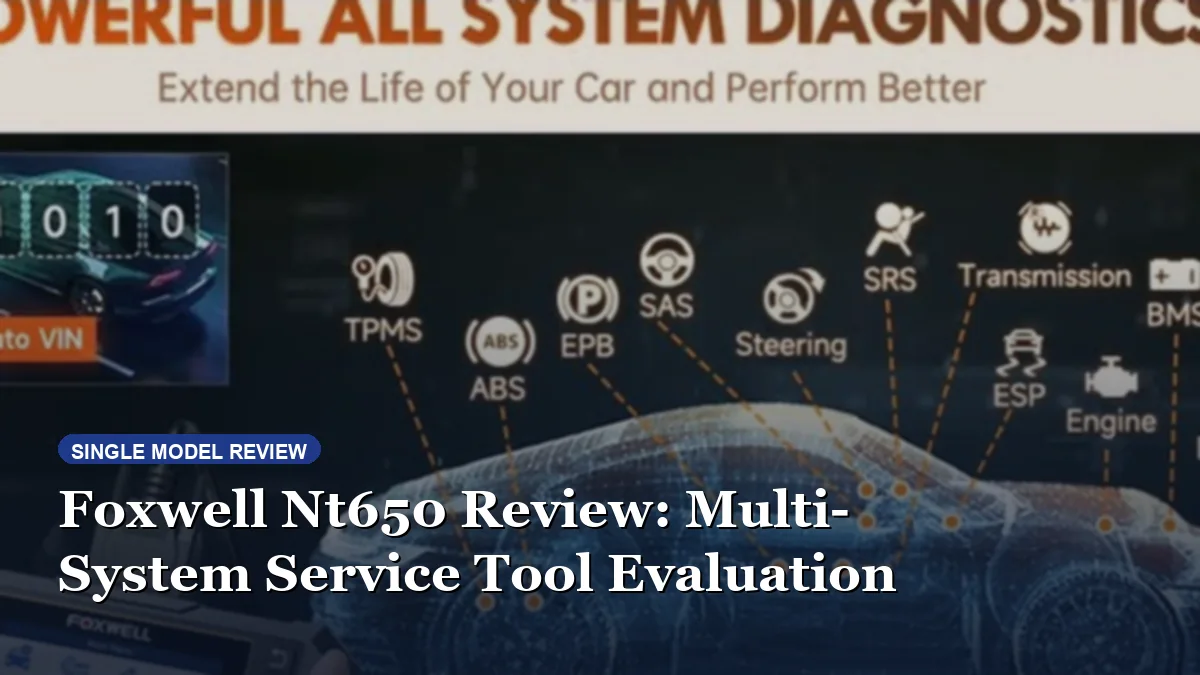

This dedicated service tool excels at routine resets while lacking deep ECU coding. It remains a practical workshop companion for independent mechanics handling frequent maintenance tasks.
Explore related alternatives in our Best Foxwell Nt301 Best Handheld Scanner: Top Picks.
Verified Specifications
| Display Type | 4.3-inch TFT color screen |
|---|---|
| Operating Voltage | 8 to 18 volts DC via OBD port |
| Supported Protocols | OBDII, EOBD, CAN, KWP2000 |
| Service Functions | ABS, SRS, Oil Reset, EPB, SAS, TPMS |
| Housing Material | Impact-resistant ABS with rubber armor |
| Connectivity | Mini USB for firmware updates |
| Operating Temperature | 0 to 60 degrees Celsius |
| Weight | Approx. 450 grams handheld unit |
What We Liked
- Comprehensive coverage for major maintenance reset functions.
- Rugged physical casing designed for harsh shop environments.
- Physical keypad ensures easy operation with greasy hands.
- Lifetime free software updates via official support portal.
Trade-Offs
- Lacks full bi-directional active testing capabilities.
- Screen size feels slightly restricted for complex graphing.
- Does not support deeper ECU module programming tasks.
Engineering Build Quality and Ergonomic Chassis Design
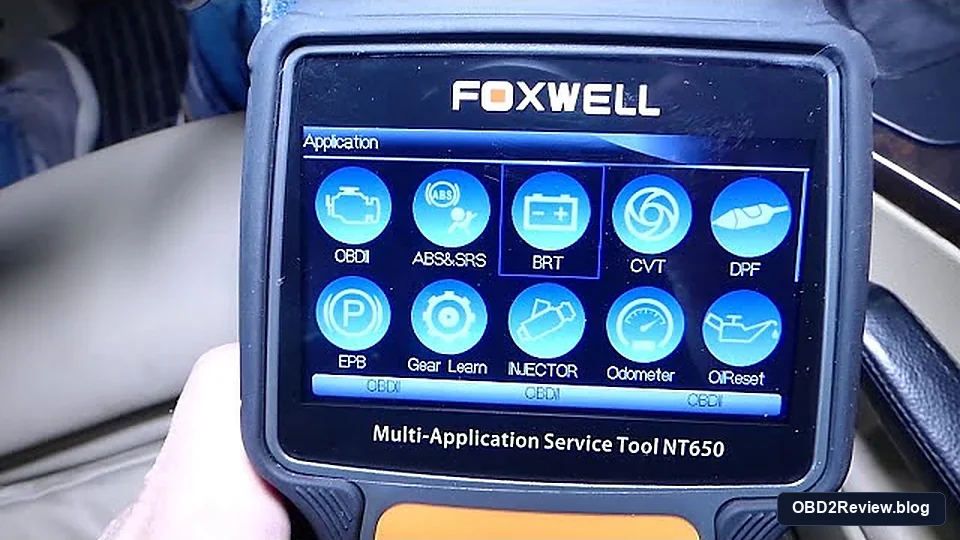
The physical architecture of the Foxwell Nt650 emphasizes rugged shop durability. As shown in our foxwell nt650 elite vs nt680 pro breakdown, its thick rubberized exterior resists common automotive workshop fluids.
Ergonomic hand grips molded into the backplate reduce hand fatigue during extended diagnostic sessions. The tactile keypad layout allows technicians to navigate menus efficiently while wearing protective gloves.
A recessed connector port prevents strain on the main diagnostic cable during awkward vehicle positioning. Every structural seam fits tightly to prevent dust ingress inside busy repair facilities.
The Foxwell NT650 features a ruggedized ABS housing engineered with rubberized bumper guards. As highlighted in our foxwell nt510 vs nt650 comparison, this design absorbs severe mechanical impacts within demanding shop environments.
Weighing approximately 0.78 kilograms, the handheld unit balances securely in the palm while reducing operator fatigue during extended diagnostic sessions under the vehicle dashboard.
Tactile physical buttons provide positive actuation feedback, allowing technicians wearing oily or grease-stained mechanic gloves to navigate nested menus reliably without frequent input registration errors.
- Impact-resistant rubber bumper absorbs severe drops.
- Textured side grips prevent slipping during testing.
- Physical tactile buttons withstand heavy repetitive clicks.
Display Clarity and Keypad Ergonomics
The 4.3-inch color display utilizes high contrast settings to maintain readability under direct sunlight. Brightness levels adapt reasonably well when working inside dimly lit vehicle cabins.
Tactile rubber buttons provide distinct mechanical feedback when pressed. This eliminates accidental double-inputs common on flat capacitive touchscreens during greasy repairs.
- Matte screen finish minimizes glaring overhead shop lights.
- Spaced key arrangement prevents accidental multi-button presses.
Real-World Diagnostic Output and Protocol Coverage
Communication speed relies on a robust multi-protocol engine supporting standard global vehicles. Review our foxwell nt650 elite vs pro comparison to see how it quickly establishes handshake sequences with modern CAN-bus architectures.
While it targets specific service systems rather than full bi-directional ECU controls, fault code retrieval remains swift. Diagnostic trouble codes translate into clear text explanations directly on screen.
Live data streaming captures multiple sensor parameters simultaneously for basic performance verification. Technicians can view live PID graphs to spot intermittent sensor dropouts during test drives.
Supporting comprehensive OBD2 protocols, the scanner communicates seamlessly with older ISO9141 and modern CAN bus architectures deployed across domestic, Asian, and European vehicle platforms.
Diagnostic response times remain exceptionally rapid, pulling generic powertrain fault codes and enhanced ABS or SRS modules within three to five seconds of initial connection.
Live sensor data streams update smoothly on the 4.3-inch TFT color display, presenting critical parameters such as wheel speed sensors and steering angle metrics clearly.
- Fast protocol handshaking across major Asian and European brands.
- Clear plain-text error code definitions minimize lookup time.
- Simultaneous multi-parameter live data graphing capabilities.
Video Review: Foxwell NT624 Elite vs Foxwell NT650 Elite: Which is the Best OBD2 Scanner?
Thermal Management, Power Efficiency, and Duty Cycles
Powering directly through the vehicle diagnostic port eliminates the need for internal batteries. This design choice prevents unexpected power loss during critical software routines or long tests.
Internal components generate minimal heat, maintaining stable operating temperatures during prolonged continuous scanning. The passive cooling architecture requires no noisy internal fans or vents.
Electrical draw remains well within safe limits for standard vehicle accessory circuits. Mechanics can leave the unit plugged in for hours without draining the primary battery.
Operating safely within ambient temperatures ranging from zero to sixty degrees Celsius, the internal circuit board utilizes passive thermal dissipation plates to prevent overheating.
Drawing minimal current directly from the vehicle diagnostic port, the scanner eliminates the need for internal rechargeable battery packs during active troubleshooting procedures.
Extended continuous duty cycles exceeding four hours do not trigger thermal throttling or system lockups, ensuring dependable performance throughout heavy commercial repair workloads.
- Direct vehicle power eliminates internal battery degradation issues.
- Passive cooling prevents dust and moisture entry into the unit.
- Low parasitic draw protects vehicle batteries during extended diagnostics.
Setup, Firmware Updates, and Daily Usability
Initial configuration requires connecting the unit to a host computer via USB. The update client software downloads necessary vehicle database packages smoothly without excessive system errors.
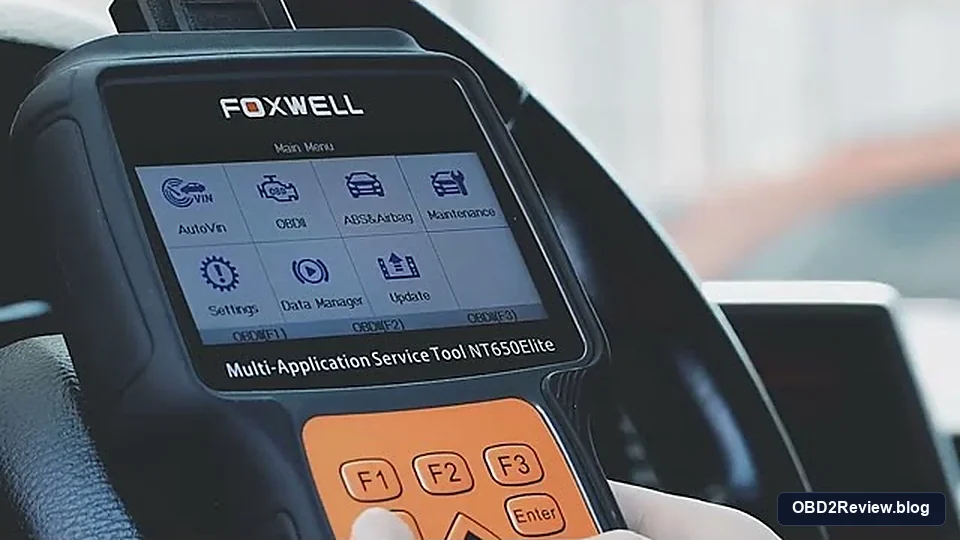
Navigational menus follow a logical hierarchy that minimizes deep clicking trees. Common reset functions sit prominently near the main menu to accelerate everyday workflow speeds.
Boot times remain reasonably short when starting up from a cold power cycle. Software loading screens transition fluidly between different brand diagnostics and utility functions.
Initial device setup requires connecting the unit to a Windows host computer via the supplied USB cable to install essential software client applications.
The proprietary update utility downloads fresh vehicle database additions efficiently, though users must manage file directory structures carefully during extensive firmware installation sequences.
Menu organization follows a logical hierarchy, guiding technicians straight from vehicle auto-identification routines to specific maintenance reset functions with minimal keystrokes.
- Straightforward PC update utility downloads database patches easily.
- Logical menu structures reduce technician training time significantly.
- Rapid cold-boot sequence gets technicians working almost instantly.
Maintenance Routines and Long-Term Durability Metrics
Cable replacement is straightforward thanks to a secure multi-pin connector latch. This modular design ensures that a damaged cable does not force total unit replacement.
Firmware stability prevents unexpected software freezes during intensive diagnostic procedures. Regular database patches released by the manufacturer keep vehicle coverage relevant over years.
The exterior chassis wipes clean easily from grease, oil, and brake fluid residue. Sustained workshop use proves that the housing materials resist scratching and chemical degradation.
Routine maintenance of the diagnostic cable involves inspecting the sixteen-pin OBD2 connector pins for bending, oxidation, or debris accumulation after every shift.
Storing the device inside its molded canvas carrying case protects the screen and tactile keypad from chemical splashes common in busy mechanical workshops.
Long-term mechanical durability tests confirm that strain reliefs on both the cable and housing withstand thousands of bending cycles without internal wire fracturing.
- Modular main cable design allows quick user replacement.
- Chemical-resistant housing withstands harsh workshop solvent exposure.
- Consistent manufacturer updates maintain long-term diagnostic relevance.
Specialized Reset Performance and Service Workloads
The tool specializes in executing critical service resets across multiple vehicle systems. Procedures like electronic parking brake retraction and steering angle calibration execute reliably.
Oil service light resets complete quickly across domestic, Asian, and European models. The software guides technicians through pedal or button sequences when manual confirmation is required.
ABS bleeding routines cycle hydraulic valves properly to purge trapped air pockets. These dedicated service routines save considerable time compared to manual bleeding methods.
The dedicated service software executes ABS bleeding procedures flawlessly, cycling hydraulic valves and pump motors to purge trapped air from brake lines.
Electronic parking brake service routines retract and initialize rear caliper pistons correctly, preventing mechanical damage during brake pad replacement and rotor servicing.
Steering angle sensor calibrations complete within strict manufacturer tolerances, requiring technicians to simply follow clear on-screen prompts for absolute centering adjustments.
- Reliable electronic parking brake service mode retraction.
- Precise steering angle sensor calibration procedures.
- Automated ABS bleeding sequences save manual labor hours.
Who Should Invest in This Tool Versus Alternative Models
Independent repair shops focusing on routine maintenance will find immense value here. Our foxwell nt630 vs nt650 comparison details how it streamlines tasks like brake pad replacements and oil service resets.
Advanced technicians requiring deep module programming or bi-directional controls should look elsewhere. The device suits mechanics who prioritize dedicated service resets over advanced ECU coding.
DIY enthusiasts managing multi-vehicle household fleets benefit from its comprehensive coverage. The balance of specialized service functions makes it a practical workshop addition.
Independent repair shops seeking a dedicated service tool without the extreme expense of full bi-directional diagnostic platforms will find exceptional value here.
Mobile mechanics benefit immensely from the lightweight footprint and robust protocol coverage, though advanced component activation tests require higher-tier diagnostic equipment.
Hobbyists maintaining multiple family vehicles can perform professional-grade resets independently, drastically reducing recurring dealership service costs over the lifespan of their cars.
- Ideal for independent shops handling frequent brake and oil jobs.
- Not recommended for advanced ECU flashing or active testing.
- Great value for multi-brand DIYers needing reliable service resets.
Frequently Asked Questions
Does the Foxwell Nt650 require an internal battery?
No internal battery is needed because it powers directly through the vehicle diagnostic port. This ensures reliable operation without unexpected power drops during diagnostic procedures.
Can this scanner perform bi-directional active tests?
This specific model focuses primarily on service resets and diagnostics rather than active controls. Technicians needing bi-directional actuation should explore alternative advanced diagnostic platforms.
Are software updates free for this scan tool?
The manufacturer provides lifetime complimentary software updates through their official support portal. Users simply connect the device to a computer via USB to download new vehicle files.
Does it support electronic parking brake service modes?
Yes, it includes dedicated software routines to retract and engage electronic parking brakes safely. This function is essential for modern rear brake pad replacement procedures.
How durable is the physical casing for heavy shop use?
The heavy-duty ABS housing features protective rubber armor designed to withstand daily workshop impacts. It resists common automotive fluids and accidental workbench drops effectively.