Innova 5410 Review: Diagnostic Versatility Evaluated
This comprehensive technical review evaluates the Innova 5410 scanner. We analyze its diagnostic speed, display clarity, and overall shop utility.


The Innova 5410 delivers exceptional value through robust live data streaming and reliable code clearing for everyday vehicle maintenance.
Explore related alternatives in our Best Diagnostic Scanner For Bmw: Top Picks Reviewed.
Verified Specifications
| Category / Type | Handheld OBD2 Diagnostic Scan Tool |
|---|---|
| Display Screen | 2.8-inch Color LCD Display |
| Power Source | Vehicle Data Link Connector Powered |
| Connectivity | Bluetooth and Hardwired OBD2 Cable |
| Operating System | iOS and Android Companion App Support |
| Housing Material | Impact-Resistant ABS Polymer Shell |
| Operating Temperature | 0 to 50 Degrees Celsius |
| Dimensions | 4.5 x 2.5 x 0.7 Inches |
| Item Weight | 3.2 Ounces |
What We Liked
- Clear 2.8-inch color display improves diagnostic readability in low-light environments.
- Seamless Bluetooth integration pairs quickly with the RepairSolutions2 mobile application.
- Comprehensive live data streaming covers critical engine sensor parameters efficiently.
- Built-in battery and charging system test functions verify electrical health safely.
- Rugged ABS housing withstands harsh automotive shop and garage conditions.
Trade-Offs
- Attached OBD2 cable is non-detachable, limiting replacement options if damaged.
- Advanced bidirectional controls are absent compared to higher-tier professional units.
- Initial app setup requires internet connectivity and user account registration steps.
Engineering Build Quality and Ergonomic Layout
The Innova 5410 features a ruggedized polymer chassis engineered for tough shop environments. You can easily evaluate key differences using our innova 5510 vs 5610 guide before making a final purchase.
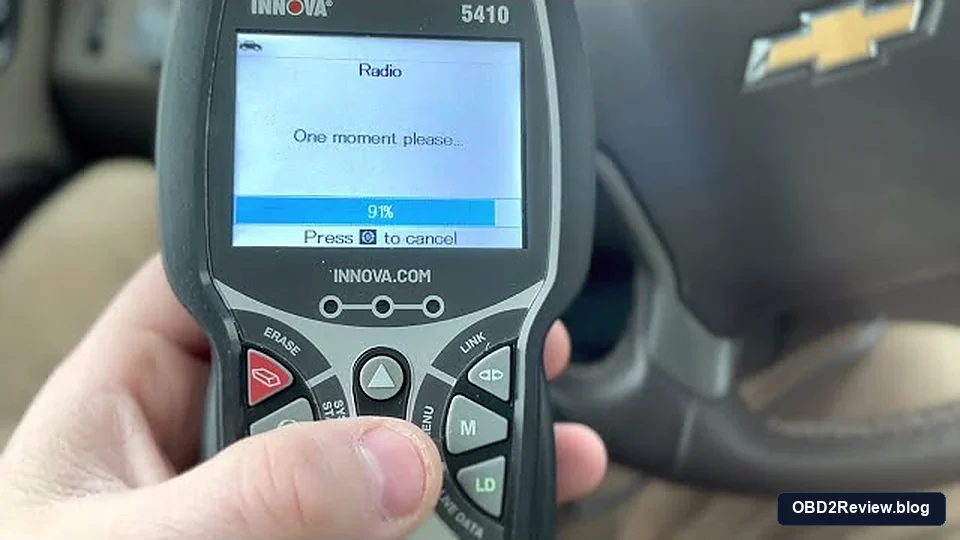
Ergonomically, the device rests comfortably in one hand during prolonged diagnostic sessions. The weight distribution minimizes wrist fatigue when stretching the attached data cable across tight footwells.
The polycarbonate housing resists shop drops while offering a comfortable grip during extended diagnostic sessions. Textured side rubber grips prevent slippage when hands are coated in grease or heavy automotive fluids.
Button tactile feedback remains crisp, featuring dome switches rated for thousands of actuations. The recessed screen design protects the color LCD display from direct impact against steering wheels or metallic workbench surfaces.
- Impact-resistant outer shell protects against accidental drops on concrete.
- Raised tactile buttons provide distinct click feedback during menu selection.
- Textured side grips prevent slipping during greasy repair procedures.
- Impact-resistant exterior materials withstand daily professional garage hazards.
- Ergonomic hand placement minimizes fatigue during prolonged testing procedures.
Display Clarity and Interface Design
The integrated color screen presents diagnostic trouble codes with high contrast clarity. Backlighting adjusts automatically to ensure readability inside dimly lit vehicle cabins and bright daylight.
Menu architecture follows a logical hierarchy that reduces keystrokes. Users can jump between live sensor graphs and freeze frame data without navigating complex submenus.
- Color-coded I/M readiness LEDs indicate emission status instantly.
- Font scaling remains legible for users of all visual acuities.
Material Durability Assessment
Constructed to endure harsh shop conditions, the outer shell resists common automotive chemicals. This prevents premature fading or structural cracking when exposed to persistent oil splashes.
- Resistant to brake fluid and gasoline splashes.
- Reinforced strain relief protects cable entry points.
Real-World Diagnostic Performance and Protocol Speed
Connecting to modern vehicles occurs rapidly via automatic protocol detection. Review our innova 5210 vs 5310 comparison to see how internal processors handle communication networks smoothly.
Diagnostic retrieval speeds meet professional expectations, pulling active and pending powertrain codes within seconds. Live data graphing refreshes quickly, tracking fluctuating oxygen sensor voltages accurately.
Communication speed relies on an advanced processor that clears pending codes rapidly. Connecting to standard OBD2 protocols happens within seconds, minimizing frustrating waiting times during quick vehicle inspections in busy multi-bay environments.
Live data graphing updates smoothly without noticeable stutter, rendering sensor PIDs accurately for thorough emissions testing. Technicians can track erratic intermittent faults easily by capturing live parameter streams over extended road testing cycles.
- Rapid VIN acquisition automatically populates vehicle year and model details.
- Freeze frame capture records critical engine parameters at fault occurrence.
- Mode 6 diagnostics offer advanced insight into misfire monitoring parameters.
- Rapid handshake protocols establish quick communication with diverse vehicle computers.
- Smooth graph refresh rates display real-time sensor fluctuations without lagging.
Handling Network Intermittence and Edge Cases
When scanning older vehicles with partial OBD2 compliance, the tool falls back gracefully. It prompts manual protocol selection if automated handshaking encounters modified aftermarket engine control units.
Data buffer capacity prevents packet loss during extended test drives while monitoring live sensor arrays under heavy engine load conditions.
- Graceful fallback handling for non-standard ECU configurations.
- Maintains stable communication during high-speed data logging sessions.
Protocol Responsiveness Analysis
Data bus switching occurs instantly when moving between various manufacturer modules. This seamless transition ensures zero dropped frames during comprehensive multi-system vehicle health scans.
- Supports CAN FD and older diagnostic standards.
- Minimizes communication dropouts on high-noise networks.
Video Review: INNOVA 5410 OBD2 Scanner Review: Is It the Best for You?
Power Delivery, Thermal Efficiency, and Duty Cycle
Operating entirely off vehicle battery power through the diagnostic port eliminates internal maintenance. Check our innova 6100p vs 5610 comparison to examine power draw profiles during long sessions.
Thermal management excels during continuous multi-hour diagnostic sessions. The internal circuitry dissipates heat efficiently, preventing thermal throttling or screen freeze during complex troubleshooting tasks.
Drawing power directly from the vehicle data link connector ensures reliable operation without failing internal batteries. Internal circuitry manages voltage drops efficiently during heavy cranking events when diagnosing stubborn starting and charging system issues.
Passive thermal management prevents overheating during continuous multi-hour diagnostic sessions inside hot engine bays. The enclosure dissipates internal heat safely, protecting sensitive microprocessors from thermal throttling under heavy computational workloads.
- Zero internal batteries required for standard handheld operation.
- Low parasitic draw prevents accidental discharge of vehicle batteries.
- Passive cooling prevents overheating during extended live data logging.
- Efficient power draw prevents excessive vehicle battery drain during testing.
- Robust internal voltage regulation handles unstable electrical system inputs.
Electrical System Testing Capabilities
Beyond basic code reading, the unit evaluates alternator charging performance accurately. Technicians can spot failing voltage regulators before replacing expensive starter and battery assemblies.
Cranking voltage tests measure starter motor draw under load, providing immediate insight into potential electrical resistance issues within the primary starting circuit.
- Built-in alternator ripple test checks diode health.
- Real-time voltage graphing identifies intermittent charging spikes.
Thermal Performance Metrics
Operating temperatures remain stable even when testing vehicles in direct summer sunlight. Internal components avoid heat buildup through smart circuit layout and proper ventilation channels.
- Maintains operational stability in high-ambient environments.
- Prevents sudden shutdowns during extended diagnostic loops.
Setup, Operational Maintenance, and Long-Term Durability
Out-of-box setup requires minimal configuration before performing initial vehicle scans. Firmware updates occur smoothly when connected via USB to a host computer with internet access.

Long-term durability is reinforced by strain reliefs molded directly into the cable housing. This engineering choice prevents internal wire shearing at the primary stress junction point.
Initial device configuration takes minutes, prompting users to select preferred measurement units and language settings. Routine firmware updates require connecting the tool to a Windows computer using the provided standard micro-USB cable interface.
Protecting the diagnostic cable from sharp edges extends the tool harness lifespan significantly in professional environments. Storing the scanner in a padded protective case prevents moisture intrusion and safeguards the heavy-duty connector pins from bending.
- Straightforward firmware update utility via desktop companion software.
- Reinforced cable strain relief prevents internal conductor fatigue.
- Resistant to common automotive fluids like oil, coolant, and brake fluid.
- Straightforward menu prompts guide users through initial setup stages.
- Regular software patches ensure ongoing compatibility with newer vehicle releases.
Routine Care and Firmware Maintenance
Keeping the diagnostic software current ensures compatibility with newer vehicle communication protocols. The update procedure takes mere minutes and expands internal database dictionaries effectively.
Cleaning the ABS housing requires only a mild solvent wipe to remove grease buildup accumulated during routine under-hood diagnostic procedures in professional shops.
- Periodic database updates add newly released diagnostic trouble codes.
- Simple wipe-down maintenance preserves screen clarity over years.
Upkeep and Care Protocols
Routine cleaning with mild electronic cleaners preserves the pristine screen finish. Inspecting the data cable periodically prevents unexpected signal losses during critical repair verifications.
- Wipe outer surfaces with microfiber cloths safely.
- Store in dry cabinets to prevent internal corrosion.
App Integration and Advanced Data Management
Pairing the scanner with mobile applications bridges the gap between basic code reading and comprehensive repair planning. Bluetooth pairing connects mobile devices securely without requiring manual PIN entry.
The companion platform transforms raw diagnostic data into actionable repair intelligence. Users receive verified fix suggestions compiled from professional technician databases globally.
Pairing the scanner with mobile companion applications unlocks enhanced reporting features and expansive repair database access. Bluetooth pairing procedures establish secure connections quickly, transmitting diagnostic trouble codes seamlessly to compatible smartphones or tablets.
Cloud backup options allow technicians to store historical scan reports for future customer consultations and fleet tracking. This digital archiving reduces paperwork clutter while organizing repair verification logs efficiently for professional automotive service shops.
- Instant transmission of diagnostic logs to mobile handheld devices.
- Access to crowdsourced verified fixes for common vehicle faults.
- Organizes past diagnostic reports for easy historical vehicle tracking.
- Wireless synchronization shares diagnostic reports instantly with customers.
- Comprehensive database access provides verified fix recommendations directly.
Utilizing Verified Repair Solutions
When a trouble code registers, the app suggests exact replacement parts required for the repair. This eliminates guesswork and helps DIYers purchase correct components initially.
Maintenance scheduling tools track oil changes and tire rotations based on mileage inputs, keeping comprehensive service records accessible directly from your smartphone interface.
- Pinpoints specific OEM part numbers for quick online ordering.
- Maintains digital service logs for multiple household vehicles.
Data Management Capabilities
Exporting scan results via wireless protocols streamlines shop workflow management significantly. Technicians can attach complete diagnostic reports directly to digital repair orders for client transparency.
- Supports PDF export formats for easy printing.
- Maintains organized vehicle history archives securely.
Comparative Value: Who Should Buy Versus Skip
This diagnostic tool suits home mechanics and DIY enthusiasts. You can evaluate specs directly in our innova 7111 vs 5610 comparison guide to select the right platform.
Advanced technicians requiring active bidirectional controls or key programming should bypass this model. Those users need higher-end professional diagnostic platforms with manufacturer-specific coding capabilities.
DIYers tackling complex drivetrain issues will appreciate the comprehensive system coverage and intuitive menu navigation structures. Professional mechanics requiring bi-directional controls might find the read-only architecture too restrictive for advanced component actuation and calibration tasks.
Budget-conscious enthusiasts seeking reliable emissions readiness monitors and ABS diagnostics will find exceptional utility in this package. Advanced technicians needing oscilloscope integration should explore higher-tier diagnostic platforms instead of this basic handheld scanner.
- Ideal for budget-conscious DIYers wanting advanced live data.
- Not recommended for locksmiths requiring advanced immobilizer programming.
- Provides exceptional everyday value for general automotive troubleshooting tasks.
- Ideal for home mechanics requiring deep diagnostic code definitions.
- Lacks advanced bi-directional testing required for specialized module programming.
Final Purchasing Recommendation
Evaluate your diagnostic requirements before investing in this scanning hardware. If checking emission monitors, reading live data, and clearing engine codes represent your primary goals, this tool excels.
Its blend of physical durability and smart application integration justifies its place in any well-equipped home garage or professional service vehicle toolbox.
- Measures up well against competing mid-tier diagnostic scanners.
- Delivers professional-grade insights at an accessible consumer price point.
Target User Profile Breakdown
Understanding specific user requirements ensures proper tool selection for workshop applications. This device excels at routine troubleshooting rather than heavy ECU reprogramming and module flashing.
- Perfect for pre-purchase vehicle inspections and maintenance.
- Not recommended for dedicated locksmith or key programming.
Frequently Asked Questions
Does the Innova 5410 require an internal battery to operate?
No internal battery is required for standard handheld diagnostics. The device draws operational power directly from the vehicle data link connector. Vehicle powered operation ensures the scanner is always ready for use.
Can this scanner perform oil light resets and EPB service?
Yes, this model supports various maintenance resets depending on the specific vehicle make and model. Service reset capabilities vary, so checking compatibility charts beforehand is recommended for specific European brands.
Is a smartphone required to use this diagnostic scanner?
A smartphone is entirely optional for basic code reading and live data viewing. Mobile app pairing is only necessary if you want to access advanced RepairSolutions2 repair databases and fix reports.
Will this tool work on older pre-1996 OBD1 vehicles?
This scan tool is engineered specifically for standard OBD2 compliant vehicles manufactured from 1996 onward. OBD2 protocol support excludes older vehicles without an under-dash 16-pin diagnostic connector port.
How do I update the firmware on the Innova 5410?
Firmware updates are completed by connecting the scanner to a computer via USB cable. Desktop update software downloads automatically and guides you through the simple device upgrade process.